A lead arrives through your website while you're on a discovery call. Another comes through LinkedIn and lands in a personal inbox. An event contact waits in a spreadsheet, a proposal sits unanswered, and a newly won client hasn't received a clear onboarding message because nobody knows who owns the next step.
For a small consulting firm, the work rarely feels manual because one task is especially difficult. It feels manual because information keeps changing hands. Someone copies a contact into a CRM, someone else sends a scheduling link, a partner remembers to follow up, and a delivery lead checks whether the sale became a project. The handoff, not the individual task, is where office friction accumulates.
Automation in office environments can help when it connects these moments into one reliable flow. This article builds that idea gradually, from the basic meaning of office automation to workflow design, consulting-specific examples, and practical implementation choices. The focus is a clear operating model for firms with 2 to 20 people, not a catalogue of disconnected software features.
Table of Contents
- "Introduction Why Office Work Still Feels Manual"
- "What Automation in Office Really Means"
- "Why Design Determines Whether Automation Helps or Hurts"
- "Key Aspects of Modern Office Automation"
- "Practical Examples for Small Consulting Teams"
- "How to Connect Automation Without Creating More Admin Work"
- "Bringing It All Together for Your Office"
"Introduction Why Office Work Still Feels Manual"
A boutique advisory firm can have excellent people and still lose momentum between stages. A business development lead may capture an inquiry in one place, a consultant may keep call notes somewhere else, and an operations coordinator may only learn about the opportunity when someone forwards an email. Each person is doing reasonable work, but the client experiences the gaps as slow replies, unclear expectations, or silence after a promising conversation.
The problem becomes more visible after a discovery call. The consultant intends to send a proposal, the proposal goes out, and the opportunity appears to be moving. Then the team waits. Nobody has defined the next reminder, the decision date, or the owner responsible for checking whether the buyer needs clarification. A proposal can become “quiet” without anyone deliberately choosing to stop pursuing it.
The same pattern appears after a sale. A signed agreement may live in email, while project setup depends on a message in Slack or a task added manually to a delivery board. If that message never arrives, the client has technically become a customer, but the internal operation hasn't fully recognized the change.
The practical question: Where does information go after someone touches it, and who is responsible for moving it forward?
Automation matters because it can make those transitions explicit. It can capture incoming requests, assign ownership, schedule the next action, send reminders, update records, and notify delivery when a proposal becomes a project. The human still handles judgment, relationship building, and specialist advice. Software handles the predictable movement around that work.
You'll learn how to identify automatable office activities, why poor workflow design can make automation harmful, and how to connect lead capture, scheduling, proposals, delivery, and referrals without creating another layer of administration. The examples are designed for small consulting and advisory teams that need a practical system rather than an abstract digital transformation programme.
"What Automation in Office Really Means"
Think of a consulting office as an airport. Requests arrive from different directions, and each one needs a safe route. A website inquiry might need qualification, a booked appointment needs confirmation, and an accepted proposal needs to reach the delivery team. If every movement depends on a person remembering what to do next, the operation becomes vulnerable to delay.
An automation hub acts like a control tower. It doesn't replace the pilots, passengers, or specialists. It collects signals, applies agreed rules, directs work to the right owner, and shows which journeys are delayed.
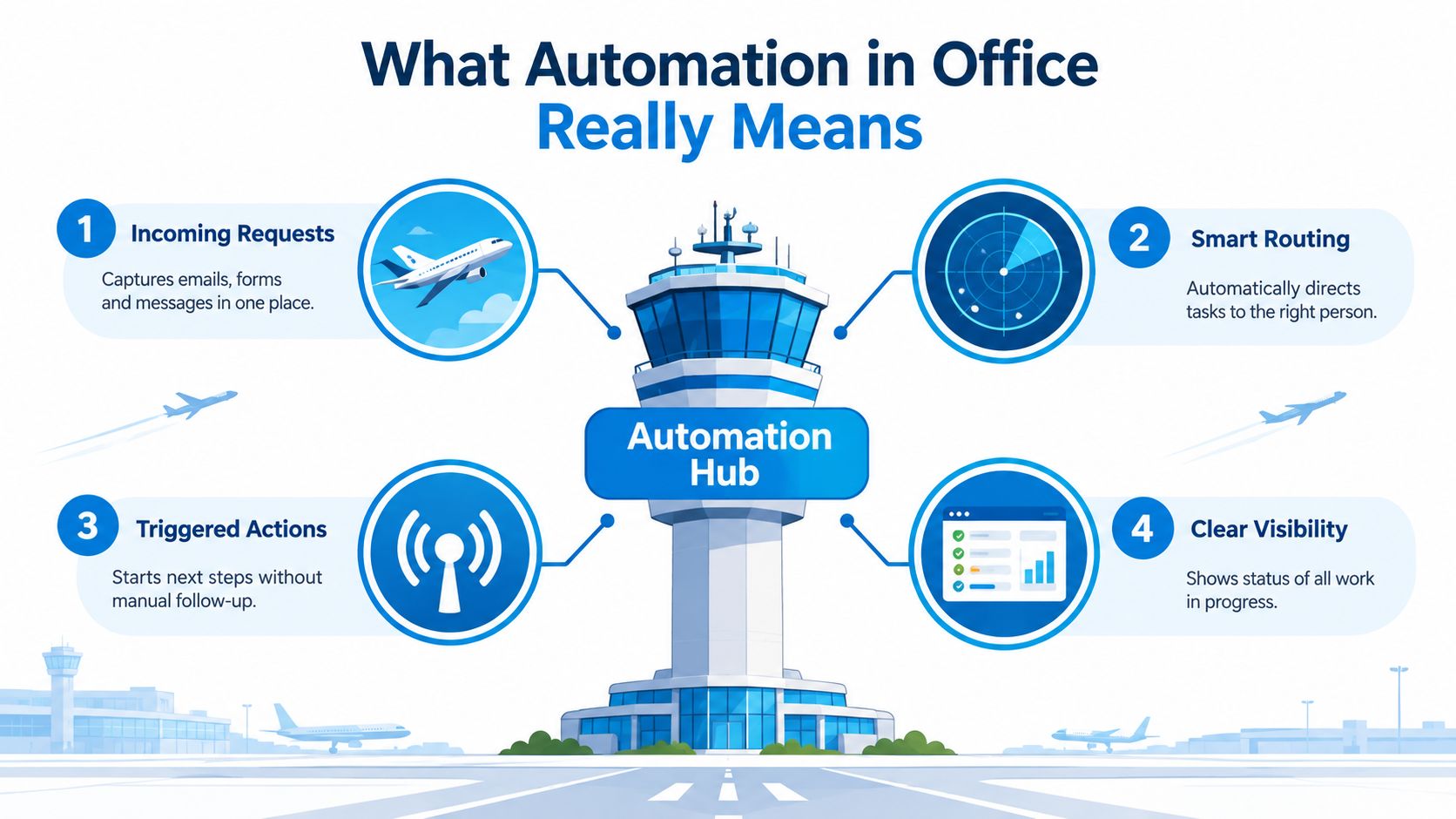
The four movements inside an automated office
Most useful office workflows contain four connected movements:
- Incoming requests: Forms, emails, messages, and event contacts enter a shared record instead of remaining scattered across personal channels.
- Smart routing: The system assigns the request according to service type, territory, capacity, or another rule the team has defined.
- Triggered actions: A new stage can start a confirmation, reminder, task, notification, or document process.
- Clear visibility: The team can see whether work is new, scheduled, waiting for a client, awaiting approval, or ready for delivery.
Appointment automation is a straightforward starting point because the sequence is easy to describe. A prospect requests a meeting, receives available times, gets confirmation and reminders, and creates a record the team can prepare from. A system such as appointment automation for consulting workflows can support that sequence, but the deeper value appears when the booked meeting also triggers ownership and follow-up.
Tasks are not occupations
Office automation doesn't mean that an entire job disappears whenever a task becomes software-driven. McKinsey Global Institute's historical baseline found that about 50% of work activities were technically automatable with then-available technology, while fewer than 5% of occupations could be fully automated, as summarized in this overview of workplace automation statistics. About 60% of occupations had at least 30% of their activities that could be automated.
That distinction matters in consulting. A system may automate lead routing, reminder timing, proposal status updates, and onboarding notifications while leaving diagnosis, interpretation, negotiation, and client trust with people. These administrative and information-processing activities are suitable because they follow recognisable patterns.
Earlier office automation relied heavily on fixed rules. Modern language-based workflows can also classify messages, summarize meeting notes, identify a likely request, or draft a response for review. The safe principle remains the same: automate the predictable next step, then keep human approval where context and judgment matter.
"Why Design Determines Whether Automation Helps or Hurts"
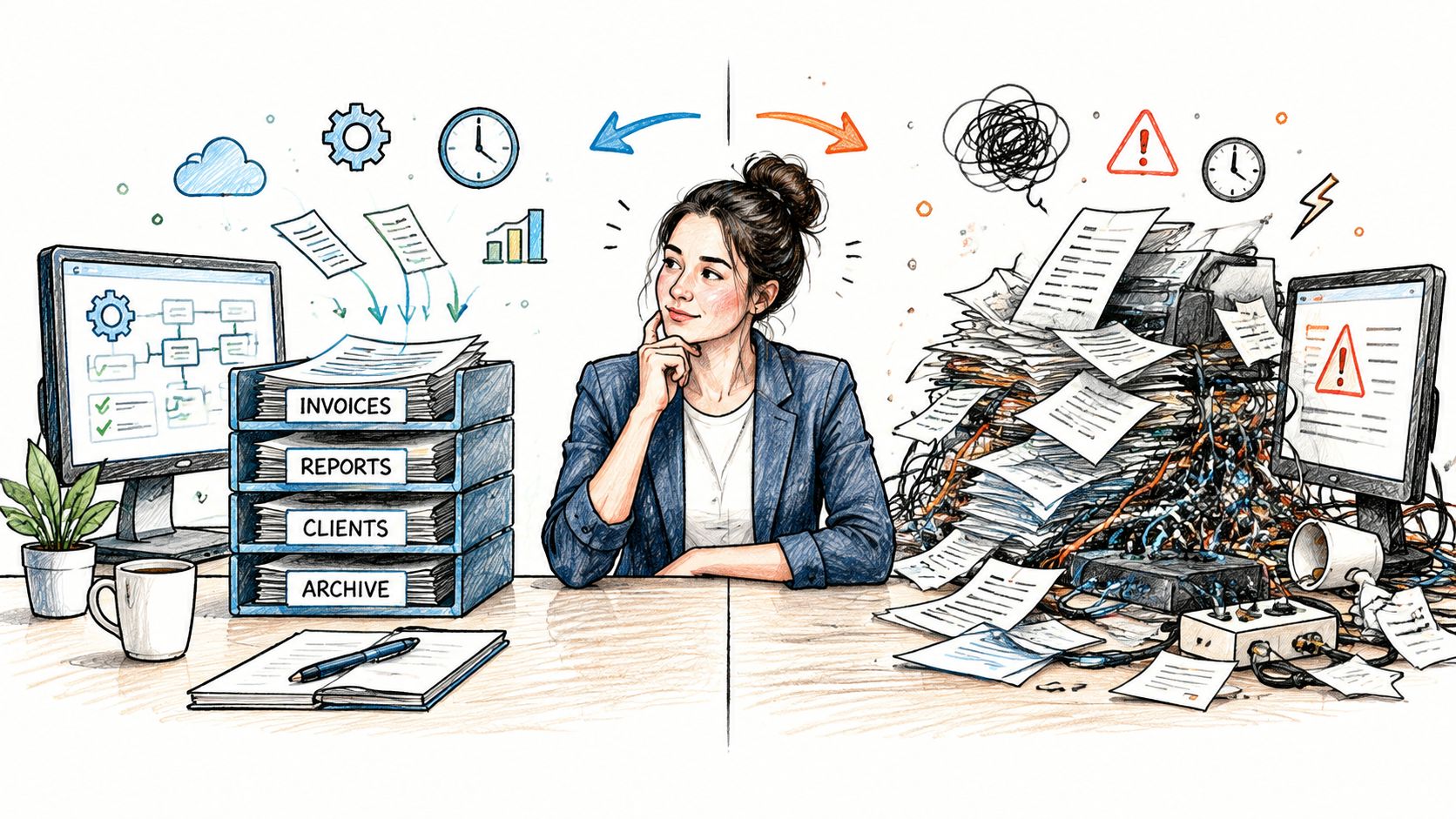
Adding software doesn't automatically improve an office. A poorly designed workflow can create more alerts, duplicate records, unclear ownership, and a false sense that work is under control. The team may spend less time copying information but more time deciding which version is accurate.
A classic NIST report on the automated office identified office design as a decisive factor in whether automation improves organizational productivity and effectiveness. The underlying lesson is practical. Messaging, records, approvals, responsibilities, and physical or digital work arrangements must support the way information moves.
Remove coordination friction first
Automation works best when it removes a known point of friction. For example, if consultants regularly forget to assign a proposal follow-up, a stage-based trigger can create that task automatically. If the problem is that pricing requires a partner's judgment, automating another email won't solve it. The workflow needs a clear approval point and a visible owner.
An empirical study of automation, administrative efficiency, and productivity found that administrative efficiency partially mediates the relationship between automation and productivity. In plain language, automation creates value when it improves the administrative conditions around productive work. It isn't enough to add a tool. The tool must reduce coordination effort, standardize handoffs, or shorten repetitive work.
Diagnose the structure before changing the stack
Review one client journey from first contact to delivery. Note where the record is created, where it changes, who receives the notification, and what proves that the next step happened. Look especially for these warning signs:
- Duplicate entry: A person types the same client details into a form, CRM, spreadsheet, proposal document, and project tool.
- Invisible waiting: A proposal or approval is pending, but no shared status shows who is waiting for what.
- Unassigned movement: A stage changes without creating a named owner or due action.
- Alert overload: Several tools notify people about the same event, so important messages blend into routine noise.
Design rule: Every automated event should answer three questions, what changed, what happens next, and who owns it.
That rule protects the office from “automation theatre,” where a workflow appears advanced but still depends on memory. Start with one complete flow, define its records and responsibilities, then add complexity only when the team can explain why it's needed.
"Key Aspects of Modern Office Automation"
Modern office automation has moved from isolated convenience features toward connected operating flows. Scheduling, reminders, approvals, routing, and handoffs each look small on their own. Together, they determine whether a consulting team can move an opportunity from interest to delivery without repeatedly rebuilding context.
The market signals that this is now a mainstream operating concern. One 2026 office automation market report places the market at $112.57 billion in 2025 and projects $166.93 billion by 2030, with an 8% CAGR. The same source reports that 70% of McKinsey survey respondents said their organizations were at least piloting automation technologies in one or more business units or functions, compared with 66% in 2020 and 57% in 2018.
The important question for a small consultancy isn't whether the market is growing. It's whether your current setup connects the stages that create client value.
Isolated tools versus connected office flows
| Office Function | Isolated Task Approach | Connected Workflow Approach |
|---|---|---|
| Lead capture | A form sends an email to one person | The inquiry creates a shared record, source, owner, and next action |
| Scheduling | A calendar link books a meeting | Booking updates the opportunity, confirms the meeting, and alerts the responsible consultant |
| Reminders | Someone remembers to follow up | Stage and date conditions trigger reminders or tasks |
| Routing | A team member forwards a message | Rules assign the request based on the agreed operating model |
| Approvals | A document waits in an inbox | The workflow records the approval status and identifies the approver |
| Handoffs | Sales sends a message to delivery | A won stage updates the record, starts delivery setup, and notifies named owners |
Look for continuity, not feature count
An isolated task can still be useful. A scheduling link saves time, and a proposal template improves consistency. The gap appears when the output of one task doesn't become the input for the next one.
For example, a completed discovery call should create a decision path. That may include a proposal task, an internal review, a client follow-up date, and a clear status if the buyer pauses. A follow-up automation workflow can support this type of continuity when it's designed around stages rather than generic reminders.
Evaluate your system by asking whether a new team member could see the complete client journey without opening several unrelated tools. If not, you likely have task automation, but not yet a connected office flow.
"Practical Examples for Small Consulting Teams"
A consulting client doesn't experience your tools one by one. They experience a sequence, inquiry, conversation, proposal, decision, onboarding, delivery, and perhaps another engagement. Automation becomes useful when that sequence remains coherent as responsibility moves between people.
Lead capture and qualification
Before automation, a website form might notify a partner while LinkedIn messages remain in a personal inbox. The firm then decides manually whether the request is relevant and who should respond.
After redesign, every approved source creates a central opportunity record. The record retains the source, service interest, contact details, and assigned owner. A suitable response can go out immediately, while the team receives a task to review fit and move the inquiry into qualification.
This doesn't mean every lead receives the same treatment. It means the team no longer relies on a single person noticing an incoming message.
Scheduling and discovery
A prospect who qualifies for a conversation receives available appointment times. Once they book, the workflow sends confirmation and reminders, updates the opportunity, and gives the consultant a preparation task. If the prospect reschedules, the record reflects that change instead of leaving an outdated calendar note somewhere else.
The human conversation still matters most. Automation protects the logistics around it, so the consultant can focus on the client's situation rather than checking whether the meeting details were sent.
Proposal tracking and decision movement
A proposal shouldn't disappear into a sent folder. When the consultant marks the discovery stage complete, the workflow can create a proposal task, apply an approved template, and set a follow-up action for the responsible owner. After sending, the opportunity should show whether the client is reviewing, requesting changes, deciding, or inactive.
The system can draft reminders or create tasks, but the consultant should decide how to handle a sensitive commercial conversation. Automation enforces the existence of a next step without pretending that every buyer needs identical language.
Onboarding and delivery kickoff
When a proposal becomes won, the workflow should treat that change as an operational event. It can update the client record, start the delivery pipeline, notify the delivery owner, create preparation tasks, and prompt kickoff scheduling.
For teams refining this transition, client onboarding guidance provides a useful way to separate welcome communication, information gathering, and internal readiness. The objective is to prevent the common situation where sales believes delivery has started, while delivery is still waiting for an informal message.
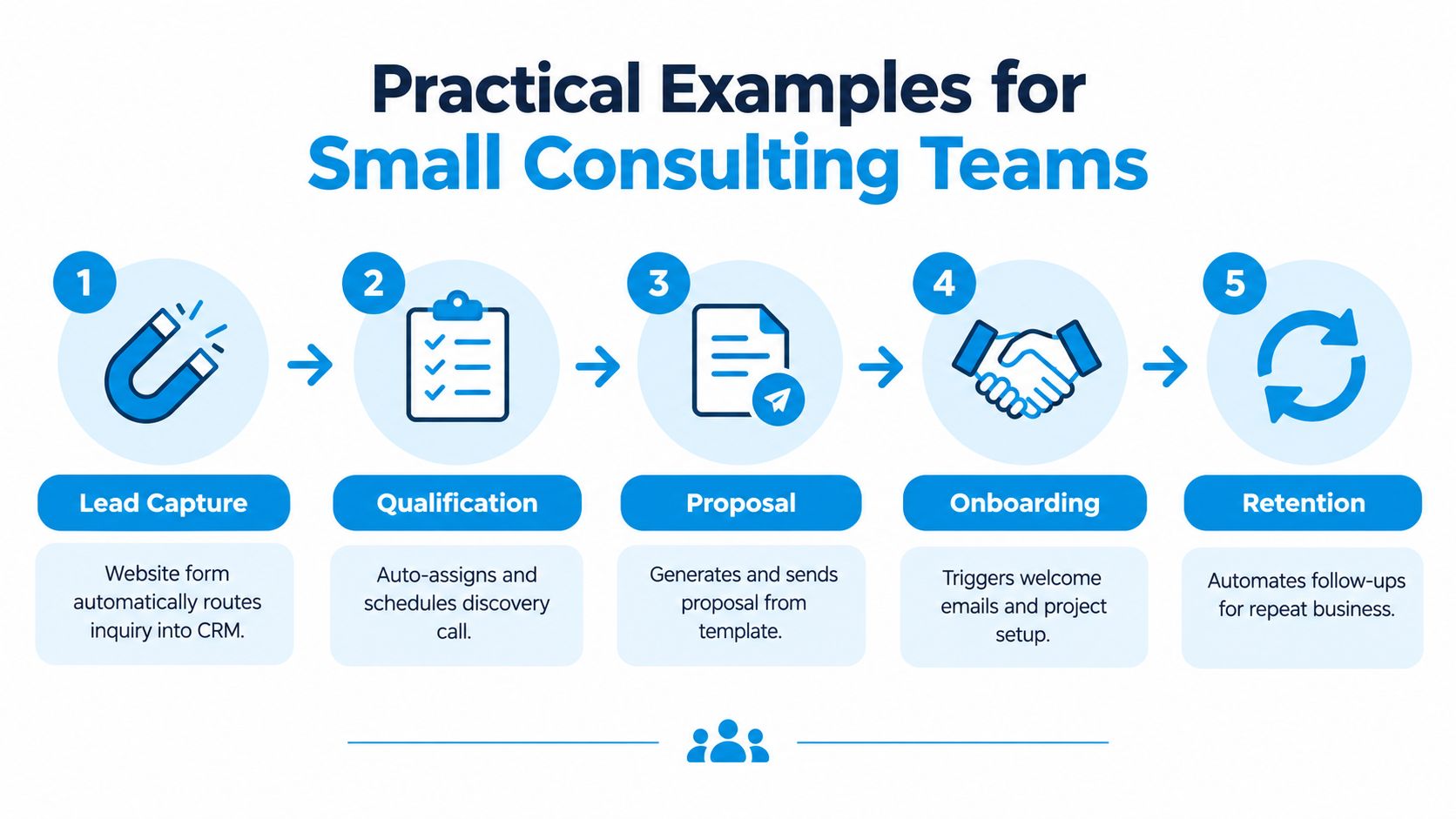
A short visual sequence makes the handoff easier to inspect:
Referrals and repeat business
After delivery, referral relationships often depend on personal memory. An automated relationship stage can record the partner, the introduction, the thank-you action, and a later nurture task. The message should remain personal, but the timing and ownership shouldn't depend on someone remembering an old conversation.
Together, these examples form one operating picture. Lead capture feeds qualification, qualification feeds scheduling, scheduling feeds proposals, proposals feed onboarding, and delivery creates the context for retention. Each stage has a clear owner and a defined next action.
"How to Connect Automation Without Creating More Admin Work"
A boutique consultancy can have excellent tools at every stage and still create admin work between them. A lead arrives through a form, scheduling happens in another system, the proposal sits in a document, and delivery waits for a message. The problem is the handoff. Automation helps when it carries the right information from one stage to the next.
The NFIB report on small-business technology and AI adoption reports that only 6% of small-business workers use AI to automate workflows with minimal human involvement, while 64% use it mainly for personal productivity. Process automation and robotic process automation also lag in small firms compared with larger firms. A team can therefore use modern tools every day and still lose proposals, repeat data entry, or miss a handoff.
Map the current journey
Record the path work takes. Include website forms, inboxes, LinkedIn, events, calendars, proposal documents, approval points, and delivery systems. Mark each place where someone copies information, waits for a response, or decides what should happen next.
Choose one narrow flow, such as discovery call to proposal follow-up. Define its trigger, the record that changes, the next action, the owner, and the exception that needs human judgment. This map exposes the loose connection before you automate it.
Connect one system at a time
Do not replace every tool at once. Start with the record that matters most, usually the opportunity or client record. Connect one neighboring stage, such as scheduling or proposal tracking, then observe whether people can manage the new tasks without confusion.
A smaller connected system beats a larger collection of disconnected automations.
The shift toward workflow-level automation is visible in leader surveys, where 46% of companies report using agents to fully automate workflows or processes. For a boutique consultancy, that figure is a direction, not a blueprint. Make one client journey dependable before extending the model.
Preserve useful human touchpoints
Automate drafting, reminders, and task creation. Keep review in the loop when tone or context matters. A reminder can send automatically, while the consultant adjusts its language for a complex buyer or sensitive decision.
Assign ownership and simplify alerts
Every workflow needs a person who monitors exceptions. That owner checks failed actions, unclear routing, stalled stages, and records needing correction. Review the workflow periodically, then remove duplicate notifications, redundant fields, and steps nobody uses. The goal is a handoff that feels like a relay, with the next person receiving both the baton and the information needed to run.
"Bringing It All Together for Your Office"
Office automation is easiest to understand when you stop viewing it as a set of clever tools. It's a way to make work move reliably from one owner to the next.
For a consulting team, inspect the journey with four questions:
- Where do new requests enter?
- What event triggers the next action?
- Who owns the current stage?
- What tells delivery that the client is ready?
If leads stall between channels, centralize capture. If discovery calls end without momentum, trigger a defined follow-up. If proposals go quiet, make the decision stage visible and assign responsibility. If won work reaches delivery late, connect the commercial stage to onboarding tasks and notifications.
The strongest office automation doesn't remove the relationship from consulting. It protects the relationship from avoidable administrative gaps. Scheduling, follow-up, proposal tracking, onboarding, and referral nurture become parts of one operating system, while consultants retain control over judgment, advice, and client communication.
Start with the handoff that causes the most frustration this week. Map what currently happens, remove one manual transfer, assign one accountable owner, and review the result before expanding the workflow.
Starward Navigators provides prebuilt pipelines and automation for consulting and advisory firms, including lead capture, appointment reminders, proposal follow-up, client onboarding handoffs, and referral relationships. Visit Starward Navigators to explore a connected approach to moving opportunities from first contact through delivery and repeat business.