You're probably dealing with some version of this right now. A prospect fills out a form on your site, books a discovery call through one tool, gets reminders from another, receives a proposal from someone's inbox, and then disappears somewhere between “good call” and “ready to start.” Everyone on your team thinks the process exists. In practice, it's a chain of handoffs with too many places to break.
That's why most advice about appointment scheduling software misses the point. It treats scheduling like a prettier calendar link. Small advisory firms don't lose momentum because the widget looked bad. They lose it because the booking event never properly connects to qualification, proposal follow-up, and onboarding.
The category has grown well beyond a niche tool. Allied Market Research estimated the global appointment scheduling software market at $205.85 million in 2018 and projected $546.31 million by 2026, a 13.1% CAGR from 2019 to 2026. Another industry estimate places the market at about $546.1 million in 2025 and projects $1.9059 billion by 2034, with 14.70% CAGR, while North America held a 34.10% share in 2025, as summarized in this market overview. That matters for one reason: firms now expect scheduling software to carry real operational weight.
Here's the blunt version. If your problem is just back-and-forth calendar emails, buy a simple scheduler. If your problem is dropped handoffs between lead, meeting, proposal, and kickoff, you need to evaluate scheduling as part of your operating system.
| Decision factor | Standalone scheduler | Integrated operating system |
|---|---|---|
| Best fit | Solo consultants and simple referral flows | Firms with multiple handoffs and active proposal pipelines |
| Setup speed | Faster to launch | Slower upfront, cleaner later |
| Data ownership | Meeting data often sits apart from deal context | Contact, meeting, proposal, and onboarding live together |
| Reminder management | Usually solid for basic confirmations | Better when reminders trigger downstream tasks too |
| Proposal handoff | Often manual or glued together with automations | Built into the same pipeline |
| Failure mode | Easy to buy, messy to maintain | Harder to choose, easier to run |
Table of Contents
- The Real Cost of Fragmented Scheduling in Advisory Firms
- Standalone Tools vs Integrated Operating Systems
- Features That Actually Matter for Consulting Workflows
- How Scheduling Connects to Lead Capture and Proposals
- Where Most Scheduling Setups Quietly Break
- Side-by-Side Comparison of Scheduling Approaches
- When an Operating System Beats a Standalone Scheduler
- Choosing the Right Setup for Your Firm
The Real Cost of Fragmented Scheduling in Advisory Firms
A small advisory firm doesn't usually notice scheduling failure in the calendar. It shows up in revenue.
One prospect books a discovery call. The intake form sits inside the scheduler. The partner never sees the qualification notes. A reminder comes from the wrong mailbox. The call gets moved, but the old slot stays blocked. After the meeting, nobody updates the CRM, so the proposal goes out late. Then onboarding starts from scratch because the delivery team can't see the meeting history.
That's not a scheduling problem. That's a workflow ownership problem.
Where the leak actually happens
Most firms split this process across too many tools:
- Lead capture lives in one place. A website form, Typeform, LinkedIn inbox, or email alias collects the lead.
- Booking happens somewhere else. Calendly, YouCanBookMe, Acuity, or another scheduler handles the meeting.
- Proposal follow-up moves to a separate system. Maybe a CRM, maybe a spreadsheet, maybe someone's task list.
- Onboarding starts manually. Someone forwards notes, sends a contract, then asks the client to book again.
Every one of those transitions creates room for missed context. Monthly reporting won't fix that because the damage happens before finance ever sees it.
Independent survey data shows this channel shift is already established. A 2026 survey found 42% of businesses use appointment scheduling software, 30% of businesses using scheduling software said they can book appointments in less than an hour, and 67% of consumers prefer booking online, up from 56% in 2021, according to Scheduling Kit's statistics roundup. For advisory firms, that means the booking step now sits near the front of client acquisition, not at the administrative edge.
Practical rule: If a booked meeting doesn't automatically create usable context for the next step, your scheduler is only solving optics.
Why advisory firms feel this harder
Retail and clinics can absorb some process slop. Many consulting firms can't. In a three-person practice, one missed handoff can stall a proposal for days because the same people sell, scope, deliver, and follow up.
That's why I'd stop thinking about appointment scheduling software as “calendar software” and start treating it as part of client acquisition infrastructure. If your client onboarding process starts with information your team has to retype after the first meeting, the process is already broken.
Standalone Tools vs Integrated Operating Systems
There are really two categories here, and firms waste time when they pretend they're the same.
A standalone scheduler owns the booking page, availability rules, reminders, reschedules, and maybe payment collection. Think Calendly, Acuity Scheduling, or YouCanBookMe. These tools are good at helping someone pick a time.
An integrated operating system treats the meeting as one stage in a continuous pipeline. The contact record, notes, proposal status, reminders, and onboarding tasks sit inside the same environment. The scheduler isn't the destination. It's a trigger.
The practical difference
Here's the side-by-side that matters in real life:
| Category | What it does well | What it usually punts on |
|---|---|---|
| Standalone scheduler | Fast launch, clean booking page, easy reminders | Proposal tracking, lead ownership, onboarding continuity |
| Integrated operating system | Preserves context across the full handoff chain | Usually takes more planning to configure correctly |
Standalone tools are attractive because they're easy to buy. One person connects Google Calendar or Outlook, publishes a link, and the firm feels modern by lunch.
The trouble starts later. Every booked meeting has to move into a CRM, proposal workflow, contract process, and onboarding sequence. If that movement depends on Zapier, inbox forwarding, or a team member remembering to update a record, you've created a maintenance problem.
Who owns the mess when something goes wrong
This is the question most buyers skip. It's the first one I'd ask.
When a prospect says, “I never got the reminder,” who owns that issue? When a proposal is sent without the intake answers attached, who owns that issue? When a kickoff gets booked before the signed agreement is logged, who owns that issue?
- With a standalone tool, the scheduler owns the appointment. Everything after that usually belongs to another app or a human.
- With an integrated system, the booking can update the record that also controls next actions.
Generic buying advice fails small firms because it overvalues launch speed and undervalues handoff reliability.
If you book a handful of calls each month, a standalone scheduler is fine. If you've got multiple consultants, active proposals, and structured onboarding, the cheap setup becomes expensive maintenance.
Features That Actually Matter for Consulting Workflows
Most feature lists are junk. They're written for broad software directories, not for firms that sell trust, scope work, and move buyers through a defined decision cycle.
The right question isn't “What features are included?” It's “Which features change show rate, consultant utilization, and handoff speed?”
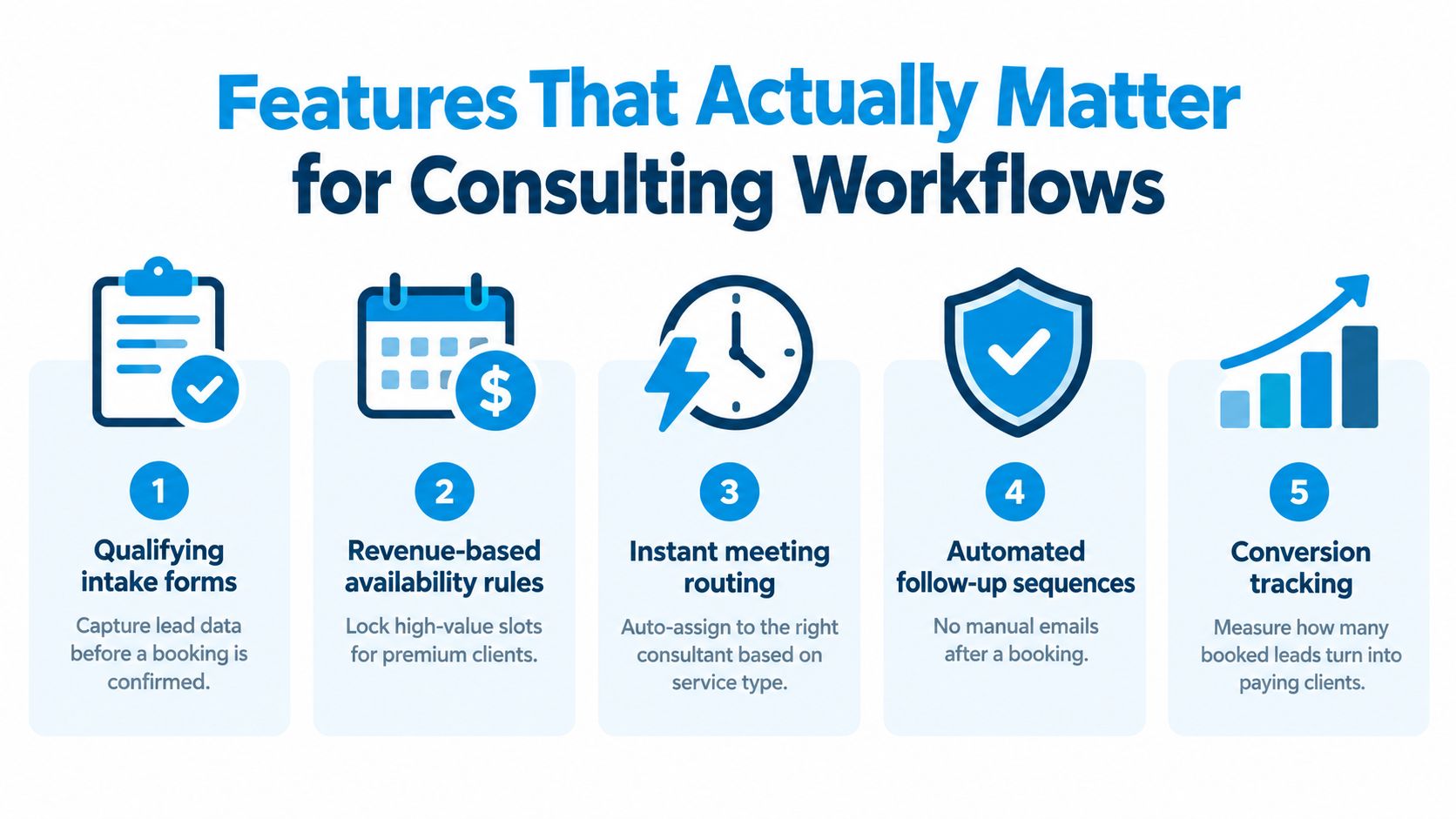
My ranking for a 2 to 20 person firm
Qualifying intake forms
This is the top feature for consulting. If your team lets anyone book senior time without filtering for budget, need, service fit, or urgency, you're wasting your best hours. Intake should happen before the booking is confirmed or at least before the meeting is accepted internally.Two-way calendar sync
Basic, but essential. If partners use Google Calendar, Outlook, or both, the sync has to prevent double-booking without forcing someone to babysit it.Reminder sequences with internal alerts
Reminder emails for the client are only half the job. The firm also needs prep alerts, owner notifications, and no-show follow-up logic. One clean booking confirmation doesn't help much if nobody internally gets prompted to prepare.Routing rules
In partner-led firms, the wrong meeting assignment costs time and credibility. Round-robin helps when capacity is even. Weighted routing is better when one partner handles strategic work and another handles diagnostic calls.Buffer rules
Most consultants underestimate this. Back-to-back discovery calls kill note quality and proposal speed. Put buffers before and after key meeting types.Timezone handling
This matters the minute you sell outside your city. A scheduler that doesn't handle locale well will create quiet friction fast.
What gets overrated
A lot of buyers get distracted by features that look impressive in demos but rarely move outcomes for advisory work:
- Group scheduling usually matters less than people think.
- Paid bookings can work for coaching or paid consults, but most B2B advisory firms win through qualification, not upfront charges.
- Fancy booking page design is nice, but it won't save a bad handoff.
- Marketplace exposure matters in some verticals, but many small advisory firms generate demand elsewhere.
One operational gap keeps coming up in software reviews. Buyers increasingly need more than a booking widget. They need routing, workflow, payment, and business operations support across the customer journey, as discussed in WaitWell's review of where many scheduling tools still fall short.
What I'd buy first
If I were setting up a small consulting firm from scratch, I'd prioritize:
- A form that qualifies before booking
- A scheduler that writes data back to the client record
- Reminder automation tied to next steps
- A workflow that logs the meeting outcome automatically
That's the core. Everything else is secondary. If you want a system built around those kinds of automations, appointment automation matters more than the booking link itself.
How Scheduling Connects to Lead Capture and Proposals
Scheduling should create motion across the whole pipeline. In too many firms, it creates an isolated calendar event and nothing else.
That's the wrong model. A booked meeting should update the lead record, route prep work, support the proposal, and set up onboarding if the deal closes.
To make that flow easier to visualize, here's the handoff chain you need:
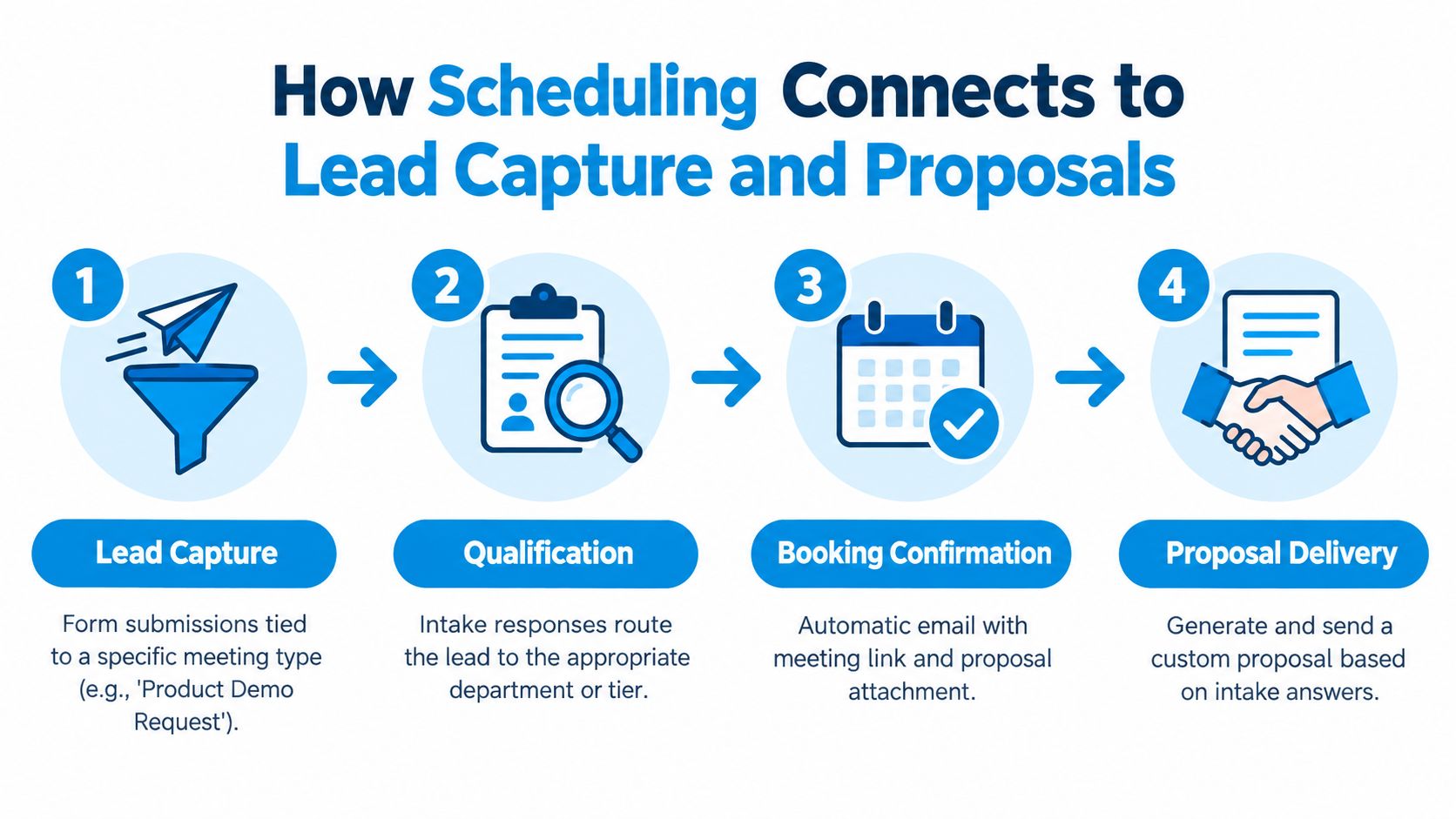
The four handoffs that matter
Lead capture comes first. The form submission has to map to a specific meeting type. “Book a discovery call” and “request a workshop scope call” should not dump into the same bucket.
Qualification comes next. Intake answers should determine whether the lead gets accepted, rerouted, or parked. If all the valuable context stays trapped inside the scheduler, the consultant starts the call half-blind.
Proposal context is where generic stacks often break. The firm needs the meeting record, notes, and intake answers attached to the opportunity, not floating in separate tools. Otherwise someone has to reconcile them manually before a proposal goes out.
Later in the chain, onboarding should pick up the same record. If the prospect signs, the kickoff should launch from the won opportunity, not from a fresh email thread.
What good data flow looks like
A clean setup usually works like this:
- Prospect submits a form tied to a meeting type
- Scheduler writes the booking back to the deal or contact record
- The booked call triggers internal tasks for prep or qualification review
- The completed meeting updates status so proposal work starts immediately
- A signed proposal triggers kickoff scheduling without recreating the client record
That's realistic for a small team. It doesn't require enterprise architecture. It requires choosing tools that share ownership of the same process.
For a closer look at how firms centralize intake before the meeting is ever booked, see lead management workflows for advisory firms.
A short demo helps make the connection clearer in practice.
Where Most Scheduling Setups Quietly Break
Most scheduling failures don't look dramatic. Nobody gets an error screen. The system just stops carrying context where it needs to go.
That's why firms often think their setup is fine until proposal velocity slows down, partners complain about bad-fit calls, or clients miss key handoff messages.
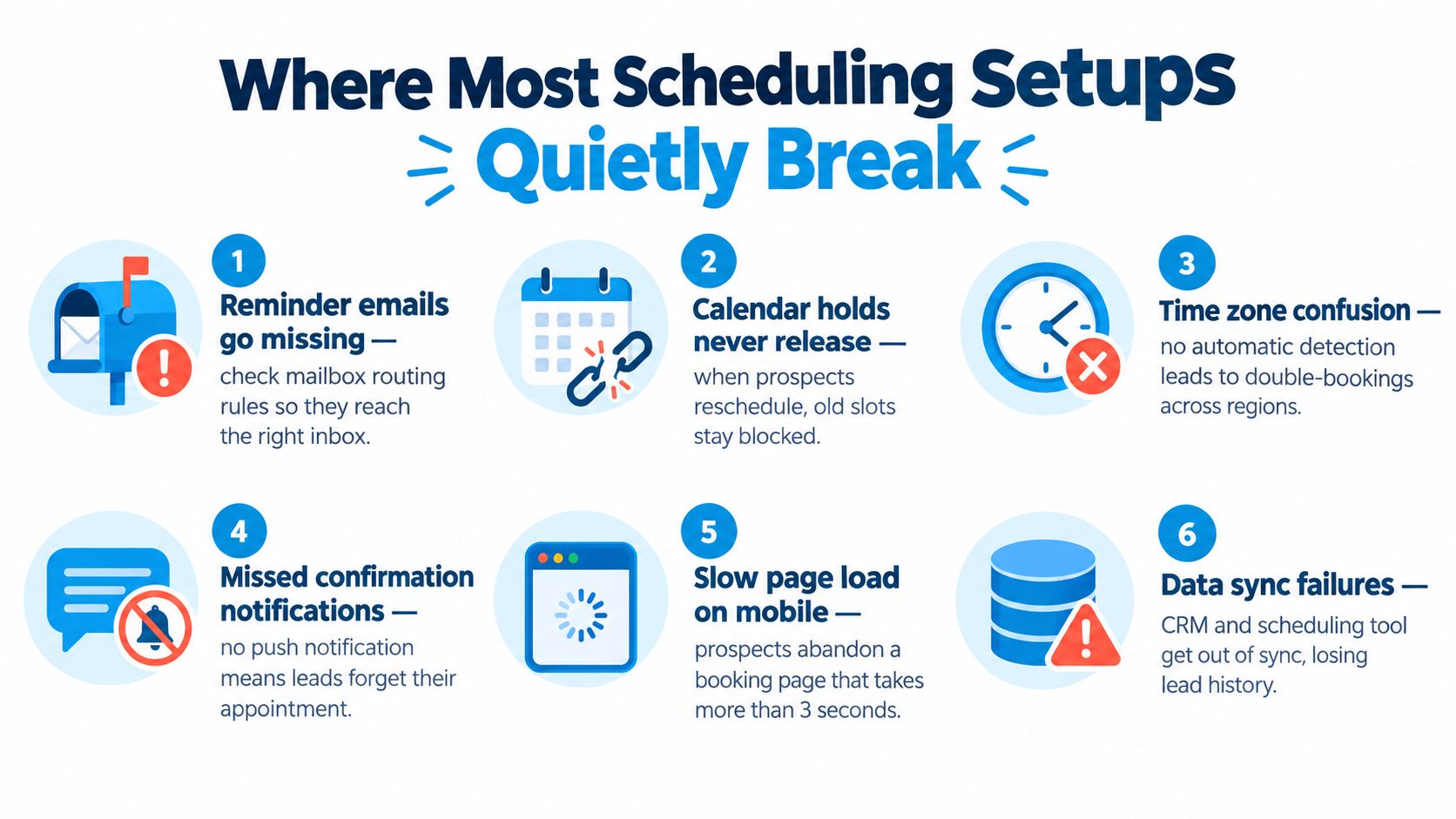
The six breakpoints I see most often
- Reminder routing is wrong. The booking confirmation goes out, but replies land in a mailbox nobody monitors. This hits small firms where one partner set up the tool with a personal inbox and never revisited it.
- Calendar holds don't release cleanly. A prospect reschedules, but the old slot stays blocked. Multi-partner practices feel this faster because capacity gets distorted across several calendars.
- Buffer rules collapse across timezones. The tool technically supports timezone conversion, but the availability logic gets messy when clients book internationally.
- Intake answers stay trapped in the scheduler. The consultant can see them before the call. The CRM can't. That's a common failure in firms that stitched together a scheduler and a sales pipeline later.
- Discovery-to-proposal is manual. A good call ends, and then someone still has to create the proposal task, update the deal stage, and remember the promised next step.
- Billing grows in all the wrong places. Usage-based add-ons and extra automation layers sneak into the stack once the team depends on several connected tools.
The pain changes by firm type
A solo consultant usually gets hurt by missed reminders or poor calendar sync.
A multi-consultant advisory firm gets hurt by routing errors and context loss.
A retainer-heavy practice gets hurt at onboarding, where the kickoff booking, owner notifications, and delivery handoff need to happen fast and consistently.
One nuance worth keeping in mind is that automation helps, but basic automation isn't always the top performer. A randomized outpatient study found no-show rates of 13.6% with staff reminders, 17.3% with automated reminders, and 23.1% with no reminders, according to The American Journal of Medicine study on reminder methods00108-7/fulltext). For advisory firms, that usually argues for a hybrid approach. Automate the standard confirmations and reminders. Keep human follow-up for high-value prospects and stalled opportunities.
Side-by-Side Comparison of Scheduling Approaches
You don't need a giant software matrix to decide this. You need a few criteria that map to what will break in your firm.
Here's the comparison I'd use with a 2 to 20 person consulting team.
Standalone Scheduler vs Integrated Operating System for Consulting Firms
| Decision Factor | Standalone Scheduler | Integrated Operating System |
|---|---|---|
| Setup time | Faster. Good if you need a booking page live quickly. | Slower upfront because the workflow has to be mapped properly. |
| Monthly cost at five users | Usually looks cheaper at first. Extra tools and automation layers often raise the real stack cost later. | Usually costs more as a core system, but replaces more of the surrounding stack. |
| CRM data ownership | Weak point. The meeting often lives as a separate object and the deal context lives elsewhere. | Stronger. The meeting and the opportunity usually share the same record structure. |
| Automation depth | Fine for confirmations, reminders, and simple routing. Thin once proposal and onboarding steps start. | Better for stage-based automation across sales and delivery handoffs. |
| Proposal workflow integration | Commonly manual or dependent on third-party glue. | Naturally stronger because proposal status can sit in the same pipeline. |
| Risk of context loss during staff turnover | Higher. Admin knowledge often lives in hidden automations or one person's setup choices. | Lower when the workflow is visible inside one system and tied to stages. |
My candid verdict
If your team only needs people to pick a time, a standalone scheduler wins on simplicity.
If your team needs to preserve context from first contact through kickoff, integrated systems win by a lot. Not because they're prettier. Because they answer the ugly operational question: what happens to the record when someone reschedules, no-shows, signs, or changes scope?
Buy based on what happens after the booking, not on how polished the booking page looks.
That single filter eliminates a lot of bad software decisions.
When an Operating System Beats a Standalone Scheduler
There's a clear threshold where standalone scheduling stops being enough. It happens when your bottleneck shifts from calendar logistics to handoff management.
At that point, the scheduler isn't the center of the problem anymore. The transitions around it are.
Signals That You Have Outgrown a Standalone Scheduler
| Operational Signal | Standalone Scheduler Pain | Integrated OS Outcome |
|---|---|---|
| Leads arrive from several channels | Team has to reconcile form fills, inbox leads, and booked calls manually | One intake flow can route all channels into the same pipeline |
| Proposal work is frequent | Discovery outcomes don't consistently trigger proposal tasks | Proposal stages can follow meeting completion automatically |
| Onboarding is structured | Kickoff booking and internal handoff rely on email relay | Won deals can trigger delivery setup and kickoff scheduling |
| Partners spend time reconciling records | Senior people update systems instead of selling or delivering | Context moves with the record instead of through people |
The rule of thumb
An operating system beats a standalone scheduler when meetings create enough downstream work that broken handoffs cost more than tool complexity.
That usually shows up when:
- Leads come from more than one source
- Several people touch the opportunity before it closes
- Proposal follow-up has to be managed deliberately
- Onboarding requires coordination rather than a simple welcome email
One integrated option can make sense. Starward Navigators combines lead capture, scheduling, proposal tracking, reminders, and onboarding handoffs in one prebuilt operating structure for small advisory firms. That's not the same thing as a generic scheduler with a few integrations. It's closer to a pipeline system where the appointment is one event inside a larger revenue workflow.
Why this matters operationally
The no-show conversation often gets framed too narrowly. Yes, reminders reduce missed appointments. In one clinic study, a scheduling system was associated with a no-show drop from 25% before implementation to 11% after adoption, and physician punctuality improved from -30 minutes to -14.2 minutes, according to the PubMed study on online appointment scheduling. But the larger operational issue in consulting is what the firm does with the appointment data before and after the meeting.
Another scheduling analysis points out a gap many buyers feel but can't quite name: most content still treats these tools as booking widgets, while real teams need them to support workflow, routing, and downstream operational management across the customer journey, as noted in Scheduling Kit's 2026 state of scheduling.
Standalone still wins in one scenario. A solo consultant with a narrow referral pipeline, minimal proposal process, and no delivery handoff usually doesn't need an integrated operating system. Anything more would be overhead.
Everyone else should be honest about the actual bottleneck. If your team spends time patching together what happened before and after a meeting, the scheduler stopped being the main purchase a while ago.
Choosing the Right Setup for Your Firm
Don't overcomplicate this decision. Most firms fall into one of two paths.
Path one for simple firms
A lightweight standalone scheduler is enough if all or most of these are true:
- You're solo or nearly solo
- Most leads come from referrals
- You hold relatively few external meetings
- Your proposal process is informal
- Client onboarding doesn't require team coordination
In that case, speed matters more than architecture. Pick something reliable, connect your calendar properly, add a qualifying form, and keep the rest simple. A spreadsheet and a disciplined follow-up habit can carry more weight than an elaborate stack.
Path two for firms with real handoffs
You need an integrated operating system if these sound familiar:
- Several consultants or partners handle different parts of the sales cycle
- You send proposals through a defined pipeline
- Booked meetings need prep, routing, and outcome tracking
- Onboarding has repeatable steps
- Your team is tired of glue tools
This is the point where “simple” stops being simple. Every manual handoff becomes a tax on senior time.
A five-point self-assessment
Use this before you buy anything:
Team size
If one person owns the entire process, fragmentation is easier to contain. Once multiple people touch the deal, shared context matters more than booking convenience.Meeting volume
Low volume can tolerate some manual handling. Higher volume exposes every weak handoff fast.Proposal cadence
If proposals are occasional, a standalone scheduler may be enough. If proposals move constantly, the meeting record needs to feed that pipeline directly.Onboarding complexity
If kickoff is just a welcome email, keep it light. If onboarding includes tasks, owner notifications, and delivery prep, separate tools become fragile.Tolerance for glue tools
Some firms don't mind patching together Calendly, Zapier, a CRM, and a proposal tool. Most eventually hate maintaining that stack.
My recommendation
Buy a standalone scheduler if your bottleneck is calendar logistics.
Buy an operating system if your bottleneck is revenue handoffs.
That's the whole decision. Don't let software demos blur it.
Starward Navigators gives small consulting and advisory firms a prebuilt client acquisition operating system that includes scheduling, reminders, proposal tracking, lead routing, and onboarding handoffs in one workflow. If your issue isn't booking a meeting but getting that meeting to reliably turn into a proposal and a smooth kickoff, visit Starward Navigators.