Top-performing advisory firms respond within four hours of contract signature and finish onboarding in five days or fewer, while bottom-tier firms sit at a 23.7-day median. If your process still lives in email threads and shared drives, that gap is exactly where clients start doubting the handoff.
Most firms think the relationship starts after the signature. In practice, the first trust test already happened on the website, before anyone on your team sent a welcome note.
Table of Contents
- Why Client Onboarding Websites Decide Retention Before Kickoff
- Public Page Versus Secure Portal Versus Hybrid Design
- Essential Pages and Flows for a Working Client Onboarding Website
- How Prebuilt Pipelines Turn Manual Handoffs Into Automated Workflows
- Measuring Whether the Onboarding Website Actually Reduces Churn
- Putting It All Together Into a Scalable Client Acquisition System
Why Client Onboarding Websites Decide Retention Before Kickoff
A prospect submits a proposal request on Friday afternoon. By Monday, they still have no clear next step, no named contact, and no secure place to share the information your team needs. The delay looks small internally. To the prospect, it signals that the same uncertainty may continue after kickoff. A well-built onboarding website prevents that gap by making the path from proposal to first conversation visible and controlled.
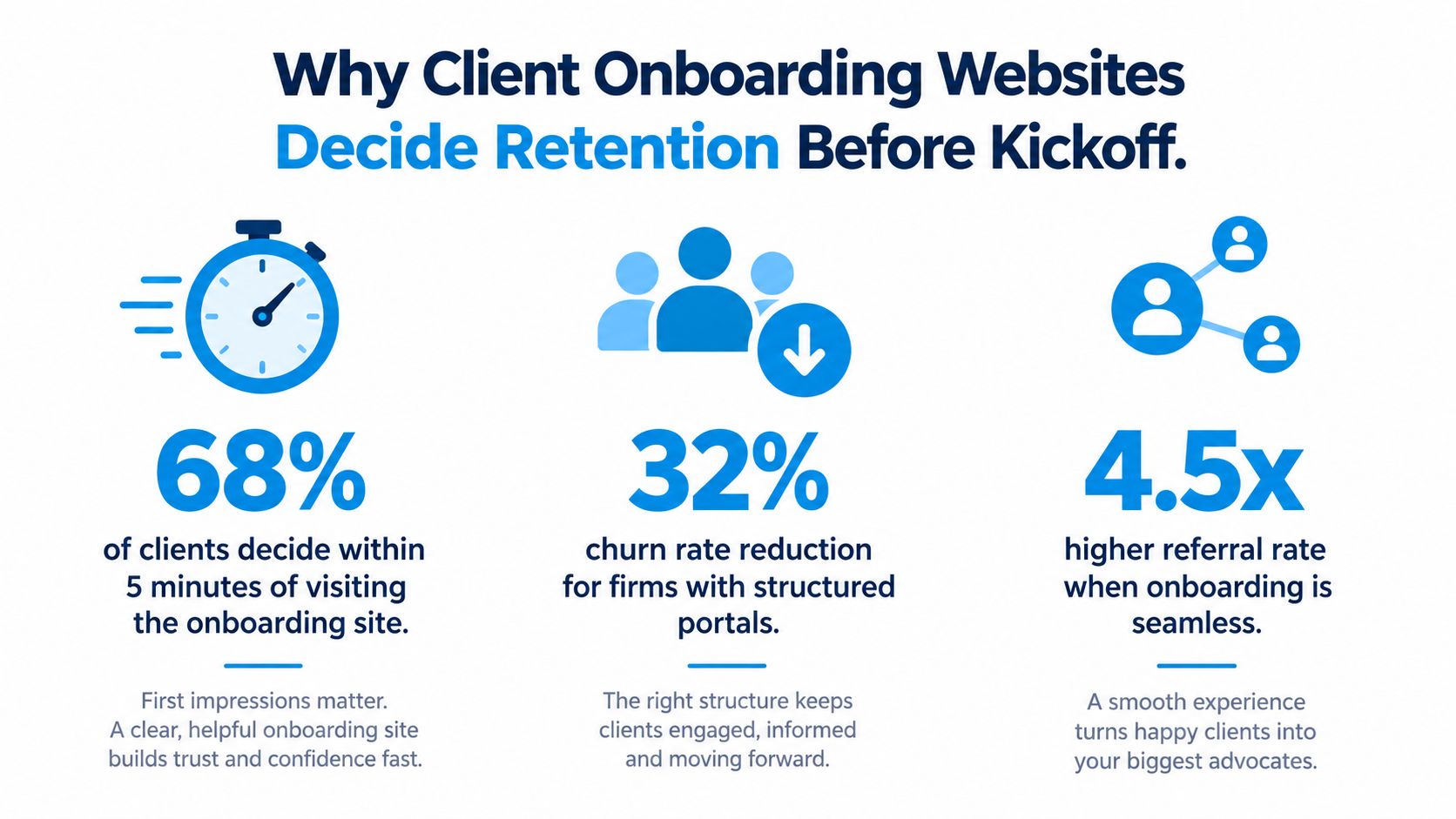
A useful client onboarding website supports the buying decision as well as the delivery process. One 2026 industry roundup says 63% of customers view onboarding support as a significant purchasing factor, 64% expect real-time communication during onboarding, and that expectation reaches 80% for B2B clients. The same source reports that a user-friendly site can attract 74% more clients, while a difficult site can drive away 50% of them. Those figures reinforce a practical point: the first digital experience affects proposal confidence, kickoff speed, and the client's willingness to stay engaged (onboarding statistics roundup).
What prospects infer from the first page
Prospects assess the process before they assess your delivery team. They look for a clear next action, plain language, and evidence that your firm can handle sensitive work without creating confusion. A public page should build that confidence, while secure intake should keep private details and documents out of ordinary email. Separating those jobs gives the prospect reassurance without making the firm collect operational data in an exposed place.
The judgment is quiet, but it influences whether a prospect accepts the proposal and how quickly the team can begin.
If the onboarding path feels unclear before the contract, the client assumes the internal handoff will be worse after the contract.
That's why the page cannot be a checklist with a logo. It should show who responds, what happens next, what the client should prepare, and where sensitive information belongs. Those signals reduce avoidable hesitation before kickoff and give the delivery team fewer manual follow-ups to manage.
Retention starts with that early sense of control. For a clear definition of the full journey, see what is client onboarding, from signature to first value. The website then becomes part of the operating system that protects trust before the first meeting, rather than a form added after the process is already designed.
Public Page Versus Secure Portal Versus Hybrid Design
The architecture choice is usually where teams make the wrong compromise. A private portal protects data, but it can't reassure a prospect who hasn't signed yet. A public page can build confidence, but it becomes risky the moment you ask for details that belong behind login.
The three models behave differently
A public page works best for trust-building, positioning, and simple next steps. It should explain the relationship, set expectations, and make the handoff feel orderly. What it should not do is collect sensitive intake data or push clients into a half-finished process that feels exposed.
A secure portal is better for structured information gathering, document exchange, and progress tracking. It suits the operational side of onboarding, where the team needs clear ownership and the client needs to know what's left. The trade-off is simple, the portal is efficient once the relationship exists, but it does little for prospects who still need reassurance before signing.
A hybrid design covers both jobs without forcing one surface to do everything. Recent portal guidance argues that the gap is especially relevant for consulting and advisory firms because onboarding often begins before a contract is signed, when prospects need reassurance more than account setup. That same guidance also points to AI-driven personalization and automation as a 2026 direction, while stressing that clients expect consistency across touchpoints, which pushes firms toward hybrid sites that combine lead capture, scheduling, and client intake with a protected workspace (client onboarding portal guidance).
What to keep public and what to hide
Public pages should carry the visible trust work, the promise of the process, the scheduling path, the sense of professionalism. The protected area should handle forms, files, progress updates, reminders, and anything that would feel intrusive if exposed too early. That split protects trust and lowers friction at the same time.
Practical rule: if the client needs reassurance, keep it public. If the client needs to submit private information or track progress, put it behind login.
The hybrid choice is usually the right one for high-consideration B2B services because it matches the actual sequence of the sale. It lets a prospect learn enough to sign, then moves them into a controlled intake environment once the relationship is official. That's the balance that avoids over-collection and keeps qualified leads from stalling.
Essential Pages and Flows for a Working Client Onboarding Website
A working system is less about pages and more about the handoff between them. If a visitor lands on a polished page but then gets dumped into a clumsy intake form, the experience still feels fragmented. The best firms design the sequence so every click answers the question, “What happens next?”
Start with a trust-building landing page. Its job is not to sell again, it's to reduce uncertainty after the sale or after proposal acceptance. Keep the promise of the process visible, then move the client toward the next action with a short path and minimal friction. The internal implementation notes in this client onboarding template are useful if you're mapping the first draft of that sequence.
Then build the intake form around only the data you'll use. Long forms create drop-off, especially when clients are still in the emotional afterglow of signing and don't want to feel like they're starting a second sales cycle. Ask for the operational details that enable delivery, not every nice-to-have field your team can imagine.
The flow that keeps momentum intact
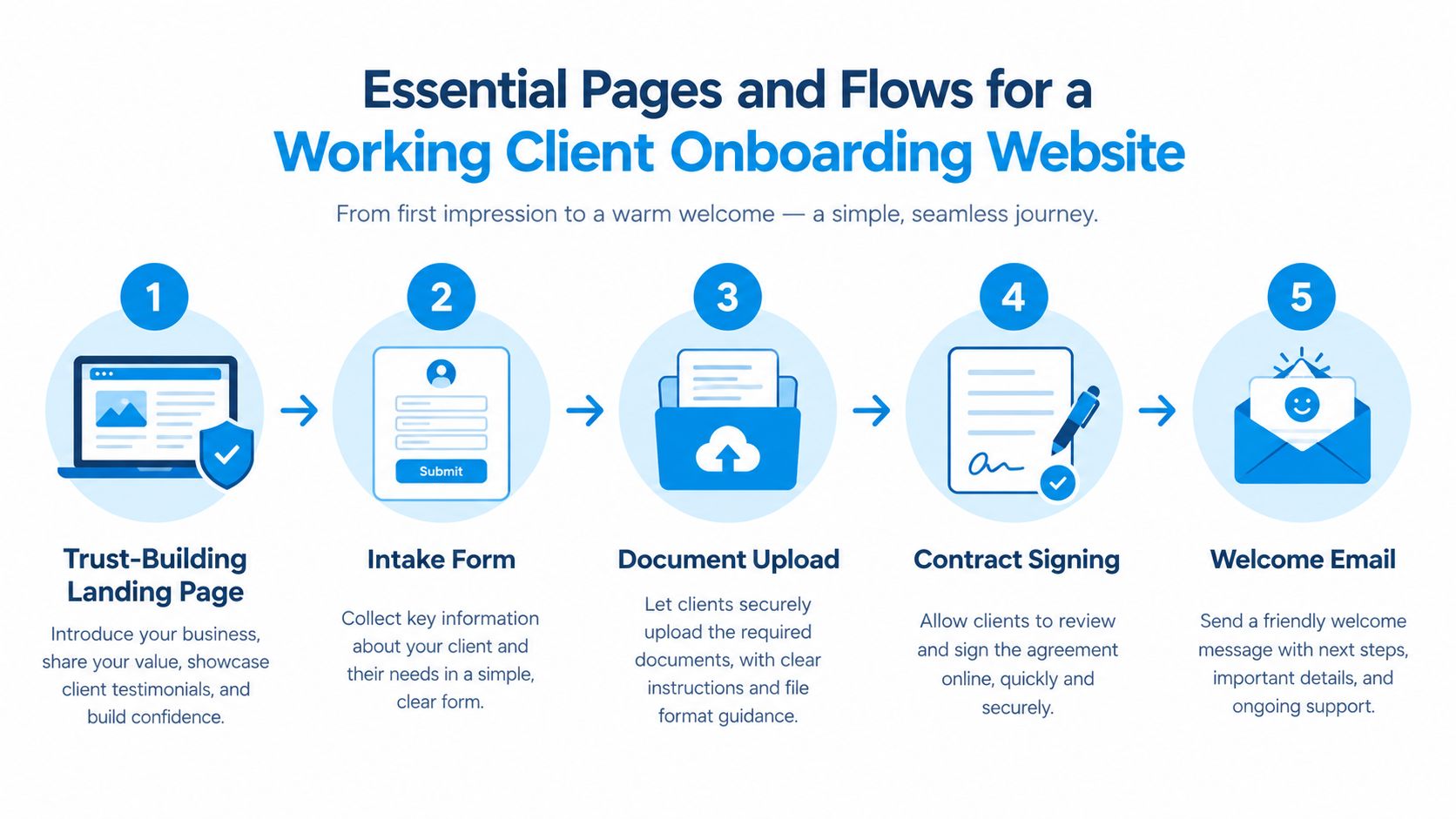
A simple sequence usually performs better than a feature-heavy maze:
- Landing page. Set expectations, explain the process, and make the next step obvious.
- Intake form. Capture only the fields needed to start work.
- Document upload. Collect supporting files without forcing email attachments.
- Contract signing. Move legally sensitive steps into a clean signing flow.
- Welcome email. Confirm what happened and what the client should expect next.
Scheduling belongs in the middle of that path, not at the end of an endless back-and-forth. If discovery logistics keep slipping, the whole client experience feels slower than it needs to be. A simple booking integration with a clear confirmation and a reminder is often enough to keep the handoff from collapsing into inbox chaos.
The best onboarding flow is the one the client can complete without asking three follow-up questions.
For the team, the client workspace should track progress from kickoff through the first deliverable, so nobody has to reconstruct the status from memory. For the client, the experience should feel like one continuous path, not a series of disconnected tasks. That continuity is what keeps proposal-to-kickoff delays short and makes the firm look operationally mature.
How Prebuilt Pipelines Turn Manual Handoffs Into Automated Workflows
Blank systems create blank accountability. Someone has to remember to update the record, another person has to remember to send the welcome note, and a third person has to remember to schedule the kickoff. That's how solid consultancies end up acting like they've never onboarded a client before.
Prebuilt pipelines fix the part that usually breaks first, the handoff from won opportunity to active delivery. In practice, that means the client record updates when the deal is marked won, the delivery pipeline starts automatically, the onboarding email goes out, and the kickoff gets triggered without someone copying details from one tool to another. Starward Navigators publishes that workflow approach in its client onboarding workflow overview, and the core point is operational, not cosmetic.
What automation should actually remove
Automation should remove the failure modes that waste the most time. Inconsistent lead response, missed discovery call logistics, quiet proposals, and manual client handoffs are all coordination problems, not strategy problems. When the system routes the next action automatically, people stop relying on memory and inbox vigilance.
The best pipelines don't try to automate the relationship itself. They automate the predictable parts around the relationship so humans can focus on judgment, context, and exception handling. That distinction matters in consulting, where the client's trust often depends on feeling that a real person is still in charge.
A good operating system also reduces internal improvisation. Instead of rebuilding each account from scratch, the team follows the same trigger path, same owner notifications, same reminders, same kickoff sequence. That consistency makes the client experience calmer and the delivery team less dependent on heroic effort.
Why prebuilt beats blank
A generic CRM gives you a shell, but not a working onboarding motion. Prebuilt pipelines for business development, client delivery, and relationships cover the whole journey from lead intake to referral management, so the team isn't stitching together isolated stages by hand. That's a major difference for small consultancies that need their operating rhythm to be repeatable on day one.
If the process only works when one person babysits it, it doesn't scale, it just gets lucky.
The implementation side matters too. A defined Map, Install, Go Live process with a 14-day go-live guarantee gives smaller firms a realistic path from chaos to a working system without turning onboarding itself into a months-long project. That matters because the point of the website is to accelerate delivery, not become another stalled initiative.
Measuring Whether the Onboarding Website Actually Reduces Churn
A polished intake flow can still fail if it doesn't move the right outcomes. The mistake most firms make is stopping at “the portal looks clean” instead of asking whether clients are moving faster, dropping off less often, and reaching value sooner. That's the only test that matters.
The useful measurement model for advisory and financial firms tracks time-to-funding, completion rate, dropout points, client satisfaction at 30 and 90 days, compliance exception rates, and rework time (financial services onboarding guide). Those measures are practical because they show where friction lives, not just whether the page loaded correctly.
What to watch first
Start with the first value moment and work backward. If the path from signed agreement to first meaningful progress is too long, the website isn't doing its job, no matter how polished it looks. For professional services, that usually means watching the moments where clients stall before kickoff, not weeks later after the relationship is already fragile.
The 2026 client-onboarding summary for professional services says the first 90 days are the highest-risk period for churn, and that effective onboarding can improve retention by 16% and reduce time-to-value by 50%. It also says only 29% of firms have a standardized onboarding process, and properly onboarded clients show 92% 90-day retention versus 76% without structured onboarding (client onboarding statistics summary). Those numbers reinforce a simple point, the early workflow is where the retention win lives.
How to instrument the site without bloating it
Keep the forms short and outcome-based. Minimize required fields, log where people abandon the flow, and avoid adding steps just because the system can support them. A longer form isn't better if it delays the first useful action.
A good dashboard should answer three questions quickly:
- Where do clients stop? Identify the exact field, step, or handoff where abandonment begins.
- How fast do they move? Measure whether the process shortens the gap between proposal and kickoff.
- Did the experience stay human? Check whether automation helped the client or just made the process colder.
The right mindset is not “How many features can we add?” It's “Which few signals tell us this onboarding website is reducing churn and getting clients to value faster?” That's the difference between a pretty front end and an operating system that improves the business.
Putting It All Together Into a Scalable Client Acquisition System
The strongest client onboarding website doesn't act like a filing cabinet. It acts like acquisition infrastructure, because the earliest part of the client journey is where confidence, speed, and handoff quality determine whether the sale becomes a working relationship. Once that frame is in place, the design choices get much easier.
Hybrid structure is usually the right architecture for consulting and advisory firms. Public surfaces handle reassurance, scheduling, and expectation-setting. Secure surfaces handle intake, document collection, progress tracking, and anything that should stay private once the deal is signed.
The operational side matters just as much. Prebuilt pipelines, standardized follow-up, owner notifications, kickoff scheduling, and referral tracking keep the firm from losing momentum between proposal and delivery. That's where small teams win, not by adding more tools, but by making the path from one stage to the next impossible to miss.
What makes the system scalable is that it connects the front end to the handoff logic. The website shapes trust, the pipeline enforces motion, and the measurement layer proves whether the process is shortening delays and improving retention. When those three pieces work together, the client sees professionalism and the team sees less rework.
If you want to turn your onboarding path into something clients can move through without hand-holding, Starward Navigators builds the pipeline and follow-up system around it. They standardize intake, kickoff, and early delivery so consulting teams stop losing time in manual handoffs and start moving clients from proposal to action with far less friction.