It's Friday afternoon, a prospect you met on Tuesday is still waiting for a reply, and a proposal from last week sits in someone's sent folder with no owner and no next step. Nothing's broken in the work itself. What's missing is a rule that acts the moment an event happens, assigns it to a person, and stops when a person takes over.
Table of Contents
- What Email Workflow Automation Actually Does
- Lead, Proposal and Onboarding Patterns Compared
- How to Build a Workflow from Trigger to Exit
- Test Deliverability and Accessibility Before Launch
- Governance Rules for Approvals, Ownership and Exceptions
- KPIs That Show Whether Automation Works
- Go-Live Checklist and Platform Decision
What Email Workflow Automation Actually Does
Say a consultant meets a prospect on Tuesday, sends a proposal on Friday, and hears nothing for two weeks. The prospect hasn't said no. Nobody was assigned to chase the decision, so nobody did. Email workflow automation is the rule set that prevents that silence. It acts when a defined event happens, not when someone remembers to check a spreadsheet.
Think of a railway signal box. Leads, proposals and clients run on fixed tracks, and signals decide where each one goes, where it waits, and when it must stop. A signal operator doesn't push every train by hand. The operator sets the route once and watches for exceptions.

Every workflow needs four parts:
- Trigger: The event that starts it, such as a form submission or a proposal marked sent.
- Condition: A check on the situation, such as whether you're looking at a new inquiry or a stalled proposal.
- Action: What happens next, such as sending an email, creating a task or updating a record.
- Exit: The event that stops it, such as a reply, a booked meeting or a closed deal.
That exit is what separates a workflow from a broadcast. A broadcast goes to a list on a date. A workflow is conditional, tied to a record, and ends on purpose.
The scale explains why manual follow-up fails. The MailStore history of email notes businesses sent an estimated 108 billion business-related emails per day in 2014, and the average person sent approximately 121 business emails daily. At that volume, repeated inquiries and reminders need a system, not memory.
Start with three jobs: lead response, proposal follow-up and client onboarding. A workflow earns its place only when it moves a real decision forward.
Lead, Proposal and Onboarding Patterns Compared
Four patterns do most of the work in a consulting firm. They look similar in a builder, but they solve different problems and they fail in different places.
| Pattern | Trigger | First action | Exit condition |
|---|---|---|---|
| Inbound lead response | Form submission or inquiry | Owner assigned and acknowledgment sent within minutes | Reply, booked meeting or disqualification |
| Lead nurture | Lead has not replied after first contact | Small number of touches spaced over several weeks | Reply, unsubscribe or stage change |
| Proposal follow-up | Proposal sent | Defined cadence starts, set once at sending | Decision recorded or proposal withdrawn |
| Client onboarding | Opportunity marked Won | Owner notified and kickoff scheduled | Kickoff completed |
Inbound Lead Response and Nurture
Inbound lead response is a speed and routing problem. The moment a form or inquiry arrives, the workflow should create the contact, record the source, assign an owner and send an acknowledgment. The acknowledgment isn't the goal. It buys time while a named person prepares a real reply. If no human acts inside your response window, escalate to a backup owner and log the miss. Don't let the automated message disguise the fact that nobody followed up.
Lead nurture starts only after that first contact hasn't produced a reply. Keep it short and spaced over several weeks. Each touch should add something the previous one didn't, such as a relevant question, a useful resource or a clear low-effort way to book a call. I would rather send three distinct messages than six reminders that say the same thing louder. Good practices for generating leads for email marketing matter here because nurture can't rescue a lead that never had intent or a record with no source attached.
Proposal Follow-Up and Onboarding
Proposal follow-up is where most consulting pipelines leak. After a proposal is sent, we automatically start a defined follow-up sequence, so the cadence is set once at sending rather than remembered by whoever wrote the document. The early messages confirm receipt and surface blockers. Later ones ask for a decision date and offer a short call to resolve scope or timing questions. The sequence should never argue price or revise scope on its own.
Client onboarding fires when the opportunity is marked Won. Notify the delivery owner, update the client record, schedule kickoff and send the client a clear next step. There's no manual handoff to forget and no gap where sales assumes delivery has started.
A sequence without clear exits keeps messaging people who already said yes, and that's faster at destroying trust than a slow reply.
That's why I'd spend more time on the exit column than on copy. Check every pattern for the replies that matter most: a yes, a no, a referral to a colleague, an out-of-office that names a return date, and a request to pause. These patterns aren't experimental anymore. Exclaimer's State of Business Email 2025 report found 29% of organizations reported automating business-email workflows in 2025 with tools such as Zapier or Power Automate.
How to Build a Workflow from Trigger to Exit
A proposal sits unanswered because the sequence has no owner and no stop rule. The emails still go out. The firm cannot tell who should answer, or whether the contact already booked.
The infographic below condenses the build order into a short sequence of moves, and the full steps follow.
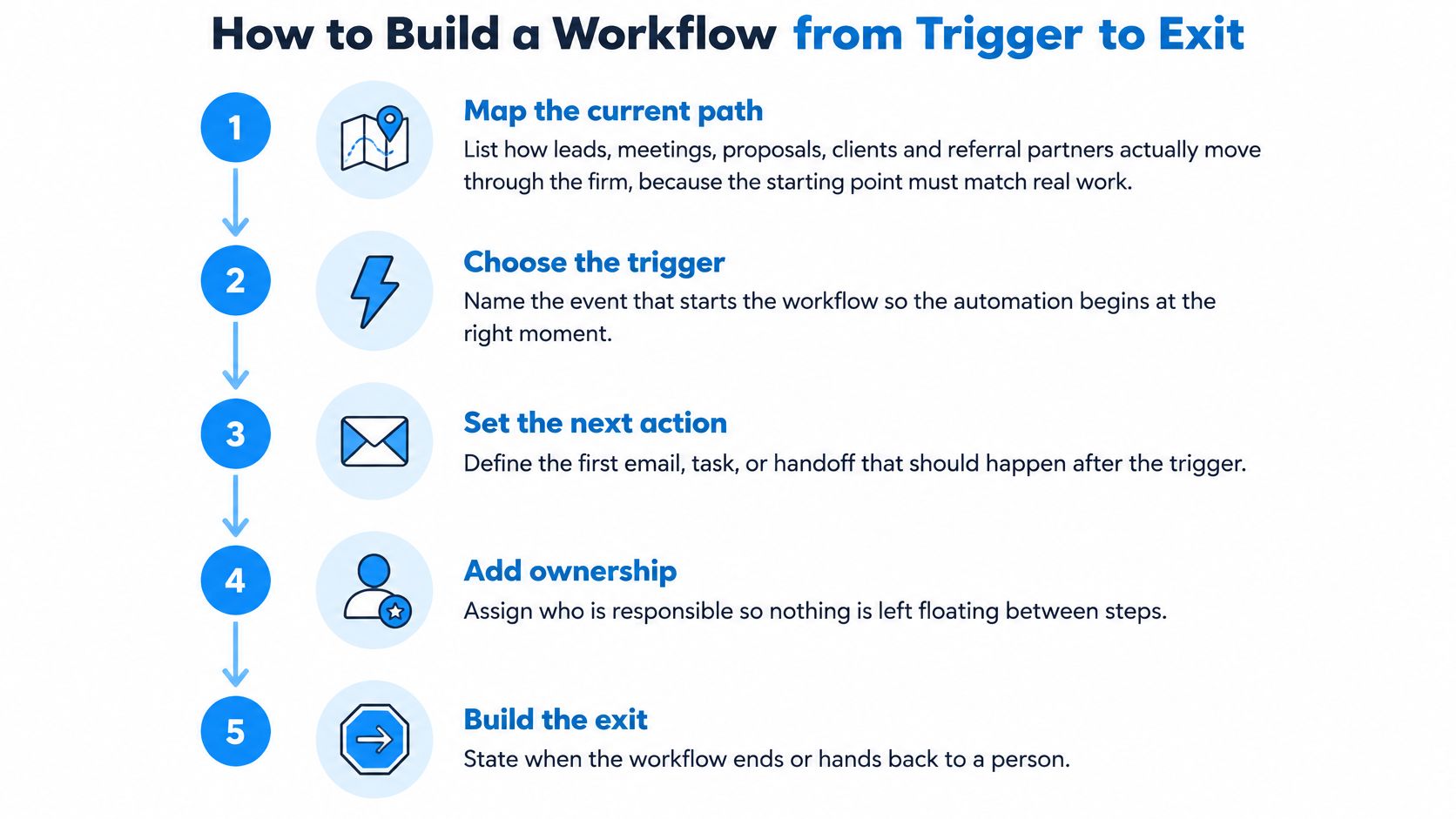
- Map the current path. List how leads, meetings, proposals, clients and referral partners move through the firm. Starward maps that path, then configures pipelines, follow-up sequences, reminders, routing and handoffs around it. The workflow has to match how the firm sells.
- Name the trigger and the record it creates. A form submission should create a contact and an opportunity with source and timestamp. Later conditions need that record. If source is blank, every branch after it is a guess.
- Write the first action, the sender, and the owner. Decide whether the system sends an email, creates a task, or does both. Mark which first action is transactional and which is nurture, and keep those sends on separate paths. Name the person who owns the reply.
- Add conditions, branches, and an approval gate. A stalled proposal should not get new-lead language. Branch on pipeline stage, source and engagement. I would hold any message that changes price or scope for human approval, and let routine reminders send. Speed helps until the message needs judgement.
- Define exit conditions and the outcome each one records. Stop on a reply, a booked meeting, a disqualification, an unsubscribe, or a stage change. Write the exit reason onto the record. Without that field, a sequence that stopped correctly looks the same as one that died.
- Load the audience with usable tags. Tags filled in on the import template are live from the first day, so a defined segment can be emailed straight away. Bad tags at import become bad branches for months.
- Test with a dummy contact. Walk every exit path and confirm the sequence stops, the owner changes, and the record updates. A structured client onboarding workflow is a good test case because it crosses sales and delivery in one move.
Watch the Build in Practice
The short video below walks through a workflow build, so you can compare the steps against your own trigger and exit logic before you configure anything.
Launch when each reply type lands with the right owner, the approval gate holds the messages that need a person, and every sequence records why it stopped.
Test Deliverability and Accessibility Before Launch
A workflow can schedule perfectly and still fail. Messages land in spam, or a client using a screen reader can't follow the content. Neither problem shows up in a sequence builder, so you have to test for both before real contacts enter.
Authentication in the Right Order
Three records do the work. SPF names the servers allowed to send for your domain. DKIM signs each message cryptographically. DMARC checks that those results align with the visible From domain and tells receivers what to do when they don't.
Set them up in this order:
- Confirm SPF and DKIM on every sending domain and subdomain you use.
- Publish DMARC in monitoring mode and read the aggregate reports to find legitimate senders you forgot.
- Move toward quarantine or rejection only after every legitimate sender passes.
Separate transactional messages such as appointment confirmations from nurture traffic, and authenticate each sending identity. That way a weak nurture campaign doesn't drag down messages clients are actively waiting for.
Accessibility Checks a Human Has to Do
The scale of neglect is hard to overstate. An accessibility analysis cited by Knak found 99.89% of 443,585 analyzed emails contained serious or critical accessibility issues, with only 21 emails passing all automated checks. The same source notes AI can address only roughly 20 to 30% of accessibility problems automatically.
That leaves three checks for a person:
- Screen reader test: Run a sample message through a screen reader and listen for reading order that makes sense.
- Heading hierarchy: Keep one clear order so assistive technology can move through the content logically.
- Meaningful link text: Write what the link does, such as book your kickoff call, instead of click here.
Contextual alternative text needs human judgement too, because a tool can describe an image but can't know why you included it. EU-facing businesses also face accessibility expectations since the European Accessibility Act took effect in June 2025, a date noted in that same analysis.
Practical rule: If a message can't be read without images, colour or a mouse, it isn't ready to send automatically.
Finally, honor unsubscribe and opt-out requests inside the workflow itself. Suppress the contact across every pipeline at once, so no other sequence can message them again.
Governance Rules for Approvals, Ownership and Exceptions
A small firm can build a sequence in an afternoon. The harder question nobody asks is who owns an AI-drafted reply and when automation must stop.
Adoption patterns show why the gap is growing. NFIB's 2025 Technology Survey found 29% of small businesses were using or planning to use AI for communications, while only 4% reported using AI for process automation. Message generation is outpacing workflow design, which means firms can produce replies faster than they can govern them.
Map Automation by Consequence
Sort every message type into three tiers before you build:
- Fully automatic: Routine appointment reminders and confirmations where the facts come from the record and nothing is being negotiated.
- Conditional: Stalled proposal follow-up that runs on a cadence but stops immediately after any reply and hands the thread to the owner.
- Mandatory human approval: Scope changes, pricing, complaints and referral-sensitive messages. Automation can draft and route these. It can't send them.
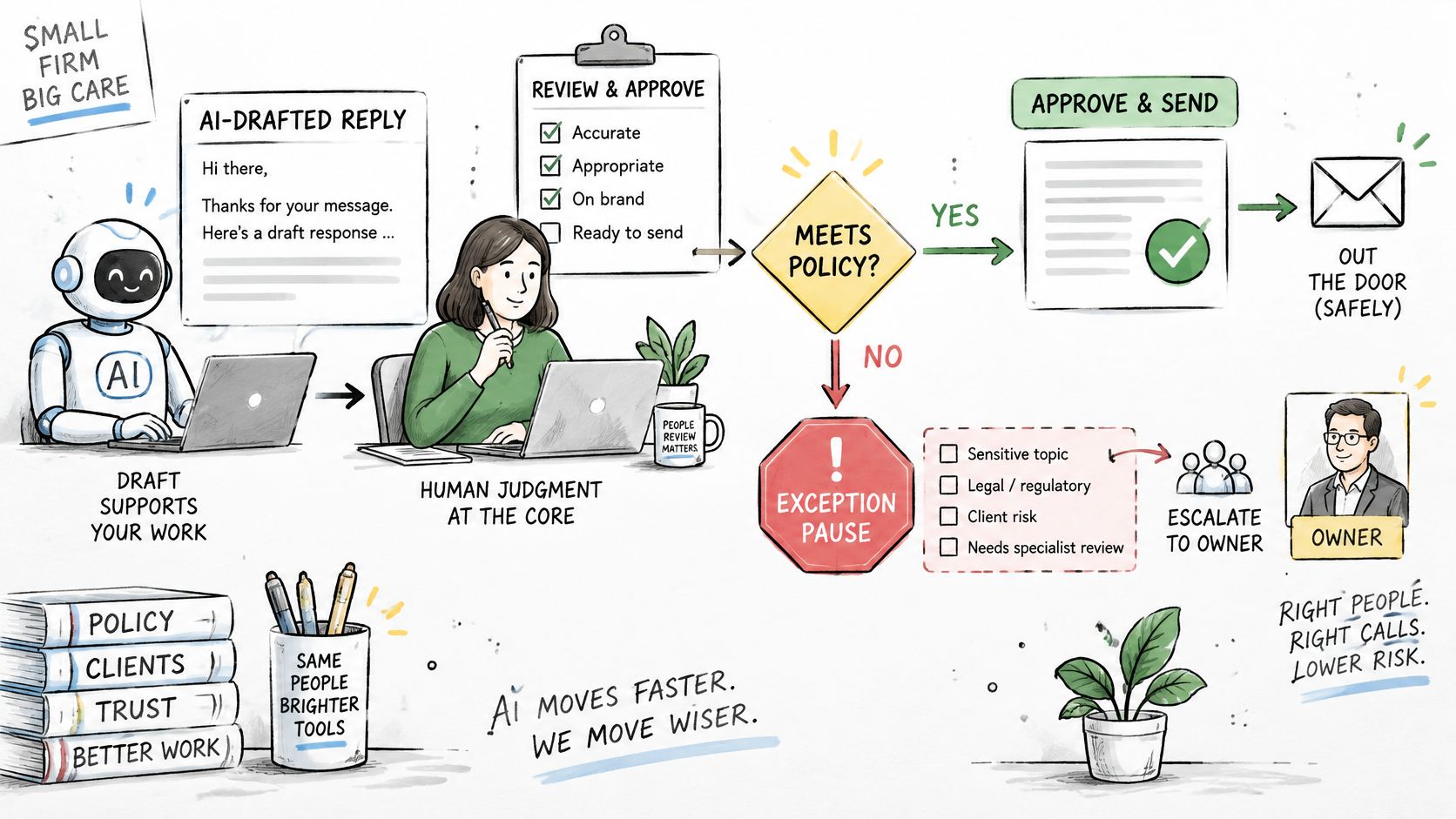
Behind those tiers, you need five supporting rules. Set approval thresholds so value and sensitivity decide who reviews. Keep an audit trail of every automated send, including which workflow sent it and why. Route sensitive or ambiguous replies to an exception queue instead of letting the sequence continue. Share suppression rules across all pipelines. Name an owner for every handoff from lead to proposal to client.
Conflicts appear when workflows don't share state. Say a client asks for a scope change on Monday and receives a cheerful proposal reminder on Tuesday. The reminder wasn't wrong on its own. It was wrong because nobody checked the single contact record across sequences. Before adding tools to manage this, it helps to compare approval tools for sales outreach against your tiers, because a tool that can't enforce your approval tier won't fix a governance gap.
One boundary stays yours. Our CRM and follow-up system doesn't provide compliance, regulatory or licensing guidance, and your firm remains responsible for its own regulatory obligations.
KPIs That Show Whether Automation Works
Opens flatter you. A workflow can show healthy open rates while proposals age, owners miss response windows and clients unsubscribe. Privacy features in mail clients also distort open tracking, so treat opens as background noise and measure decisions instead.
| Metric | What It Reveals | Warning Sign |
|---|---|---|
| Median first human response | How fast a new lead reaches a person | Creeping past the SLA window |
| Contacted within SLA (%) | Whether routing holds at volume | Growing backup-owner escalations |
| Reply rate by source | Which channels start conversations | High opens with flat replies |
| Meeting booking rate | Whether sequences move leads to calls | Sends continue with no bookings |
| Proposal-to-decision rate | Whether follow-up closes deals | Proposals aging without a recorded decision |
| Unsubscribe and complaint rate | Trust damage from over-messaging | Spikes after a sequence change |
| Exit reason mix | Whether sequences stop when they should | Most exits marked completed with no reply |
| Inbox placement by provider | Whether messages reach the inbox | Drops in any single mailbox provider |
Reading Exits Before Adding Emails
Start with outcome metrics: replies, booked meetings, proposal decisions and unsubscribes. Then read the exit reason mix, because it tells you whether the workflow works or merely runs. If most contacts leave marked completed with no reply, your sequence reached its last step without changing anything. Don't fix that by adding a seventh email. Sharpen the conditions, shorten the path to a human, or accept that the source quality is the problem.
Reply rate by source helps you decide where automation deserves more effort. A referral source that replies often but books rarely needs a different intervention than a website source that never replies, and disciplined tracking of sources makes that visible when you track referrals as their own channel.
Underneath all of it sits placement. A global benchmark from Validity based on seed addresses across hundreds of mailbox providers reported 93% SPF adoption, 90% DKIM adoption, but only 48% DMARC adoption, with inbox placement at 63%. Authentication prevalence alone doesn't guarantee delivery, so monitor placement by mailbox provider and suppress hard bounces, repeated soft bounces, complaints and opt-outs quickly.
Run a monthly routine:
- Compare each KPI against last month for the same pattern.
- Check complaints and unsubscribes after any sequence change.
- Fix one pattern at a time so you know what caused the movement.
Go-Live Checklist and Platform Decision
Tick these five items before you switch anything on:
- First pattern chosen: Lead response, nurture, proposal follow-up or onboarding, picked because it's where work currently stalls.
- Written map complete: Every stage moves from trigger to exit on paper before it exists in software.
- Approval rule set: Each message type sits in one of the three consequence tiers.
- Domains authenticated: SPF and DKIM pass, with DMARC in monitoring mode and reports being read.
- One KPI named: A single metric with a warning sign you'll review after the first month.
Then decide who maintains the rules. Build in-house if someone in your firm will own exits, suppressions and monthly reviews. If nobody will, use a platform, and compare your written map against options like tools for managing marketing emails to see which ones enforce the rules you've already decided.
Our CRM brings contacts, scheduling, messaging, proposals and automation into one place. Every prebuilt automation runs on every plan, self-serve workflow-builder access begins at Core Plus, and the pipelines cover proposal follow-up, no-show recovery, client handoff and referral nurture.
I would launch one pattern on one small segment, review its exits and KPIs after a month, and expand only when the stop rules hold.
If your proposals stall because follow-up depends on memory, Starward Navigators can set up the pipelines, sequences, reminders and handoffs that keep every lead and client moving. Visit Starward Navigators to see how the system works and choose the first workflow you'd put on rails.