Most advice about an appointment schedule template in Excel starts with the grid. Pick a layout, add names and times, print it, and assume the scheduling problem is solved. That works only when the workbook records appointments without needing to confirm them, remind attendees, route ownership, or preserve context during a handoff.
A useful comparison needs to test time-slot clarity, status tracking, printability, customization, collaboration, and automation. It also needs to expose the work that templates leave to people: checking for conflicts, updating cancellations, sending confirmations, and telling the next owner what happens after a discovery call.
Calendar-based planning is already mainstream. A 2026 calendar-workforce survey reported that 83% of employed Americans depend on a calendar for day-to-day workflow, while 1 in 8 said they'd missed a meeting because of calendar mismanagement. That makes Excel a reasonable control layer for solo consultants and small advisory teams, but not automatically a dependable scheduling system.
The resources below are judged against real consulting workflows, including discovery calls, onboarding handoffs, proposal follow-up, and the point at which reminders or online booking become more useful than a spreadsheet.
Table of Contents
- 1. Vertex42 Appointment Schedule Template in Excel
- 2. Vertex42 Appointment Calendar Templates in Excel
- 3. Microsoft Excel Schedule Templates Gallery
- 4. Smartsheet Weekly Appointment Calendar
- 5. WPS Office Appointment Schedule in Excel
- 6. Template.net Appointment Schedule in Excel and Google Sheets
- 7. Someka Appointment Calendar and Time-Blocking Template in Excel
- 8. Spreadsheet123 Weekly Schedule Template in Excel
- 9. Koalendar Free Appointment Calendar Template
- 10. Sourcetable Appointment Schedule Excel Template
- Top 10 Excel Appointment Schedule Templates, Comparison
- Choose the Grid or Upgrade the Workflow
1. Vertex42 Appointment Schedule Template in Excel
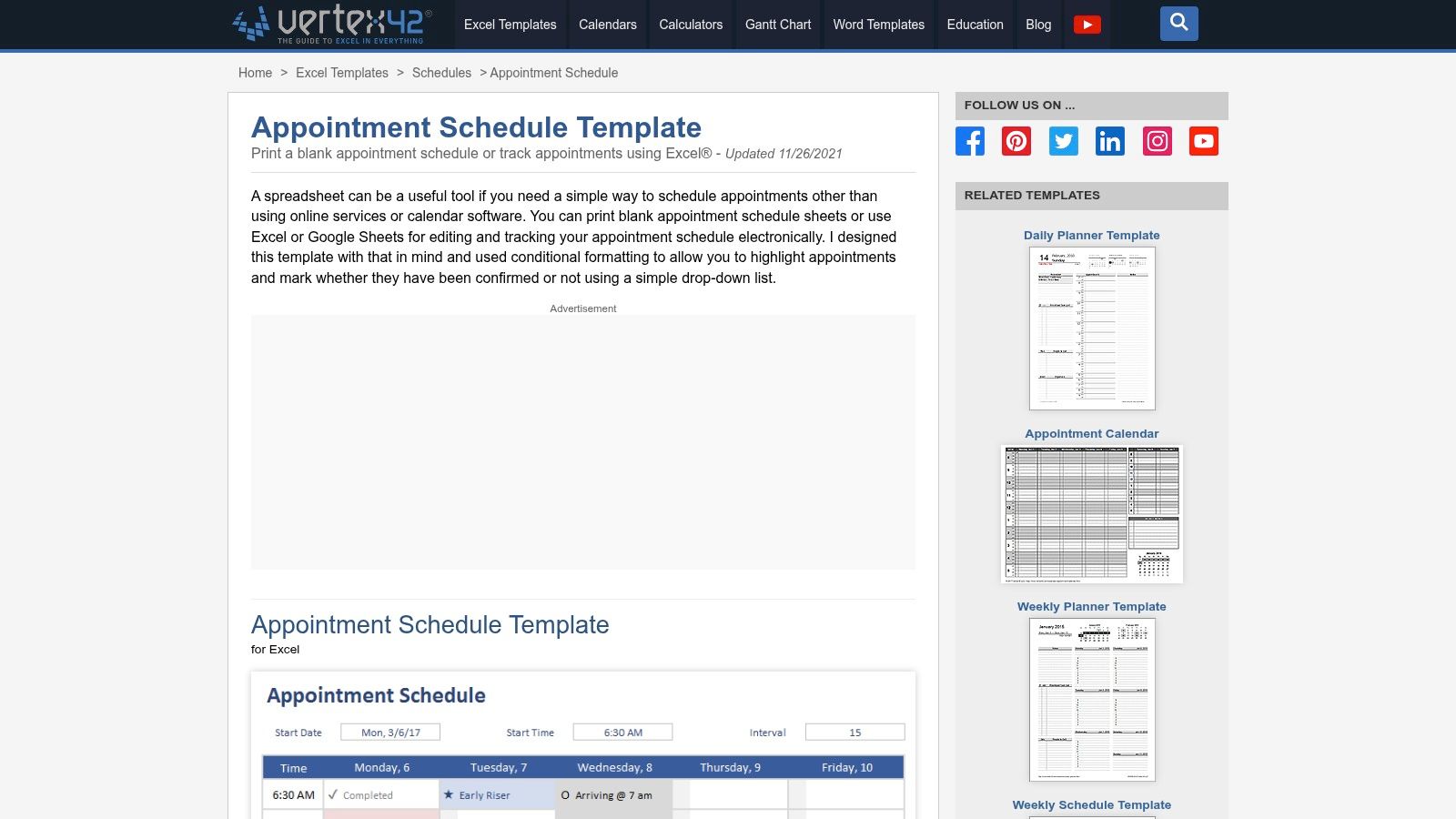
Vertex42's Appointment Schedule Template is the most direct fit when you want an appointment ledger rather than a general planner. Its weekly grid can be adjusted for start times and appointment intervals, so a consultant can shape it around discovery calls, delivery meetings, or office hours without rebuilding the timing logic.
The template's practical strength is its visual discipline. A weekly view makes availability obvious, and status markers such as confirmed, no-show, and breaks give a front desk or solo operator a quick way to interpret the day. The print-oriented design also matters when a team still keeps a physical schedule near reception or uses a printed briefing sheet before client meetings.
Where it fits consulting work
Use it for a simple weekly operating view. Add the prospect or client name, meeting type, owner, status, and a short next-step note. For an onboarding process, the workbook can sit beside a more complete client onboarding workflow as a temporary schedule record.
Practical rule: A confirmed status should mean someone actually confirmed the appointment, not merely that a person typed a name into the grid.
Vertex42 is easy to customize and has a mature feel, but its limits are clear. Someone still has to enter bookings, change canceled calls, notice double-bookings, and send reminders. It's a strong prototype for deciding which fields you'll need before automation. It isn't a reminder engine or a client handoff system.
2. Vertex42 Appointment Calendar Templates in Excel
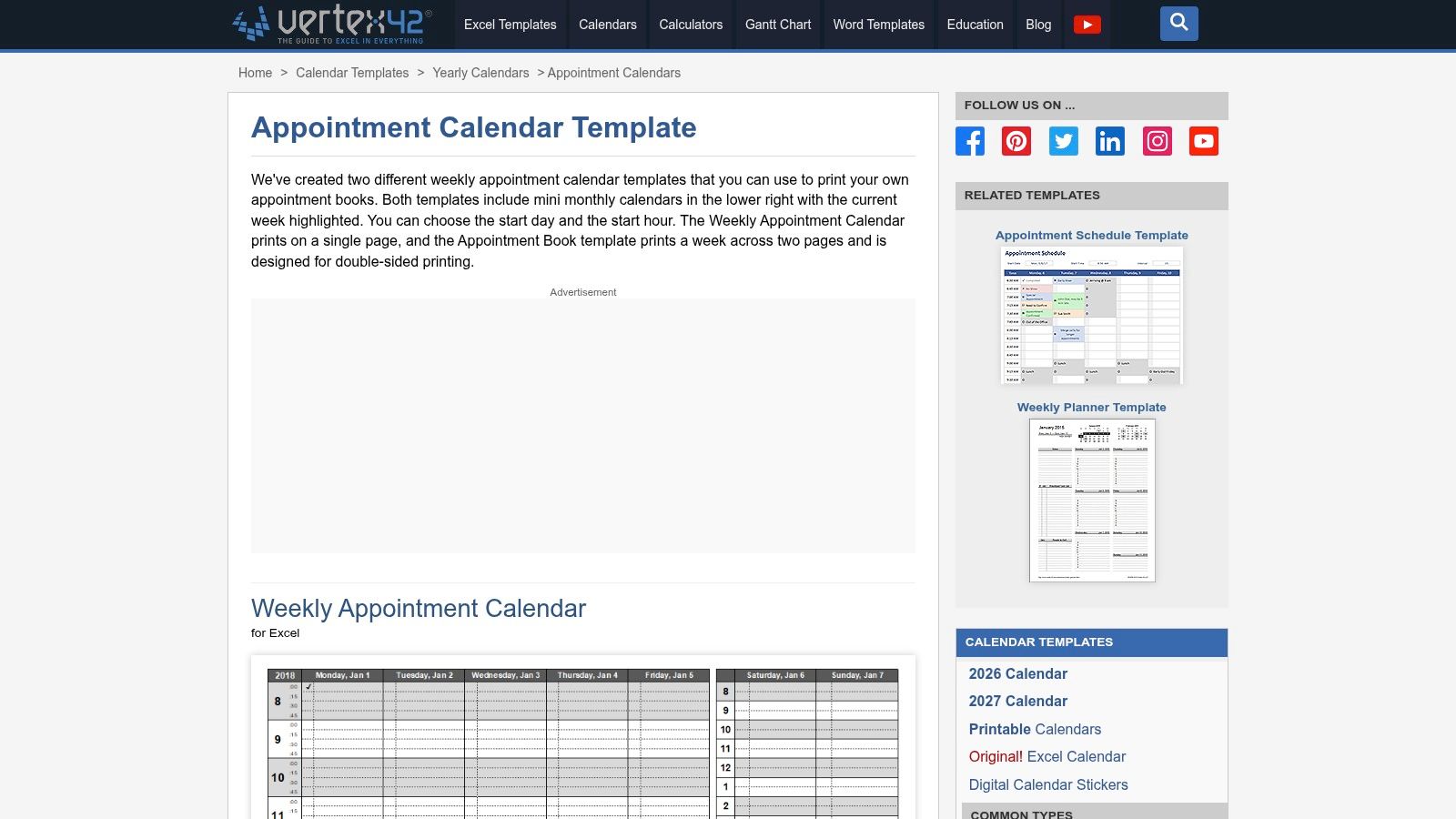
Vertex42's Appointment Calendar Templates are better suited to teams that care about a clean printed artifact. The collection includes a single-page weekly calendar and an appointment book format that spreads a week across two pages, making it practical for double-sided printing and binder-based administration.
That distinction sounds minor until a consultant has to choose between a quick wall view and a record that someone can carry through a day of meetings. The single-page version helps a solo advisor scan open time. The appointment-book format gives a front desk or coordinator more physical space for notes and manual updates.
The print workflow is the feature
These templates also work in Google Sheets, which lowers the barrier when a client or subcontractor doesn't use desktop Excel. Still, compatibility doesn't remove the central handoff risk. If one person updates a shared file while another works from a printed copy, the team can end up using two different versions of the schedule.
For discovery calls, keep the appointment page focused on logistics and store qualification notes elsewhere. For proposal follow-up, add a small next-action field rather than turning the calendar into a sales database. The layout is intentionally simple, and that's why it deploys quickly.
Its weakness is equally simple: there are no built-in notifications or follow-up sequences. A canceled consultation can disappear from the page without creating a task to contact the prospect. This is a good printable calendar, not a connected workflow.
3. Microsoft Excel Schedule Templates Gallery
Microsoft's Excel Schedule Templates Gallery is the sensible starting point for firms already standardized on Microsoft 365. It offers daily and weekly planners that can be adapted into appointment books by adding time slots, client fields, meeting types, and ownership columns.
Microsoft's own template library explains the operational appeal of schedule templates: they provide a preformatted structure with built-in formulas, so users can reuse timing and layout logic rather than rebuilding it for every planning cycle. The gallery also supports themes and formatting, and many templates use formulas that update calendar structures when dates change.
Collaboration without false confidence
Sharing through OneDrive makes this option more useful than a file sitting on one laptop. A consulting team can give a coordinator access, maintain a common workbook, and refresh dates and assignments instead of creating an entirely new schedule every week. Microsoft's schedule-template guidance also describes editing daily, weekly, and monthly schedules directly in Excel, adding or removing rows and columns, and reusing a template by refreshing dates and assignments.
That convenience doesn't guarantee accuracy. A shared workbook still depends on people entering changes promptly and understanding which fields control the schedule. It also won't automatically turn a new website inquiry into a confirmed meeting.
For a discovery-call workflow, add a lead source, qualification status, owner, and next action. For onboarding, add kickoff readiness and handoff notes, but avoid putting sensitive delivery detail into a broadly shared calendar file. Teams looking for consulting templates can use the workbook as a planning layer, while keeping the client record and follow-up logic in a system designed for those tasks.
4. Smartsheet Weekly Appointment Calendar
The Smartsheet Weekly Appointment Calendar is useful when you want a ready-made time-slot grid in Excel or a printable PDF. Smartsheet's broader collection includes daily and weekly scheduling formats, so a team can compare layouts before choosing a working pattern.
The immediate benefit is speed. You don't have to decide how to draw the week, where to place time slots, or how to prepare a printable page. That's helpful for a solo consultant who needs a temporary schedule for discovery calls or for a small firm setting up an interim process while evaluating collaborative software.
Separate the download from the platform
The Excel file itself is static. It can show the schedule, but it doesn't provide the collaboration behavior associated with a live Smartsheet workspace. The supplied plan notes also indicate that the free Smartsheet plan is no longer available to new signups, and product upsells may appear around the resource.
That distinction matters during handoffs. A partner may print the sheet before a call, while a coordinator changes the online version later. Unless the team has a clear rule for which version is authoritative, a proposal follow-up meeting can be moved without the responsible person noticing.
Use the download when the requirement is a printable weekly schedule. Don't treat it as evidence that your team has real-time coordination. If you later move into Smartsheet, assess the paid collaboration environment separately from the Excel template itself.
5. WPS Office Appointment Schedule in Excel
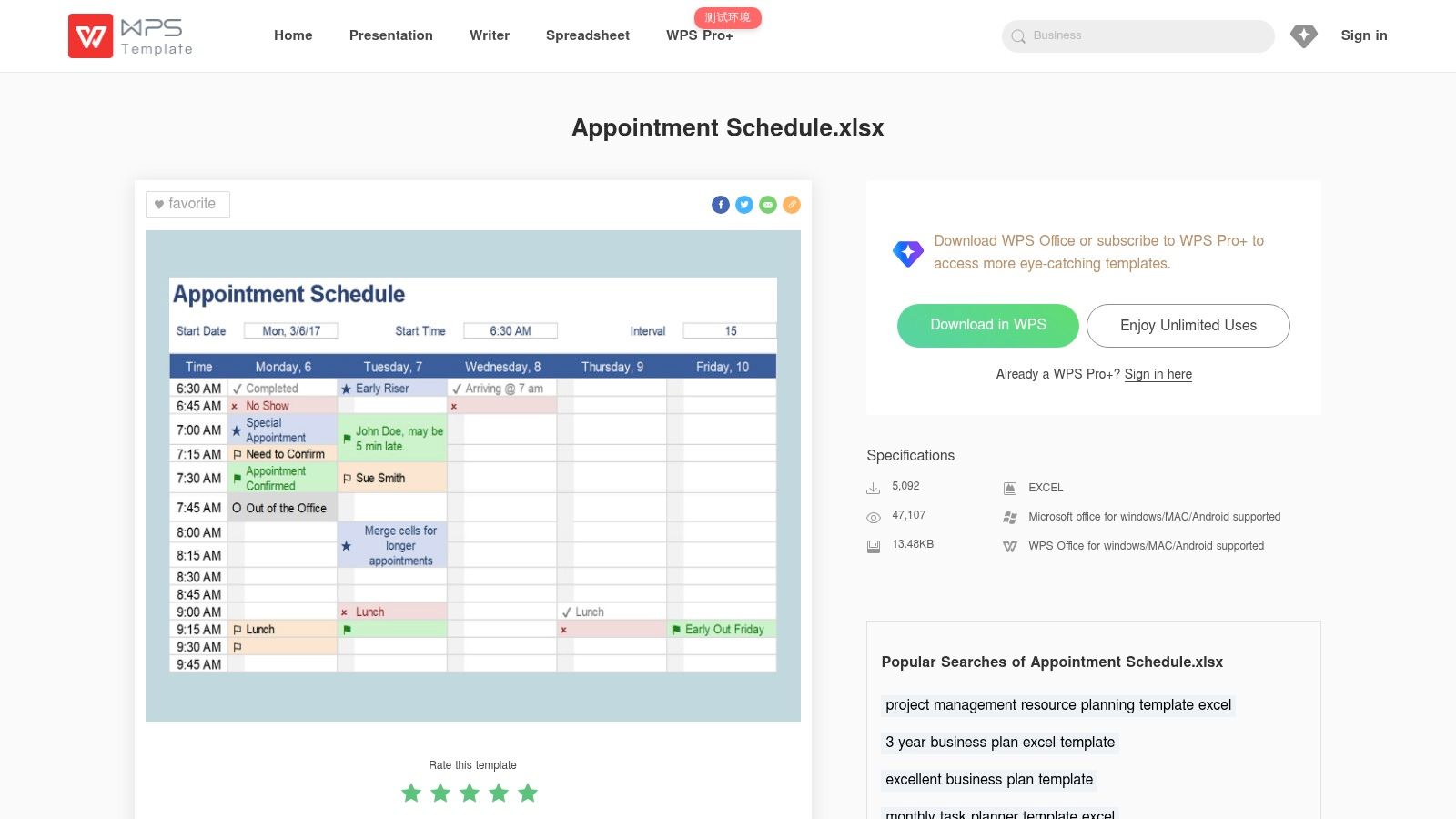
WPS Office's Appointment Schedule template takes a catalog approach. It offers appointment-focused XLSX layouts, weekly and shift variants, and several visual styles that can be opened in Excel, Google Sheets, or WPS Office.
That variety is valuable when the first problem is visual fit. A solo advisor may want a compact weekly view, while a small consulting team may need separate areas for different consultants or work blocks. WPS makes it easy to test alternatives before investing time in a custom workbook.
Check the file before standardizing it
The trade-off is uneven catalog quality. Some resources may require a WPS Pro subscription or login, and the difference between free and premium templates can affect whether the file is suitable for a team standard.
Before using a WPS file in client operations, inspect its formulas, protected cells, date behavior, and print settings. Then test a real scenario: book a discovery call, move it, mark it confirmed, and record the onboarding owner. If those actions require awkward workarounds, the visual design isn't saving administrative time.
WPS works best as a fast prototyping source. It's less compelling as the foundation for proposal follow-up because a polished grid still leaves reminders, ownership changes, and stale appointments to manual discipline.
6. Template.net Appointment Schedule in Excel and Google Sheets
Template.net's Appointment Schedule is aimed at customization. The typical structure includes date, time, client, and notes, while the wider library offers multiple styles and file formats, including Excel and Google Sheets.
That makes it useful when the schedule will be shared with a client or included in a branded onboarding pack. A boutique advisory firm can adjust colors, headings, and labels so the document looks like part of its existing client materials instead of an anonymous spreadsheet.
Branding doesn't replace process design
The basic ledger structure is appropriate for recording appointments, but consulting workflows need more context. A discovery call may require a qualification field and owner. An onboarding call may need kickoff status, access requirements, and a handoff note. A proposal follow-up needs a next action and decision stage, not only a date and client name.
Template.net's account and subscription requirements also deserve attention. The plan notes indicate that downloads can require an account or subscription, and the library mixes free and paid items. Confirm the access terms before building a team process around a particular file.
Choose this resource when presentation and editable formatting matter. Don't choose it because a client-facing workbook looks finished. The team still needs a reliable method for confirming meetings and communicating changes.
7. Someka Appointment Calendar and Time-Blocking Template in Excel
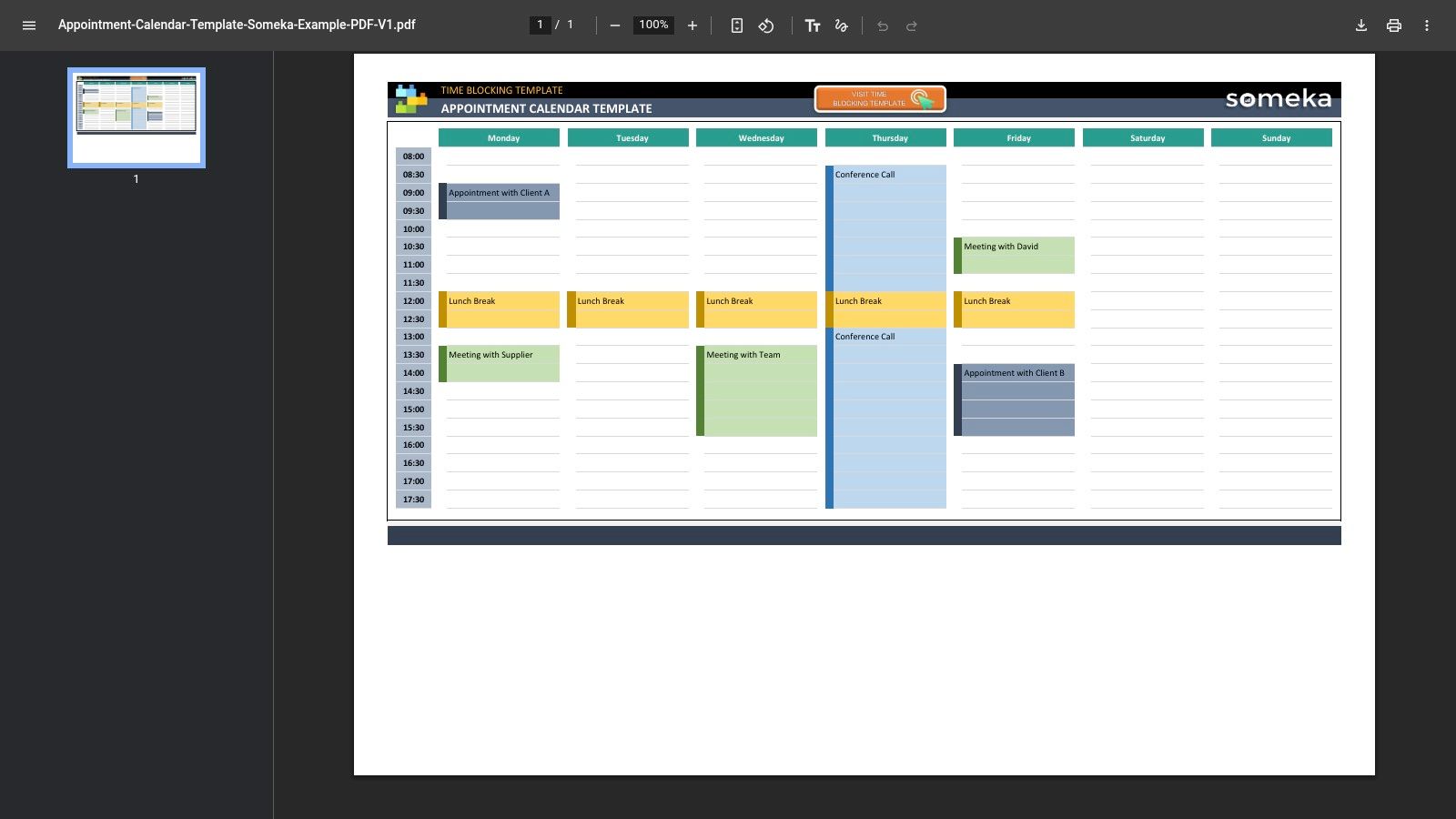
Someka's Appointment Calendar and Time-Blocking Template is designed for users who want more structure than an unprotected grid. It combines time-blocking, categories, color coding, and print-ready weekly layouts, with designated input areas and locked formula sections.
The guardrails are the important part. A consultant can enter information in the intended cells without accidentally overwriting timing formulas or the layout. That lowers the chance that a well-meaning edit breaks the workbook during a busy scheduling day.
Better control, with a licensing question
Categories help separate discovery calls, delivery sessions, internal work, and breaks. That makes the workbook more useful for a consultant who needs to protect delivery capacity while still seeing client-facing commitments. Documentation and examples also make it easier to hand the file to someone who didn't build it.
The cost is a paid product, and licensing rules matter for multi-user teams. A firm should confirm whether each person can edit the workbook under its chosen license and how the file will be stored and shared.
Someka is a stronger fit when consistency matters more than absolute simplicity. It can support an internal scheduling standard, but it still won't send appointment confirmations, follow up on a quiet proposal, or notify a delivery owner that a new client is ready for kickoff. Its controls reduce workbook errors. They don't remove workflow ownership.
8. Spreadsheet123 Weekly Schedule Template in Excel
Spreadsheet123's Weekly Schedule Template isn't appointment-specific, and that's both its weakness and its flexibility. The general weekly grid can be adapted by setting time increments, labeling columns by day or resource, and adding appointment fields.
This approach works when the consulting firm has a scheduling pattern that standard appointment templates don't understand. For example, the columns might represent consultants, meeting rooms, or service lines rather than just Monday through Friday. The same workbook can also be repurposed for room bookings or internal availability.
Build the missing status layer
The template is print- and Excel-friendly, but it needs adaptation before it can support a dependable appointment process. Add fields for client, meeting type, owner, confirmation status, cancellation reason, next step, and handoff notes. Use data validation for statuses so users don't create variations such as “Confirmed,” “confirmed,” and “Booked” that later become difficult to filter.
A lightweight status model might include:
- Requested: The prospect or client has asked for a time, but nobody has confirmed it.
- Confirmed: The attendee and consultant have agreed on the appointment.
- Completed: The meeting happened and the next action is recorded.
- Reschedule needed: The original time is no longer valid and requires follow-up.
That structure turns a blank weekly planner into a basic operating record. It also increases maintenance work. Spreadsheet123 is a good base for a custom workbook, but it's not the right choice if the team wants to avoid designing its own appointment logic.
9. Koalendar Free Appointment Calendar Template
Koalendar's Free Appointment Calendar Template is a practical bridge between an offline schedule and online booking. The download includes Excel, PDF, and Word versions, with a weekly time-slot calendar and an appointment log area that non-Excel users can understand quickly.
That bridge matters for a consultant who still receives bookings by email but expects to move toward self-service scheduling. The workbook can document current appointments while the firm tests how much information it needs before a call. It's also useful when a printable version must remain available for clinics, salons, or small advisory practices that work partly offline.
Know when the spreadsheet has done its job
The Excel automation is minimal. Most of the value comes from the formatted grid, not from formulas that coordinate availability or trigger communications. That's acceptable during a transition, but it becomes a problem when several people book appointments through different channels.
A consultant moving from discovery to proposal follow-up should record the next action outside the calendar or add a dedicated field. Otherwise, the appointment remains a historical entry rather than a step in the sales process. Once clients need to choose available times themselves, or the team can't depend on manual updates, appointment automation becomes more useful than extending the workbook.
Koalendar is strongest when you need a readable temporary tool. It shouldn't be mistaken for a full online scheduling workflow.
10. Sourcetable Appointment Schedule Excel Template
Sourcetable's Appointment Schedule Excel Template is a concise starter workbook for tracking slots, names, notes, and status. Its clean structure makes it easy to rebrand or extend with formulas and lookups, which is useful for a technically confident consultant who wants to build a customized process.
The workbook can serve as a foundation for adding fields that matter in advisory work. Include lead source, qualification outcome, assigned consultant, confirmation method, proposal stage, and next action. A lookup can then bring client or company details into the appointment view without forcing the scheduler to retype them.
A blank foundation still needs an owner
Sourcetable is less established than Vertex42 or Microsoft in this comparison, and its advanced scheduling features are limited. Treat it as a starter file, not a validated operating system. Test the workbook with a real sequence: a prospect requests a discovery call, the meeting is confirmed, the call is completed, a proposal is sent, and a follow-up is assigned.
If each step requires a separate manual note or an email outside the workbook, the file is recording activity rather than managing it. That may be enough for a solo operator with a low appointment volume. It becomes fragile when multiple consultants share responsibility for follow-up or onboarding.
The best use is controlled extension. Add only fields that drive a decision or handoff, and keep the schedule readable. Once the workbook starts requiring scripts, multiple linked tabs, or constant reconciliation, the maintenance burden is telling you to evaluate a connected system.
Top 10 Excel Appointment Schedule Templates, Comparison
| Template | Core features ✨ | Quality / UX ★ | Price / Value 💰 | Best for 👥 | Why choose / Standout 🏆 |
|---|---|---|---|---|---|
| Vertex42 – Appointment Schedule Template (Excel) | Weekly grid, configurable intervals, status legend, print views | ★★★★, stable & customizable; manual entry | 💰 Free, high prototyping value | 👥 Small teams, Excel users | 🏆 Widely trusted Excel standard; print-optimized |
| Vertex42 – Appointment Calendar Templates (Excel) | Single-page weekly or two-page week book, print-optimized, Excel/Sheets | ★★★★, fast deploy for printed workflows | 💰 Free | 👥 Front-desk, printed binder workflows | 🏆 Optimized for printing; very low learning curve |
| Microsoft – Excel Schedule Templates Gallery | Daily/weekly planners, theming, auto-updating formulas, OneDrive share | ★★★★, first-party reliability, M365 integration | 💰 Free with Excel / Microsoft 365 | 👥 Orgs standardized on Microsoft 365 | 🏆 Seamless OneDrive sharing & ongoing support |
| Smartsheet – Weekly Appointment Calendar (Excel/PDF) | Time-slot grids, daily/weekly variants, printable PDF/Excel | ★★★, quick downloads; static files unless on Smartsheet | 💰 Free download; product upsells exist | 👥 Teams planning to move to collaborative Smartsheet | 🏆 Curated library + ready-to-print options |
| WPS Office – Appointment Schedule (Excel) | .xlsx layouts, weekly/shift variants, cross-app compatibility | ★★★, large catalog; mixed template quality | 💰 Freemium, some pro templates require subscription | 👥 Users needing varied visual styles across apps | 🏆 Broad visual choices compatible with Excel/Sheets |
| Template.net – Appointment Schedule (Excel/Google Sheets) | XLSX/Google formats, ledger fields, branding/customization | ★★★, fast styling; account/paywall for many items | 💰 Freemium / subscription often required | 👥 Teams needing branded client handoffs | 🏆 Many stylistic templates for client-facing materials |
| Someka – Appointment Calendar / Time-Blocking (Excel) | Time-blocking, color categories, locked formulas, docs/support | ★★★★, polished, professional finish | 💰 Paid, license fees for multi-user | 👥 Boutique consultancies seeking structure & guardrails | 🏆 Professional design + locked integrity and support |
| Spreadsheet123 – Weekly Schedule Template (Excel) | Weekly grid with hour/minute increments, print-friendly variants | ★★★, adaptable library; not appointment-specific out-of-box | 💰 Mostly free | 👥 Users who repurpose templates for varied needs | 🏆 Large, established template library for quick refit |
| Koalendar – Free Appointment Calendar (Excel/PDF/Word) | Weekly time-slot calendar, appointment log, printable formats | ★★★, simple, readable; minimal automation | 💰 Free | 👥 Clinics, salons, consultancies transitioning online | 🏆 Multi-format printable bridge to online scheduling |
| Sourcetable – Appointment Schedule Excel Template | Weekly calendar layout, client fields, easy-to-extend base | ★★★, clean starter; easy to rebrand & extend | 💰 Free | 👥 Teams building formulas/integrations (VLOOKUP/XLOOKUP) | 🏆 Lightweight base ideal for custom extensions |
Choose the Grid or Upgrade the Workflow
The right choice depends less on the template's appearance than on the work surrounding each appointment. A printable Excel grid is appropriate for a low-volume, single-owner schedule where one person can see every booking, update every change, and communicate directly with attendees. Vertex42's appointment layouts, Koalendar's transitional file, or a simple Microsoft schedule can handle that use case without unnecessary complexity.
Choose a more structured workbook when categories, statuses, and handoffs matter. Someka offers stronger input guardrails, while Microsoft and Spreadsheet123 provide useful foundations for a custom internal design. Add fields for the meeting type, consultant, confirmation status, owner, next step, and handoff notes. Keep the schedule as a coordination view, not a dumping ground for every client detail.
A calendar-workforce survey reported that 78% of calendar-dependent workers felt very to extremely productive while using calendars to manage their workflow. The finding, reported by CalendarLabs, supports a practical conclusion: calendars help when they give people a shared view of commitments. They don't solve the surrounding process by themselves.
For consulting firms, the most important test is the complete journey. A discovery call needs qualification context and ownership. A completed call needs a defined next action. A proposal follow-up needs a reminder when nobody responds. A won engagement needs a handoff that tells the delivery owner what was promised and when kickoff should occur.
The administrative burden also grows beyond the visible appointment. A 2025 scheduling research summary reported that professionals spend 3.0 hours per week, or about 36 minutes per workday, managing meetings, including finding times, coordinating schedules, and rescheduling. The same source reported an average of 4.7 meetings each week that are canceled or rescheduled. Those figures explain why a spreadsheet can feel efficient at first and then become a recurring coordination task.
Move beyond Excel when clients need self-service booking, when several people manage availability, or when reminders cannot depend on someone remembering to send them. The need is especially clear when a canceled call must trigger a follow-up, a confirmed meeting must create preparation work, or a new client must move from sales into delivery without a manual copy-and-paste handoff.
Starward Navigators is relevant at that point because it connects appointment confirmations and reminders with lead capture, proposal follow-up, client onboarding, and referral workflows. It's designed for small consulting and advisory firms that need a connected operating process rather than a generic spreadsheet replacement. The decision is simple: keep the grid while it gives you control, and upgrade when the people around the grid become the source of missed steps.
Starward Navigators provides appointment confirmations and reminders alongside lead capture, proposal tracking, client onboarding handoffs, and referral workflows for consulting and advisory firms. If your Excel schedule is becoming a manual coordination system, visit Starward Navigators to see how a connected workflow could replace those handoffs.