The best form isn't the shortest form. It's the form that makes the next step obvious for both the prospect and your team. A discovery request, a guide download, an event registration, a referral, a proposal request, and a diagnostic assessment all signal different levels of intent, so forcing them through one universal contact form creates avoidable friction or collects the wrong information.
For consulting and advisory firms, a useful lead generation form template balances four decisions: how much qualification to request, where to route the submission, how quickly to follow up, and what context the next person needs. The seven templates below connect each acquisition goal to its place in the funnel. They also show where a shorter form wins, where deeper qualification is justified, and how Starward Navigators can connect submissions to pipelines, reminders, proposals, handoffs, and referral workflows.
Table of Contents
- 1. Multi-Stage Discovery Form Template
- 2. Lightweight Appointment Booking Form Template
- 3. Content Gated Lead Magnet Form Template
- 4. Event and Webinar Registration Form Template
- 5. Referral Partner Intake Form Template
- 6. Proposal Request and Engagement Scope Form Template
- 7. Strategic Assessment and Diagnostic Form Template
- Lead Generation Form Templates, 7-Way Comparison
- Turn Form Submissions Into Managed Opportunities
1. Multi-Stage Discovery Form Template
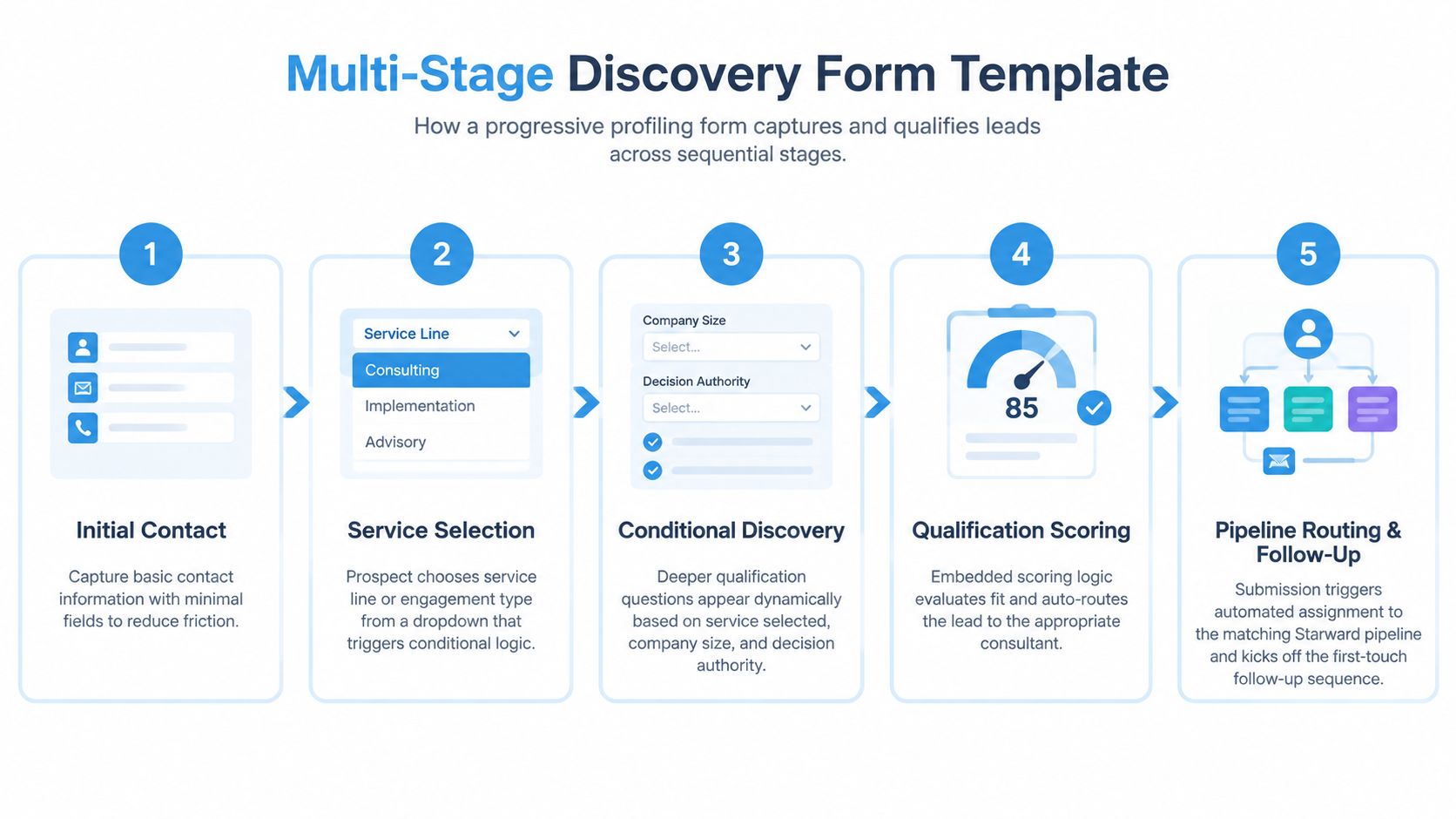
A multi-stage discovery form works well when a consulting firm needs meaningful qualification but doesn't want to present a long wall of questions. The first screen should ask for contact details and a small number of high-value qualifiers. Later screens can reveal questions about service type, company context, urgency, or decision authority based on earlier answers.
For example, a fractional CFO firm could use an industry selector to route a prospect toward the right specialist. An advisory firm might ask whether the visitor wants a diagnostic, ongoing advisory support, or a defined project before showing timeline questions. A business development consultant could use decision-making authority to distinguish a buyer from someone gathering information for an internal stakeholder.
Branching should clarify the path
Start with two or three critical qualifying questions, then reveal optional fields only when the answer makes them relevant. Conditional logic improves relevance when it removes questions that don't apply. It creates confusion when prospects encounter unexplained branches, contradictory labels, or internal terms such as “engagement archetype” and “pipeline disposition.”
Use plain, benefit-focused language. “What would you like help with?” is easier to answer than a list of service categories written for your internal operations team.
Practical rule: Every answer should either change the routing decision, personalize the first conversation, or determine the next follow-up. If it does none of those things, remove it.
Map the service selector directly to a prebuilt pipeline, assign an owner, and trigger an immediate acknowledgment. Speed matters after submission. A 2026 benchmark across 2,241 companies reported a median B2B response time of 42 to 47 hours, while only about 7% of teams replied within five minutes. Leads contacted within five minutes converted at roughly 21%, compared with 2.3% for next-day replies, according to the speed-to-lead benchmark.
Use the completed form as the starting point for a consistent client onboarding workflow, not as an isolated inbox notification. Test the branching with your sales team, confirm that every answer maps to a real pipeline stage, and make sure the first-touch sequence reflects the prospect's stated need.
2. Lightweight Appointment Booking Form Template
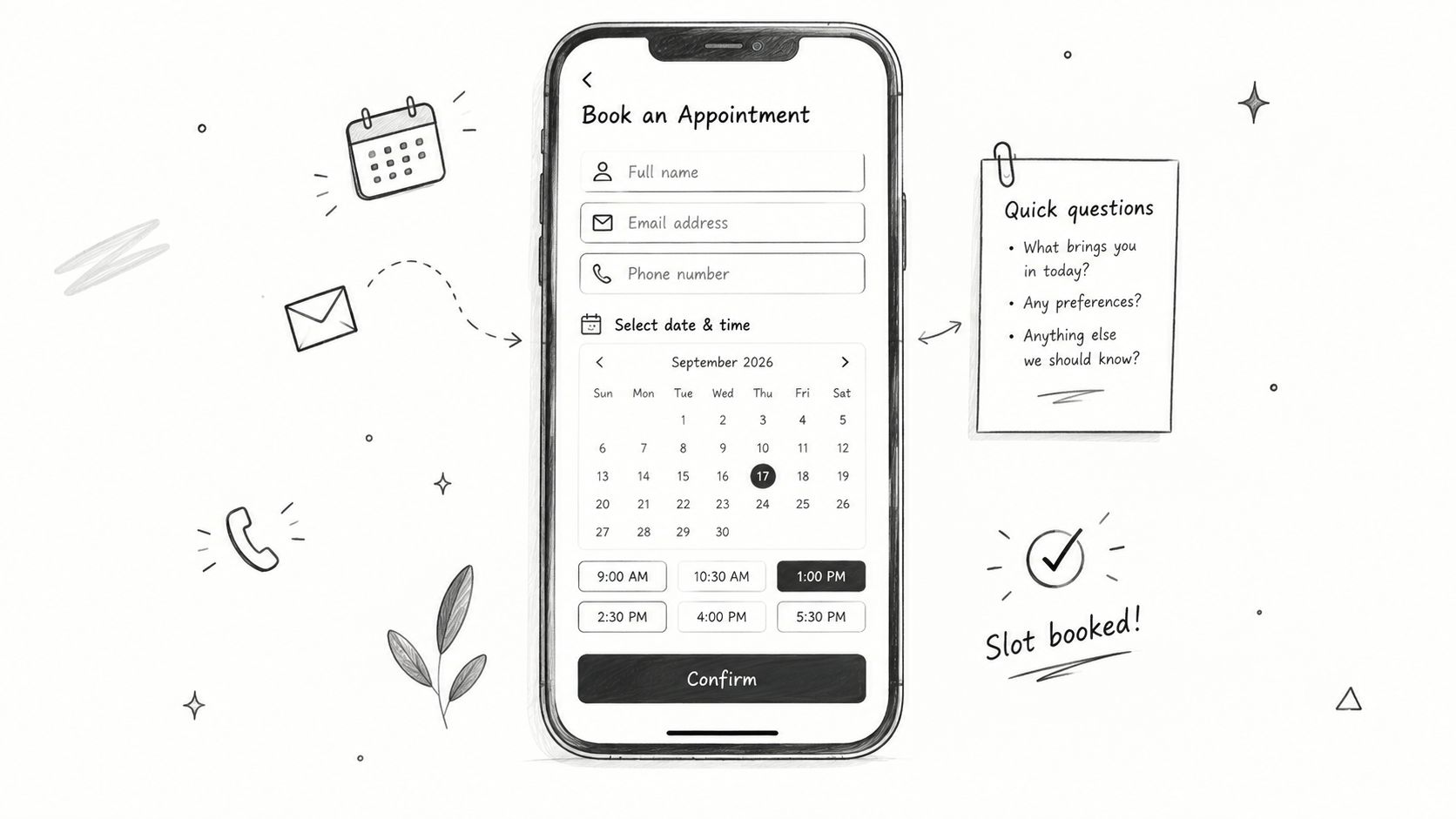
Use a lightweight booking form when the desired conversion is a conversation, not a detailed qualification record. A solo fractional executive offering an initial consultation may need only a name, work email, and one short question before sending the prospect to a calendar. Adding extensive scope questions before showing availability can turn a high-intent action into administrative work.
The trade-off is clear. A short booking flow maximizes momentum, but the consultant receives less context before the call. That's acceptable when the service is easy to explain, the calendar is controlled, and the first conversation is designed to qualify fit. It's less suitable when every call requires substantial preparation or when capacity is tightly constrained.
Put scheduling close to submission
Send qualified visitors directly into appointment selection. A pre-form question can filter obvious mismatches, while one post-booking question can capture useful context without delaying the booking decision. Ask something such as, “What's the primary challenge you'd like to discuss?” and place the answer on the appointment record.
Set booking availability conservatively enough to allow preparation. Keep the mobile experience simple, with a single-column layout, clear labels, and a calendar that doesn't require repeated navigation. Test availability against real team calendars so simultaneous bookings, time-zone issues, and unavailable slots don't undermine trust.
A confirmation email should state the appointment details, expected preparation, and next step. Reminder automation belongs in the same workflow. The form's job isn't finished when someone clicks the booking button. It should create the contact, associate the appointment, notify the owner, and start the reminder sequence.
The fastest booking flow can still feel professional when the confirmation explains exactly what happens next.
For firms using LinkedIn-native capture, the platform-native approach can reduce friction because user information is pre-populated. Recent benchmarking notes report about 13% conversion for LinkedIn Lead Gen Forms, compared with 2.9% for standard landing pages, and says forms with 3 to 5 fields convert 17% better than forms with 6 or more fields, as reported by the 2026 lead-generation statistics compilation. Treat those figures as directional benchmarks, not a substitute for testing your own audience and offer.
3. Content Gated Lead Magnet Form Template
A gated lead magnet form exchanges contact information for a guide, checklist, template, or recording. It belongs earlier in the funnel than a consultation form, so it should capture interest and permission to follow up, not force a sales qualification interview.
A fractional CFO firm might offer a financial planning guide for scaling companies. A business development consultant could provide a sales pipeline template for B2B services. An advisory firm might gate a recording from an industry roundtable. Each asset should create a useful interest signal that informs the next email, not an excuse to ask every question your CRM supports.
Match friction to value and intent
For most early-stage resources, require only essential fields such as email, first name, and company. A role field can be optional when it helps segmentation. If the asset has lower perceived value, asking for extensive firmographic data is unlikely to feel proportionate.
The field-count trade-off is visible in benchmark data. One compilation reported conversion falling from 23.1% with three fields to 6.9% with ten or more fields, reinforcing the friction created by additional questions. The same source reported a B2B average of 5.13% across 13 industries and more than 110 million tracked sessions, as summarized in the form conversion benchmark reference.
Use progressive profiling across repeat downloads. Tag contacts by asset type, send the resource immediately, and enroll the contact in a nurture path based on the topic they chose. An optional question such as whether the company is actively seeking advisory support can separate education-focused subscribers from people closer to a buying conversation.
Don't treat delivery as the final step. Connect the form to email lead generation workflows that deliver the asset, confirm consent, and schedule relevant follow-up. A guide about cash-flow planning should lead to practical financial planning content, while a sales pipeline template should lead toward a diagnostic or discovery conversation.
4. Event and Webinar Registration Form Template
An event form has two jobs, registration and useful segmentation. It shouldn't feel like a sales application, but the information collected should help the speaker prepare and give the follow-up team a reason to continue the conversation.
A fractional CFO firm hosting a financial planning webinar could ask attendees which planning issue they want addressed. A business development consultant running a pipeline workshop might ask about the participant's current challenge. An advisory firm hosting an industry roundtable could collect role, interest area, and accessibility needs. Those answers can improve the live experience and give the follow-up sequence genuine context.
Separate attendance from buying intent
Ask for the information required to deliver the event, then add only questions that affect segmentation or follow-up. Conditional logic can show more context questions to executives while keeping the registration path lighter for general attendees. Avoid asking for budget or detailed scope unless the event is explicitly positioned as an assessment or consultation.
Automate the operational details:
- Confirm registration immediately: Send the event details, calendar option, access instructions, and expectations after submission.
- Schedule reminders: Use reminders one day and 30 minutes before the event, with the correct time zone and joining link.
- Track engagement: Separate live attendees, partial viewers, full recording viewers, and registrants who didn't attend.
- Personalize follow-up: Send the recording and a relevant next step within 24 hours, based on attendance and stated interest.
Use a post-event survey as a second qualification moment. Someone who reports a specific operational challenge can enter a different sequence from someone who wants more educational content. The form and the event workflow should preserve those answers so the follow-up doesn't restart the conversation from zero.
5. Referral Partner Intake Form Template
A referral form serves a relationship, not just a lead record. Professional partners, former clients, board members, and association contacts need a respectful way to share context without feeling that they're completing an internal administrative request.
The form should explain why each question helps the referred person. Ask who the prospect is, what prompted the referral, which service may be relevant, and whether the referrer has permission for you to mention their name. That last detail protects the relationship and prevents an awkward first contact.
Preserve attribution and trust
A useful referral flow should make the referrer visible from the first record onward. Capture the partner's name, relationship, referral source, and any relevant context. Keep the form mobile-friendly and make it easy to open from a QR code after an event or meeting.
The plan should include a clear appreciation workflow. Send the referrer a thank-you acknowledgment, notify the internal owner, and record what happens next. If the prospect becomes an opportunity, the referrer should not have to chase your team for an update.
Keep the intake proportionate. The provided plan recommends six to eight fields maximum for respecting the referrer's time. Those fields should earn their place by improving the first conversation or enabling attribution.
A referral workflow earns future referrals by showing the referrer that their introduction was handled carefully.
Build reporting around outcomes, not just submission volume. Track which relationships produce relevant conversations, which service areas receive referrals, and whether the team follows up consistently. A structured referral tracking process can connect partner stages, thank-you messages, and future nurture without relying on scattered email threads.
For a past client referring a company to a fractional COO, the form might capture the operational issue and permission to mention the introduction. The assigned consultant can then open with relevant context instead of a generic “How can we help?” message.
6. Proposal Request and Engagement Scope Form Template
A proposal request belongs later in the journey than a general contact form. The prospect has already expressed interest in a defined engagement, so the form can ask for scope, timeline, stakeholders, authority, and commercial context. The purpose isn't to make the prospect complete your entire discovery process. It's to give your team enough structure to decide whether a proposal is appropriate and what preparation it requires.
A fractional CRO or COO service may need the engagement type, desired start timing, and decision process. An advisory firm responding to an RFP may need the project scope, stakeholders, deliverables, and procurement requirements. A consulting firm may need to understand whether the person submitting can authorize the engagement or is coordinating for someone else.
Collect only proposal-grade information
Use cascading fields. Ask the engagement type first, then reveal the scope questions that apply to that service. Budget and timeline questions can remain hidden until the visitor selects a formal proposal or retainer request. This keeps the form relevant without sacrificing qualification depth.
Map form answers to proposal templates and opportunity fields. The service selection should determine the pipeline, the decision timeline should determine the follow-up cadence, and stakeholder details should populate additional contacts where appropriate. A proposal record should move from discovery complete to proposal preparation, then to a defined decision stage with an owner and next action.
Avoid putting this form on every page. A detailed proposal request on a general services page can discourage visitors who only want to ask a preliminary question. Place it behind a clear call to action such as “Request a formal scope review” or “Start a proposal conversation.”
The benchmark evidence supports normalization around a five-field comparison model. One 2026 B2B benchmark reported a median conversion rate of 13.2% and a top-quartile rate of 21.8% after normalizing forms to five fields, while noting that 5 to 7 fields clustered around the benchmark and additional fields reduced performance. See the B2B form conversion benchmark for the reported methodology.
7. Strategic Assessment and Diagnostic Form Template
A diagnostic form earns permission to ask deeper questions by promising useful interpretation in return. Frame it as a financial health assessment, sales capability diagnostic, or organizational readiness assessment, not as a generic lead form. The language changes the perceived exchange from “give us your details” to “get a structured view of your situation.”
A fractional CFO firm could assess planning and reporting gaps. A business development consultant could score pipeline maturity. An advisory firm could evaluate readiness for a strategic initiative. In each case, the result must connect clearly to services the firm can deliver.
Make the result specific enough to matter
Use branching so respondents skip irrelevant sections based on company type or current situation. Build scoring around actionable gaps, not neutral trivia. If every respondent receives the same result, the assessment feels like a disguised contact form and loses credibility.
Deliver the result immediately after submission, ideally as a readable results page or downloadable report. Explain what the score means, identify the most relevant gaps, and offer a clear next action such as a strategic review. Route high-intent or high-fit assessments to a faster human follow-up cadence, while lower-fit contacts can enter an educational sequence.
The form also needs operational safeguards. Test the scoring with your sales team, confirm that recommendations match real service capabilities, and make sure the first discovery conversation references the submitted findings. A consultant who ignores the assessment results forces the prospect to repeat themselves and wastes the value created by the form.
Use the image as a visual explanation of the experience. Later, a short walkthrough can help the team align the assessment with its intended handoff.
For field strategy, don't apply “keep it short” mechanically. One recent benchmark reported conversion rates of 18.2% for one-field forms, 13.0% for two fields, 11.5% for three, 9.9% for four, and 8.1% for five, with performance falling to 4.2% for nine or more fields. The same source reported a cross-industry median of 17.3% among form interactors, not all page visitors, in its lead-generation statistics research. A diagnostic can justify more questions when the result is useful and the follow-up uses the answers.
Lead Generation Form Templates, 7-Way Comparison
| Template | 🔄 Implementation Complexity | ⚡ Resources & Speed | 📊 Expected Outcomes | 💡 Ideal Use Cases | ⭐ Key Advantages |
|---|---|---|---|---|---|
| Multi-Stage Discovery Form Template | High, multi-stage conditional logic and routing; needs careful testing | Moderate–High development and maintenance; moderate completion time | Better-fit leads, improved routing and qualification; moderate completion rates | Complex B2B consulting, multi-service firms, early qualification before discovery | Targets high-quality prospects; reduces discovery time; scalable routing |
| Lightweight Appointment Booking Form Template | Low, single-page with calendar integration | Low dev effort; requires real-time calendar sync; fastest conversion path | High booking/completion rate; low upfront qualification | Discovery calls, solo consultants, webinar signups | Fast conversions; reduces scheduling friction and no-shows |
| Content Gated Lead Magnet Form Template | Low, minimal fields, optional collapsible questions | Low effort; quick asset delivery; high completion speed | High volume of awareness-stage leads; low per-lead qualification | Top-of-funnel content offers, list building, nurture campaigns | Excellent completion rates; feeds segmented nurture workflows |
| Event / Webinar Registration Form Template | Low–Medium, registration + session preferences and logistics | Moderate effort for calendar invites and reminders; quick registration | Captures warm, engaged attendees; useful segmentation for follow-up | Webinars, workshops, multi-track events and in-person sessions | Drives engaged leads; enables session-based follow-up and segmentation |
| Referral Partner Intake Form Template | Medium, dual referrer/referee sections and attribution tracking | Moderate effort; tracking and thank-you workflows; mobile-friendly | Higher-quality referred leads with context; improved partner engagement | Referral programs, partner networks, advisor referrals | Formalizes referrals; preserves context and boosts attribution accuracy |
| Proposal Request / Engagement Scope Form Template | Medium–High, structured scope, budget, timeline, file uploads | Moderate effort to map fields to proposal templates; slower than booking | Produces proposal-ready leads; reduces rework and clarifies scope | Prospects explicitly requesting proposals or formal engagements | Streamlines proposal generation and improves forecasting accuracy |
| Strategic Assessment / Diagnostic Form Template | High, long questionnaire, scoring logic, branching and reports | High development and maintenance; longer completion time | Deep qualification and perceived value; strong conversion when followed by review | Insight-led selling, diagnostic-driven advisory and fractional services | Generates rich, defensible insights; primes high-value discovery conversations |
Turn Form Submissions Into Managed Opportunities
Choose the template according to the next action, not according to what looks best in a form builder. Use the lightweight booking form when the prospect is ready for an immediate conversation. Use the gated lead magnet form for early-stage interest that needs nurture. Event and referral forms support relationship-led acquisition, while discovery and diagnostic forms support deeper qualification. Reserve the proposal form for prospects with enough scope and intent to justify proposal preparation.
The strongest implementation starts with a field audit. For every question, identify the person who uses the answer, the routing decision it changes, or the follow-up it personalizes. If nobody can name an operational use, remove the field. The benchmark evidence consistently points toward a friction trade-off, although the right length depends on intent, perceived value, and the cost of a poor-fit lead.
Then connect the form to the operating process. Define the pipeline, assign the owner, preserve the original answers, trigger the right acknowledgment, and create a clear next step. A high-intent consultation request should notify the responsible person quickly and offer scheduling. A content download should deliver the asset and enter the correct nurture path. A referral should acknowledge the partner and retain attribution. A proposal request should create accountability between discovery, proposal delivery, and decision.
Mobile testing, privacy notes, validation, duplicate handling, and CRM routing deserve the same attention as layout and copy. Current guidance emphasizes that forms need to work end to end, including submission flow, confirmation, routing, and follow-up, rather than serving as attractive but disconnected design assets. That's particularly important for small consulting firms, where one missed handoff can leave an opportunity unattended.
Starward Navigators can connect these capture patterns to consulting pipelines, appointment confirmations and reminders, proposal tracking, client handoffs, and referral workflows. Its prebuilt operating system is designed to manage acquisition from first contact through repeat business, so the form becomes part of a managed process instead of another standalone tool.
Starward Navigators provides website-connected forms, prebuilt consulting pipelines, automated follow-up, appointment reminders, proposal tracking, client handoffs, and referral workflows. Visit Starward Navigators to connect your lead generation forms to the operating system behind the next step.