A former client texts that they mentioned your fractional CFO work to a finance director. That director forwards the note to the CEO. Weeks later someone lands on your site, picks "referral" from a source list, and leaves no name. You thank the wrong person, or nobody. A referral tracking form should stop that. A single dropdown is not an attribution system. Private introductions move through several people, often offline, and the person who claims the introduction is not always the one the prospect later confirms. Treat the form as the first record of that handoff, with a claimed source kept separate from a verified relationship.
Table of Contents
- Fields Every Referral Tracking Form Needs
- How to Build the Form Step by Step
- Capturing Attribution Without Losing the Source
- Handling Referrals From Several People or Offline Channels
- Consent and Privacy for Referred People
- Measuring the Referral Funnel and Connecting It to Pipelines
- Automating Referrer Nurture and Launching the Form
Fields Every Referral Tracking Form Needs
Every later rule depends on the same inputs. Credit has to land on a person, the lead has to be routable, and the original source has to survive later edits. 92% of consumers trust recommendations from friends and family, which is why referral origin deserves its own field instead of a generic "other" bucket, as summarized by Extole's referral statistics roundup. A shared "other" label hides which relationships produce clients.
| Field | Input type | Why it matters | Requirement |
|---|---|---|---|
| Referrer name or partner ID | Text or drop-down | Credits the person who made the introduction | Required |
| Referral source | Controlled list: partner, client, event, LinkedIn, website, other | Sets the original source for reporting | Required |
| Prospect name and email | Text and email | Lets the firm follow up | Required |
| Prospect company | Text | Matches duplicate submissions | Required |
| Service interest | Drop-down | Routes the lead to the right owner | Required |
| Free-text context | Long text | Records the referrer's own description | Optional |
| Consent checkbox | Checkbox | Records permission for future marketing | Optional |
| Referral ID | System generated | Links form, contact and opportunity records | Automatic |
| Submission timestamp | UTC date and time | Measures first-response speed | Automatic |
Referrer name or partner ID is required because an introduction is a person, not a channel. Referral source stays a controlled list so reports don't split "LinkedIn" from "linkedin." Prospect name, email, company, and service interest are the four values a team needs to route and reply. The context box stays optional so a referrer can write in their own words without blocking submit. Consent sits last and stays optional, because operational follow-up is not the same as permission to market.
Referral ID, the UTC timestamp, and hidden campaign parameters are automatic. Nobody should type them.
Cut rule: If a field doesn't change who receives the lead, when they hear back, or how the source is credited, remove it.
Say Maria Lopes, a former client with partner ID P-0412, submits the form. Source is client referral. Prospect is Daniel Ortiz at Ortiz Logistics, service interest fractional CFO. Context: "Mentioned your CFO service to Daniel after our board meeting." Consent is left unchecked. The system writes the referral ID and UTC timestamp, routes the lead to the fractional CFO owner, and creates a first follow-up task within the hour.
How to Build the Form Step by Step
A useful form records the path from introduction to submitted lead, not a name or a code alone. Benchmark data covering 739 online forms and 93 million form views found an average starter-to-completion rate of 51.7% and a view-to-completion rate of 34.6%, measured from January 2022 through April 2025, according to Octo Agency's form conversion statistics. Roughly half of people who start finish. About one in three viewers submits. Referred prospects often arrive with trust and little patience, so extra qualification questions belong on the discovery call.
Eight build steps
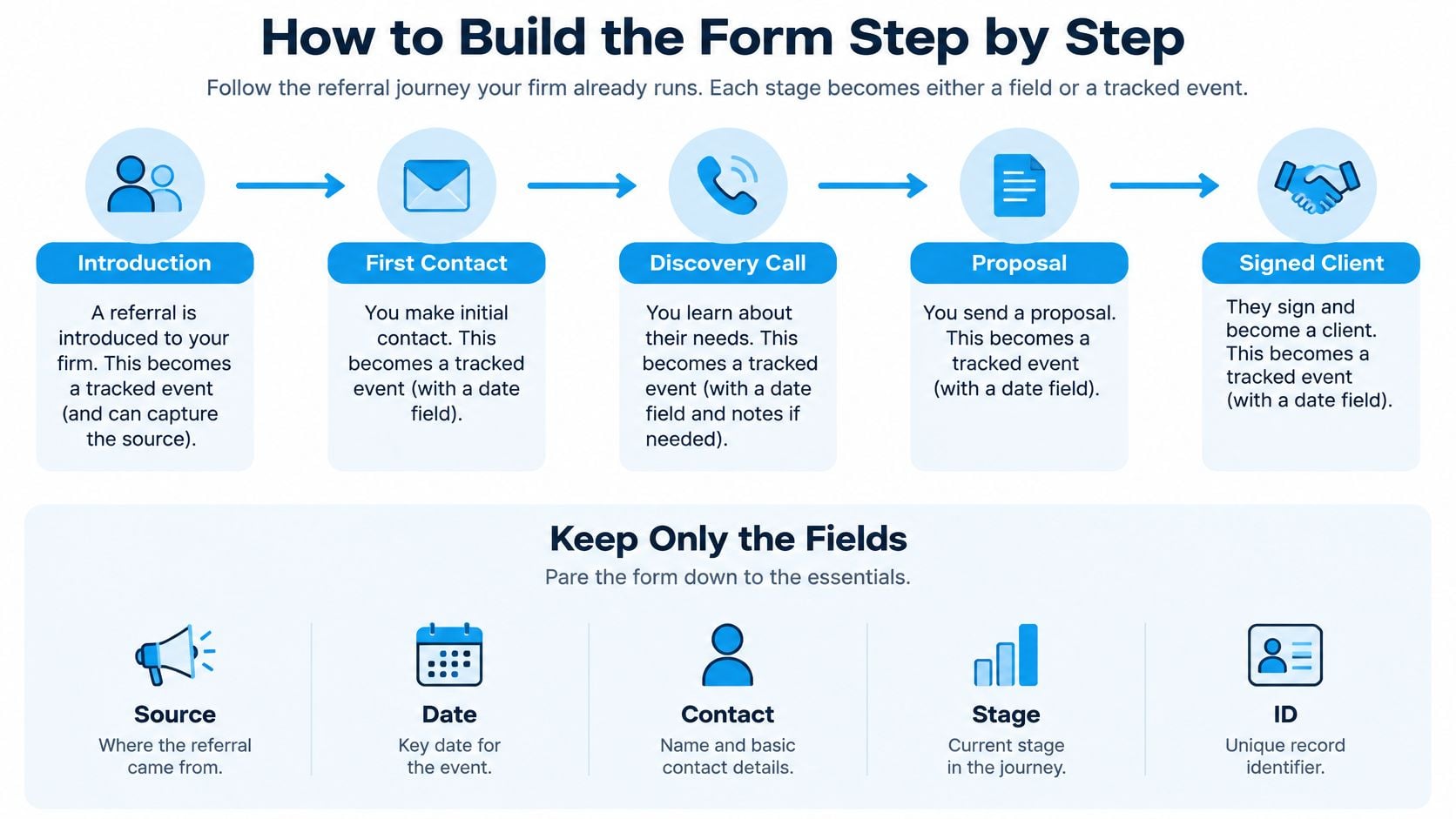
- Map the path you already run. Introduction, first contact, discovery call, proposal, signed client. Each stage becomes a field or a tracked event. The slip is inventing stages nobody uses.
- Keep only the fields from the table. Cut anything that doesn't change routing or credit. Budget, headcount, and "how did you hear about us" twice are the usual extras.
- Build the form on the site you already have. Forms and lead capture connect to the customer's current website, or can be built on the Sites tools included in every plan. Require prospect name, email, and service interest. Leave context and consent optional.
- Add the controlled source list and hidden fields. Those hidden fields receive the referral ID and campaign parameters. Don't ask the referrer to paste a campaign name.
- Turn on form view and form start. Without both events you can't tell weak traffic from a form people abandon. Pair that view with how you handle lead capture for email follow-up so a warm introduction isn't dumped into a cold list.
- Write a confirmation that states the next step and a rough wait. "We'll reply within one business day" beats "Thanks for submitting."
- Route the record to an owner and create the first task. An unassigned referral sits until someone notices the inbox.
- Test three submissions. One complete, one missing email, one submitted twice. The duplicate should flag, not create a second opportunity.
After a week, check that every source produced a submission you can see, duplicates are flagged, and you can report a first-response time.
Capturing Attribution Without Losing the Source
Browser referrers usually name a site and not a campaign. A missing referrer mixes a genuine direct visit with a link shared in chat or email, where the referrer is stripped. Umami's marketing attribution guide treats that fragility as the reason for a fixed capture order, not a hope that the browser will cooperate.
Capture order
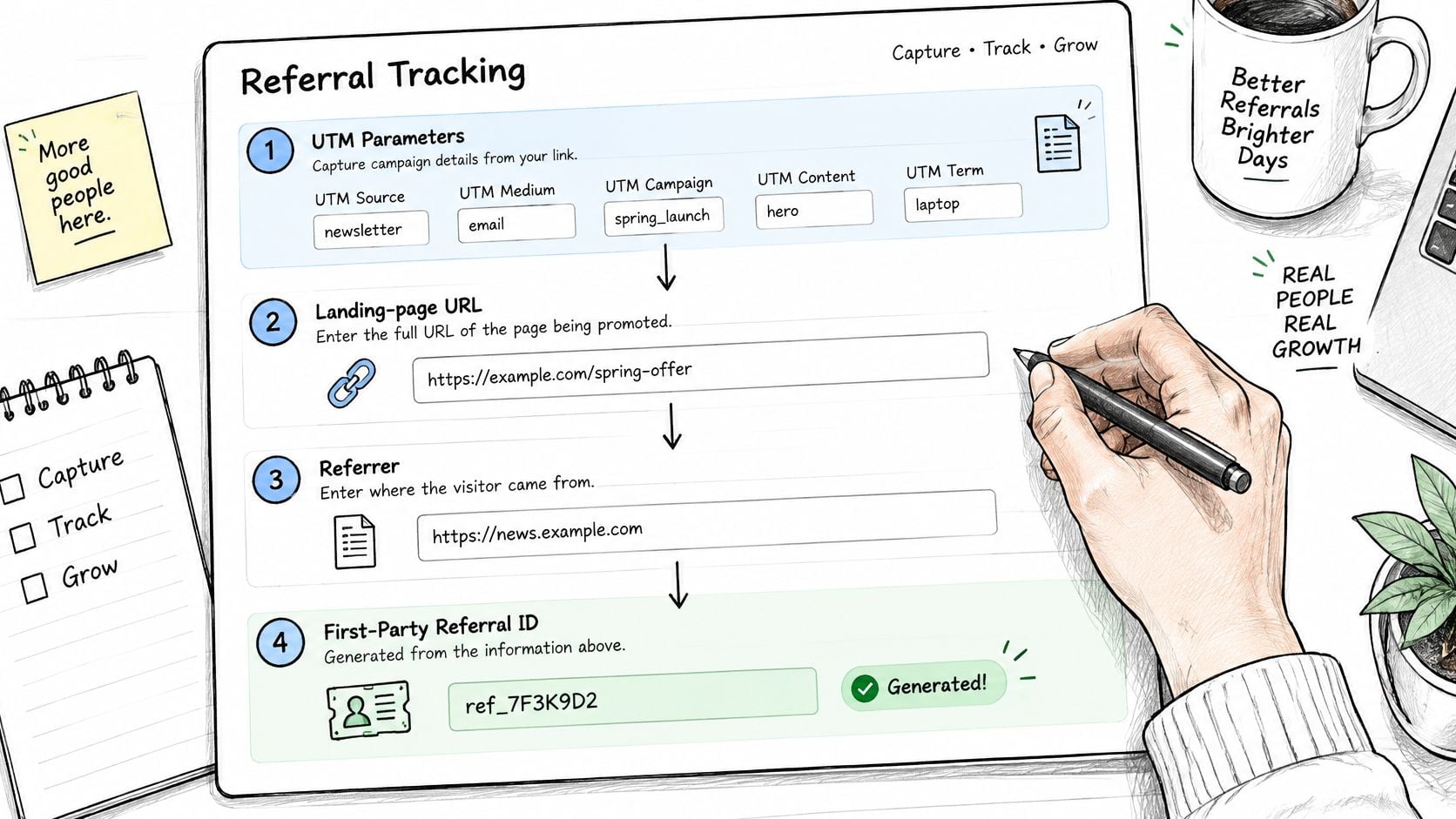
- Read UTM parameters first when the link carries them. Skipping this lets a later page overwrite the campaign.
- Store the landing-page URL and the referrer. You need both, because the referrer names a site and the URL may hold the partner or campaign.
- Generate a first-party referral ID. Cookies and sessions die. The ID is what you can still join to a record.
- Persist those values in a cookie or a server-side session before submit. If you wait until the thank-you page, a refresh can wipe them.
- Attach the ID to the contact, the opportunity, and the eventual client. Credit that stops at the form never reaches revenue.
Keep first-touch and last-touch side by side. Overwriting the original source is how a conference introduction becomes "website" after the prospect googles you. Build a taxonomy of source, medium, campaign, partner, and referral type, and normalize capitalization and aliases so "LinkedIn" and "linkedin" are one value.
For the person-level side of the same problem, referral attribution for advisors and consultants is a useful walkthrough of how a website and a partner portal should share one credit record.
Duplicate detection should use normalized email plus organization. Flag repeated submissions from one address, self-referrals, and forms finished in a few seconds. Attribution assigns credit. It does not prove the referral caused the sale.
Handling Referrals From Several People or Offline Channels
A former client privately mentions your fractional CFO service to a finance director. The director forwards the email to the CEO. Three months later, after a conference conversation, the CEO books a call. A link-based form records none of that accurately. UTM parameters don't name a person, and sharing often strips them.
Extole's guide to tracking referrals without cookies is clear that tagged links break on forwarded email, messaging apps, AI recommendations, phone calls, events, and partner introductions. Stronger setups combine first-party capture with a referral code, partner ID, landing page, referrer, consent, and a human answer to "who introduced you?"
Use a short intake form with Who introduced you? as open text. Then enrich the internal record with partner, first-touch, last-touch, and verification status. Claimed source is what the former client said. Verified relationship is what the partner confirmed. Those are different fields.
The Relationships & Referrals pipeline tracks referral partners from first relationship through active referral and ongoing nurture, which is where that verification belongs, not on the public form.
- Several contributors: A buying committee can include people who each arrived through a different introduction. Forcing one "referral source" deletes the others.
- Unattributed, not guessed: An AI recommendation or an untagged phone call stays unattributed until someone confirms it.
- False precision: Extra fields don't create better data. Poorly governed fields invent certainty you can't act on.
Capture only what you can act on. Let the internal record hold partner, campaign, verification, and what happened after the inquiry.
Preserve that split through inquiry, discovery, proposal, closed-won, and repeat work. Volume of introductions is not the same as referral quality.
Consent and Privacy for Referred People
A referral form often stores facts about someone who has not contacted you. That is a different problem from a person filling in their own details. You may hold the referrer's name, company, email, and phone, plus a comment about the prospect. The prospect can be identifiable before they have ever spoken to the firm.
Attribution setup guidance for AI search leads recommends assessing lawful basis and cookie consent in the EU and UK, recording the consent timestamp and policy version, and refusing to treat UTM values as a way to identify a person. First-party or server-side storage, hashed IP handling, and a stated purpose limit what you keep.
Restraint comes first. Don't turn an introduction into a marketing lead the moment the form arrives.
- Say why, in one sentence on the form. Explain what you collect about the referrer and what you do with it. Privacy policy clauses for web forms are a practical checklist when you draft that sentence and the policy behind it.
- Separate marketing consent from follow-up. The checkbox is optional. Thanking a referrer and routing a lead don't require a newsletter opt-in.
- Store the consent timestamp and the policy version. A checkbox with no date is hard to defend later.
- Limit free text. Tell staff not to paste health, family, or other sensitive detail into the context box.
- Restrict partner access. A referring partner sees the status of their own referrals, not the whole pipeline.
- Set retention and deletion. Delete unconverted introductions after a period you can name, such as the end of the following quarter if the prospect never replies.
Treat the submission as an introduction request until the prospect engages. Only then does the record become a full marketing lead.
That rule cuts unnecessary data and still lets you honor a warm introduction without surprising the person who was named.
Measuring the Referral Funnel and Connecting It to Pipelines
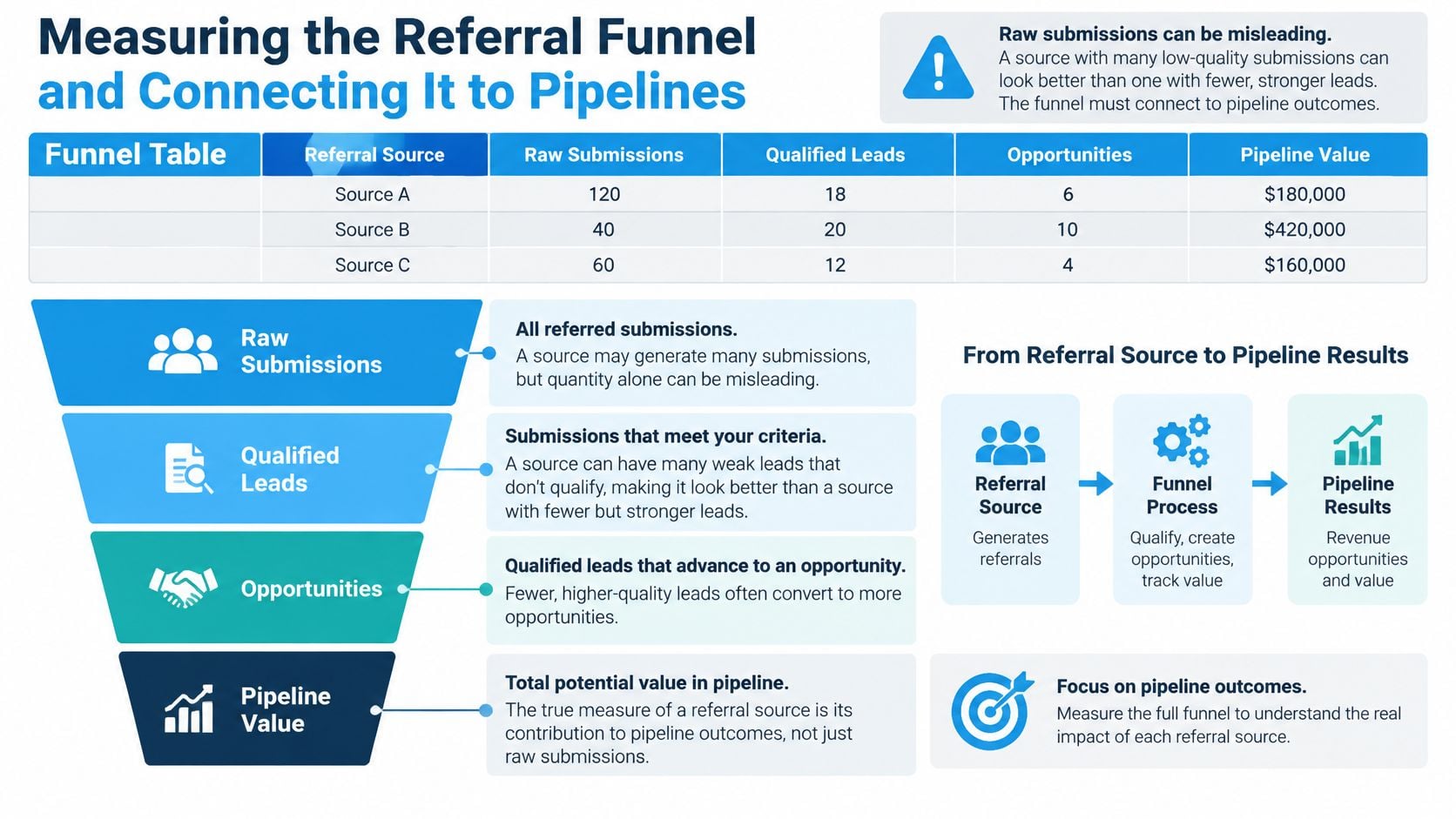
Raw submissions mislead. A partner who sends many weak leads can look busier than one who sends a few that close. Measure separate events, then connect them to pipeline stages.
| Stage | Event to record | Metric formula |
|---|---|---|
| Form view | Form page loaded | Total views |
| Form start | First field completed | Starts divided by views |
| Validation error | Field rejected | Errors divided by starts |
| Completion | Successful submission | Completions divided by starts, and by views |
| Qualified referral | Qualified in review | Qualified divided by completions |
| Meeting booked | Calendar event created | Meetings divided by qualified referrals |
| Proposal sent | Proposal stage reached | Proposals divided by meetings |
| Won engagement | Stage set to Won | Wins divided by proposals, and revenue per referral source |
Zuko's form benchmarking reports that 48% of users who begin interacting with forms fail to complete them, which implies an approximate 52% starter-to-completion rate overall. Inquiry forms do worse, at about 18.0% view-to-completion and 42.7% starter-to-completion. Review abandonment by field, error rate, and completion time every week. A spike after phone, email, or a qualification question is friction, not proof the traffic was poor.
A worked week
Say one source produces 120 views, 60 starts, and 27 completions. View-to-completion is 27 divided by 120, or 22.5%. Starter-to-completion is 27 divided by 60, or 45%. If 18 of those 27 qualify, 9 book meetings, 3 reach proposal, and 1 signs, you can compare that partner on revenue per source, not on form count.
A qualified referral moves the card into the referral pipeline. A booked meeting moves it into business development. A won engagement starts delivery. Keep the original source in an immutable field and put later corrections in a separate current-attribution field, with timestamps in UTC and a unique referral ID. The operating picture belongs in a CRM built for consulting firms, where source, stage, and owner sit on the same record.
Judge each source by revenue and by whether those clients stay, not by how many forms it sent.
Automating Referrer Nurture and Launching the Form
A form that nobody is thanked for will be used once. The referral nurture system tracks referral partners, thanks them automatically when a referral lands, and keeps them in a nurture rhythm. The Relationships & Referrals pipeline uses the stages New Relationship, Connected, Partner, Referral, Active Partner, and Nurture, so a thank-you is a stage action, not a favor someone remembers.
- Send a thank-you when the referral lands. Name the referrer and state the next step. Don't repeat prospect details they weren't told would be shared.
- Update on three moments only. Qualified, meeting booked, and won. Stay inside the consent and retention limits you already set. Referral sources who send new business receive ongoing nurture touches on a schedule, including between introductions.
- Create the owner's task and a reminder. If no first response is logged inside the window you agreed, the reminder fires. Silence is how warm leads go cold.
- Before launch, confirm three things. Fields match the field table, a test submission keeps the capture order, and the consent sentence is live on the page.
- Ask three partners who sent business last year to use the form on their next introduction. Then check whether those referrals arrive through it. A referral management workflow only helps if partners will open the link.
- Review at day thirty with the funnel rates: views, starts, completions, qualified referrals, meetings, proposals, and wins, plus revenue by source.
The form is the start of the referral record, not the end of it.
Starward Navigators builds client acquisition infrastructure for small consulting and advisory firms, including referral intake, partner stages, and follow-up from first introduction through signed work. If your introductions still live in inboxes and spreadsheets, map that path into one operating system instead of adding another source dropdown. Visit Starward Navigators to see how referral partners, pipelines, and nurture fit the way a boutique firm already sells.