
23% of companies never responded to an online inquiry in the 2011 Harvard Business Review study of 2,241 U.S. companies, as summarized by Vida's speed-to-lead overview. For an independent consultant, that's a useful way to rethink CRM software: not as a better address book, but as protection against inquiries that arrive while you're busy delivering the work you've already sold.
Table of Contents
- Why Independent Consultants Lose Revenue Without a CRM
- The CRM Features Every Consulting Practice Needs
- How Fast Lead Response Protects Your Pipeline
- Following Up on Proposals and Referrals Until They Close
- Keeping Client Data Clean Without Weekly Admin
- Seats, Contacts and Plan Limits to Size First
- How to Evaluate Options and Go Live
- Choose the CRM That Fits How You Sell
Why Independent Consultants Lose Revenue Without a CRM
A prospective client emails during a workshop. A referral arrives through LinkedIn while you're preparing a board presentation. An event contact asks for a conversation, but their message stays in your notebook until you finish a client deadline.
None of these situations requires a careless consultant. They require only a founder who sells, delivers and administers engagements at the same time.
The leak starts when remembering becomes the process. You intend to reply, but the inquiry has no assigned owner, no visible status and no scheduled next action. By the time you return to it, the prospect may have booked a conversation elsewhere.
A contact list isn't an operating system
A contact list stores names and addresses. A CRM for independent consultants should also record the relationship between the person, the opportunity and the work that needs to happen next.
That distinction matters when your business comes from referrals, LinkedIn and events rather than a staffed sales desk. Recognizing someone's name doesn't tell you whether they're awaiting a proposal, introducing a colleague or considering a repeat engagement.
A pilot doesn't fly from memory. A solo practice shouldn't manage every sales commitment through memory, either.
Your inbox, calendar and notes can each hold part of the story without showing the whole picture. A useful CRM connects those pieces so you can resume a conversation without reconstructing it.
Before comparing software, answer these questions:
- Where do leads arrive? Include private messages, introductions and event conversations, not just website forms.
- Where do deals stall? Separate unanswered inquiries from delayed proposals and unresolved decisions.
- Who follows up during client work? If the answer is still you, define what the system must handle until you're available.
These answers establish the job you're hiring the software to do. They also help you avoid paying for capabilities that don't address your actual bottleneck.
The CRM Features Every Consulting Practice Needs
Use the workflow below as your core buying checklist. Each row connects a feature to a specific point where a consulting opportunity can be lost.
Required CRM features by workflow stage
| Workflow stage | Feature to require | Revenue risk if missing |
|---|---|---|
| Lead capture | Source tagging from website, email, LinkedIn, events and referrals | Unknown which channels earn clients |
| First response | Automatic acknowledgment and owner assignment | Leads go cold before the first reply |
| Discovery call | Booking, confirmations and no-show reminders | Missed calls and wasted preparation |
| Proposal stage | Dated follow-up tasks and decision-stage status | Proposals stall without accountability |
| Won client | Conversion record and kickoff tasks for delivery | Client context is re-entered by hand |
| Referral partner | Partner stage, thank-you and nurture tracking | Referrers thanked once, then forgotten |
A referral partner, a LinkedIn post and a conference conversation can all produce an inquiry. Source tagging preserves that distinction through to the signed engagement, so you can judge channels by clients rather than activity.
First-response features protect the gap before a real conversation begins. Scheduling features then reduce the coordination needed to hold that conversation, while proposal features keep the opportunity moving toward a decision.
The visual checklist adds qualification and relationship management to that picture.
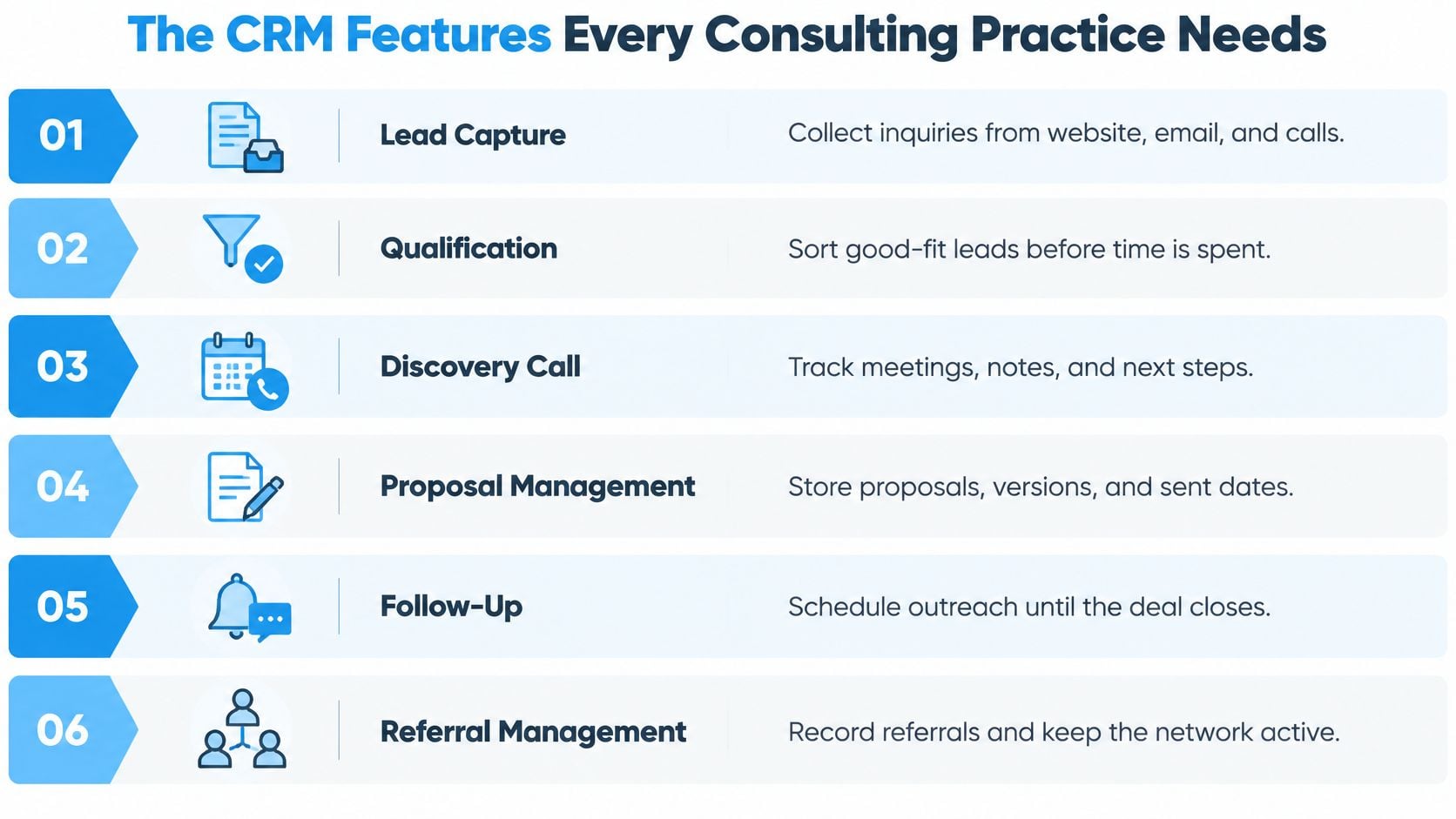
Require fields only when they support a decision
Start with name, company, source, stage and next action. Add qualification details such as the business problem, decision-maker or purchasing constraints only where they change what you'll do.
A large custom-field library isn't useful if nobody maintains it. Relationship context can live in a concise meeting note instead of a form with empty boxes.
During your evaluation:
- Confirm coverage. Find where each workflow row exists in the candidate system.
- Mark manual work. Identify which activities you currently perform through email or calendar reminders.
- Choose the costliest gaps. Test the missing workflows that most directly affect booked conversations or pending decisions.
How Fast Lead Response Protects Your Pipeline
Calling within five minutes made a lead roughly 100 times more likely to be contacted and 21 times more likely to enter the sales process than calling after 30 minutes in a study associated with James Oldroyd, covering more than 15,000 web leads and 100,000 call attempts across six companies, according to RankPlan's lead-response overview.
Those findings concern calls to web leads, not automated emails or guaranteed consulting conversions. The practical lesson is narrower: don't let a promising inquiry wait unnoticed because nobody is available to handle it.
The response workflow needs to connect intake with an actual next step.
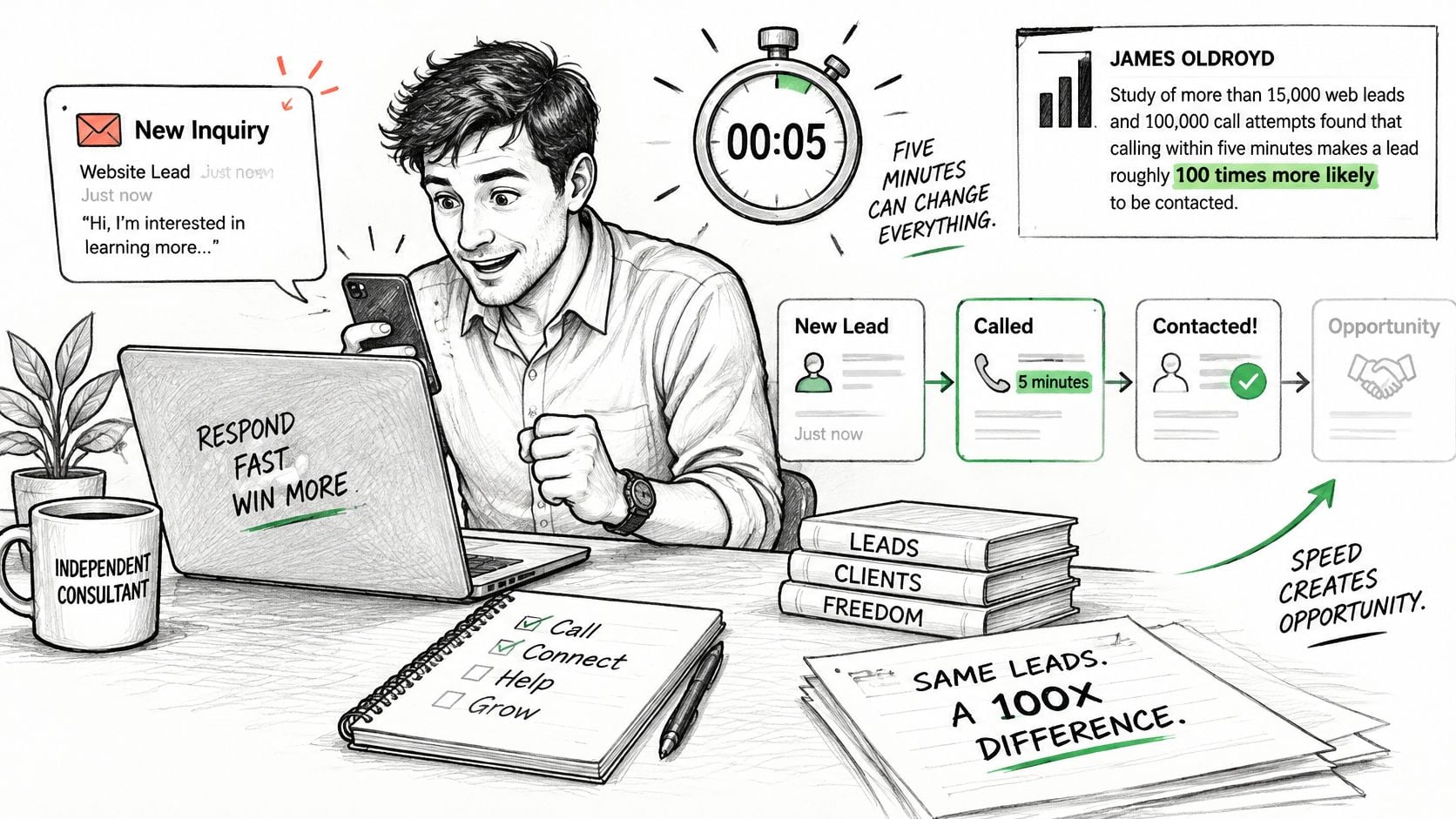
Build a routing rule, not just an autoresponder
Say a prospect submits a form asking about operational planning. The form should create or update their contact, attach the inquiry to an opportunity and record the source.
The system then assigns an accountable owner and sends a confirmation with the appropriate booking option. If the prospect doesn't book, the owner receives a follow-up task. If they do book, the inquiry should leave the unbooked follow-up sequence.
That last condition matters. A prospect shouldn't receive a message asking them to schedule a call they've already scheduled.
Configure the workflow around these principles:
- Record the source. Preserve both the channel and any named referrer.
- Acknowledge the request immediately. State what happens next without pretending a consultant has personally reviewed it.
- Assign responsibility. Even in a solo practice, every inquiry needs a clear owner.
- Stop incompatible sequences. Booking, declining or becoming a client should change which messages can be sent.
An acknowledgment isn't a substitute for a relevant reply. It's a bridge that gives the prospect direction while the consultant becomes available.
This video offers another format for exploring lead-response workflows.
Handle the exceptions before launch
For after-hours inquiries, state when the prospect can expect human contact. If website visitors need help finding the right service or leaving a request, Expressify AI's 24/7 AI chat support is an option to evaluate alongside your intake process. Test how the conversation reaches the CRM rather than assuming it does.
A referred inquiry needs a separate acknowledgment to the introducer, without exposing confidential prospect details. A booked prospect who doesn't attend needs a rescheduling route, not a return to the original new-lead sequence.
Email campaigns create another intake path. If you're generating leads for email marketing, distinguish campaign engagement from an explicit request to speak. They shouldn't automatically trigger the same sales response.
Finally, submit a test inquiry through every channel you use. Time the first acknowledgment, check the assigned owner and inspect the resulting task. Test during working hours and outside them, then confirm that booking cancels the unbooked reminder.
Following Up on Proposals and Referrals Until They Close
Use this illustrative proposal cadence as a starting configuration, then adjust it to the buyer's agreed timetable. It's a working recommendation, not a measured optimum.
Proposal follow-up cadence
| Timing after send | Action | Record field to update |
|---|---|---|
| On send | Confirmation to client and owner set | Sent date and owner |
| 2 business days | Check-in on open questions | Next date |
| 1 week | Value-based follow-up | Next action |
| 2 weeks | Ask for the decision date | Decision date and decision holder |
| Monthly after 2 weeks | Nurture until the proposal moves | Stalled flag and next date |
In a 2025 survey of 500 sales professionals and leaders in U.S. and U.K. organizations, 34% identified poor process standardization as a scaling challenge, according to monday.com's CRM survey. For consultants, standardization should extend past discovery into the proposal-to-decision gap.
Confirm receipt before asking for a decision. Use the early check-in to uncover questions, then make later follow-ups useful by clarifying scope, sharing relevant context or explaining an implementation choice.
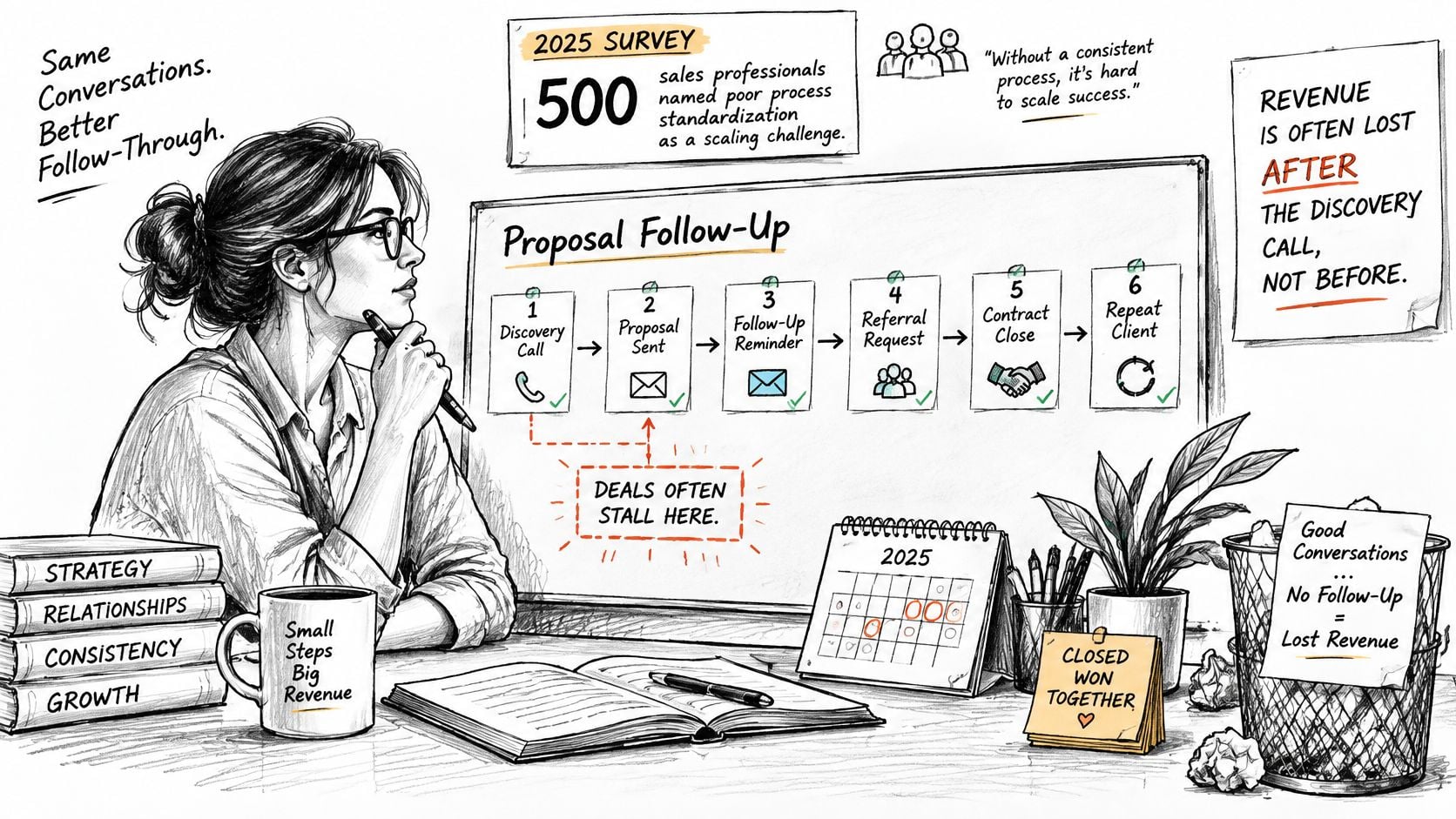
Track the decision path and the introduction
When a new stakeholder appears, add their role and update the approval path. Don't erase the original sponsor or restart the opportunity because procurement or finance has joined.
Run referral relationships in parallel. Segment partners by potential, recency and reciprocity, then choose a prompt thank-you target and a recurring relationship reminder that you can maintain. A useful approach to tracking referrals connects the introduction to the opportunity without treating the referrer as the buyer.
Before closing an opportunity review, identify the next date, the next action and the person who holds the decision.
If the buyer declines or asks you to stop, end the sequence. Nurture is appropriate for an unresolved opportunity, not permission to keep pursuing a clear no.
Keeping Client Data Clean Without Weekly Admin
A 2025 CRM data-quality review reports that 91% of CRM data is incomplete and roughly 25% of an average B2B database contains critical errors. These are broad CRM findings, but the operational problems are easy to recognize in a consulting practice.
A duplicate contact can receive conflicting reminders. A missing source can leave a valuable introduction unattributed. An outdated owner can send a proposal task to someone who no longer manages the relationship.
The answer isn't to reserve a growing block of time for cleanup. Configure the system to prevent predictable errors and leave exceptions for human review.
Resolve identity before sending messages
Normalize email and organization-domain fields so differences in capitalization or formatting don't create unnecessary mismatches. Match incoming records against email plus organization, and flag conflicts instead of automatically overwriting important details.
A new opportunity shouldn't automatically create a new person. The same executive might commission a planning engagement and later request implementation support, both attached to the same contact and company.
Use a review queue for uncertain matches:
- Changed employer. Confirm whether to update the existing relationship or preserve an employment history.
- Shared inbox. Don't merge distinct people because they use a departmental address.
- Conflicting ownership. Resolve who manages the relationship before activating outreach.
- Different lifecycle values. Check whether an existing client has entered a new sales conversation.
Keep original source attribution separate from the latest interaction source. An event invitation shouldn't erase the referral that first brought the client to your firm.
Make stage changes carry their own checks
Require information when it becomes necessary, not all at once during intake. A proposal shouldn't move to sent without a value, a next step and a follow-up date.
When an opportunity reaches Won, the system should update the contact and company, create the delivery record, assign the responsible owner, notify relevant colleagues and schedule kickoff tasks. Transfer the agreed scope, decision history and important commitments with it.
Treat this as a connected handoff. If the delivery record fails to create, make the failure visible rather than allowing the sales record to look complete while delivery has no instruction.
Practical rule: Automate only after you can explain which record changes, who becomes responsible and how you'll notice a failed step.
Keep timestamps for important changes and a visible history of automation outcomes. These details help you distinguish an overlooked task from a workflow that never ran.
For maintenance, use a short recurring exception review rather than reopening every contact. Check unassigned opportunities, unresolved duplicate flags, overdue tasks and open proposals without a next date.
A compact dashboard should show those exceptions directly. Don't make the consultant build a report each time they want to know what needs attention. The objective is less repetitive administration, not a promise that reliable records require no oversight.
Seats, Contacts and Plan Limits to Size First
Size the account around the people who need access and the relationships you intend to retain. The following are planning scenarios, not claims about how every firm should license its CRM.
Seat and contact planning by firm setup
| Firm setup | Users to plan for | Check before buying |
|---|---|---|
| Solo consultant | 1 | Whether the contact limit covers past clients and referrers |
| Two-partner practice | 2 | Whether the second partner needs full pipeline access |
| Five-person advisory firm | 5 | Seat cost for associates who only log activity |
| 10 to 20 person firm | 10 to 20 | Per-seat versus flat-rate pricing at this headcount |
A solo consultant's contact requirement includes more than active prospects. Past clients, referral partners and event contacts may all belong in the relationship history, provided you have an appropriate reason to retain their information.
For a partner-led practice, decide whether each partner needs to edit opportunities or just receive updates. Associates may need to record activities and read handoff notes without requiring every sales capability.
Compare access models using the actual team
Per-seat pricing charges according to licensed users. Flat-rate pricing covers a defined package, which can still have user, contact or feature limits.
For example, a hypothetical three-person firm would need three paid logins under a plan that charges for every user, even if one partner handles most selling. A bundled plan might cover those logins, but its contact allowance could still be too small.
Don't solve that problem with a shared password. Separate accounts preserve ownership, access control and a usable activity history.
For a product-specific example of how packaging affects cost, Docket's guide to Sales Hub budgeting for revenue teams is a useful resource when comparing the relevant vendor's tiers. Keep your comparison focused on the access and functions your own practice requires.
Price the working configuration
The lowest advertised tier isn't necessarily the tier you can use. Check whether the configuration includes the automation, invoicing, document handling and permissions your workflow requires.
Distinguish between receiving a preconfigured workflow and having access to a workflow builder. A founder who wants managed setup has a different requirement from an operations lead who intends to build and modify sequences independently.
Also confirm how contacts are counted. Ask whether the allowance includes archived records, unsubscribed contacts or only a defined category, and what happens when you reach the limit.
Build a sizing worksheet with these inputs:
- Current relationships. Count unique people after removing duplicates, including past clients and referrers.
- Expected additions. Estimate growth from your own event plans, referral activity and outreach, rather than adopting an arbitrary allowance.
- Required access. List each person, what they need to see and what they need to change.
- Essential capabilities. Mark the features needed at launch separately from those you might use later.
Compare the cost of that complete configuration across candidates. Include setup and required add-ons where applicable, and record the terms for adding users or contacts. A clear buying decision starts with a usable account, not an attractive entry price.
How to Evaluate Options and Go Live
Use the same questions for each candidate so a polished demonstration doesn't substitute for a working test.
Evaluation criteria for consulting CRM vendors
| Criterion | What to ask | Red flag |
|---|---|---|
| Consulting workflows | Does it ship with discovery, proposal and handoff stages? | Blank pipelines you must design yourself |
| Setup effort | Who maps and configures the system, and how long does it take? | Months of configuration before first use |
| Follow-up automation | Can proposal follow-up run on a schedule set once? | Manual reminders for every open deal |
| Data hygiene | Does it flag duplicate contacts and require fields at stage change? | Duplicates accumulate silently |
| Compliance scope | Does the vendor state what it does not cover? | Implied legal or regulatory advice |
| Total cost | Which features sit behind higher tiers? | Essential tools locked behind upgrades |
Only 34% of respondents said their teams fully used their CRM in a 2025 survey of 379 B2B professionals reported by PLANADVISER. Test usability through work you need to perform: create a discovery booking, run a proposal follow-up and record a referral thank-you.
Time the work and note where you need help. A generic CRM with blank pipelines requires design decisions; a consulting-shaped configuration still requires review, but you're evaluating an existing process rather than inventing it.
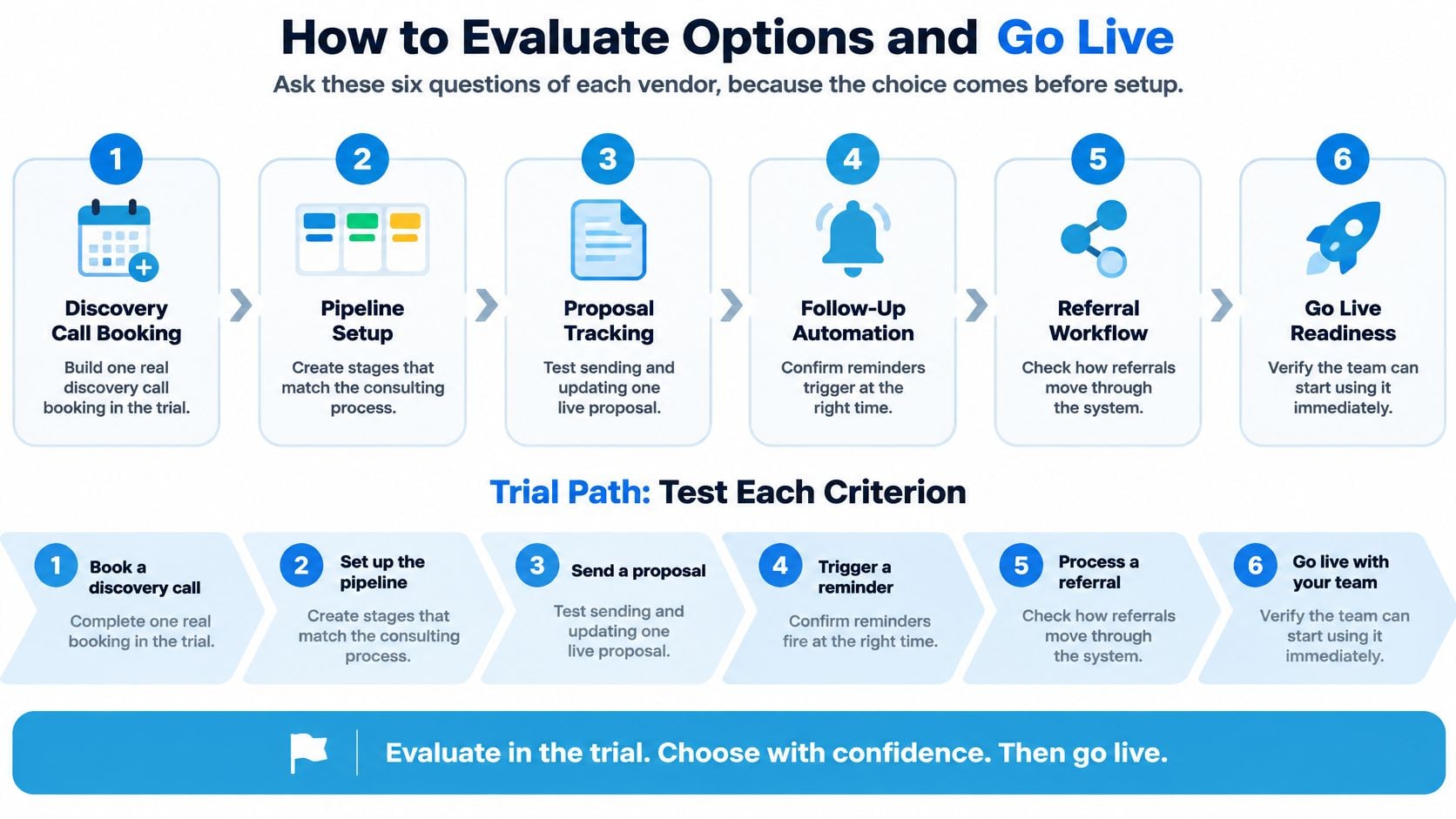
Map, install and review before launch
At Starward Navigators, our implementation follows Map, Install and Go Live. We map how leads, meetings, proposals, clients and referral partners currently move through your firm, then configure around that map.
During Install, we configure the pipelines, automations, calendars and follow-up sequences around how you sell. You review them rather than building them, including how client onboarding should begin after a signed engagement.
Our scope is CRM and follow-up automation. We don't provide compliance, regulatory or licensing guidance, and your firm remains responsible for its obligations.
Before launch, approve message wording, ownership and exception handling. At your post-launch checkpoint, inspect actual records: did proposal follow-ups happen when intended, and were referral introductions acknowledged?
Choose the CRM That Fits How You Sell
A solo consultant with a referral-heavy practice should prioritize proposal accountability and relationship continuity over elaborate reporting. The system needs to make unresolved decisions visible without requiring the founder to remember every conversation.
A small advisory team has a different coordination problem. Partners need a shared view of opportunities, associates need appropriate context and delivery owners need to know what was promised before work begins.
For a fractional executive, the sales process should reflect an engagement: understanding the business problem, establishing fit, agreeing scope and reaching a decision. A product-demo funnel can create unnecessary stages while leaving the approval process undocumented.
The best fit isn't the system with the longest feature list. It's the one you can keep accurate during a demanding client week.
Starward Navigators combines CRM, scheduling, messaging, proposals and automation in one place, with pipelines shaped around consulting sales. Our Core plan costs $97 per month and includes 2 users and 2,000 contacts; distinguish that starting package from higher-tier document, invoicing and workflow-builder requirements before choosing a plan.
Make the buying decision concrete
Before contacting vendors, prepare a short working brief:
- List the gaps. Identify where your current process loses inquiries, decisions or relationship context.
- Set the trial tasks. Use a representative consulting opportunity to test booking, follow-up, referral handling and handoff.
- Confirm capacity. Count retained relationships and everyone who needs pipeline access, then match the necessary features to the appropriate tier.
Choose the system that leaves the fewest routine decisions for the busiest person in the firm. You should finish a client meeting knowing where to find the next sales action, not wondering which inbox contains it.
Starward Navigators builds CRM and follow-up infrastructure for consulting and advisory firms, from lead intake and proposal follow-up to client handoffs and referral nurture. Visit Starward Navigators to explore how its Map, Install and Go Live process could fit the way your firm sells.