A partner forwards a promising introduction to the wrong inbox. A proposal sits in a shared drive because nobody owns the next conversation. Someone returns from a client call, intends to follow up, then spends the afternoon on delivery work. By the time the partner remembers, the prospect has gone quiet.
That's the operating reality behind many small consulting firms' revenue leakage. The problem usually isn't a lack of relationships or expertise. It's the absence of a reliable system that turns those relationships into visible opportunities, assigns responsibility, protects proposal follow-up, and keeps referral partners connected after the engagement ends.
A sales automation CRM can fix that, but only if you configure it around advisory work. High-volume sales software often assumes standardized products, SDR handoffs, and rapid transactions. Consultancies need something different: partner-led qualification, thoughtful proposals, a clear decision process, careful client onboarding, and a referral pipeline that continues after delivery.
Table of Contents
- What a Sales Automation CRM Actually Does
- How Sales Automation CRM Evolved Into an Operating Layer
- Core Features That Matter for Consultancies
- Mapping the Lead to Referral Workflow
- Purpose-Built Versus Generic CRM Platforms
- How Consultancies Should Evaluate Vendors
- Common Misconceptions That Kill CRM ROI
- Choosing the Right Path for Your Firm
What a Sales Automation CRM Actually Does
A CRM should give your firm one dependable record for every contact, company, opportunity, referral source, conversation, proposal, and next step. Automation should then act on that record without pretending it can replace the partner's judgment.
For a five-person consultancy, the practical flow is simple:
- A referral or website inquiry enters the system.
- The CRM records the source and assigns an owner.
- The responsible partner receives a qualification task.
- A discovery meeting creates the next action automatically.
- A proposal-stage opportunity triggers follow-up reminders.
- A closed-won deal starts the client handoff.
- A satisfied client or relationship partner enters a deliberate referral workflow.
That's more useful than a contact database with a marketing layer attached. The system needs to answer three operational questions at any moment:
- What do we know? Contact details, account context, relationship history, service interest, source, proposal status, and recent activity.
- What happens next? The task, meeting, reminder, approval, or handoff required to move the relationship forward.
- Where are deals stalling? The stage, owner, missing action, or delayed decision that's putting revenue at risk.
The three primitives
The first primitive is a single source of truth. If one partner tracks referrals in email, another stores proposals in folders, and a third keeps follow-up dates in a notebook, your pipeline report is fiction.
The second is rule-based workflow automation. A proposal entering a decision stage should create a follow-up task. A booked discovery call should produce confirmations and internal preparation steps. A won opportunity should initiate the delivery handoff. These rules remove administrative chasing, not relationship-building.
The third is operational analytics. You need visibility into proposal age, owner activity, stalled stages, referral sources, and opportunities without a scheduled next step. The point isn't to produce impressive dashboards. It's to identify the exact place where a partner needs to intervene.
Practical rule: Automate the reminder, the record update, and the handoff. Keep qualification, scope judgment, pricing, and sensitive relationship conversations with a human.
The CRM should support client continuity too. A documented client onboarding process helps connect the commercial promise to delivery, so the sales record doesn't become irrelevant the moment a contract is signed.
How Sales Automation CRM Evolved Into an Operating Layer
A consultancy can lose a referral before anyone notices. The inquiry sits in one inbox, a partner remembers the proposal differently, and no one owns the next conversation. CRM software evolved to address this coordination problem, moving from contact storage toward a system that keeps commercial work moving.
CRM began as a digital version of the Rolodex in the early 1980s. It became a major sales infrastructure category, then shifted toward browser-based sales force automation in the 2000s. Salesforce, founded in 1999, helped move CRM access into the browser and changed the expectation that sales information belonged on a local machine. The history of CRM development explains why modern platforms resemble workflow systems more than address books.
Marketing automation added email campaigns, lead scoring, and behavioral triggers. Proposal tools, scheduling software, e-signature platforms, project intake systems, and reporting products addressed other parts of the revenue process. Each tool solved a narrow task, while small firms became responsible for connecting the handoffs.
Consultancies adopted these systems more cautiously because their opportunities are bespoke, relationship-led, and shaped by partner availability. A rigid pipeline built for standardized software sales can flatten an advisory opportunity into misleading stages. “Qualified” means little until a partner understands the client's situation, decision structure, urgency, and willingness to act.
Modern CRM platforms now support natural-language queries, automated email drafting, messaging integrations, and workflow orchestration. The important shift is from static contact storage to coordinated execution across the sales process. For an advisory firm, that means preserving relationship context while making proposal follow-up and decision ownership visible.
Why the evaluation bar changed
A connected system can capture an inquiry, assign responsibility, schedule a meeting, record proposal progress, alert the delivery owner, and preserve the referral relationship. That continuity matters because the proposal-to-decision gap is where revenue often leaks, while past clients and referral partners remain future pipeline sources.
The right evaluation question is not whether a CRM stores contacts. Ask whether it can run the firm's operating rhythm without forcing partners to behave like transactional sales representatives.
A platform that only stores information creates another chore. A platform that connects information to accountable next actions becomes part of how the consultancy operates.
Core Features That Matter for Consultancies
Most CRM feature lists are designed to make vendors look complete. Consultancies need a shorter test. Does the system preserve relationship context, protect the proposal-to-decision process, and make ownership obvious?
Table stakes
A workable sales automation CRM should include:
- Linked contact and account records: Connect individuals to their firm, engagement history, referral relationship, and active opportunities.
- Consultancy-shaped stages: Use stages such as new inquiry, qualification, discovery, proposal preparation, proposal sent, decision, won, and lost. Don't copy a SaaS pipeline if it doesn't describe how your partners sell.
- Email and calendar integration: Log correspondence and meetings with minimal manual entry. If consultants must recreate every interaction inside the CRM, adoption will deteriorate.
- Task automation: Create reminders for proposal follow-up, partner check-ins, decision dates, and client handoffs.
- Source attribution: Record whether an opportunity came from a client, partner, website, event, LinkedIn conversation, or another channel.
These capabilities establish execution discipline. They don't make the firm impersonal. They stop good intentions from depending on memory.
Differentiators that affect revenue
Referral tracking deserves first-class status. A referral isn't merely a lead source attached to a closed deal. It's a relationship that needs acknowledgment, updates, nurture, and future attention. Track the referring person, relationship owner, referral date, outcome, and next relationship action.
Proposal status should connect to the opportunity. Your CRM should show whether a proposal is being drafted, internally reviewed, delivered, viewed, revised, accepted, or waiting on a decision. The system should make the next follow-up visible without sending generic messages automatically.
Role-based visibility matters. Partners may need access to their own pipeline and selected firm-level reports without exposing every client relationship or commercial detail. A small firm still needs sensible permissions, especially when independent advisors or delivery specialists share the system.
AI assistance should remain bounded. Call summaries, draft follow-ups, and suggested action items can reduce administration. Autonomous selling is a poor fit for advisory work because context, tone, timing, and discretion matter more than message volume.
Features I'd treat as oversold
Territory management rarely solves a consultancy's real bottleneck. Complex lead scoring models are usually unnecessary when a partner personally qualifies a small number of high-value conversations. High-volume sequence builders can also create more risk than value if they encourage impersonal outreach to relationship-based prospects.
The benchmark evidence points in a clear direction. Across more than 10,000 teams, the Pipeline CRM benchmark reports that all top performers used CRM automation, compared with 67% of the overall population. Those top performers also created 3.26 times more deals and ran 3.70 times more follow-ups per deal, suggesting that consistent activity density matters. For a consultancy, the lesson isn't to imitate an SDR factory. It's to automate the repetitive steps that keep valuable opportunities moving.
Mapping the Lead to Referral Workflow
A consultancy's revenue workflow shouldn't end at closed-won. The client relationship, delivery experience, expansion opportunity, and referral network all belong in the same operating model.
Capture and qualify
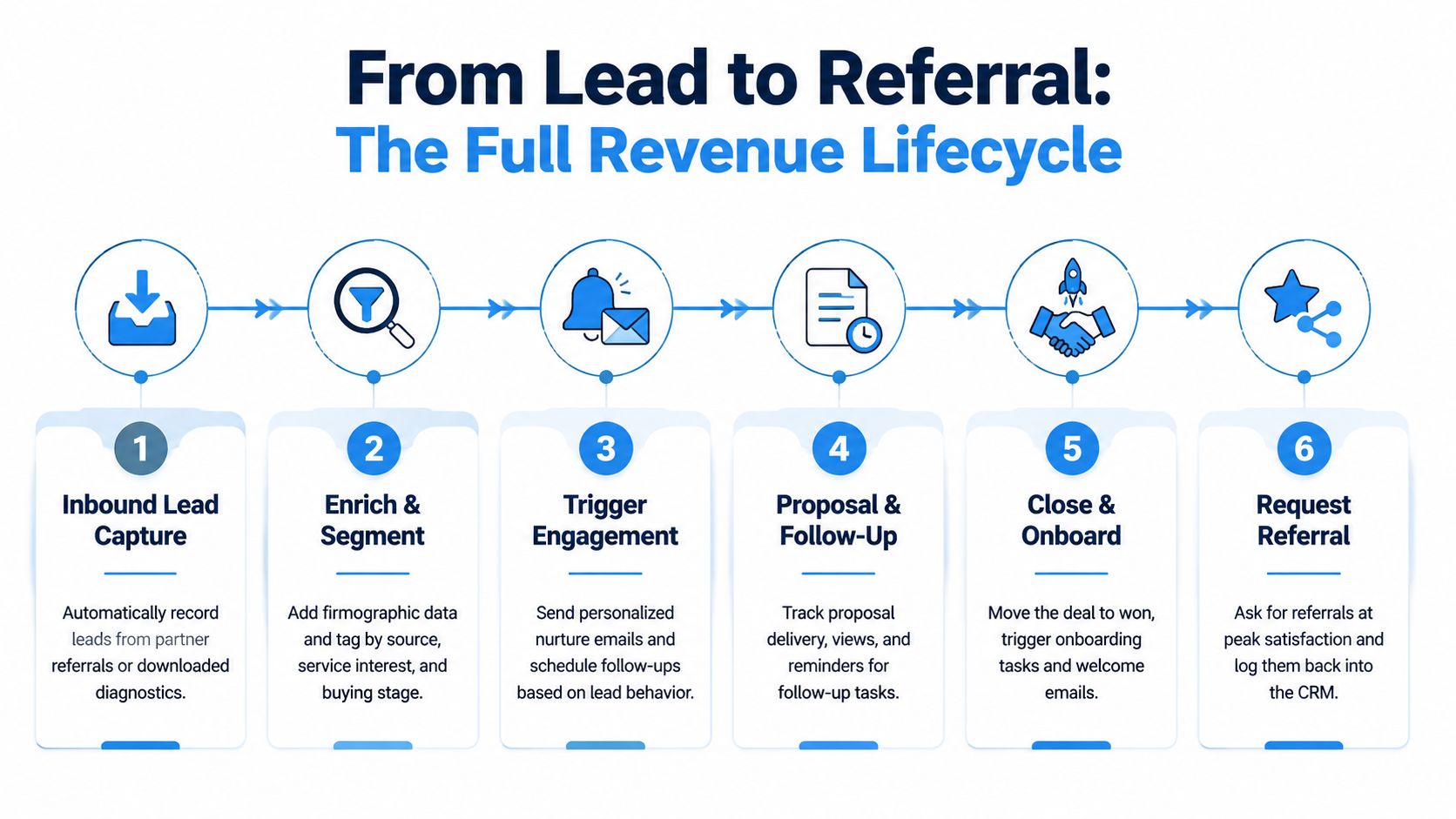
Start with the source. If a former client introduces a prospect, the CRM should create the contact, associate the referring relationship, and assign the opportunity to the right partner. If someone downloads a diagnostic, capture the form context, service interest, and buying stage.
Enrichment should support a conversation, not create a false precision. Add the firm's industry, size, role of the contact, relevant challenge, and relationship context. Then let the partner qualify the opportunity through a discovery conversation. A scoring model can assist with sorting, but it shouldn't decide whether a nuanced advisory engagement is viable.
The trigger is an assigned qualification task and an internal notification. The handoff that must remain human is the partner's assessment of fit, urgency, authority, and scope.
Build and follow up on the proposal
Once discovery is complete, move the opportunity into proposal preparation. Store the scope, assumptions, stakeholders, commercial terms, and proposal version in one record. An approval trigger can notify the relevant partner or reviewer before delivery.
When the proposal is sent, the CRM should create a decision-stage task with a specific date and owner. If the buyer views the proposal or requests changes, update the opportunity and notify the partner. Don't send a sequence that sounds like a mass campaign. Create a draft or reminder that gives the partner context for a personal follow-up.
Response time matters most at the front of the funnel. A lead-response study summary reports that firms responding within 5 minutes were about 100 times more likely to contact a lead and 21 times more likely to qualify it than firms waiting 30 minutes. For consultancies, instant routing and acknowledgment are appropriate, but the substantive qualification should still come from a person.
Close, onboard, and create the referral loop
A won opportunity should trigger delivery tasks, owner notifications, kickoff scheduling, and a client welcome workflow. The partner shouldn't have to send a separate message to operations explaining what was sold.
After the engagement reaches a clear satisfaction point, schedule a relationship check-in. Ask for a referral when the client has experienced a useful outcome, not as a mechanical post-sale event. Record the request, response, introduction, and thank-you action. A documented referral tracking workflow turns goodwill into a managed source of future opportunities without reducing the relationship to a number.
A strong system makes the loop visible: source, opportunity, engagement, satisfaction, referral, and new opportunity.
Purpose-Built Versus Generic CRM Platforms
The choice between a purpose-built consulting CRM and a generic horizontal platform is an operating decision, not a popularity contest. Generic platforms usually offer broader ecosystems, extensive integrations, and deep customization. Purpose-built platforms reduce the configuration burden and use language closer to the firm's actual work.
The right fit depends on where your firm loses time. If the problem is fragmented tools and missing proposal follow-up, a prebuilt workflow may create value faster. If the firm has unusual reporting, complex systems, or a dedicated operations team, a configurable horizontal platform may justify the implementation effort.
| Operational Problem | Purpose-Built CRM | Generic CRM |
|---|---|---|
| Partner-led qualification | Usually reflects partner ownership and relationship context | Often requires custom fields, routing rules, and training |
| Proposal-to-decision follow-up | Commonly preconfigured around proposal stages and reminders | Usually built through workflows, integrations, or add-ons |
| Referral management | May include referral stages, source attribution, and nurture actions | Possible, but often treated as a custom object or campaign process |
| Client handoff | Can connect closed-won to onboarding tasks and delivery ownership | Requires configuration across sales and project tools |
| Integrations | May cover the common consultancy stack, with limits | Usually offers a wider ecosystem |
| Analytics | Faster to deploy for standard advisory workflows | More flexible, but reporting quality depends on setup |
| Configuration effort | Lower at the start | Higher, especially when adapting sales-team terminology |
| Long-term flexibility | Constrained by the product's intended model | Stronger when processes are unusual or expanding |
When each path makes sense
A purpose-built option is sensible for a small or mid-sized consultancy that wants a defined operating system, not a blank canvas. It's particularly useful when partners resist CRM administration and the firm needs proposal tracking, reminders, onboarding, and referrals working without a long design project.
A generic CRM fits better when the firm already has an operations owner, needs unusual integrations, or expects multiple departments to share one highly customized data model. HubSpot, Salesforce, and similar platforms can work well, but the firm must budget for process design, governance, training, and ongoing administration.
The comparison of HubSpot for consulting firms is useful as a starting point, but don't choose from feature grids. Run the same real workflow through each option: referral capture, partner qualification, proposal delivery, decision follow-up, closed-won handoff, and referral request.
The cheaper CRM is often the one that requires fewer workarounds, not the one with the lower subscription price.
How Consultancies Should Evaluate Vendors
A polished demo can hide a weak operating fit. Give every shortlisted platform a real referral, proposal, and handoff workflow, then require the vendor to configure it live.
Write the process in plain language first. Define who owns a referral, what qualifies an opportunity, what happens after discovery, how proposals are approved, what marks a stalled decision, and when delivery receives the handoff. If partners cannot agree on those rules, a new CRM will only make the disagreement harder to see.
Score the operating fit
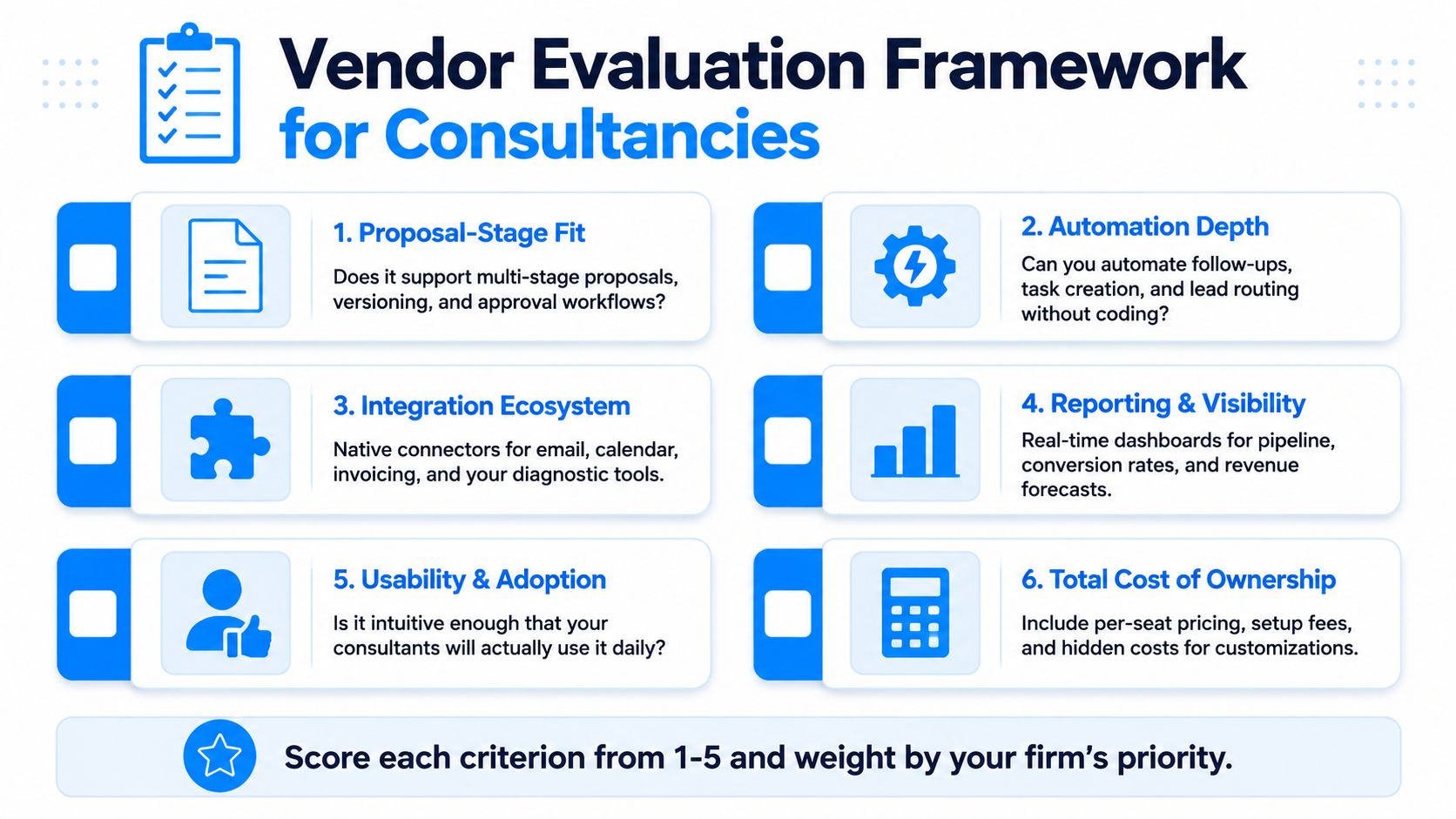
Use these criteria during evaluation:
- Proposal-stage fit: Can the platform track preparation, approval, delivery, revision, decision status, and the next action?
- Automation depth: Can the team create routing, reminders, follow-up tasks, and handoffs without engineering support?
- Integration coverage: Does it connect with the email, calendar, forms, scheduling, invoicing, and delivery tools already in use?
- Reporting usefulness: Will partners read reports that show stalled opportunities, upcoming decisions, referral activity, and ownership?
- Adoption quality: Can consultants update records during normal client work without opening a complicated administrative interface?
- Total cost: Include setup, migration, customization, training, additional seats, contact limits, and future workflow changes.
Use real records, not sample data. Ask one partner to create an opportunity from an inbox referral. Ask another user to move a proposal through its stages, then inspect the resulting report. The platform should make ownership, decision timing, and the next step obvious. If the vendor needs a long explanation to demonstrate those basics, reject the fit.
Watch for commercial and implementation red flags
Per-seat pricing can punish partner-led selling when many people need visibility but only some users perform daily sales work. Scrutinize mandatory annual contracts if the vendor will not support a practical pilot. Attractive dashboards mean little when the vendor cannot show how referral, proposal, and follow-up data reaches them.
Run two paid pilots instead of ten generic demos. Give both vendors the same workflow, test records, and adoption criteria. Ask who will configure the system, who owns the data model, how support works after launch, and how the firm can export its records if the relationship ends.
CRM adoption pressure should not decide the purchase. A consultancy needs a shared process before it needs more automation. Assess whether partners will record referrals, update proposal stages, act on stalled decisions, and complete the delivery handoff. If they will not, postpone the purchase and fix ownership first.
Common Misconceptions That Kill CRM ROI
The most damaging CRM belief is that an automation toggle creates an automated sales process. It doesn't. Software executes the rules you define, including bad rules, vague stages, incomplete ownership, and emails that no partner would send personally.
Misconfiguration one
Capturing leads without defining qualification creates a larger pile of unworked records. The firm feels productive because inquiries enter the database, but nobody knows whether a contact is an active opportunity, a future relationship, a poor fit, or a referral partner. Define the qualification decision and the owner before adding more automation.
Misconfiguration two
Automating generic follow-ups turns a thoughtful consultancy into a source of templated noise. A reminder that says, “Just checking in,” doesn't give a partner useful context or a prospect a reason to respond. Use automation to prepare the task, include the proposal context, and suggest the next action. Let the partner write the message.
Misconfiguration three
Forcing a rigid sales pipeline onto relationship-led work produces inaccurate forecasts. A proposal may be commercially promising but waiting on a board meeting, budget approval, or internal sponsor. Your stages should expose those realities rather than pretending every opportunity follows the same linear route.
Misconfiguration four
Ignoring referrals after the deal closes discards one of the firm's most valuable relationship channels. Referral sources need ownership, updates, appreciation, and follow-up. A referral field attached to a closed-won record isn't a relationship strategy.
Misconfiguration five
Treating dashboards as strategy creates reporting theater. A dashboard can show that opportunities are stalled, but it can't decide whether the partner should call, revise scope, disqualify the deal, or wait for a known decision event. Use reports to diagnose behavior and bottlenecks, then change the workflow or the conversation.
Automation should remove repetition, not remove responsibility.
CRM value depends on workflow discipline. If partners don't agree on stage definitions, ownership, next steps, and data standards, automation will make inconsistency easier to repeat. Start with fewer workflows, test them against real opportunities, and expand only when the team trusts the records.
Choosing the Right Path for Your Firm
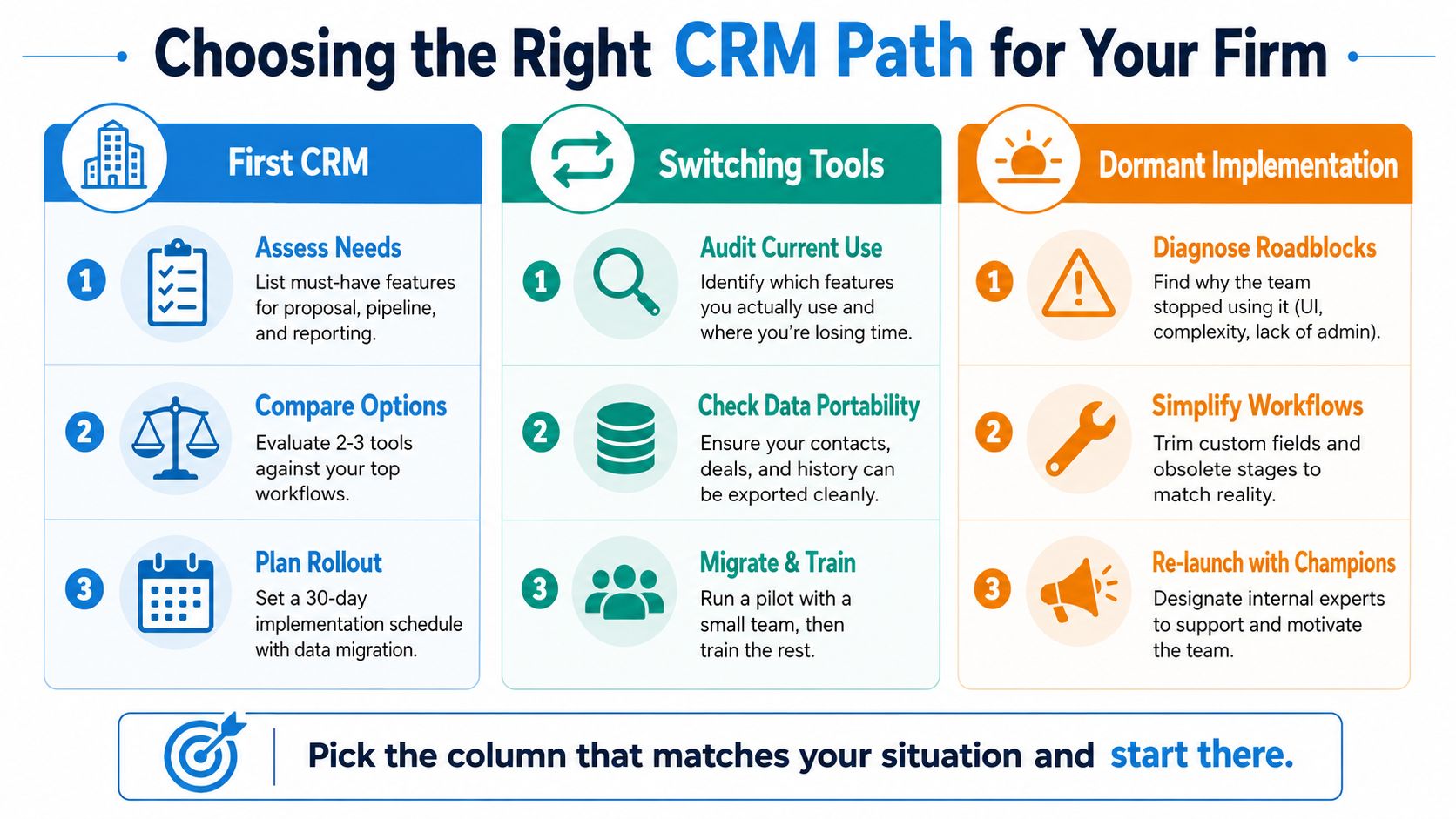
Your next move depends on the condition of the current system. Don't buy a new CRM because the existing one feels frustrating. First identify whether you're starting, switching, or repairing.
If you're buying your first CRM
During the first 30 days, interview the partners and map the path from referral to proposal decision. At 60 days, test two or three platforms against real workflows, not generic demo records. By 90 days, launch a narrow process covering lead capture, ownership, proposal follow-up, and the closed-won handoff.
If you're switching tools
Start with an audit of what people use. Identify essential records, dead fields, duplicate contacts, broken integrations, and reports nobody trusts. Confirm that contacts, opportunities, activity history, and referral relationships can be exported cleanly before signing a replacement contract. Pilot the migration with a small group, then train the rest of the firm around the new workflow.
If the implementation is dormant
Don't assume the tool failed. Find the roadblock. The interface may be too complex, the stages may not match the firm, the fields may be excessive, or nobody may own administration. Remove obsolete stages, reduce required fields, rebuild the proposal workflow, and relaunch with internal champions who can answer daily questions.
A consultancy is ready to buy when partners agree that missed follow-up is costing opportunities, the firm can name the workflow it needs to standardize, and one person owns implementation. It should wait when nobody agrees on qualification, nobody will maintain the records, or the desired process changes every week.
The question every partner should answer before signing is: What specific behavior will this system make easier and more consistent from next Monday onward?
Starward Navigators provides a prebuilt client acquisition operating system for consulting and advisory firms, including pipelines, proposal follow-up, appointment reminders, client handoffs, and referral relationship workflows. If your firm needs to turn those processes into a working sales automation CRM rather than another unfinished configuration project, visit Starward Navigators and assess the implementation against your real lead-to-referral workflow.