Most appointment reminders are treated as administrative housekeeping. The evidence says they're closer to an operational control. A BMJ Open meta-analysis of 21 studies found that electronic text notifications reduced no-shows from 21% to 15% and made patients 25% less likely to miss appointments. The same principle applies to consulting: a well-timed reminder protects booked time, gives prospects an easy way to reschedule, and keeps the next pipeline step moving.
The best appointment reminder message examples do more than repeat a date and time. They match the consulting scenario, decision stage, audience, channel, and follow-up workflow. A discovery call needs reassurance. A strategy session may need preparation. A proposal review needs decision-maker accountability. A high-value opportunity may justify a personal video, while an unconfirmed meeting needs escalation rather than another generic nudge.
Below are eight practical sequences for email, SMS, calendar, video, and internal alerts. Starward Navigators is one example of an operating system that coordinates appointment confirmations, reminders, follow-up, proposal stages, and client handoffs for consulting and advisory firms.
Table of Contents
- 1. Simple Confirmation and 24-Hour Reminder Sequence
- 2. Value-Add Reminder With Pre-Call Preparation
- 3. Multi-Channel Hybrid Reminder With Email, SMS, and Calendar
- 4. Dynamic Reminder With Conditional Logic
- 5. Proposal-Specific Reminder With Next Steps Clarity
- 6. High-Touch Personalized Video or Voice Reminder
- 7. Automated Escalation Reminder for No-Response Situations
- 8. Mobile-First SMS-Primary Reminder for Busy Executives
- 8-Point Appointment Reminder Comparison
- Build a Reminder System That Fits the Meeting
1. Simple Confirmation and 24-Hour Reminder Sequence
The simple sequence remains the best starting point for routine consulting appointments. Send one message immediately after booking, then another 24 hours before the meeting. It works for discovery calls, initial consultations, advisory intake meetings, and other appointments where the prospect already understands the purpose.
The immediate confirmation should remove uncertainty. Include the consultant's name, meeting type, exact date and time, timezone, video link, and a rescheduling path. A calendar attachment, such as an .ics file, makes the appointment easier to place alongside the prospect's existing commitments.
Booking confirmation email
Subject: Confirmed, your advisory consultation with [Consultant Name]
Hi [First Name],
Your [discovery call or consultation] is confirmed for [Day, Date] at [Time] [Time Zone] with [Consultant Name].We'll meet here: [Video Link]
Add it to your calendar: [Calendar Link]
Need to change the time? [Reschedule Link]Looking forward to learning more about [Company Name].
[Consultant Name]
The 24-hour reminder should be shorter. Confirm who's attending, especially if the prospect mentioned bringing a finance lead, co-founder, or operations executive. Don't repeat every detail from the original email if the message becomes harder to scan.
This sequence is also a sensible default inside a client onboarding template. It gives a small firm a repeatable standard without forcing every meeting into an elaborate automation.
The evidence supports keeping reminders practical rather than decorative. In a separate outpatient study of 9,835 patients, no-reminder appointments had a 23.1% no-show rate, compared with 17.3% for automated reminders, according to this appointment reminder evidence summary. For consultants, the lesson is simple: start with consistent timing and clear actions before adding complexity.
2. Value-Add Reminder With Pre-Call Preparation
A reminder can also improve the quality of the meeting. For strategic advisory work, transformation consulting, fractional executive services, or any engagement where discovery depth matters, send a preparation note 48 to 72 hours before the appointment. That gives the prospect time to think without burying the final reminder under attachments.
The preparation request should feel optional but useful. Asking for a one-page assessment, a short list of current challenges, or a recent organizational chart can create a better conversation. Asking for a large document package can create friction and give a busy prospect another reason to postpone.
Preparation email
Subject: Optional preparation for our strategy session
Hi [First Name],
We're scheduled for [Day, Date] at [Time] [Time Zone]. To make the session as useful as possible, you may want to consider:
- The business priority you need to address first
- What's currently slowing progress
- What a successful outcome would look like
If it's helpful, you can review this short [Company Assessment] before we meet: [Resource Link]. No formal preparation is required.
Our agenda is [brief agenda].
Best,
[Consultant Name]
Keep the material scannable. A brief summary is more likely to be used than a dense resource library. For a fractional CFO, the request might focus on the company's most urgent cash-flow question. For a business transformation consultant, it might ask the prospect to identify a process that consistently breaks down.
The appointment reminder should support the meeting, not turn into unpaid consulting. Give the prospect enough context to arrive prepared, but save diagnosis and recommendations for the session itself.
Practical rule: Preparation should lower the prospect's cognitive load, not create homework.
You can connect this sequence to a broader client onboarding workflow so that intake information, meeting ownership, and the next pipeline stage stay connected. That matters when the appointment is part of a larger qualification process rather than an isolated calendar event.
3. Multi-Channel Hybrid Reminder With Email, SMS, and Calendar
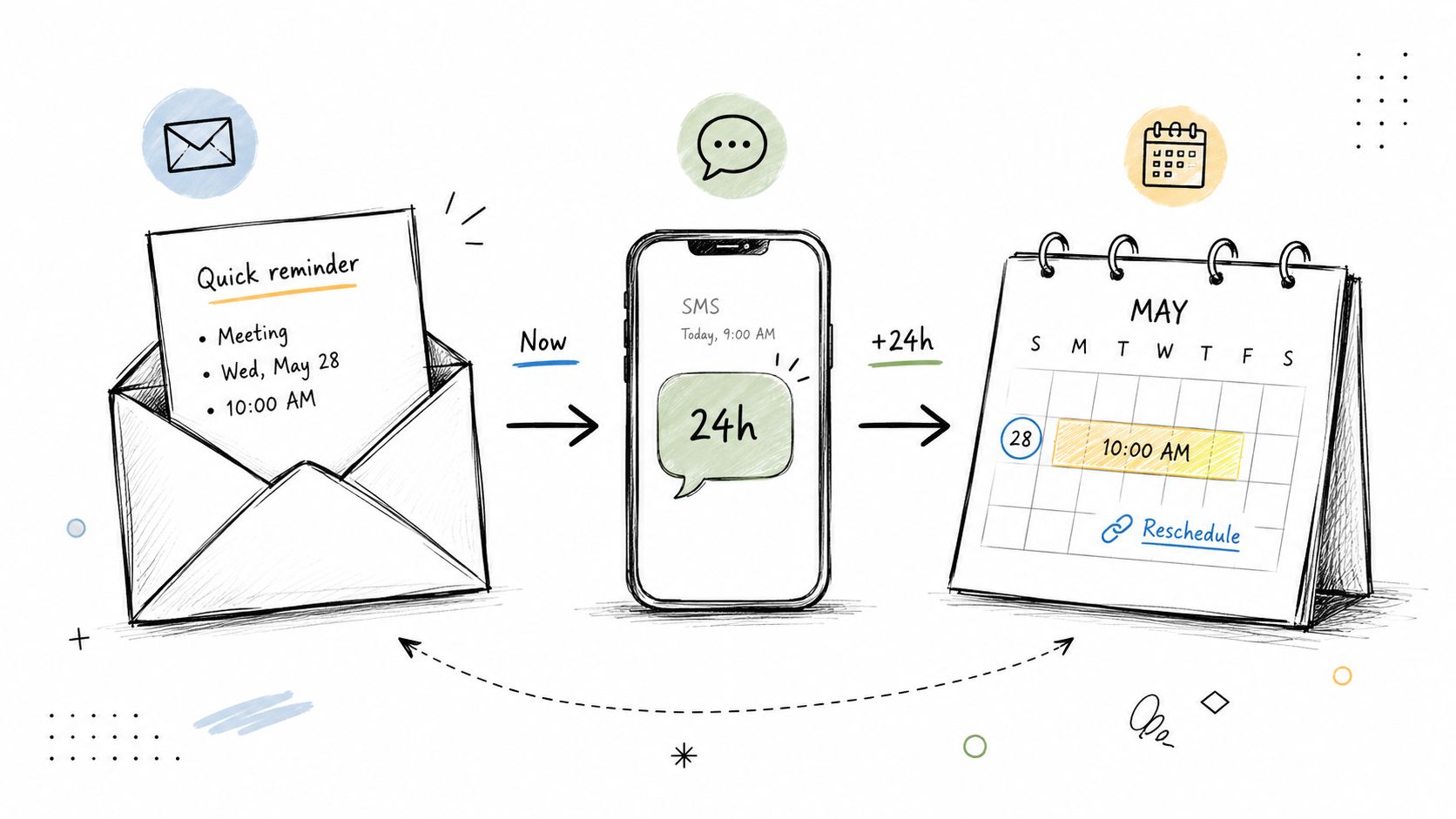
Email, SMS, and calendar notifications serve different jobs. Email carries context. SMS delivers a quick prompt. The calendar entry keeps the meeting visible among the prospect's commitments. Combining them works when each channel adds something distinct, not when the same paragraph is copied three times.
A practical sequence looks like this:
- At booking: Create the calendar event and send the confirmation email.
- 48 hours before: Send an email with the agenda, meeting link, and preparation details.
- 24 hours before: Send a concise SMS with the time, timezone, link, and confirmation action.
Email at 48 hours
Hi [First Name],
A reminder that our [meeting type] is scheduled for [Day, Date] at [Time] [Time Zone]. We'll cover [topic one] and [topic two].Meeting link: [Link]
If you need another time, reschedule here: [Reschedule Link]Best,
[Consultant Name]
SMS at 24 hours
Hi [First Name], [Consultant Name] here. Our [meeting type] is tomorrow, [Day] at [Time] [Time Zone]. Join here: [Short Link]. Reply YES to confirm or use [Reschedule Link] if needed.
Use SMS only when the prospect has opted in and the relationship supports it. A C-suite executive who has already exchanged texts with the consultant may welcome a short mobile reminder. A cold prospect who only provided an email address may experience an unexpected text as intrusive.
Timezone handling deserves attention, especially for multi-office consultancies and distributed buying committees. Store the recipient's timezone with the appointment and test every channel using the same event data. Track channel responses separately so you can see whether prospects confirm by email, SMS, calendar interaction, or direct reply.
This approach fits firms building lead generation for email marketing because the reminder should remain connected to the lead record and communication history.
4. Dynamic Reminder With Conditional Logic
The same reminder shouldn't go to every prospect. A founder considering growth support, a COO evaluating operational efficiency, and a finance lead reviewing fractional CFO services may attend the same type of call, but they arrive with different priorities.
A role-based reminder uses reliable information from the contact record to adjust the message. Start with a small number of conditions, such as role, company size, and engagement stage. Over-segmentation creates more branches to maintain and increases the chance that a merge field or message variant feels inaccurate.
For a finance lead
Hi [First Name],
Our conversation on [Day] will focus on the financial visibility and reporting priorities you mentioned for [Company Name]. If there's a specific metric or forecast you want to examine, feel free to bring it to the session.Join here: [Meeting Link]
Reschedule: [Link]
For a founder
Hi [First Name],
We're looking forward to discussing the growth constraints you raised for [Company Name]. We'll use the session to clarify the priority, understand what's already been tried, and identify a practical next step.Join here: [Meeting Link]
For an operations leader
Hi [First Name],
In our upcoming session, we'll focus on the workflow and execution issues affecting [Company Name]. If another team member owns the process day to day, consider inviting them.Meeting link: [Link]
The message should reflect the prospect's stated challenge, not pretend to know more than the record supports. Audit contact data before enabling conditional logic, and test each branch with internal records. A wrong role, company name, or industry reference damages trust faster than a neutral reminder would.
Starward Navigators' workflow model is relevant here because triggers and conditions can connect appointment reminders to broader pipeline stages. Keep the first version manageable, review branch performance regularly, and retire variations that don't improve clarity or attendance.
5. Proposal-Specific Reminder With Next Steps Clarity
Proposal meetings need a different kind of reminder. The prospect isn't just deciding whether to attend. They may be deciding whether to approve scope, involve a decision-maker, set a start date, or request changes. A generic “looking forward to speaking” message leaves too much unresolved.
Send the reminder 48 hours before the proposal review. State who should attend, what the meeting will cover, and what happens afterward. If the prospect has an internal decision date, name it plainly rather than hiding it behind vague language.
Proposal review email
Subject: Proposal review for [Company Name] on [Day]
Hi [First Name],
Our proposal review is scheduled for [Day, Date] at [Time] [Time Zone]. We'll confirm the recommended scope, answer questions, and agree on the next step.Please include [Decision Maker Role] and [Relevant Stakeholder] if they'll be involved in approval. If the proposal is approved, onboarding can begin after the agreement is completed. We're aiming to confirm the decision by [Specific Date].
Proposal summary: [One-sentence description of the engagement].
Review link: [Meeting Link]
Need to adjust the time? [Reschedule Link]Best,
[Consultant Name]
The trade-off is directness. Naming a decision date can feel uncomfortable, but it prevents a meeting from ending with an undefined “we'll get back to you.” The wording should remain collaborative, not coercive. “We're aiming to confirm the decision by [date]” gives the prospect a clear planning reference without pretending the outcome is already decided.
If the prospect can't confirm that the right attendees will join, offer to reschedule. A proposal review without the people who control the decision often becomes another information-sharing call, not a decision meeting.
The message can also include a personal mobile number for urgent questions. That signals ownership, but only include it if the consultant can respond promptly. A number that routes to nobody creates the opposite impression.
6. High-Touch Personalized Video or Voice Reminder
A personal video or voice message earns its place when the opportunity is important enough to justify extra effort. It can strengthen the relationship before a high-stakes strategy discussion, executive advisory call, or proposal conversation. It shouldn't become the default for every booked meeting.
Keep a video under 45 seconds and record it with a phone camera in natural lighting. The production doesn't need to look like a commercial. The prospect should see a prepared consultant who remembers the context, not a polished advertisement.
Video script
Hi [First Name], I'm looking forward to our conversation on [Day] about [specific challenge you mentioned]. I'll bring a few observations on [relevant topic], and we can use the time to decide whether there's a useful next step. The meeting link is included below. See you then.
A voice note can work well in a channel the prospect already uses, such as WhatsApp. Keep it equally focused:
Hi [First Name], quick reminder about our strategy call on [Day] at [Time] [Time Zone]. I'm looking forward to discussing [specific issue] and sharing the recommendations we outlined. I've included the meeting link here. Speak soon.
Personalization matters more than polish. Mention the prospect by name and reference a concrete detail from the prior conversation. Don't read a generic script while calling it personal.

Place the video link in the email body or description, and include a text fallback because some email clients won't render video playback. Reserve this format for the opportunities where relationship depth or meeting value justifies the time. A short written reminder is usually more efficient for routine discovery calls.
7. Automated Escalation Reminder for No-Response Situations
An unconfirmed meeting needs a workflow, not repeated manual checking. Escalation should move from a gentle reminder to a direct confirmation request, then to an internal alert for the consultant. The purpose isn't to pressure the prospect. It's to surface risk early enough to protect the consultant's schedule.
A simple sequence might look like this:
- T-24 hours: Send a friendly reminder with “Confirm” and “Reschedule” actions.
- T-6 hours: If there's no response, ask directly whether the meeting is still convenient.
- T-6 hours internally: Alert the consultant if the prospect remains unconfirmed.
- Before the meeting: Let the consultant decide whether to call, release the slot, or proceed.
T-6 SMS
Hi [First Name], we haven't received confirmation for our meeting today at [Time] [Time Zone]. Are we still on? Confirm here: [Confirm Link]. If another time works better, reschedule here: [Reschedule Link].
The confirmation action should take one click. A prospect shouldn't have to search for the original email, reply with a specific phrase, and explain why they can't attend. The final message should offer rescheduling, which captures flexibility instead of treating silence as rejection.
Track no-confirmation separately from no-show. Those are different signals. A no-confirmation may indicate poor channel fit, weak qualification, stale contact data, or a calendar conflict. A no-show suggests a different operational problem. Separating the statuses helps the firm improve both marketing and scheduling.
Use escalation to create visibility, not guilt. “Confirming we're still on” is more professional than “Where are you?”
The evidence behind reminder escalation is substantial, but it doesn't justify sending unlimited messages. A 2022 pragmatic randomized study found that adding one more SMS reduced primary-care no-shows from 9.1% to 8.4% and same-day cancellations from 4.6% to 4.3%. For consulting firms, the practical implication is that a small incremental touch can be worthwhile when the timing and action are clear.
8. Mobile-First SMS-Primary Reminder for Busy Executives
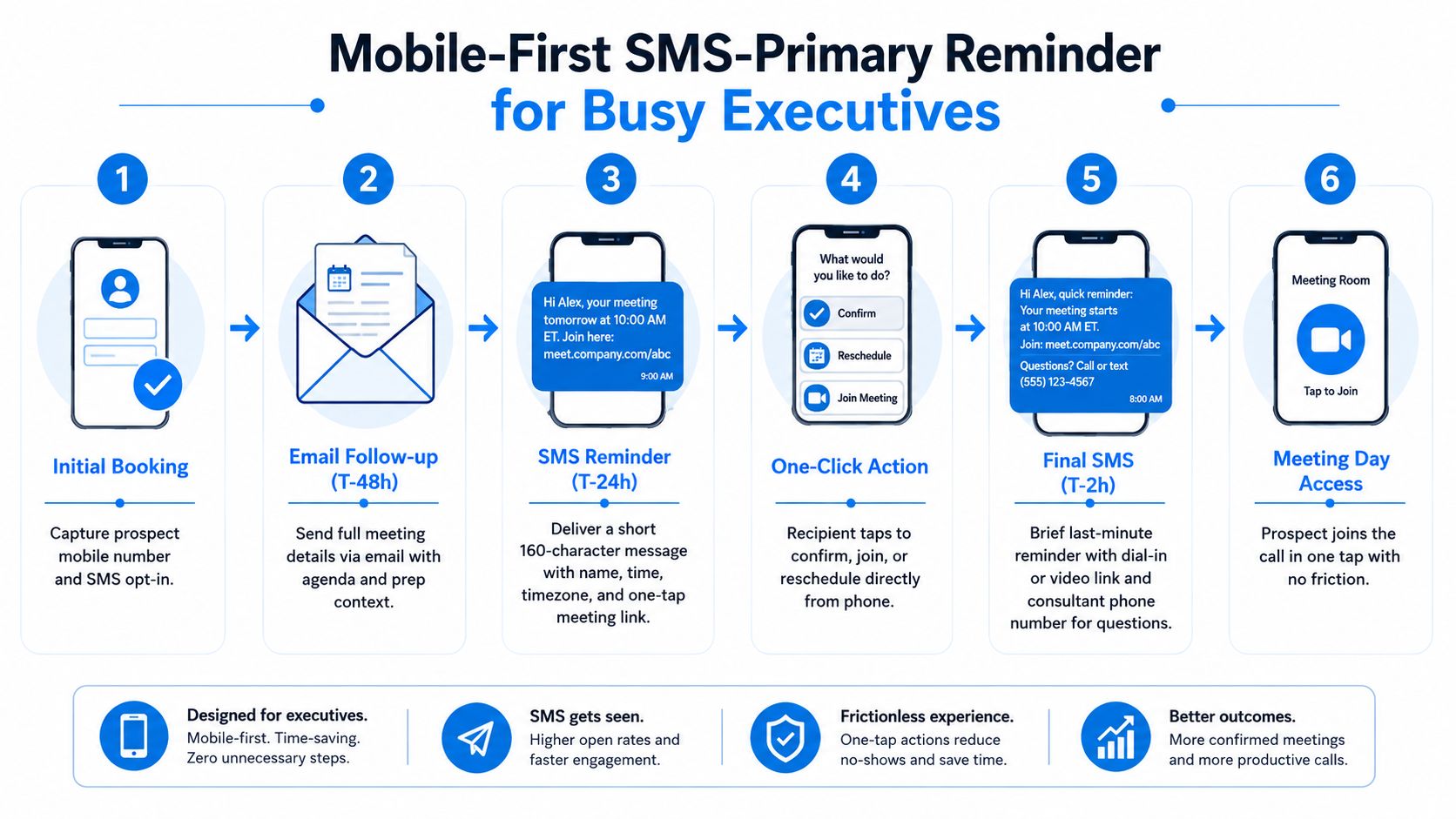
Some executives manage most appointment logistics from their phones. For them, a concise SMS can outperform a detailed email because it presents the time, meeting link, and next action in one glance. Use this format only when the recipient has opted in to SMS and has shown a preference for mobile communication.
The message should identify the meeting, state the exact time and timezone, include one clickable link, and provide a simple response option. Avoid jargon, long agenda paragraphs, and multiple competing links.
SMS example
Hi [Name], reminder: your CFO strategy call is Tuesday at 2:00 PM CST. Join here: [Zoom Link]. Reply YES to confirm or [Reschedule Link] to choose another time. Questions? [Phone Number]
For a growth consultation:
Hi [Name], your growth consultation is tomorrow at 10:00 AM ET. We'll discuss [specific topic]. Join here: [Link]. Reply YES to confirm or use [Reschedule Link].
For an executive advisory call:
Hi [Name], your advisory call is in 24 hours at [Time] [Time Zone]. Dial [Phone] or join [Link]. Questions? Call [Consultant Number].
Send the detailed email earlier, with the agenda and preparation information, then use SMS as the mobile nudge. Keep the meeting link clickable and test how it renders on different devices. A link that requires several taps or opens the wrong calendar account defeats the purpose of the message.
SMS also requires disciplined ownership. The recipient may reply with “not today,” ask to move the meeting, or send an urgent question. Route replies to a monitored business number or shared inbox, not an unattended automation.
A systematic review of electronic reminders reported attendance of 72.8% with SMS reminders versus 66.1% without them in a safety-net health-system study. That doesn't mean every consulting prospect will respond identically, but it reinforces the operational case for using SMS when consent, timing, and channel preference are handled properly.
8-Point Appointment Reminder Comparison
| Template | 🔄 Implementation complexity | 💡 Resource requirements | ⚡ Speed / efficiency | ⭐ Expected outcomes | 📊 Ideal use cases |
|---|---|---|---|---|---|
| Simple Confirmation + 24-Hour Reminder Sequence | Low, 2-step automated flow | Minimal, calendar + email/SMS integration | High, quick setup and execution | Good (⭐⭐⭐⭐), strong no-show reduction | Discovery calls, initial consultations, intake meetings |
| Value-Add Reminder with Pre-Call Prep Instructions | Medium, attachments and formatting required | Moderate, prep content, templates, editing time | Moderate, prep increases lead time | High (⭐⭐⭐⭐), better meeting quality & qualification | Strategic advisory, RFP reviews, in-depth discovery |
| Multi-Channel Hybrid Reminder (Email + SMS + Calendar) | High, coordinate channels and staggered sends | High, SMS gateway, calendar sync, channel tracking | Moderate, multiple touchpoints, careful timing | Very High (⭐⭐⭐⭐⭐), higher show rates across audiences | C-suite consultations, cross-timezone or time-sensitive meetings |
| Dynamic Reminder with Conditional Logic (Role-Based Messaging) | High, branching logic and persona rules | High, CRM data quality, multiple templates | Moderate, automated but complex to maintain | Very High (⭐⭐⭐⭐⭐), tailored relevance and conversion lift | Diversified advisory practices, segmented pipelines |
| Proposal-Specific Reminder with Next Steps Clarity | Medium, stage-triggered content and timelines | Moderate, proposal tracking integration, clear copy | Moderate, longer message but focused outcomes | High (⭐⭐⭐⭐), reduces proposal limbo and speeds decisions | Proposal reviews, decision-maker calls, deal-closing meetings |
| High-Touch Personalized Video or Voice Reminder | Medium–High, manual recording + distribution setup | High, consultant time, video tools/platforms | Low–Moderate, high impact but not scalable | Very High (⭐⭐⭐⭐⭐), strong engagement and trust building | Top-tier opportunities, high-value advisory engagements |
| Automated Escalation Reminder (For No-Response Situations) | Medium, multi-step escalation logic | Moderate, workflow rules, alerts/webhooks | Moderate, proactive but more touches | High (⭐⭐⭐⭐), prevents wasted time and reduces no-shows | High-volume practices, tight schedules, historically high no-shows |
| Mobile-First SMS-Primary Reminder for Busy Executives | Low–Medium, SMS flows and opt-in management | Moderate, SMS gateway costs and compliance | Very High, fastest opens and one-tap actions | High (⭐⭐⭐⭐), exceptional open/confirm rates | Fractional executives, C-suite advisory, time-sensitive consultations |
Build a Reminder System That Fits the Meeting
The right sequence depends on what the appointment needs to accomplish. Use the simple confirmation and 24-hour reminder for routine discovery calls and initial consultations. Add preparation when the meeting requires thoughtful input. Coordinate email, SMS, and calendar notifications for busy or high-value prospects, but make sure each channel has a distinct role.
Use role-based messaging when your data is reliable and the prospect's priorities differ by persona. Don't personalize merely to insert a company name. A founder should receive growth-oriented context only when the conversation supports it, while a finance lead may need a reminder centered on reporting, cash flow, or forecasting concerns.
Proposal meetings deserve their own workflow. Name the expected attendees, summarize the decision, and state the next step after approval. Reserve personalized video or voice reminders for priority opportunities where relationship depth matters. The extra effort can be valuable, but it isn't efficient as a standard treatment for every appointment.
Escalate only when confirmation is missing. A gentle reminder followed by a direct confirmation request and an internal alert gives the consultant a chance to act without flooding the prospect. Use SMS when the recipient has opted in and values speed. If they reply with a reschedule request, the system should present available times or route the request to an owner quickly.
Before activating any sequence, check the operational basics:
- Timing: Send messages relative to the appointment, not according to a fixed clock that ignores the meeting schedule.
- Timezone: Display the recipient's timezone consistently across email, SMS, calendar, and video links.
- Meeting link: Test that the link opens correctly on desktop and mobile.
- Confirmation action: Make confirmation one click or one short reply.
- Rescheduling path: Give the prospect a visible way to choose another time.
- Tone: Match the message to the meeting value and the existing relationship.
- Ownership: Assign someone to handle replies, exceptions, and high-value unconfirmed meetings.
- Measurement: Separate confirmations, reschedules, no-confirmations, and no-shows so the workflow can improve.
The reminder shouldn't end at attendance. For consulting firms, it can prepare the prospect, qualify participants, support proposal accountability, and trigger a clean client handoff after approval. Starward Navigators can help standardize appointment reminders within broader pipelines, follow-up sequences, proposal tracking, and client onboarding workflows.
Starward Navigators provides consulting and advisory firms with appointment booking, confirmations, reminders, rescheduling, follow-up automation, proposal tracking, and client handoff workflows in one operating system. Visit Starward Navigators to see how you can turn appointment reminders into a repeatable part of your client-acquisition process.