The popular advice says client onboarding begins after the contract is signed. For advisory firms, that's already too late. The client's onboarding experience is shaped by lead capture, scheduling, discovery, proposal follow-up, and the quality of the handoff long before a deal is marked Won.
The best client onboarding process is therefore an end-to-end operating system, not a post-sale checklist. It should create consistency without making every engagement feel identical, move quickly without rushing judgment, preserve discovery context, assign clear ownership, and help a small team personalize delivery without relying on memory.
The nine frameworks below are evaluated through that lens. Each one addresses a different failure point, from missed lead notifications to quiet proposals and incomplete delivery handoffs. Starward Navigators is one relevant example because its prebuilt system spans business development, client delivery, and relationships and referrals, rather than isolating onboarding inside a single project board.
Table of Contents
- 1. Automated Handoff and Pipeline Kickoff
- 2. Structured Discovery Call Framework
- 3. Proposal Tracking With Enforced Follow-Up
- 4. Unified Lead Capture and Intelligent Routing
- 5. Automated First-Response Sequences
- 6. Pre-Delivery Client Context and Knowledge Transfer
- 7. Referral Relationship Tracking and Nurture Automation
- 8. Standardized Onboarding Checklist and Task Automation
- 9. Integration and Data Centralization Architecture
- 9-Point Client Onboarding Process Comparison
- Build the Best Client Onboarding Process for Your Firm
1. Automated Handoff and Pipeline Kickoff
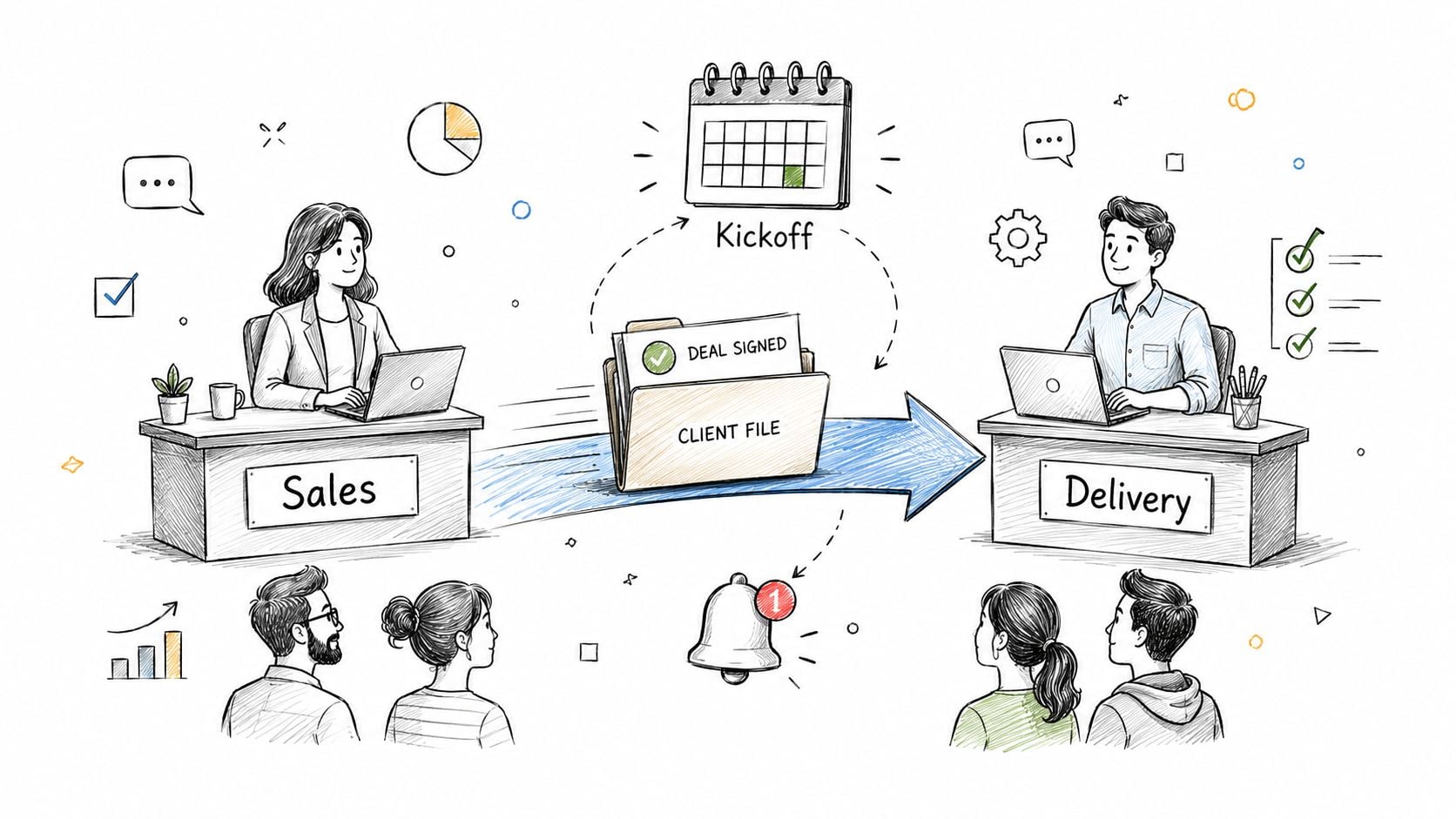
A signed agreement creates momentum, but it doesn't automatically create an organized delivery team. In many firms, the salesperson updates a spreadsheet, sends a rushed internal email, and assumes someone else will schedule the kickoff. That gap is where client confidence starts to erode.
An automated handoff moves the opportunity from sales into delivery as soon as the firm has met its defined Won criteria. The system can update the client record, assign the delivery owner, notify the right people, create onboarding tasks, and prepare kickoff scheduling. Starward Navigators, for example, uses a Won-stage update to start the delivery pipeline and coordinate onboarding activity. HubSpot and Salesforce can support comparable workflows through deal automation and workflow rules.
Design the trigger before the workflow
Automation is only as reliable as the decision that starts it. Define what “Won” means for your firm. The trigger might require a signed agreement, confirmed scope, completed payment terms, and an assigned delivery owner. If a deal can enter Won before those conditions are met, the automation will create premature work and confusing client messages.
Build the delivery stages before connecting the trigger. A consulting engagement might move through handoff review, intake, kickoff ready, kickoff complete, first deliverable, and early review. Add the discovery notes, decision drivers, scope, timeline, and special requests to the handoff record, rather than asking the delivery team to search through sales emails.
Practical rule: Automate the transfer of responsibility, not the transfer of judgment.
Schedule the kickoff after the internal team has enough time to review the brief. The right interval depends on complexity and availability. A pilot with a small group of clients can reveal duplicate alerts, missing fields, and incorrect ownership before the workflow reaches every engagement.
2. Structured Discovery Call Framework
A discovery call is part sales conversation, part expectation-setting exercise. If the prospect receives a vague confirmation, misses the meeting, or arrives without the required context, the firm loses more than a calendar slot. It loses a chance to demonstrate how it works.
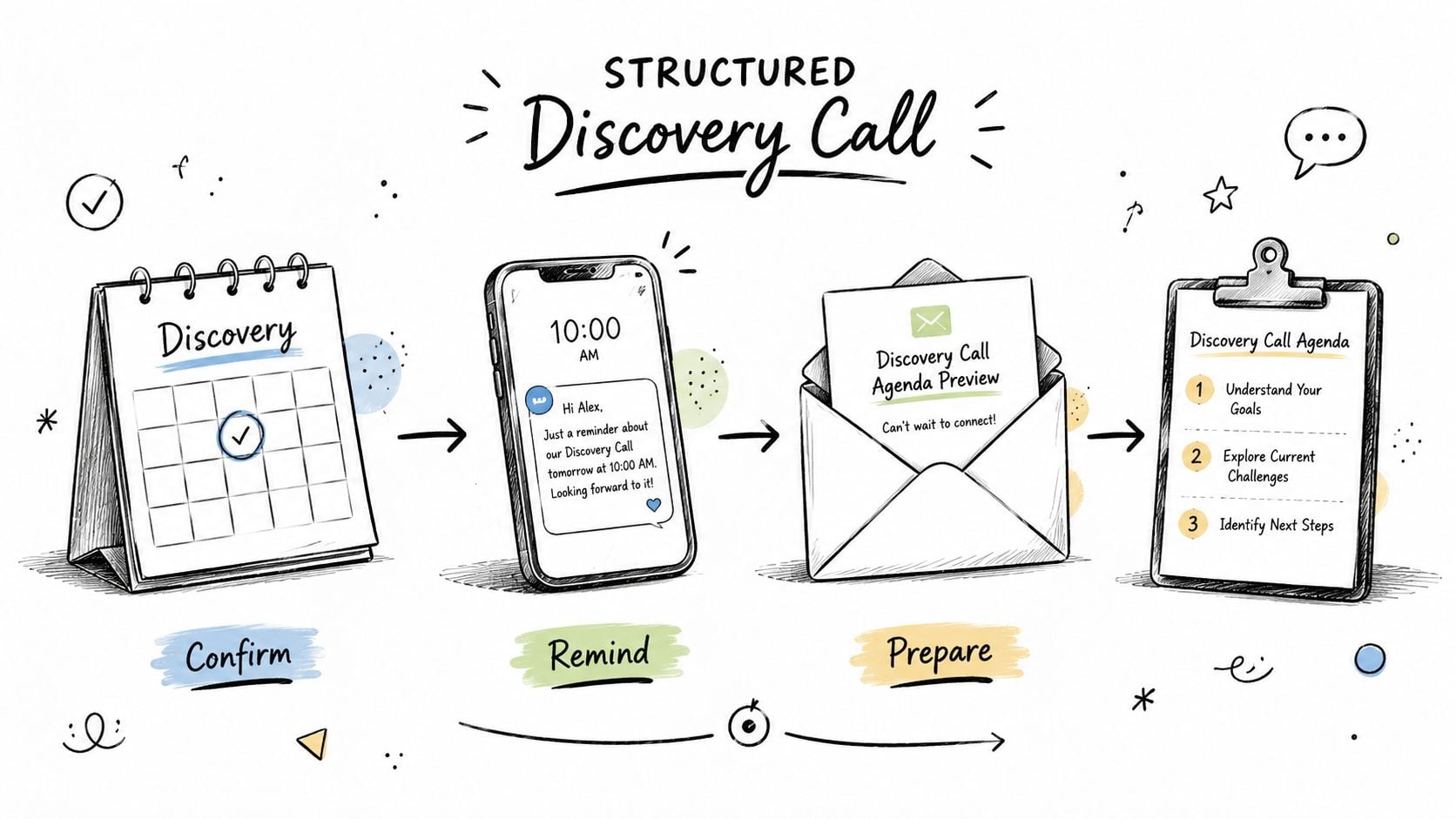
A structured discovery framework starts with a reliable booking experience. Calendly paired with Zapier can add a new contact, notify the assigned advisor, and launch confirmation messages. Acuity Scheduling can handle client reminders, while Starward Navigators combines appointment scheduling with confirmation and reminder automation.
The technology matters less than the sequence. A useful confirmation should tell the prospect why the meeting is happening, what will be discussed, who will attend, and what preparation would make the conversation productive. Pull in the company name, role, stated challenge, and relevant service area so the message feels connected to the inquiry.
Protect the advisor's preparation time
Client-facing reminders are only half the process. The facilitator needs an internal preparation alert with the original form submission, qualification notes, relevant account history, and a short agenda. If multiple advisors might attend, the record should show who owns the call and who is responsible for follow-up.
Use outcome categories that support the next action. “Qualified,” “needs more information,” “proposal expected,” and “not a fit” are more useful than a generic “call completed.” Each outcome can start a different follow-up path, which prevents every prospect from receiving the same message.
A short review after each call can improve the framework. Track which questions produce useful information, where prospects become uncertain, and which preparation materials they use. The best framework gives advisors structure while leaving room for the judgment that complex B2B engagements require.
3. Proposal Tracking With Enforced Follow-Up
A proposal that sits without an owner is not a pipeline stage. It's an unresolved decision. Advisory firms often put substantial thought into the proposal itself, then leave the next step to individual memory and a hopeful email.
A proposal tracking framework gives every proposal a visible status and a dated next action. Useful stages might include discovery complete, proposal drafting, proposal sent, review scheduled, decision pending, approved, declined, and paused. Those stages should reflect how the firm sells, not how a generic CRM labels opportunities.
HubSpot can create follow-up tasks from deal properties. Pipedrive can automate movement between custom stages, and SalesLoft can support multi-touch outreach for stalled opportunities. Starward Navigators emphasizes defined next steps between discovery and decision, which is particularly relevant for firms whose proposals involve multiple stakeholders.
Make follow-up proportional and accountable
Not every proposal deserves the same sequence. A straightforward advisory package may need a concise check-in and a scheduling link. A complex transformation engagement may require a review call, stakeholder mapping, and a response to unresolved risks. Segment by engagement type, buying committee, and decision complexity rather than sending every prospect an identical cadence.
The record should include the decision-maker, other influencers, the promised decision date, open questions, and the advisor responsible for the next contact. That information turns follow-up from “checking in” into a useful continuation of the sales conversation.
A follow-up sequence should make it easier for the buyer to decide, not merely remind them that the seller is waiting.
Measure progression qualitatively at first. Are proposals receiving responses? Are objections appearing earlier? Are advisors closing the loop when a prospect declines? A stalled proposal needs a clear disposition, because accurate learning from lost or paused work is more valuable than an inflated pipeline.
4. Unified Lead Capture and Intelligent Routing
Lead capture becomes an onboarding problem the moment information enters the firm. A website form, inbox inquiry, LinkedIn message, event conversation, and referral can all represent the same commercial opportunity, yet many small firms store each one in a different place.
Centralization gives the team one record for the person, organization, source, need, and owner. HubSpot's forms can update CRM records automatically. Pipedrive offers a centralized lead inbox, while Salesforce supports assignment rules. Starward Navigators connects forms and site tools with a broader acquisition workflow, helping firms bring website, inbox, LinkedIn, and event opportunities into one system.
Route by fit and capacity
Routing should reflect how the firm delivers expertise. Create rules for advisory specialty, client segment, geography where relevant, conflict checks, and current capacity. A lead interested in fractional finance work shouldn't sit with an advisor who only handles operational strategy, even if that advisor happens to be available.
Use a small number of meaningful qualification fields. Capture the client's stated problem, desired outcome, urgency, estimated scope, referral source, and preferred next step. Too many required fields slow down the prospect and encourage internal workarounds. Too few fields force the advisor to repeat basic questions.
A monthly source review can reveal which channels create appropriate conversations, not just the most inquiries. Firms building an email-led acquisition channel can also use this guide to generating leads for email marketing as a practical reference for connecting capture with follow-up.
Make ownership visible
The person responsible for the next action should be obvious from the record. Send an immediate internal notification, but avoid notifying an entire team when only one person needs to act. Review routing rules regularly as specialties, workloads, and service priorities change.
5. Automated First-Response Sequences
A new inquiry creates a narrow window for relevance. The first response doesn't need to sell the whole engagement. It needs to confirm receipt, show that the firm understands the inquiry, and offer a clear next step.
A strong first-response sequence starts with a short, personalized message. Include the prospect's company and role when available, reflect the problem they described, and provide one calendar link or one specific action. HubSpot, ActiveCampaign, Klaviyo, and Starward Navigators can all support trigger-based follow-up, but the sequence should remain simple enough for an advisor to maintain.
Build paths around intent
A referral lead shouldn't receive the same message as someone who downloaded a general resource. A prospect who requested a consultation may need scheduling help, while a lower-intent contact may need useful education before a sales invitation feels appropriate.
Separate sequences by source and stated need. Keep the opening message focused, then use later touches to answer common questions, explain the engagement model, and provide relevant proof. Testimonials and case studies should support the prospect's decision, not function as decorative content with no connection to their problem.
Set a clear stopping rule. Once a prospect replies, books a meeting, or asks not to be contacted, automation should pause and hand control to a person. If there's no response after the firm's chosen sequence, route the record for a deliberate decision rather than continuing indefinitely.
Human checkpoint: Automation can start the relationship, but an advisor should own the interpretation of intent.
Review responses, not vanity metrics alone. Look for the messages that produce useful replies, the questions prospects ask repeatedly, and the points where people stop engaging. Those observations should improve both the first response and the discovery call.
6. Pre-Delivery Client Context and Knowledge Transfer
The most expensive onboarding mistake is making the client repeat information they already shared. Re-discovery wastes the delivery team's time and signals that the firm's internal systems are disconnected.
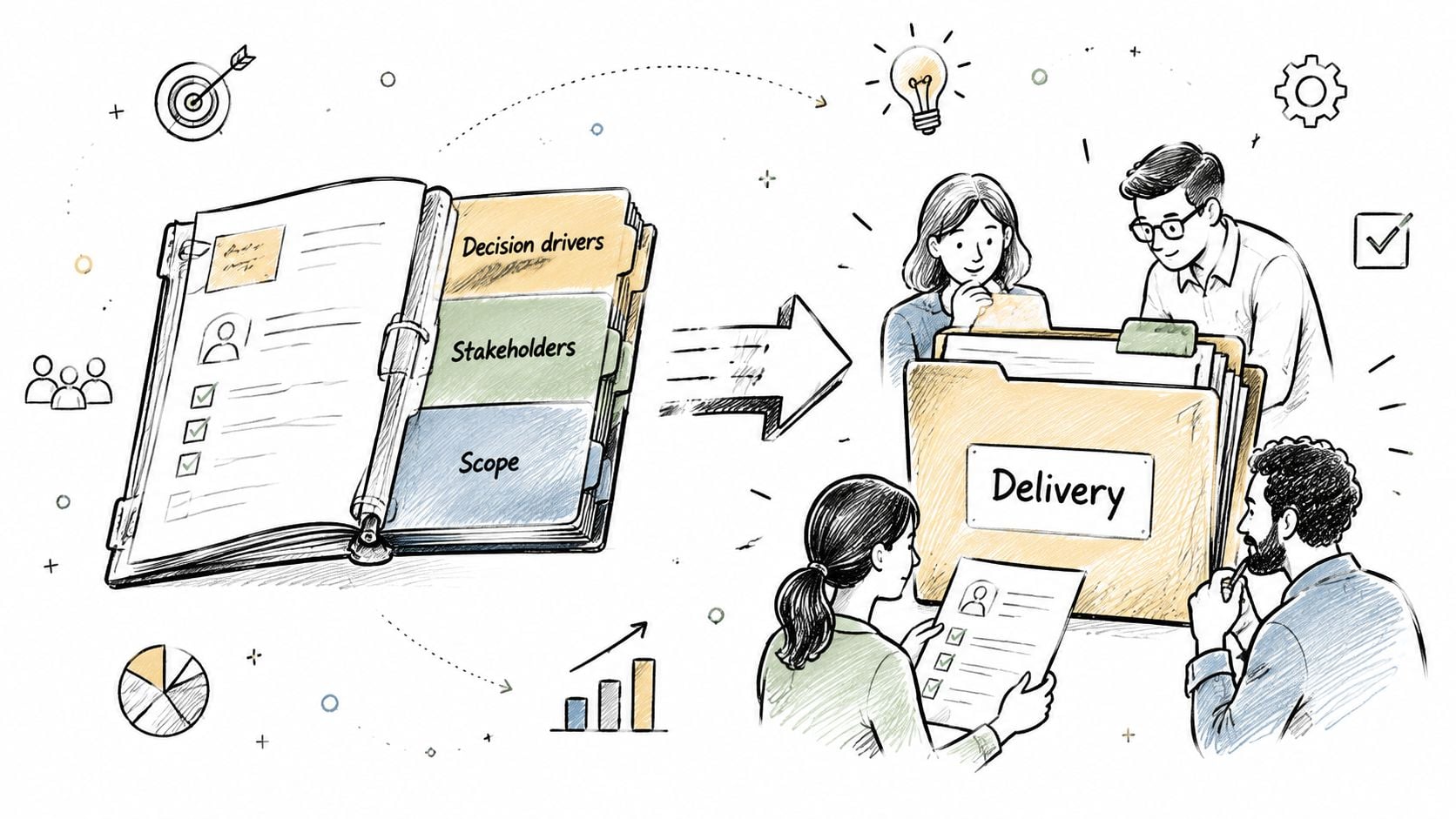
A context-transfer process turns sales knowledge into delivery-ready information. The record should contain the client's goals, current situation, decision drivers, stakeholders, agreed scope, timeline, risks, preferences, and any commitments made during the sales process. Starward Navigators can populate handoff data as an opportunity moves into delivery. HubSpot, Asana, and Monday.com can connect deal information with service or project records when fields are mapped carefully.
Capture structured context, not transcripts
A call transcript alone isn't a handoff. Delivery needs interpretation. Use mandatory discovery questions for the facts that affect scope and execution, then add a short advisor summary explaining why the client chose the engagement and what would make the first phase feel successful.
Create a client briefing document automatically at close, but require human review before it reaches the delivery owner. The salesperson should confirm that the promised deliverables, deadlines, decision-makers, and unresolved questions are accurate. Delivery should have a way to flag missing information and recommend changes to future discovery questions.
A short internal review is valuable when the engagement is complex, unusual, or high-risk. It's unnecessary for every small project if the record already contains complete information. That trade-off keeps the process practical for small advisory teams.
The handoff is complete when delivery can explain the client's desired outcome, immediate priorities, agreed boundaries, and first action without reopening the entire sales history.
7. Referral Relationship Tracking and Nurture Automation
Referrals are often managed through memory, scattered notes, and occasional thank-you messages. That approach can feel personal, but it becomes unreliable as the firm grows or as several people interact with the same referral partner.
A referral relationship framework gives the firm a structured view of who introduces opportunities, what type of client they refer, how active the relationship is, and what support would make future introductions easier. HubSpot can create partner workflows, Pipedrive can organize contact relationships, and LinkedIn Sales Navigator can support systematic outreach. Starward Navigators includes relationship and referral workflows alongside acquisition and delivery pipelines.
Keep gratitude specific
A thank-you should acknowledge the actual introduction and the client's context. Don't promise confidential results or disclose details the client hasn't authorized. Share appropriate updates only when they're permitted and useful to the referrer.
Segment partners by relationship type, strategic fit, and recent activity. A trusted professional alliance may call for periodic planning conversations. A former client may respond better to a useful resource or a thoughtful check-in. A broad, impersonal newsletter can weaken a relationship that depends on trust.
A practical referral record can include:
- Relationship owner: Name the person responsible for staying in touch.
- Referral context: Record why the partner introduced the client and which problems they commonly identify.
- Follow-up commitment: Set the next relationship action, such as a conversation, resource, or thank-you.
- Permission boundaries: Note what information can and can't be shared about referred work.
For a deeper operating model, use this resource on how to track referrals. The objective isn't to turn every relationship into a points program. It's to make appreciation, communication, and learning consistent enough that referrals don't depend on one person remembering at the right moment.
8. Standardized Onboarding Checklist and Task Automation
A checklist creates repeatability, but a checklist alone doesn't create accountability. The useful version assigns each activity to a person, attaches the right client communication, and shows what must happen before the engagement can proceed.
Start by documenting the current process without trying to improve it immediately. Mark each step as mandatory, optional, conditional, internal, or client-owned. Then create separate templates for different services, because a fractional executive engagement may need a different intake and approval path than a strategy workshop.
Use gates instead of task clutter
A good workflow doesn't assign every task on the first day. It releases work when prerequisites are complete. For example, the internal briefing can precede the kickoff agenda, and the kickoff outcome can precede the first deliverable plan.
Tools such as Asana and Monday.com support project templates and task automations. HubSpot can create onboarding tasks from lifecycle or deal changes. Starward Navigators provides a client onboarding workflow that connects the Won stage with delivery activity and a broader first-month structure.
Client-facing messages should live within the same workflow as internal tasks. The person responsible for intake shouldn't have to search for the welcome email template, and the delivery owner should see whether the client has supplied the materials needed for the next step.
Use approval gates where quality or scope is at risk. A senior advisor may review the kickoff plan for a complex engagement, while a simpler recurring service can move through a lighter path. Review the templates after client feedback, delivery retrospectives, and scope disputes. Standardization should remove avoidable variation, not prevent advisors from making informed exceptions.
This client onboarding workflow shows the kind of connected structure firms can adapt rather than rebuilding every task from a blank board.
9. Integration and Data Centralization Architecture
Disconnected tools create hidden onboarding work. An advisor enters a contact in a form, copies it into a CRM, adds a calendar event, sends an email, creates a project, and then updates several records after the kickoff. Each transfer creates an opportunity for inconsistency.
A centralized architecture makes the CRM or operating system the source of truth for core relationship data. Email, calendar, forms, project management, and internal communication can connect around that record. HubSpot offers native email and calendar integrations. Zapier can connect Salesforce with Gmail and Slack, while Microsoft 365 and Dynamics 365 can support a connected enterprise environment.
Map the data before choosing the connector
List each system, the fields it owns, the fields it receives, and the events that should trigger an update. The client's legal name may belong to the CRM, the appointment time to the calendar, and deliverable status to the project workspace. Decide what happens when two systems contain different values.
Start with the integrations that remove the most repetitive work:
- CRM and forms: Capture and route inquiries without manual copying.
- CRM and calendar: Connect booking, ownership, and meeting outcomes.
- CRM and email: Preserve communication history and trigger appropriate follow-up.
- CRM and delivery workspace: Transfer scope, dates, owners, and client context.
Test failed scenarios, not only successful ones. A disconnected calendar, duplicate contact, missing required field, or changed email address can expose weaknesses that a normal test won't catch. Add monitoring for failed syncs and give the team a clear recovery procedure.
Use the data centralization architecture diagram as a visual prompt for mapping the flow. A connected system isn't defined by the number of integrations. It's defined by whether the team can trust the record and act without duplicating work.
A short demonstration of connected onboarding architecture can also help teams evaluate how data moves across tools.
9-Point Client Onboarding Process Comparison
| Item | 🔄 Implementation complexity | ⚡ Resource requirements | 📊 Expected outcomes | 💡 Ideal use cases | ⭐ Key advantages |
|---|---|---|---|---|---|
| Automated Handoff & Pipeline Kickoff | Medium, pipeline setup, calendar & CRM integrations; some customization | Moderate, CRM admin, calendar sync, templates, testing | Faster time-to-delivery; consistent onboarding; fewer handoff gaps | Small consulting firms needing clear sales→delivery transition | Eliminates manual errors; accelerates kickoffs; improves accountability |
| Structured Discovery Call Framework | Low, scheduling templates & reminder sequences | Low, scheduling tool, email/SMS service, agenda templates | Lower no-shows; better-prepared meetings; stronger first impressions | Advisory firms with high-volume discovery calls | Reduces no-shows; standardizes prep; automates reminders |
| Proposal Tracking with Enforced Follow-Up | Medium, stage tracking and timed cadence rules | Moderate, CRM workflows, cadence tool, dashboard & escalation rules | Higher close rates (≈20–35%); fewer stalled proposals; clearer pipeline | Firms with longer sales cycles requiring multi-touch follow-up | Systematic follow-up; visibility on stalled deals; improves close rates |
| Unified Lead Capture & Intelligent Routing | Medium–High, multi-source capture, scoring & routing logic | Moderate, forms, scoring rules, CRM routing, dedupe rules | Faster first contact; better lead fit; clear attribution | Multi-person teams receiving leads from many channels | Routes to best-fit advisor; eliminates manual entry; single source of truth |
| Automated First-Response Sequences | Low, templated welcome sequences with personalization tokens | Low, email automation platform, calendar link, content assets | Immediate engagement; higher meeting bookings; scalable nurture | Solo consultants and small firms needing instant responses | Captures attention quickly; scalable outreach; drives discovery bookings |
| Pre-Delivery Client Context & Knowledge Transfer | Medium, discovery templates, field mapping, mandatory capture | Moderate, templates, CRM custom fields, team handoff review | Saves time (≈10–20 hrs/engagement); reduces re-discovery; smoother starts | Firms delivering complex engagements with many stakeholders | Ensures continuity; faster project start; reduces misalignment |
| Referral Relationship Tracking & Nurture Automation | Low–Medium, partner tracking and scheduled nurture workflows | Low, CRM partner records, nurture sequences, reporting | Increased referral volume; predictable referral pipeline; lower CAC | Firms where referrals account for large portion of new business | Systematizes gratitude; measures referral ROI; builds referral pipelines |
| Standardized Onboarding Checklist & Task Automation | Medium, design checklists, dependencies, templated tasks | Moderate, PM tool, automation rules, client comms templates | Consistent onboarding; fewer missed steps; scalable operations | Growing firms scaling beyond founders and standardizing delivery | Prevents missed steps; consistent client experience; easier scaling |
| Integration & Data Centralization Architecture | High, technical two-way syncs, data mapping, ongoing maintenance | High, integration platform/dev resources, monitoring, governance | Single client record; reduced manual entry; fewer communication gaps | Firms suffering tool fragmentation and manual syncing pain | Eliminates duplicate data; ensures current info across tools; audit trails |
Build the Best Client Onboarding Process for Your Firm
The best client onboarding process for a small advisory firm isn't the one with the most automation. It's the smallest connected workflow that fixes the firm's most expensive gap without creating new administrative work.
Start at the front of the operating system. Centralize lead capture and routing so inquiries have an owner. Stabilize discovery logistics with confirmation messages, reminders, preparation alerts, and defined outcomes. Then enforce proposal next steps so the firm knows whether a prospect is progressing, paused, or closed.
Once those stages work reliably, improve the transition into delivery. Automate the handoff only after the firm has defined its Won criteria, mapped delivery stages, and decided what context the delivery team needs. Add a standardized onboarding checklist with conditional tasks, approval gates, client communications, and a clear owner for every important action.
Measure the workflow before expanding it. Useful measures include speed to first response, proposal progression, handoff completion, onboarding consistency, time to first value, and day-30 satisfaction. A 2026 onboarding benchmark found that top-performing firms responded within four hours of signing, used intake portals rather than email, completed onboarding in five days or fewer, and automated follow-ups. The same report recorded a median first-response time of 2.4 hours for the top 20% of firms, 1.8 days for the middle 60%, and 4.2 days for the bottom 20%, illustrating the operational gap in the earliest client phase (2026 client onboarding benchmark report).
Speed should serve value, not replace it. A 2026 industry summary reported that B2B SaaS onboarding commonly lasts 30 to 45 days, while self-serve experiences should aim for less than 2 minutes to first perceived value and use about 14 days of nurturing to support conversion. It also reported retention above 80% at 12 months among customers reaching first value within 14 days, compared with 35% to 50% for those taking longer than 30 days (customer onboarding statistics and benchmarks). Advisory firms should adapt the principle to their own engagements by defining the first meaningful result, not by copying a SaaS timeline.
The commercial case is also broader than administration. A 2026 industry roundup reported a 63% year-over-year increase in customer satisfaction for companies with structured onboarding and cited 63% of buyers evaluating onboarding support before committing (structured onboarding statistics). Treat onboarding as part of the sales motion, then decide which elements deserve premium implementation, deeper education, or ongoing advisory support.
The operational bottleneck often appears in handoffs and exceptions rather than kickoff meetings. Reports cited 45% of teams struggling with siloed information and 62% of customer success leaders lacking real-time onboarding visibility, which explains why personalization alone doesn't solve coordination failures (state of onboarding report). Assign ownership, centralize context, and make exceptions visible.
Finally, decide whether onboarding is a service asset you can package. 2025 reporting found that 54.5% of companies were looking to price onboarding as a premium service, nearly 50% already used AI-powered onboarding tools, about 90% planned to use AI or automation in 2025, and only 25% had fully automated processes (2025 customer onboarding report). For an advisory firm, that may mean standardizing the core experience while offering premium implementation, specialized intake, continuous education, or re-onboarding as client needs expand.
Starward Navigators is a relevant option for firms that want a prebuilt system across business development, client delivery, and relationships and referrals. Its Map, Install, and Go Live implementation approach is designed for firms seeking an operating system for these connected workflows rather than a blank CRM that requires extensive configuration.
Starward Navigators provides prebuilt pipelines, automated follow-up, appointment reminders, proposal tracking, client handoffs, and referral relationship workflows for small consulting and advisory firms. Visit Starward Navigators to explore a connected approach to building and implementing your client onboarding process.