A Tuesday discovery call is booked through the intake form. The partner has reviewed the prospect's website, the account executive has checked the qualification notes, and everyone is ready at 10 a.m. At 10:04, the meeting room is still empty. The join link sits untouched, the partner's preparation time is gone, and the opportunity remains stuck at the same pipeline stage.
That failure rarely comes from one dramatic mistake. More often, the prospect forgot, missed the email, needed a different time, or never received a useful prompt to confirm the booking. An appointment reminders app can address the immediate attendance problem, but a consulting firm gets more value when it treats the reminder as part of a broader revenue workflow. A confirmation, cancellation, reschedule, no-show, or rebooking should all update the firm's operating picture.
The practical question isn't whether another notification should enter the inbox. It's how to prevent a booked meeting from becoming a dead end, recover the slot when plans change, and keep the opportunity moving.
Table of Contents
- The Discovery Call That Never Happened
- What an Appointment Reminders App Actually Does
- Must-Have Features for Consulting Firms
- Why Reminder Design Matters as Much as Sending
- Wiring Reminders Into Your Acquisition Operating System
- Beyond No-Shows, Two-Way Workflows and Pipeline Recovery
- A 14-Day Rollout Plan and the Metrics Worth Watching
The Discovery Call That Never Happened
The partner asks the question nobody wants to answer: was the lead even qualified?
The account executive has a reasonable explanation. The prospect completed the form, selected a time, and received the calendar invitation. From the booking system's perspective, everything worked. From the firm's perspective, the opportunity produced no conversation, no next step, and no reliable signal about buying intent.
That distinction matters in a small consultancy. A missed discovery call consumes more than the scheduled meeting length. Someone prepared an agenda, reviewed the account, reserved attention, and likely delayed another task. If the firm treats the appointment as a calendar entry only, the team may mark the lead as cold or leave it untouched while the prospect's interest fades.

A reminder changes the operating sequence before the meeting. It gives the prospect a clear chance to confirm, cancel, or choose another time. It gives the firm an opportunity to recognize uncertainty rather than interpret silence as rejection. The reminder therefore becomes the smallest unit of revenue protection, because it protects the work already invested in creating the opportunity.
Evidence supports the basic intervention. A BMJ Open systematic review and meta-analysis summarized by Clinekt Health covered 16 healthcare studies and reported a pooled no-show rate of 15% in intervention groups versus 21% in control groups. Recipients were 25% less likely to miss appointments, with a risk ratio of 0.75. Healthcare isn't consulting, but the operational lesson transfers: electronic reminders can influence attendance across appointment types.
The stronger consulting use case goes further. A reminder shouldn't end at “See you tomorrow.” It should capture the appointment's current state and route the next action. That means the rest of the workflow knows whether the prospect confirmed, rescheduled, canceled, failed to attend, or rebooked.
What an Appointment Reminders App Actually Does
An appointment reminders app sits between booking and attendance. It owns the confirmation message, reminder cadence, delivery channel, response handling, and rebooking path. The appointment becomes a workflow with states, not just an event on a consultant's calendar.
That makes it different from several tools firms commonly confuse with it:
- Native calendar notifications alert the person who owns the calendar. They're usually device-bound and often operate as a one-shot prompt.
- CRM task reminders tell an internal team member to perform an action. They don't necessarily reach the prospect or update the booking state.
- Mass email tools can send polished messages, but they usually don't know whether a specific recipient confirmed, canceled, or moved the meeting.
The operational value comes from managing transitions. A booking event should create a confirmed record or a pending confirmation state. A cancellation should release the slot and offer a new path. A no-show should alert the owner and create a follow-up action. A rebooking should preserve the original prospect, source, and opportunity history instead of creating an unconnected appointment.
The working definition
For a consulting firm, the category can be defined:
An appointment reminders app is a two-way scheduling workflow that confirms appointments, sends context-aware reminders, records attendance states, and routes cancellations or no-shows back into the pipeline.
That definition sets a useful boundary. A tool that only sends a notification may reduce some forgetfulness, but it doesn't provide pipeline hygiene by itself. A system that records what happened and triggers the appropriate handoff can help the firm decide what to do next without asking a partner to inspect several disconnected tools.
Must-Have Features for Consulting Firms
Consultancies should evaluate reminder software against the full life of a meeting. The table stakes are reliable delivery and accurate booking details. Professionalised firms also need the system to respond intelligently when a prospect changes plans.
| Feature | What It Does | Why a Consulting Firm Needs It |
|---|---|---|
| Two-way confirmation | Lets the prospect confirm, cancel, or reschedule from the message | A silent prospect becomes a visible appointment state, and the firm gets earlier notice of changes |
| Multi-channel delivery | Uses email and SMS, with other channels available where appropriate | Different audiences notice different channels, and longer meeting details fit better in email |
| Timezone-aware scheduling | Displays and sends times based on the prospect's location | Prevents a client from receiving a morning reminder at an unreasonable local hour |
| Two-way calendar sync | Reads consultant and client availability and writes approved changes back | Reduces double booking and keeps the booking page aligned with real capacity |
| Internal alerts | Notifies the consultant, partner, or AE about confirmations, changes, and no-shows | Gives the team time to prepare and prevents missed handoffs |
| Embedded rebooking links | Includes a direct route to another time in confirmations and reminders | Turns a cancellation into an active recovery opportunity rather than a lost conversation |
Start with confirmation, not decoration
A prospect who can confirm with one tap has less friction than one who must reply to an email, find a calendar invite, or visit a general booking page. The same principle applies to cancellation. Easy cancellation isn't a concession to poor commitment. It gives the firm a chance to release the slot, ask for a reason where appropriate, and offer a better time.
Treat timezone logic as a data requirement
The consultant's Outlook setting isn't a reliable substitute for the prospect's timezone. Intake forms and booking pages should capture location or timezone explicitly, especially when a firm sells across regions. Every message should show the local date, local time, and meeting link clearly.
Multi-channel delivery is useful, but it shouldn't become uncontrolled repetition. Use email for context, preparation notes, and calendar details. Use SMS for a short action prompt. Add WhatsApp or voice only when the audience and consent process justify it.
The feature that separates a mature workflow from a basic one is rebooking logic. If a prospect cancels, the application should offer suitable alternatives immediately, preserve the opportunity record, and notify the assigned owner. The firm shouldn't depend on a consultant remembering to send a new link later.
Why Reminder Design Matters as Much as Sending
Sending any reminder is better than leaving the prospect alone, but design determines whether the message produces a useful response. Timing, channel, wording, and the requested action all shape what happens next.
The evidence is clear that electronic notifications can affect attendance. A BMJ Open review reported that digital notifications made patients 23% more likely to attend clinic, with a risk ratio of 1.23, and 25% less likely to no-show, with a risk ratio of 0.75. The same source reported moderate-quality evidence that mobile text reminders improved attendance compared with no reminder, with RR 1.14 and a 95% confidence interval of 1.03 to 1.26.
Those findings don't justify copying a healthcare sequence directly into a consulting workflow. They do support a more disciplined conclusion: the reminder isn't a binary feature. The firm should design the sequence around the appointment's risk, audience, and lead time.
Build cadence around the decision window
A discovery call for an executive prospect often needs an earlier reminder than a routine internal meeting. A message sent too close to the start time may confirm attendance but leave no practical opportunity to reschedule. A useful sequence commonly includes:
- Immediate confirmation: Show the selected time, timezone, meeting purpose, and join link.
- Advance reminder: Give the prospect enough time to identify a conflict and select another slot.
- Short-window prompt: Place the meeting back in view without overwhelming the recipient.
The incremental value of layered reminders appears in randomized evidence. In a study of 125,076 primary care visits, no-shows fell from 9.1% with one text to 8.4% with two texts. In 33,593 mental health visits, no-shows fell from 20.1% to 17.9%. The study reported relative risks of 0.93 and 0.89, respectively, as described in the randomized study available through PMC. The consulting implication is not that every firm should use identical offsets. It's that cadence can be treated as an operating variable.
Practical rule: Give the prospect a useful action in every message. Confirm, change the time, review the agenda, or join the call.
Copy matters too. “Reminder, meeting tomorrow” is weaker than a message that identifies the meeting purpose and offers a clear reschedule path. Operators should test tone and send offsets, then review outcomes by meeting type rather than assuming one sequence suits every audience.
Wiring Reminders Into Your Acquisition Operating System
An appointment should enter the CRM as live deal data the moment someone books it. The booking event can update the opportunity stage, assign ownership, start the reminder sequence, and alert the consultant responsible for the call.
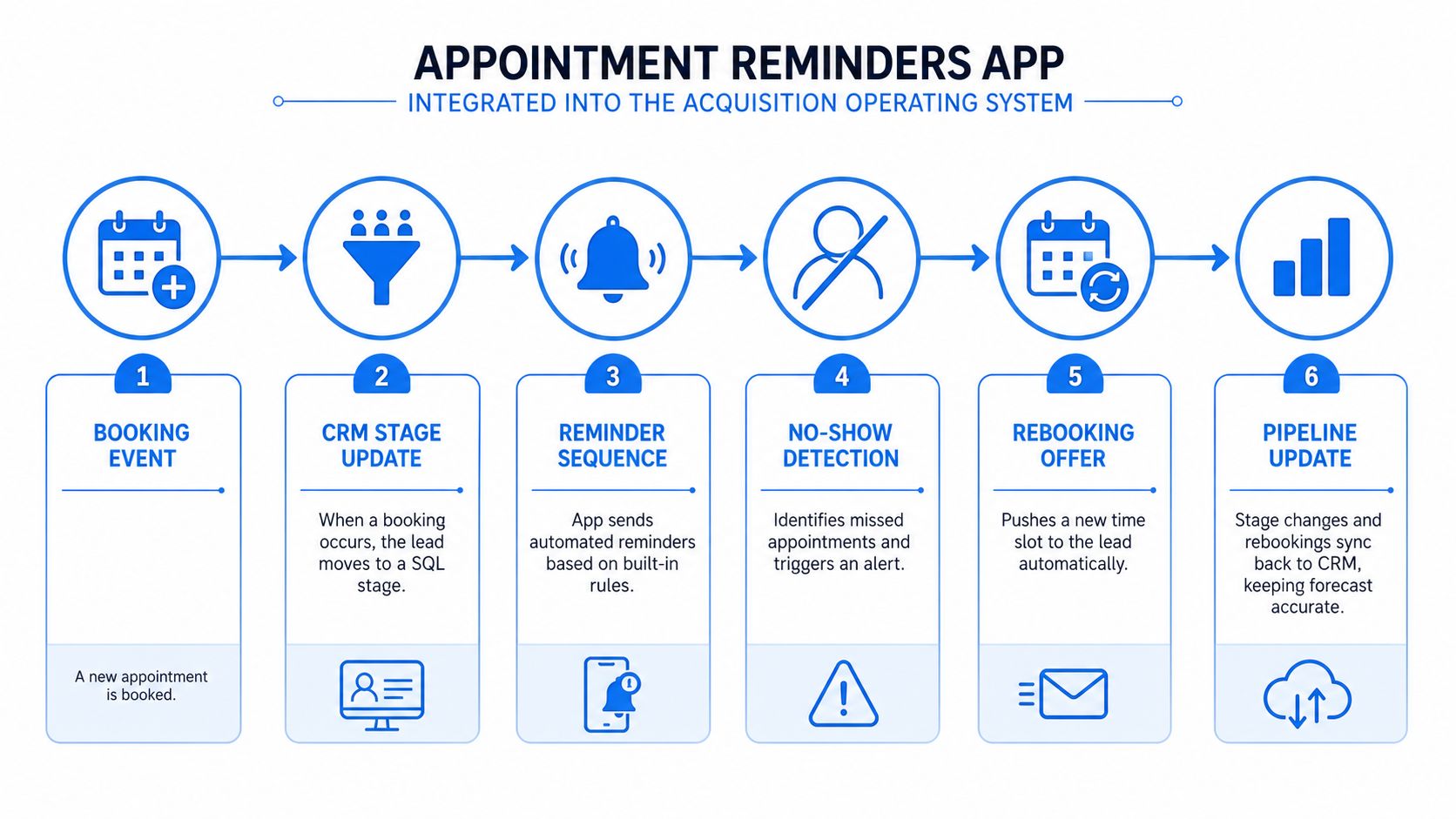
The handoff needs clear rules. A confirmed meeting should move the opportunity into the appropriate pre-call state and preserve the source that produced it. A cancellation should retain the opportunity while opening the rebooking path. A no-show should create an owner alert and a follow-up task instead of leaving the record marked as booked.
Use events as triggers
A practical event map looks like this:
- Booking event: Create or update the opportunity and attach the appointment details.
- Confirmation response: Record the prospect's commitment and notify the assigned consultant when needed.
- Reschedule response: Preserve source attribution, update the time, and reset only the relevant reminder steps.
- No-show event: Alert the owner, reopen the follow-up motion, and offer a fresh booking path.
- Completed meeting: Move the opportunity to the next stage and prompt for notes, proposal preparation, or a defined next step.
This structure prevents a common failure. The calendar says the meeting occurred, but the CRM still shows an untouched lead. That gap makes forecasting unreliable and forces the team to reconstruct history manually.
Appointment automation for consulting and advisory firms is one example of how booking, confirmations, reminders, rescheduling, and no-show recovery can sit within a broader acquisition workflow. The important design choice is the connection between the reminder event and the opportunity record, not the presence of a standalone notification tool.
The acquisition operating system should also pass context forward. A meeting booked from a referral should remain identifiable as a referral after rescheduling. A prospect who no-shows should enter a recovery sequence that respects the prior conversation. The partner shouldn't need to search an inbox to discover why the opportunity stalled.
That architecture turns reminders into a control layer for pipeline momentum. The app handles the client-facing exchange, while the acquisition system handles ownership, stage movement, alerts, and next steps.
Beyond No-Shows, Two-Way Workflows and Pipeline Recovery
A narrow no-show dashboard misses a large part of the operational value. Prospects who can't attend may still be interested. If the only available action is to ignore the reminder, the firm loses useful information and creates unnecessary friction.
Let the prospect change the state
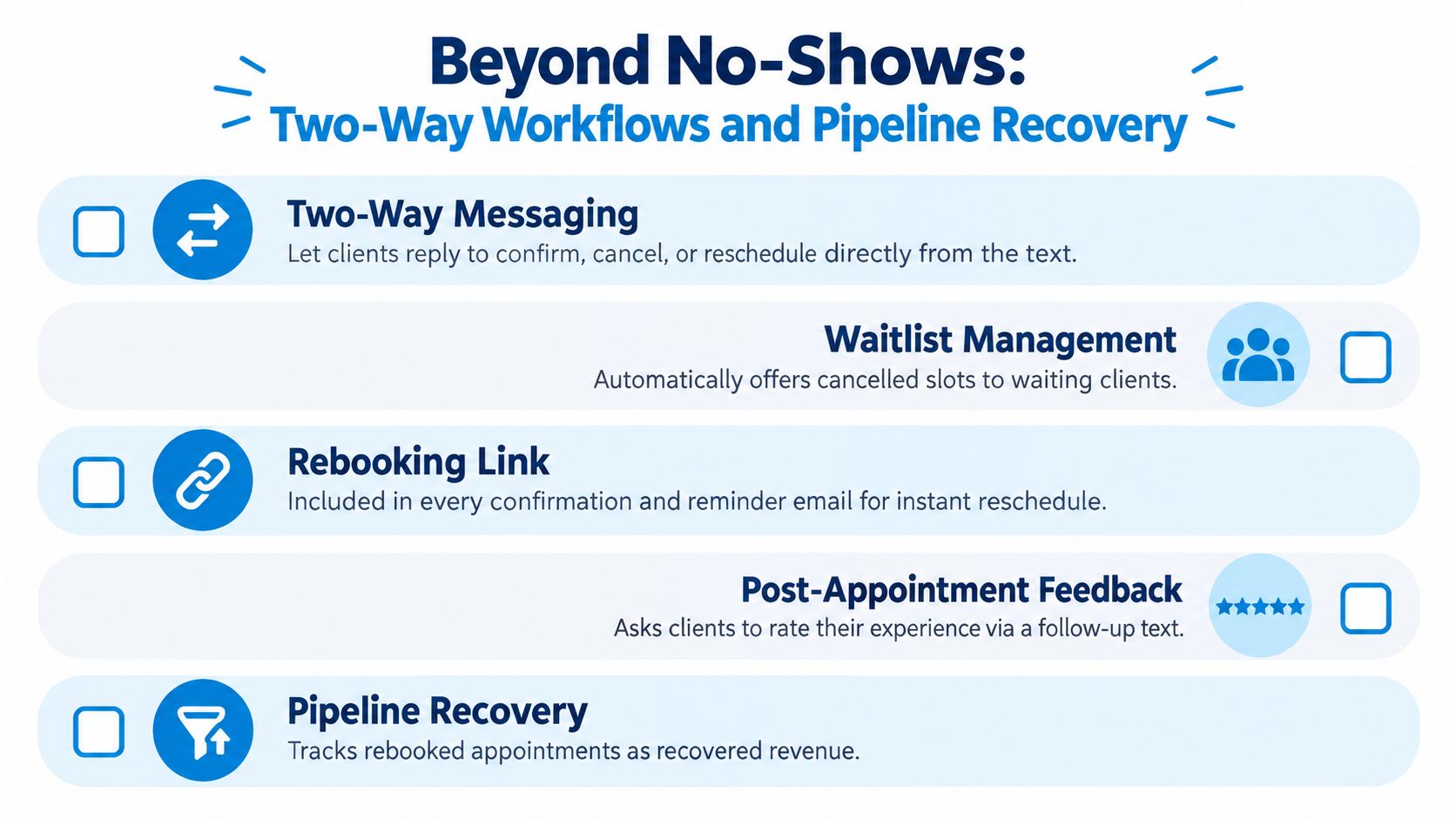
Two-way messaging gives the prospect a direct route to say, “I need another time.” That response is operationally better than silence because the firm can preserve the relationship and release the original slot. The workflow should ask for minimal context, offer suitable alternatives, and keep the opportunity attached to the same contact and source.
A systematic review on digital reminders and cancellation behavior highlights an important nuance: reminders can increase cancellations and rescheduling of unwanted appointments. That isn't automatically a negative result. In a consulting pipeline, an early cancellation can be more valuable than a late no-show because the firm has time to recover the slot and clarify whether the opportunity is still active.
Use waitlists as a revenue control
A waitlist should contain qualified prospects, not an unfiltered queue. When a valuable slot opens, the system can offer it to the next suitable lead based on service fit, urgency, geography, or partner availability. For example, an executive introduction canceled in the morning could trigger an offer to the next qualified prospect, while the original opportunity receives a rebooking link.
The same logic applies after the meeting. A reminder thread can lead into recap delivery, feedback collection, proposal instructions, and next-step scheduling. The firm shouldn't treat “attended” as the finish line. Attendance only creates value when someone records the outcome and moves the opportunity toward a decision.
Preserve the conversation
A rebooked meeting must retain its history. The original booking source, assigned owner, qualification notes, and prior responses should stay connected. That makes the workflow useful for client onboarding workflows too, because a won opportunity can transition into delivery without forcing the team to rebuild the record.
A canceled meeting is a pipeline event, not a pipeline failure.
Measure recovered opportunities alongside no-shows. A firm that reduces silent losses, fills released capacity, and gets more prospects to a defined next step is improving pipeline hygiene even when attendance alone doesn't tell the whole story.
A 14-Day Rollout Plan and the Metrics Worth Watching
A small consulting firm doesn't need a sprawling transformation project to improve appointment operations. A focused rollout can standardize the booking path, create a sensible reminder sequence, connect responses to the pipeline, and expose the gaps that need human judgment.
Days 1 through 3
Audit every way a meeting gets booked. Include the website form, scheduling links sent by partners, direct inbox replies, referral introductions, and manually created calendar events. Identify where timezone data is captured, which channels have consent, and who owns the opportunity after booking.
Choose the minimum channel mix that matches the firm's audience. Email may carry the agenda and meeting details, while SMS can handle the short confirmation prompt. Don't activate additional channels until the firm has clear routing, consent, and ownership rules.
Days 4 through 6
Configure the immediate confirmation, an advance reminder, and a short-window prompt. Verify that every template displays the prospect's local date and time, the correct consultant, the meeting purpose, and a working reschedule route.
Use the firm's client onboarding template as a model for required fields and ownership discipline. The reminder sequence should draw from structured data rather than improvised notes.
Days 7 through 9
Turn on two-way confirm, cancel, and rebook responses. Add internal alerts for the opportunity owner and any partner who will participate in the call. Test the edge cases manually, including a cancellation, a reschedule across timezones, a duplicate booking, and a no-show.
Days 10 through 12
Connect reminder events to the acquisition system. A booking should update the stage, a confirmation should be visible to the owner, a no-show should create a recovery action, and a rebooking should retain attribution. Keep the first integration narrow enough that the team can see every event while it learns the workflow.
Days 13 through 14
Pilot with one partner's calendar and a defined set of meetings. Watch the queue live, inspect message timing, review responses, and adjust copy where prospects hesitate. Expand only after the pilot produces a reliable handoff from booking to next step.
| Phase | Days | Key Actions | Metric to Watch |
|---|---|---|---|
| Audit | 1 to 3 | Map booking sources, owners, channels, and timezone fields | Percentage of bookings with complete routing data |
| Configure | 4 to 6 | Build confirmation and reminder sequence | Delivery and confirmation behavior |
| Route responses | 7 to 9 | Enable two-way actions and internal alerts | Reschedule and cancellation response time |
| Connect pipeline | 10 to 12 | Sync stages, no-shows, rebookings, and notes | Opportunities with a current appointment state |
| Pilot and tune | 13 to 14 | Run one partner's book and revise copy | Show rate, recovery activity, and next-step bookings |
Track confirmation rate, show rate, median reschedule latency, and pipeline velocity from reminded meetings to booked next steps. Set internal thresholds that reflect the firm's baseline instead of importing unsupported targets. If show performance stalls, inspect timing, message clarity, timezone handling, and rebooking friction before blaming the software.
The right appointment reminders app doesn't replace qualification, good outreach, or strong discovery calls. It protects the handoffs between them. When every booking response becomes visible deal data, the firm stops treating empty calendar slots as isolated disappointments and starts managing them as recoverable pipeline events.
Starward Navigators provides prebuilt acquisition pipelines, appointment confirmations and reminders, follow-up automation, proposal tracking, and client handoff workflows for small consulting and advisory firms. Visit Starward Navigators to see how its appointment automation can connect meeting logistics with the pipeline instead of leaving reminders in a scheduling silo.