You leave a client workshop with a full notebook and a crowded inbox. A promising web inquiry arrived while you were facilitating, and the proposal you sent earlier still needs a decision date. By evening, both are waiting for attention, even though everyone at the firm intended to follow up.
A client follow up system closes that gap between intention and action. For an advisory firm, the payoff isn't more email. It's fewer opportunities lost to silence, a named owner on every open item, proposals with dated next steps, a clean transition into delivery, and a pipeline you can inspect without borrowing a partner's memory.
Table of Contents
- What a Client Follow Up System Is
- The Parts a Small Advisory Firm Must Run
- Speed and Persistence Behind Qualification
- Proposal Follow Up by Buyer Readiness
- Failure Modes That Lose Consulting Work
- How to Select and Install the System
- Map the Firm Before You Add Software
What a Client Follow Up System Is
A client follow-up system is the combination of rules, triggers, owners, and records that carries a relationship from first contact through a decision, then into delivery and referrals when work is won. Software supports it, but software alone isn't the system.
Consider the inquiry that arrived during your workshop. A reminder app might tell you to reply later. A spreadsheet might preserve the contact's name. An empty CRM might hold both, yet still leave nobody accountable for taking action.
The layers that make follow-up dependable
A working system connects three layers:
- Capture: Website forms, inbox messages, LinkedIn conversations, and event contacts connect to the right opportunity, rather than becoming disconnected lists.
- Commitment: Each open opportunity has a named owner and a dated next step. Another colleague can tell what's supposed to happen without reading an entire email thread.
- Control: When someone misses that commitment, the system creates an exception, alerts a backup, or routes the item for review.
The distinction matters when the same consultants sell and deliver. A partner can be committed to a prospect and still miss a message while traveling or running a workshop. Good intentions don't provide coverage.
Think of an air-traffic handoff. The next controller is named before the first controller looks away. Responsibility doesn't disappear between people.
Judge the habit before buying the tool
For the workshop inquiry, capture means recording the message against an opportunity. Commitment means assigning someone to assess it by a stated time. Control means alerting a backup if that assessment doesn't happen.
The same test applies to a proposal, a missed discovery call, or a referral introduction. Can a colleague see the next action, its owner, and what happens if it's missed?
You can assess those layers before purchasing anything. If you can't describe them, start with the operating rules. Otherwise, you'll buy a better place to store unfinished work.
The Parts a Small Advisory Firm Must Run
Parts of a client follow-up system
| Part | What it must do | Trigger | Owner |
|---|---|---|---|
| Lead capture and first response | Log the inquiry, acknowledge it, and assign an owner | New contact from website, inbox, LinkedIn, or an event | Business development owner |
| Discovery logistics | Send confirmation and reminders, then recover a missed meeting | Meeting booked or no-show | Meeting owner |
| Proposal tracking | Store sent date, decision owner, next-step date, and outcome | Scope or proposal sent | Opportunity owner |
| Human escalation | Alert a backup when a response window or next-step date passes | Missed SLA or aged next step | Partner or designated backup |
| Referral nurture | Thank the source when a referral lands and continue a spaced rhythm | Introduction received or partner goes quiet | Relationship owner |
| Client handoff | Mark Won, start delivery, notify the owner, and schedule kickoff | Opportunity becomes Won | Delivery owner |
From inquiry to decision
Start with capture. Connect website forms and the shared business-development inbox to the CRM. For LinkedIn and event conversations, give consultants a short intake form or a defined manual entry task. Don't assume every channel will integrate automatically.
Match the person to an existing organization and opportunity before creating another record. Otherwise, colleagues may contact the same buyer independently without seeing each other's conversations.
Discovery logistics should preserve momentum after booking. Confirm the meeting, provide joining details, send reminders, and give the meeting owner a recovery task if the prospect doesn't attend. A missed call needs a status, not an abandoned calendar entry.
For the connection between contact records and outbound communication, the AONMeetings guide to CRM and email provides useful context. The practical requirement is that a colleague can see what was sent and what happened next.
Proposal tracking begins when the document leaves the firm, not when someone remembers to update the pipeline. Store the decision owner separately from your internal opportunity owner. The buyer's decision process and your team's accountability aren't the same thing.
Beyond the sale
Escalation gives the backup enough context to act: the inquiry, prior conversation, missed commitment, and required decision. An alert saying only that an opportunity is overdue creates another investigation.
Referral nurture belongs to the relationship owner, even when someone else handles the introduced opportunity. Keep the source relationship distinct from the sales conversation, and avoid sharing confidential prospect details in a thank-you.
For won work, use a defined client onboarding workflow to connect the commercial commitment to delivery. The delivery owner needs the agreed scope, stakeholder details, promises made during sales, and the kickoff action.
Run an absence test: if the usual owner were unavailable, which rows would still move? Mark each row as operational, partly manual, or held in someone's head. That gap list is a better selection brief than a collection of desired software features.
Speed and Persistence Behind Qualification
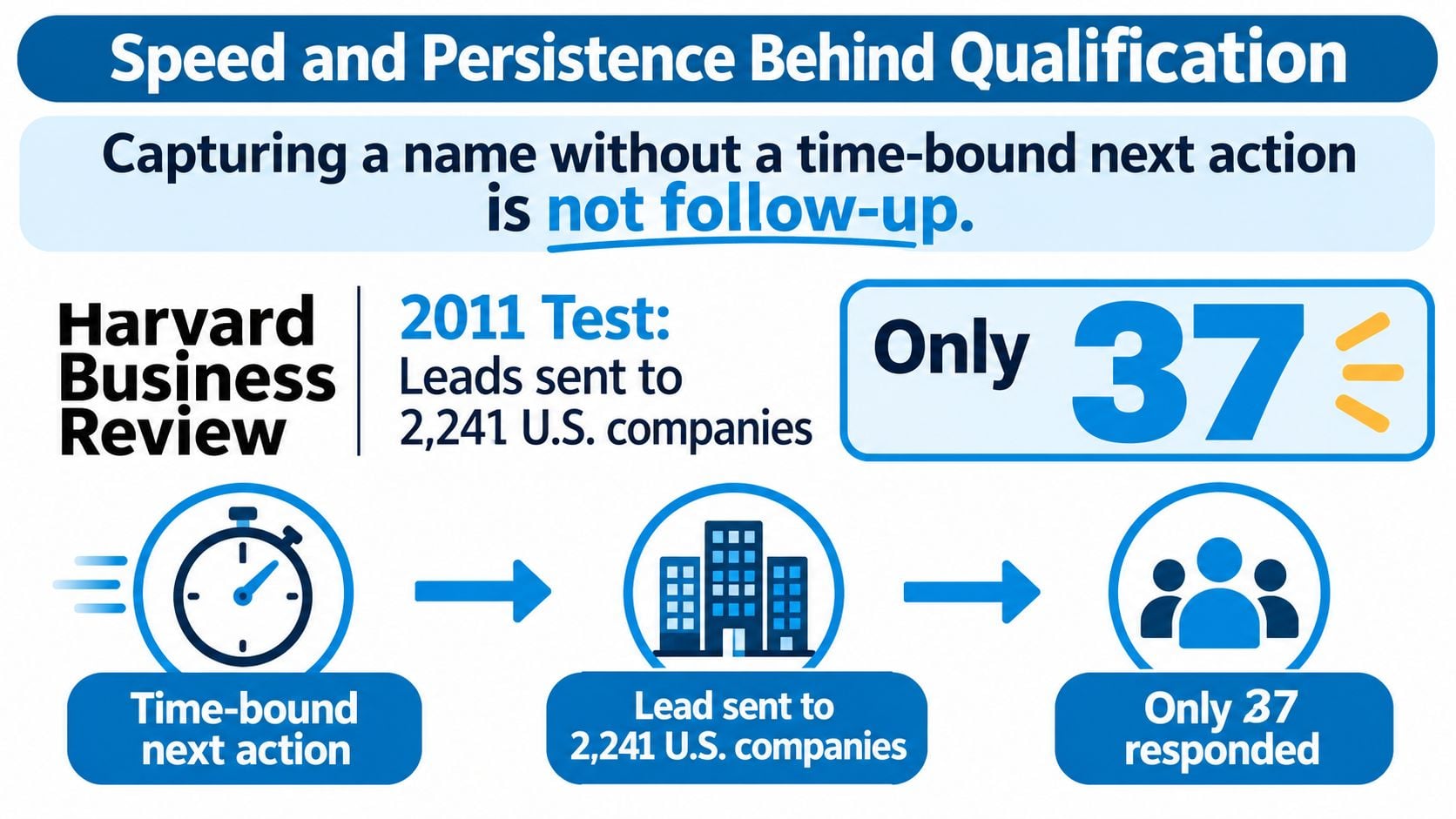
Capturing a name without a time-bound next action is not follow-up. A contact record proves that an inquiry arrived. It doesn't prove that anyone attempted a useful conversation.
The timing problem is visible in the 2011 Harvard Business Review analysis summarized by Vida: researchers submitted test leads to 2,241 U.S. companies, with the response distribution shown below; the associated analysis of approximately 1.25 million leads found that contact attempts within an hour were nearly seven times more likely to qualify a lead than attempts made an additional hour later, and more than 60 times more likely than attempts delayed at least a day.
First-response timing in the 2011 lead test
| Response timing | Share of test leads |
|---|---|
| Responded within one hour | 37% |
| Responded within one to 24 hours | 16% |
| Responded after more than 24 hours | 24% |
| Never responded | 23% |
The visual below emphasizes the need to attach action to capture.
Separate acknowledgment from human contact
For the consultant facilitating a workshop, automatic acknowledgment prevents an unexplained silence. Assignment and a deadline make it possible for a colleague to respond while the partner remains with the client.
But an auto-reply isn't qualification. Don't interpret the timing findings as evidence that an automated receipt creates the same result as a human contact attempt. Advisory buyers may need to discuss fit, seniority, conflicts, urgency, or a sensitive organizational problem.
Record acknowledgment and human response separately. Otherwise, a dashboard can report excellent response times while prospects still wait for someone who can help.
Measure the commitments that matter
Track these operational measures:
- Time to acknowledgment: How quickly the firm confirms receipt.
- Time to first human attempt: When an accountable person tries to engage.
- Owner coverage: Whether every new inquiry has someone responsible.
- Next-step coverage: Whether open opportunities have an actionable, dated commitment.
Apply the same discipline to introductions. A defined process for tracking referrals should preserve the source and assign the introduced opportunity without leaving either relationship unattended.
Adopt a practical service standard: acknowledge immediately, target human contact within an hour during business hours, and escalate that day if the owner hasn't acted. Treat this as an internal operating target, not a promise of conversion or an expectation that partners remain available around the clock.
Persistence then becomes a managed continuation of a relevant conversation, not compensation for a first response nobody owned.
Proposal Follow Up by Buyer Readiness
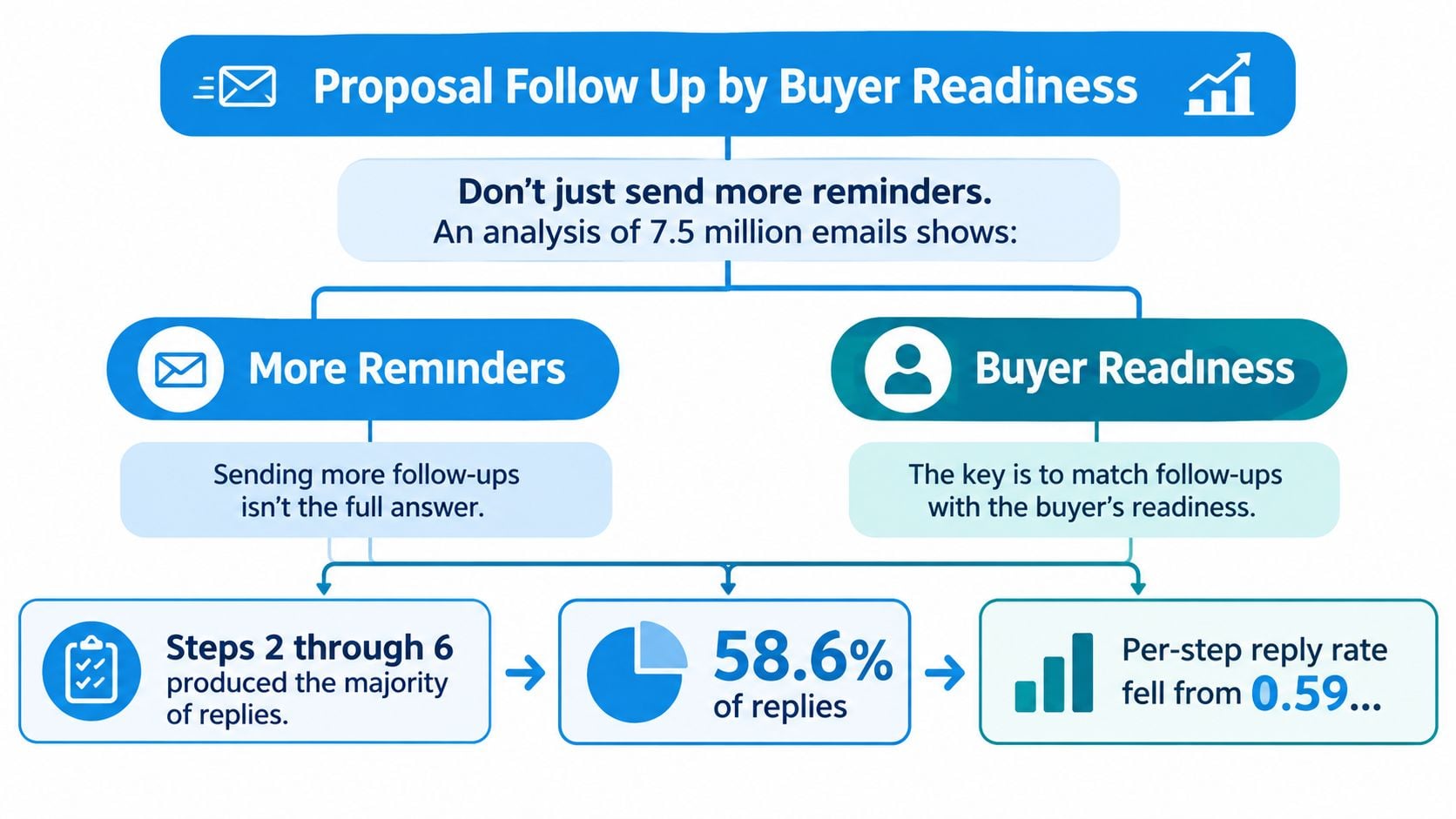
Sending more reminders isn't a diagnosis. A buyer waiting for procurement paperwork needs something different from a buyer who can't explain the proposal's value to their finance director.
An analysis of 7.5 million emails summarized in Bebop's sales follow-up statistics found that follow-up steps 2 through 6 generated 58.6% of replies, while the per-step reply rate declined from 0.59% on the first message to 0.28% by step 6; the same compilation reports that 52% of professional-services decision-makers preferred the speed and convenience of digital buying, compared with 27% who preferred dealing with supplier representatives.
The practical implication is segmentation, not a louder sequence. Use buyer readiness to choose the next intervention.
Record why the proposal is waiting
Give every open proposal a stall reason and a concrete next step. If the reason isn't known, record it as unknown and make diagnosis the owner's task. Don't let automation invent an objection.
Proposal stall reasons and the intervention for each
| Stall reason | Intervention |
|---|---|
| Procurement waiting on paperwork | Short status note and a dated next step |
| Unclear scope | One-page outcome tightened, not a feature recap |
| Missing internal consensus | Material the champion can forward internally |
| Budget timing | Reactivation date and a paused status |
| Weak perceived value | One ROI clarification to the economic buyer, then a human conversation |
Say your champion supports an operating-model engagement but needs approval from finance. Another scheduling link doesn't help them make the case. A forwardable summary of the business problem, intended outcome, assumptions, and decision required gives them something usable.
If scope is unclear, tighten the boundaries and acceptance criteria. If budget timing is the obstacle, ask permission to reconnect at the relevant planning point, then pause active pursuit.
Change paths when the buyer changes state
Stop or branch when the buyer replies, books, declines, becomes unqualified, or reaches the firm's defined inactivity threshold. An ambiguous response should create a review task, not trigger a guessed sentiment-based reply.
Make each workflow step idempotent, meaning that running it again won't send a duplicate message or create another appointment. Before sending, check both the buyer's current state and whether that action has already completed.
No response can mean the buyer lacks a decision path. Repetition won't supply one.
For a different presentation format, the following video is available.
Judge proposal follow-up by proposal age, loss reasons, reactivation, and the presence of a next step. Message volume alone can't tell you whether the buyer is closer to a decision.
Failure Modes That Lose Consulting Work
Some organizations don't merely reply late. They never reply. In a 2024 test of 1,000 B2B SaaS companies, 635 didn't answer a demo request, according to Pipes.ai's speed-to-lead benchmark summary.
That test isn't a consulting-firm benchmark. It illustrates a design risk worth testing in your own operation: a request can enter a company's systems without reaching anyone who takes responsibility for it.
Follow-up failures and the control that stops them
| Failure | How it shows up | Control |
|---|---|---|
| No accountable first response | Inquiry waits through delivery work or is never answered | Instant acknowledgment, owner SLA, backup alert |
| One cadence for every silence | Same reminder after procurement delay, unclear scope, or a no | Reason code and a different next action |
| No stopping rule | Emails continue after decline, ambiguity, or a long inactivity gap | Branch or stop, and route sensitive replies to a person |
| Silent client handoff | Won work has no kickoff owner or delivery start | Automatic Won update, delivery start, and owner notice |
| Unmanaged referral sources | Partners are thanked once or forgotten between introductions | Partner stage plus scheduled nurture |
When automation needs to yield to judgment
Consider a prospect who replies that the proposed engagement could expose a disagreement between senior stakeholders. A generic booking reminder ignores the substance of that message. The opportunity owner needs to read it, assess who should respond, and decide whether a partner should take over.
Create exception rules for unclear fit, unusual urgency, senior stakeholder involvement, and sensitive commercial issues. Don't use deal value as the only routing criterion. A modest engagement can still involve a relationship or reputational risk that deserves senior attention.
The handoff itself needs a quality standard. A backup should receive the actual message and relevant context, not just an urgency label. Require the receiving person to accept ownership so the original owner doesn't assume coverage that never happened.
Inspect a lost opportunity, not just the dashboard
Choose a recent piece of lost or stalled work and reconstruct the activity trail. Identify the first point where someone expected another person, a reminder, or a workflow to act.
Then test the corresponding control. Did the backup alert reach someone available? Did a buyer's reply suspend scheduled messages? Did delivery receive the commercial context?
Maximizing automated touches can damage trust when the buyer expects judgment. Pick the failure that most closely matches your recent lost work and repair that control before adding another sequence.
How to Select and Install the System
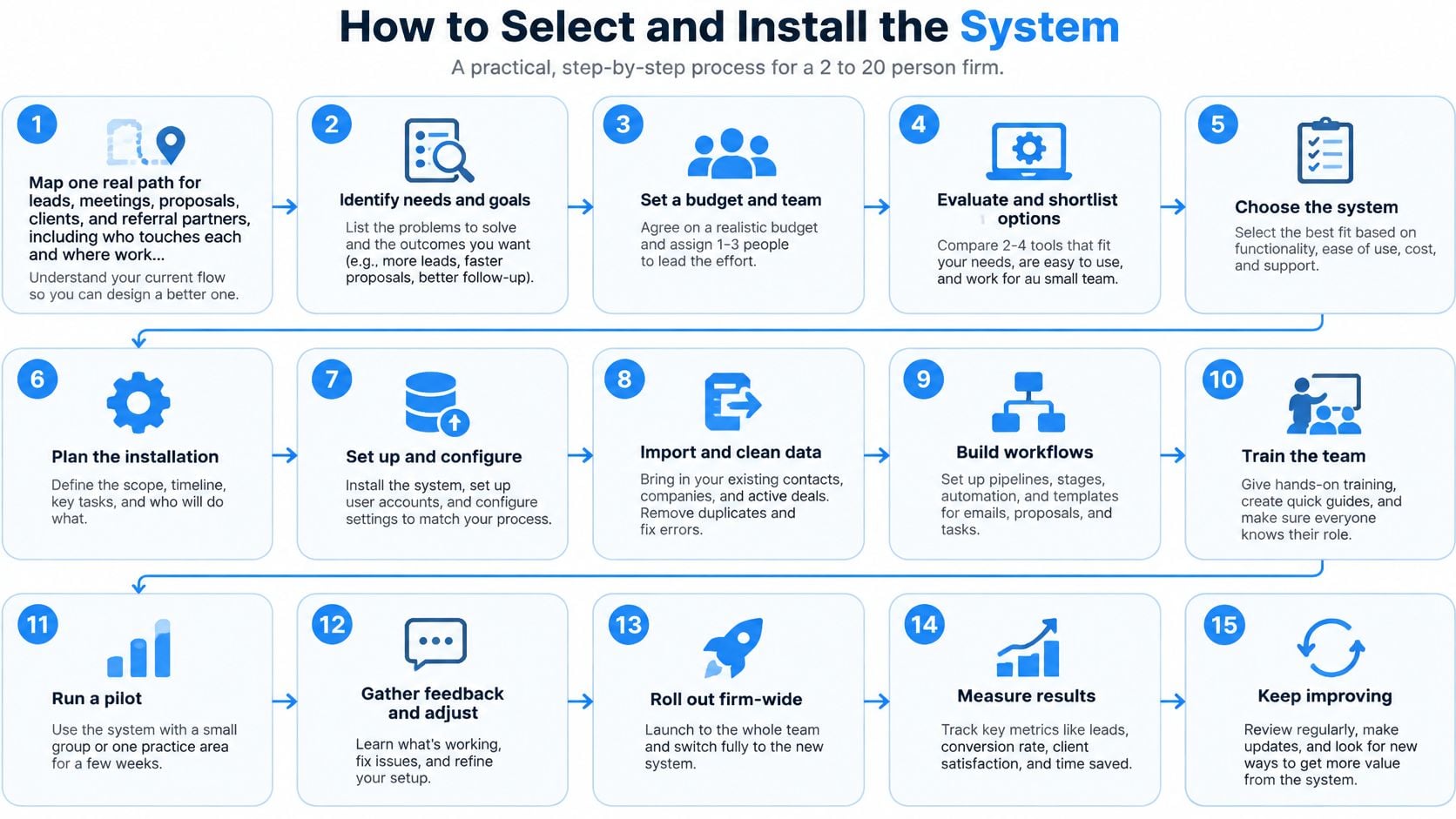
Choose tooling after defining the work it must carry. A polished demonstration won't reveal whether your firm has agreed who owns an unanswered inquiry or what counts as a stalled proposal.
Use the process illustration as an implementation aid, with the operating steps below guiding the actual rollout.
Define the operating rules
Map a real path through the firm. Trace an inquiry, a meeting, a proposal, a new client, and a referral relationship. Record who touches each item, where the record lives, and where progress currently stops. Use actual examples rather than the process everyone wishes they followed.
Turn the parts table into a gap list. Mark which triggers already run reliably and which depend on someone remembering. Include manual work that functions well. You don't need to automate a task merely because automation is possible.
Write the service levels. Define acknowledgment and human-response commitments separately, including business hours and absence coverage. State exactly when an overdue item reaches the backup. An SLA, or service-level agreement, is useful only when someone can tell whether it was met.
Specify exits and review conditions. Document what happens after a reply, booking, decline, disqualification, or inactivity cutoff. Add a partner-review route for uncertain intent or commercial sensitivity. Test these conditions before enabling outbound messages.
Select against the workflow, then roll out narrowly
Evaluate tools against concrete criteria. Require a shared opportunity for the buying group, stage-based triggers, proposal next-step dates, referral stages, and a durable activity log with duplicate-send protection. Use the CRM guide for consulting firms to frame workflow fit rather than comparing feature counts. If AI capabilities are part of your shortlist, Andy's guide to AI CRM offers additional evaluation context. Keep human approval around sensitive communication, and prefer consulting-shaped stages over a blank configuration project.
Install a narrow slice first. Begin with new inquiries and open proposals, not every historical contact. For example, a new inquiry can trigger acknowledgment, an owner task, and a small set of varied contact attempts across appropriate channels before stopping or escalating. The InsideSales 2021 lead-response analysis reported that seven or more follow-up attempts produced 15% more connections, but that finding doesn't establish a universal cadence for advisory buyers. Expand attempts only where relevance and permission justify them.
Go live with named owners and inspect outcomes. Run a short pilot with a scheduled review. Examine median human-response time, items without next steps, proposal age, and won opportunities that entered delivery. Test reruns, replies arriving just before scheduled sends, owner absences, and failed integrations. Preserve an append-only activity history so troubleshooting doesn't depend on recollection.
Add relationship nurture after the core works. Introduce referral and expansion touches once inquiry handling and proposal movement are dependable. Give someone responsibility for reviewing paused records and retiring outdated templates.
Installation test: A colleague should be able to explain why the next action will happen, who owns it, and what will stop it.
Your next action is the map, not a software demo. That map lets you evaluate whether a platform removes a real operational gap or merely adds another interface.
Map the Firm Before You Add Software
Set aside a working session with the people who sell, schedule, scope, and deliver. Write down the current path of a lead, a meeting, a proposal, a new client, and a referral partner. Circle the first place where the next step disappears.
Don't tidy the map to make the firm look organized. If a consultant forwards an email to a partner and assumes it's handled, record that assumption. If someone manually checks sent proposals whenever they have spare time, write that down too.
Make the purchase decision from the gaps
If the path remains unclear, don't shop yet. A blank CRM will reproduce the same uncertainty with cleaner screens. Resolve ownership and decision rules before choosing how to automate them.
If the path is clear and the firm wants installation rather than a configuration project, a purpose-built operating system may fit. Starward Navigators builds follow-up and client acquisition infrastructure for consulting and advisory firms.
Our implementation follows Map, Install, and Go Live:
- Map: Establish how leads and clients move through the firm.
- Install: Configure prebuilt pipelines, follow-up, reminders, routing, and handoffs around that movement.
- Go Live: Begin working in one operating system while repetitive follow-up runs automatically.
That division keeps the firm's judgment separate from repetitive administration. Your team still decides whether an engagement fits, how to handle a sensitive reply, and when a buyer needs space rather than another message.
Define success before the mapping conversation
Bring the internal gap list to a mapping conversation. Include an unanswered inquiry, an open proposal, and a handoff that required chasing, with confidential details removed where appropriate.
Judge the proposed installation by whether each new inquiry and open proposal will have an owner and a date. Ask how exceptions reach a person and how delivery receives the commitments made during sales.
Starward is a CRM and follow-up automation system, not a provider of compliance, regulatory, or licensing guidance. Your firm remains responsible for its own regulatory obligations.
Starward Navigators installs follow-up and client acquisition infrastructure around the way consulting and advisory firms work. Once you've documented your gaps, visit Starward Navigators to arrange a mapping conversation about inquiry routing, proposal next steps, and client handoffs. Bring your gap list so the discussion starts with the work that needs to move, not the number of emails you could automate.