You blocked an hour, opened the video link five minutes early, and reviewed your notes. Ten minutes pass. No prospect, no message, no way to reclaim the slot for someone else who's ready to talk.
That empty hour usually isn't a motivation problem. It's a reminder problem. The prospect booked when interest was high, then work moved on, the calendar invite sank under newer meetings, and nobody gave them a clean moment to confirm, prepare, or reschedule.
A single polite nudge won't fix that consistently. You need appointment reminders templates built as sequences across the meeting lifecycle, with a clear job for each touch. A 2016 systematic review and meta-analysis in BMJ Open found patients who received notifications were 23% more likely to attend than patients who received no notification, with attendance at 67% versus 54%. The same analysis found multiple notifications worked better than a single one.
Below are eight ready-to-send sequences for consulting and advisory work. Each one gives you the copy, the send window, who it fits, and where it breaks, so you can match the reminder to the meeting instead of sending the same message to everyone.
Table of Contents
- 1. 24-Hour SMS Reminder with Confirm or Reschedule Reply
- 2. 7-Day Heads-Up Email with Agenda and Prep Questions
- 3. 24-Hour Confirmation Follow-Up
- 4. Same-Day Pre-Call Reminder with Join Link
- 5. Email Reminder with Discovery Call Prep Questions
- 6. Confirmation-Required Reminder with Slot Release Rule
- 7. Self-Service Reschedule Reminder
- 8. Decision-Meeting Reminder with Attendee Check
- How the eight reminder templates compare on timing, channel, and fit
- Build the Sequence Once and Let Every Meeting Run on It
1. 24-Hour SMS Reminder with Confirm or Reschedule Reply
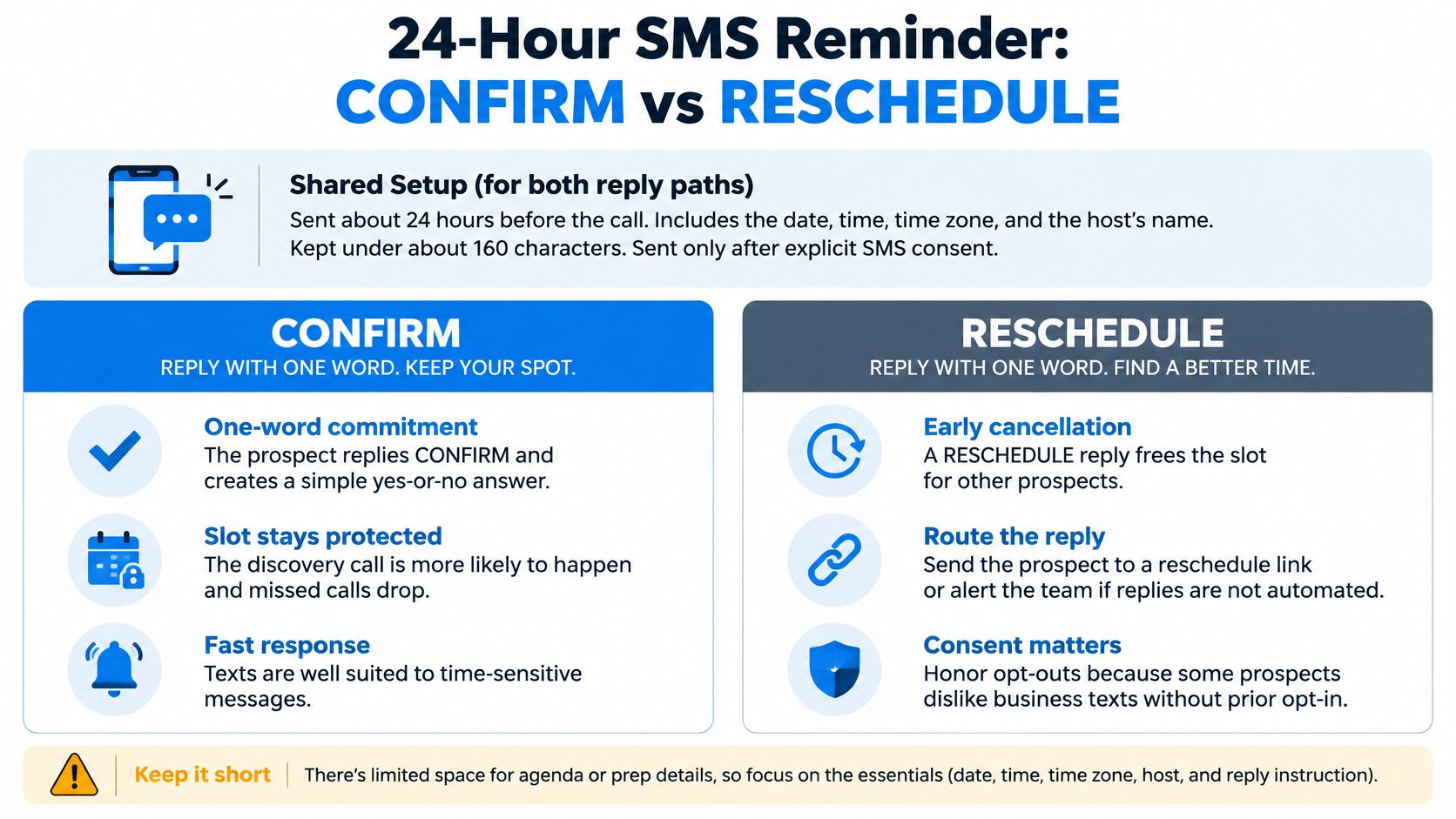
Send this about 24 hours before a discovery call, not the morning of it. That window gives the prospect time to move the meeting while you can still reuse the slot. It also creates a small, explicit commitment instead of passive awareness.
Hi {first_name}, this is {advisor_name} from {firm}. Reminder, our discovery call is tomorrow at 10:00 AM ET. Reply CONFIRM or RESCHEDULE.
Keep it that short. You're not selling the call again or restating the agenda. You're asking for one decision, and both answers help you. CONFIRM locks the slot, and RESCHEDULE protects the pipeline better than silence. For practical routing ideas, see how to reduce no-shows with confirmation texts without turning the thread into a negotiation.
What makes this one work
- Explicit consent first: Collect SMS permission during booking and honor opt-outs immediately, or trust drops before the call starts.
- A real reply path: Route RESCHEDULE to an automated reschedule link or a named team alert, never to an unmonitored inbox.
- A named sender: Send from the advisor the prospect expects to meet, not a generic number they'll ignore.
In 2024, 87% of consumers surveyed by Text Request's State of Business Texting report said they wanted to receive business messages related to appointment scheduling and appointment reminders. That doesn't make SMS right for every client. Senior buyers who live in email, prospects on shared phones, and anyone who didn't opt in need a different channel.
Use this as your default for first discovery calls and repeat check-ins. Skip it for sensitive decision meetings where a text from an advisor can feel abrupt, and don't send a second identical text if there's no reply. Escalate to email or a personal note instead.
2. 7-Day Heads-Up Email with Agenda and Prep Questions
A week out, your goal isn't urgency. It's anchoring. You're putting the meeting back on the prospect's mental calendar early enough for them to gather material, invite the right colleague, or tell you the timing no longer works.
Try this structure for a paid diagnostic or proposal review. Keep the whole email under 150 words, and put the agenda in the first two lines where it can't be missed on a phone preview.
Looking forward to our strategy session on the 14th. We'll cover your current pipeline, where deals stall, and what to fix first. Please bring your current Q3 pipeline notes so we can focus on the gaps.
Where the 7-day email earns its place
This fits meetings that need preparation, documents, or more than one attendee. A casual intro call doesn't need it, and sending a formal agenda for a 15-minute fit check can make a small conversation feel heavier than it is.
Say you're running a strategy session with a fractional CFO client. The early email gives the operations lead time to pull cash flow numbers instead of estimating them live. That changes the quality of the meeting, not just the show rate.
Timing precision matters less than reliability here. A systematic review in BMC Health Services Research notes most reminder interventions were delivered 1 to 3 days before the appointment, and it found no statistically significant subgroup difference based on SMS timing, frequency, or message content. Build a baseline you can send every time, then measure replies and reschedules.
Don't bury a reschedule link at the bottom under three paragraphs of context. Put date, time, timezone, and the confirm or reschedule action near the top. If nobody replies, that's fine at this stage. The confirmation ask comes later.
3. 24-Hour Confirmation Follow-Up
This is the second touch, not a repeat of the first. If the prospect already got a 7-day agenda email, the 24-hour follow-up should be short, direct, and focused only on attendance.
Confirming our session tomorrow at 2:00 PM ET. Reply YES to confirm, or use this link to pick a new time, {reschedule_link}.
That distinction matters. Repeating the full agenda a day later trains people to skim. A confirmation ask tells you whether to prepare, whether to alert a colleague, and whether the slot is about to open up.
Build the two-touch rhythm
A randomized trial covered by The American Journal of Managed Care involving 54,066 scheduled visits found two automated reminders, one 3 days and another 1 day before, reduced missed appointments to 4.4%, compared with 5.8% for a reminder only 3 days before. The extra reminder didn't reduce satisfaction in that trial.
- Stop on confirmation: Once the prospect replies YES, end the sequence automatically so you don't nag someone who's already committed.
- Pair it with prep: Use this after an earlier agenda email when the meeting needs material, not as a stand-alone for complex sessions.
- Alert the owner on silence: Flag non-responses for a personal check instead of sending a third automated copy.
Platforms built for this kind of sequencing, including our own follow-up automation for consulting pipelines, work best when confirmation stops the workflow cleanly. Say a prospect confirms on Tuesday afternoon. Your consultant prepares with confidence, and no same-day reminder needs to ask the same question again.
The failure mode is false certainty. A YES reply doesn't guarantee attendance if the join link is buried or the timezone is wrong. Keep those details visible in the calendar invite and the same-day touch.
4. Same-Day Pre-Call Reminder with Join Link
Ninety minutes before the call, nobody needs your value proposition. They need the link. This reminder exists to remove last-minute friction, especially for clients across time zones or anyone who rarely uses your meeting software.
Our call starts at 3:00 PM ET. Join here, {meeting_link}. If the link does not open, call {phone} with meeting ID {id}.
Send it one to two hours before, not five minutes before. That gives the prospect time to test audio, install an update, or find a quieter room without starting the call flustered.
Details that prevent a messy start
- Test every link: Click the join link as a guest before the sequence goes live, because permissions break more often than copy does.
- Always add a backup: Include a dial-in number for any video meeting, even with technical audiences.
- State the timezone plainly: Write 3:00 PM ET, not just 3:00 PM, and match the calendar invite exactly.
In 2024, 68% of businesses surveyed in Text Request's State of Business Texting ebook already used texting for appointment scheduling. Adoption doesn't fix bad logistics, though. A text with the wrong link is worse than no text.
Say you're meeting a founder who's traveling. The early reminder lets them reschedule from the airport. This same-day message gets them into the room. If it's your only reminder, it's too late to recover the slot, so pair it with a 24-hour confirmation every time.
5. Email Reminder with Discovery Call Prep Questions
Before our call on Thursday, could you share (1) the main growth goal this quarter, (2) the biggest blocker, and (3) who else influences the decision? Short bullets are fine.
Send this by email two to three days before a first discovery call. Earlier and the prospect forgets they answered; later and they have no time to reply. Frame the questions as optional but useful, and cap the list at three.
A prep reminder earns its place by improving the conversation as well as protecting the slot. Three short answers let you skip the generic opening and spend live minutes on the actual blocker.
How to get answers without creating homework
The ask is a signal about what matters rather than a written brief. If the prospect replies with three lines, you can skip generic opening questions and spend the call on their actual blocker. If they don't reply, you still have a clean structure for the live conversation, so the request carries no pressure either way.
Store the answers in the contact record where the consultant will see them before dialing. Answers buried in an email thread don't help a colleague who covers the call, and they won't carry into proposal context later. A quick reply-to-CRM step, manual or automated, is what turns a polite email into usable prep.
Concise asks get answered. Long questionnaires get skipped. Keep the tone short and plain, and adjust it by meeting type and relationship rather than running one warm default for every prospect.
Practical rule: If answering your prep questions takes longer than three minutes, you've written an assignment, not a reminder.
Say a boutique consultancy sells pipeline diagnostics. The blocker answer tells the advisor whether to bring a sales example or a delivery capacity example. That's the payoff. Skip this template for routine client check-ins where you already hold the context, because asking again reads like you never kept notes.
6. Confirmation-Required Reminder with Slot Release Rule
Use this sparingly, and only when calendar capacity is scarce. It tells the prospect the slot will be released if they don't confirm inside a set window, which protects solo advisors and fractional executives who can't absorb silent no-shows.
Please confirm your call tomorrow at 11:00 AM by replying YES within the next two hours. If we do not hear back, we will offer the slot to another client and you are welcome to rebook, {rebooking_link}.
The rebooking link matters. Without it, the message reads like a penalty. With it, you're setting a boundary while keeping the relationship intact.
Guardrails before you turn this on
- Set a fair window: Use two to four hours for same-day or next-day slots, and never send the deadline outside reasonable waking hours.
- Name one owner: Assign a person to handle unconfirmed alerts, release decisions, and waitlist offers.
- Automate the flag, not the judgment: Let the system surface silence, then let a human decide whether this prospect gets grace.
In 2024, 63% of medical groups responding to an MGMA poll on patient no-shows reported that patient no-show rates had either stayed the same or decreased, while 37% reported increases. Reminders alone don't guarantee attendance. That's why the release rule needs a recovery path behind it.
I recommend reserving this for high-demand diagnostic slots and repeat reschedulers. The same scarcity logic appears in other appointment businesses that explain how to schedule tutoring sessions efficiently, but a consulting prospect expects more discretion than a commodity booking.
For implementation, our appointment automation with confirmations and internal alerts supports this pattern when the owner and release rule are defined first. Don't use it on a strategic account where a deadline text would damage trust. A personal email works better there.
7. Self-Service Reschedule Reminder
The easiest reschedule is the one the prospect can finish without emailing you. This template puts a direct link in the reminder so a conflict becomes a moved meeting instead of a quiet disappearance.
Need to move our meeting? Pick a new time here, {reschedule_link}. Your current slot is Tuesday at 9:30 AM ET.
Show the current slot in the message. People often can't remember what they're moving, and forcing them to check a calendar first adds exactly the friction you're trying to remove.
Keep self-service from becoming endless drift
- Cap the moves: Allow two automated reschedules per prospect, then route the next request to a person.
- Limit the horizon: Show only the next two weeks of availability so stale options don't push the conversation into next quarter.
- Log every move: Record each reschedule as an activity so repeated drift is visible before you invest proposal time.
Accessibility belongs in this design too. A review in the Journal of the American Medical Informatics Association identifies digital exclusion, language barriers, and confidentiality concerns as recurring barriers to technology-facilitated reminders. Plain language, minimal disclosure on shared devices, and a phone fallback make the link usable for more people.
Say a prospect hits a board meeting conflict on Monday night. They move the call to Thursday in under a minute, your calendar updates, and the pipeline stage stays honest. The failure mode is a broken calendar sync that double-books the new slot. Test create, move, and cancel paths before launch, not after a client finds the bug.
8. Decision-Meeting Reminder with Attendee Check
Proposal reviews fail in a different way. The primary contact shows up, the decision-maker doesn't, and you spend an hour presenting to someone who can't say yes. This reminder checks attendance early enough to fix that.
Send it at least three days before the meeting. Name the required attendees, state the decision in one sentence, and ask the primary contact to confirm the right people are invited.
Ahead of Thursday's review, could you confirm that {cfo_name} and {ops_lead} can join? The goal is to agree on next steps for the proposed Phase 1 engagement.
What to do when a key person is missing
Don't postpone indefinitely by default. Offer a shorter working session with the available attendees to clear technical questions, then book the decision meeting with a firm date. That keeps momentum without pretending a decision can happen without the decision-maker.
- One decision sentence: Write the outcome you need, such as approve Phase 1 scope, not a vague purpose like discuss proposal.
- Named attendee check: List people by name and role so the primary contact can spot a missing invite quickly.
- A fallback offer: Give a shorter session option in the same message so a gap doesn't stall the deal for weeks.
In a 2025 nationwide survey reported in Medical Science Monitor of 1,162 Polish adults, 62.5% supported SMS reminder systems for healthcare appointments. Support for reminders doesn't solve stakeholder alignment, though. Channel choice is secondary here. The attendee list is the point.
For firms tracking the proposal behind the meeting, our proposal follow-up workflow from discovery to decision connects this check to the stage that follows. Say the CFO can't attend. You learn that on Monday, not at the start of Thursday's call, and you can reset expectations while goodwill is intact.
How the eight reminder templates compare on timing, channel, and fit
The eight templates cover different points in a meeting sequence. Choose each touch by what the recipient needs to do, then match the channel to that action.
| Item | Send Timing | Channel | Best For |
|---|---|---|---|
| 24-Hour SMS Reminder with Confirm or Reschedule Reply | About 24 hours before the appointment | SMS | Solo consultants and small firms booking discovery calls |
| 7-Day Heads-Up Email with Agenda and Prep Questions | About one week before the meeting | Proposal reviews and strategy sessions with senior decision-makers | |
| 24-Hour Confirmation Follow-Up | About 24 hours before the meeting | SMS or email | Confirmation step in a reminder sequence for proposal reviews and strategy sessions |
| Same-Day Pre-Call Reminder with Join Link | 1–2 hours before the meeting | Message with a join link or dial-in details | Remote discovery calls and client workshops across multiple locations |
| Email Reminder with Discovery Call Prep Questions | Before the scheduled discovery call, early enough to review the questions | Independent advisors and boutique consultancies with structured discovery processes | |
| Confirmation-Required Reminder with Slot Release Rule | Within a defined confirmation window, such as two hours after sending | Reminder message with confirmation request and internal alert | Fractional executives and advisors with limited weekly availability |
| Self-Service Reschedule Reminder | Include a reschedule link in the 24-hour reminder, with SMS or email based on the sequence | SMS or email with a reschedule link | Teams with multiple advisors and high volumes of discovery calls |
| Decision-Meeting Reminder with Attendee Check | At least three days before the meeting | Email listing attendees and asking the recipient to flag anyone missing | Business development leaders managing multi-stakeholder proposal reviews |
Build the Sequence Once and Let Every Meeting Run on It
Don't start by writing eight perfect messages. Start by mapping how your meetings move. A first discovery call, a paid diagnostic, an existing client check-in, and a proposal decision meeting need different reminders, different owners, and different fallback paths when someone goes quiet.
Pick one template per meeting type, then set the send windows as a sequence. For most consulting firms, that baseline is an immediate booking confirmation, a 48 to 72-hour reminder with prep or attendee checks, a 24-hour confirmation, and a same-day join link message. Add a slot release rule only where demand justifies it, and add self-service rescheduling everywhere a silent no-show would otherwise kill the conversation.
Consistency beats endless copy tweaks. A 2016 review in the Journal of Medical Systems identified 28 studies comparing SMS reminders with no reminders, including 13 randomized controlled trials, with a pooled odds ratio for attendance of 1.62. Reliability, coverage, and a working reply path will do more for you than debating one adjective.
Test the operational handoffs, not just the words
Click every meeting link as a guest. Reply CONFIRM, RESCHEDULE, and STOP from a test phone, and confirm the sequence stops, the calendar updates, and the right owner gets alerted. Check timezone rendering, plain-language readability, and how much meeting detail appears on a lock screen. Then track show rate, response rate, reschedule completion, and lead-stage conversion by sequence, not opens alone.
A reminder that sends on time but routes replies to nobody is not a system. It's a timed message with a blind spot.
Segment as you learn. First-time prospects may need prep questions and a low-friction reschedule link. Repeat reschedulers may need a firmer confirmation rule and a personal follow-up after the second move. High-value proposal reviews need attendee checks more than urgency. Let recipients choose email, SMS, or phone where you can, because the best channel is the one they'll answer.
We configure these sequences around a map of how leads, meetings, proposals, clients, and referral partners currently move through your firm. Setup takes about two weeks in most cases once we have your contact list, calendar, and domain access. Our calendar and scheduling tools are included on every plan, and discovery call confirmations, reminders, and no-show recovery run automatically once the workflow is live.
Build the sequence once, test every path, and review the numbers monthly. Your consultants should spend their hour in the meeting, not wondering whether anyone is coming.
If missed discovery calls and drifting proposal meetings are costing you billable hours, Starward Navigators can install prebuilt reminder, confirmation, reschedule, and no-show recovery sequences mapped to how your firm sells and delivers. Visit Starward Navigators to see how the system connects scheduling, follow-up, proposals, and handoffs in one place.