It's Thursday afternoon. A proposal went out on Monday, the partner who made the introduction hasn't heard anything back, and a website inquiry from yesterday is still sitting in a personal inbox. Nobody is ignoring the work on purpose. The team is delivering, and the next step lives in someone's memory.
That stretch, from a sent proposal to a real decision, is where small firms lose work they already earned the right to pursue. A clientflow management platform is the minimum operating setup that keeps a firm of two to twenty people from depending on memory. It isn't a longer feature checklist. It's a place where every inquiry, proposal, kickoff and referral partner has an owner, a date and a next action.
If your firm still runs on inboxes and goodwill, the pages below show the smallest system that keeps opportunities moving, and where the software has to stop so your judgment can take over.
Table of Contents
- What a Clientflow Management Platform Does
- How Pipelines Keep Every Opportunity Moving
- Routing Leads Fast Enough to Respond in Time
- Following Up on Proposals Without Sounding Pushy
- Handing a Won Deal to Delivery Without Re-Keying
- Running Referral Partners as a Pipeline
- Deciding Whether a Small Firm Should Adopt One
What a Clientflow Management Platform Does
A clientflow management platform is a single workspace that moves every client relationship, from first inquiry to repeat engagement, through defined stages. Each record carries an owner, a timer and a next action.
Think of it as a dispatch desk for client work. Inquiries, meetings, proposals and referral partners sit on one board. The desk notices when something stops moving, the way a dispatcher notices a job that never left the yard. Say a strategy inquiry arrives on Tuesday. It lands on the board with your name, a same-day call as the next action, and a due time. If Thursday arrives and the card hasn't moved, the desk flags it. Nobody has to remember the thread.
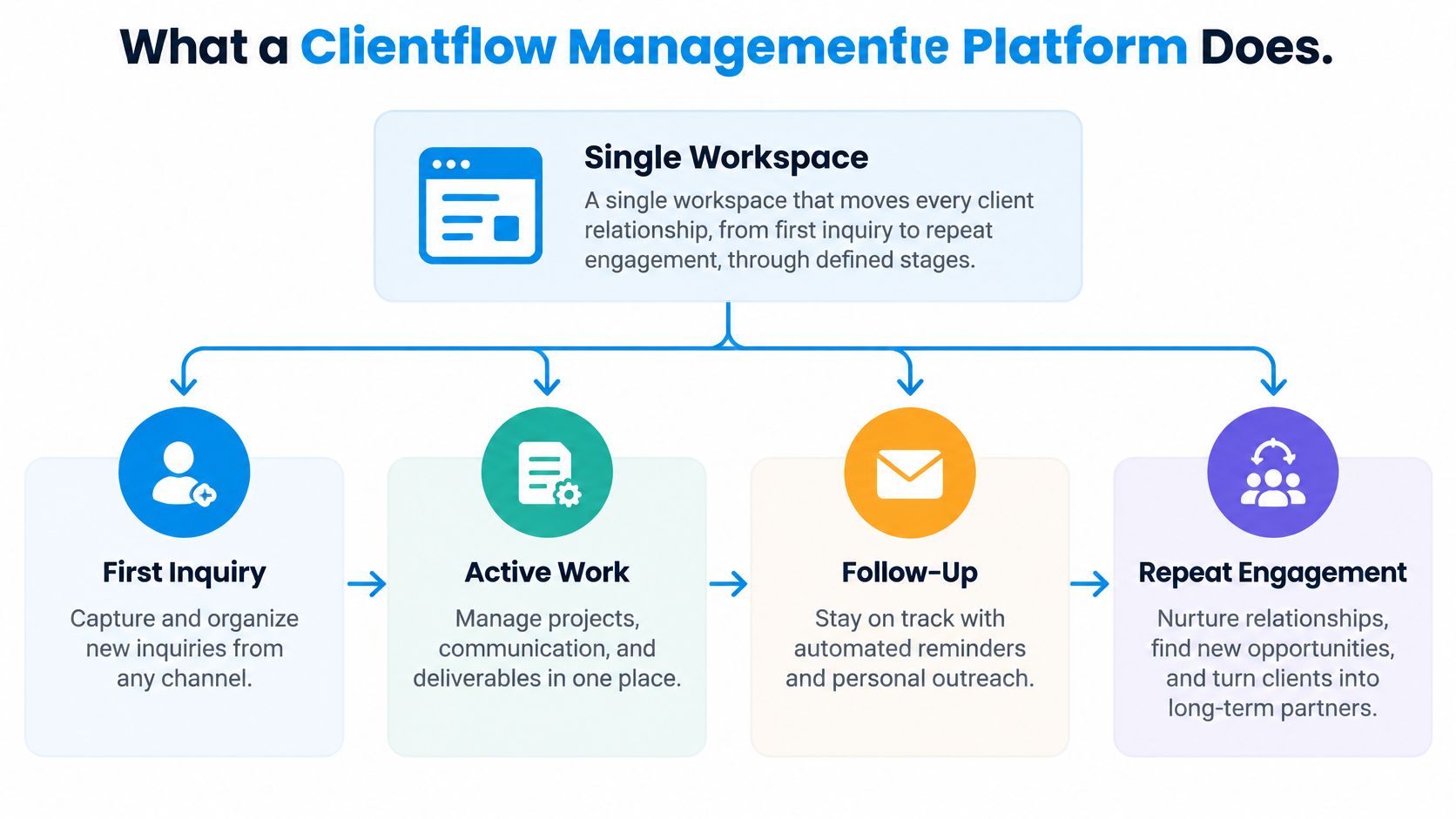
A contact list only stores names. The value sits in the workflow. A standalone CRM, which customer relationship management explained by SignalSpot describes as a home for contacts and deals, holds records. Project tools start tracking tasks only after delivery begins. This platform spans both, so the promise made in sales is still on the record when delivery opens the file.
Six capabilities and what fails without them
| Capability | What it does | What breaks without it |
|---|---|---|
| Pipelines | Stage each opportunity with an owner and a next action | Deals sit with no visible next step |
| Lead routing | Capture inquiries from forms, inboxes, LinkedIn and events, then assign an owner at once | Inquiries wait in personal inboxes |
| Follow-up sequences | Send timed follow-ups for new leads, proposals and stalled opportunities | Follow-up depends on memory |
| Proposal tracking | Record each proposal with a defined next step until a decision | Quiet proposals disappear |
| Client handoffs | Mark a deal Won, update the client record and start delivery | Sales context is re-keyed or lost |
| Referral tracking | Track partners from first introduction through ongoing nurture | Introductions go unacknowledged |
Three properties define the category. Shared visibility puts every open opportunity on one board. Timed actions fire without someone remembering. A record of who did what and when makes the history checkable later.
Run a short self-check. Of those six, which does your firm already do informally, and which still depend on one person remembering?
How Pipelines Keep Every Opportunity Moving
A pipeline is a row of stages. Each card shows its stage, owner, due date and next action. If any of those four is blank, the card is decoration.
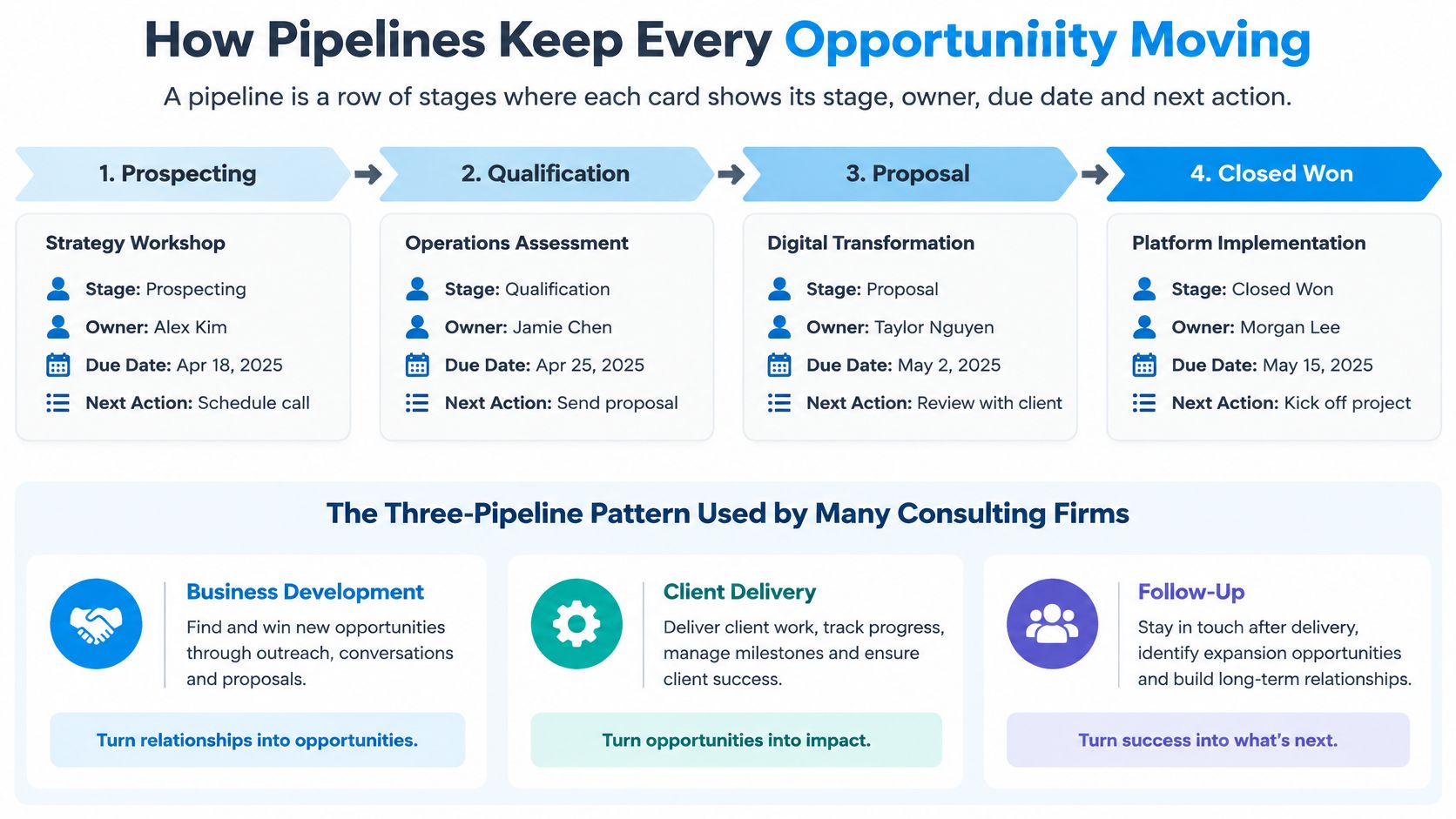
Many consulting firms run three pipelines side by side: Business Development, Client Delivery, and Relationships and Referrals. Business development holds the sale. Delivery holds the work after a yes. The third holds partners, who are not prospects and shouldn't sit in a sales column. One owner per card stops the "I thought you had it" loop that shows up the week someone is on leave.
Client delivery stages
The Client Delivery pipeline uses seven stages. The owner sets the next action before leaving the card.
| Stage | What the team does | Next action to set |
|---|---|---|
| New Client | Confirm the Won record and client details | Schedule onboarding |
| Onboarding | Collect access, contracts and background material | Set the kickoff date |
| Kickoff | Hold the first working session | Confirm deliverables and review dates |
| In Delivery | Run the engagement against the agreed scope | Log milestones and open risks |
| Review | Present results and gather feedback | Agree on the next phase |
| Complete | Close the engagement and archive notes | Request a testimonial or referral |
| Expansion | Propose follow-on work | Send a new proposal to the same client |
A card in Review with no agreed next phase is how expansion work dies. The client liked the readout. Nobody booked the conversation about what comes next.
Write stages as states, not activities
- Define each stage by a buyer or client state, not by an activity. "Proposal sent" tells you where the decision stands. "Emailed" does not.
- Write the exit condition for each stage. A card leaves Discovery only when criteria and stakeholders are written down.
- Assign one owner per stage. Shared ownership means nobody moves the card on a busy Friday.
- Attach a next action and a date to every open card. A card without a date is a note, not work.
- Move a card only when its exit condition is met. Dragging it forward to make the board look healthy hides the stall.
The common mistake is naming stages after activities such as called, emailed or met. Replace those with states such as discovery complete, proposal sent and decision pending. Activity names tell the team what someone once did. States tell them what is true now.
This week, draft a five-to-seven stage list for business development, and write an exit condition beside each stage. If you can't name the exit, the stage isn't ready to go on the board.
A short walkthrough makes the card fields easier to picture than a blank template does.
Routing Leads Fast Enough to Respond in Time
Treat speed as a latency problem, not a nicer email template. Website forms, a shared inbox, LinkedIn messages and event contacts should feed one queue. Personal inboxes are where inquiries go to wait.
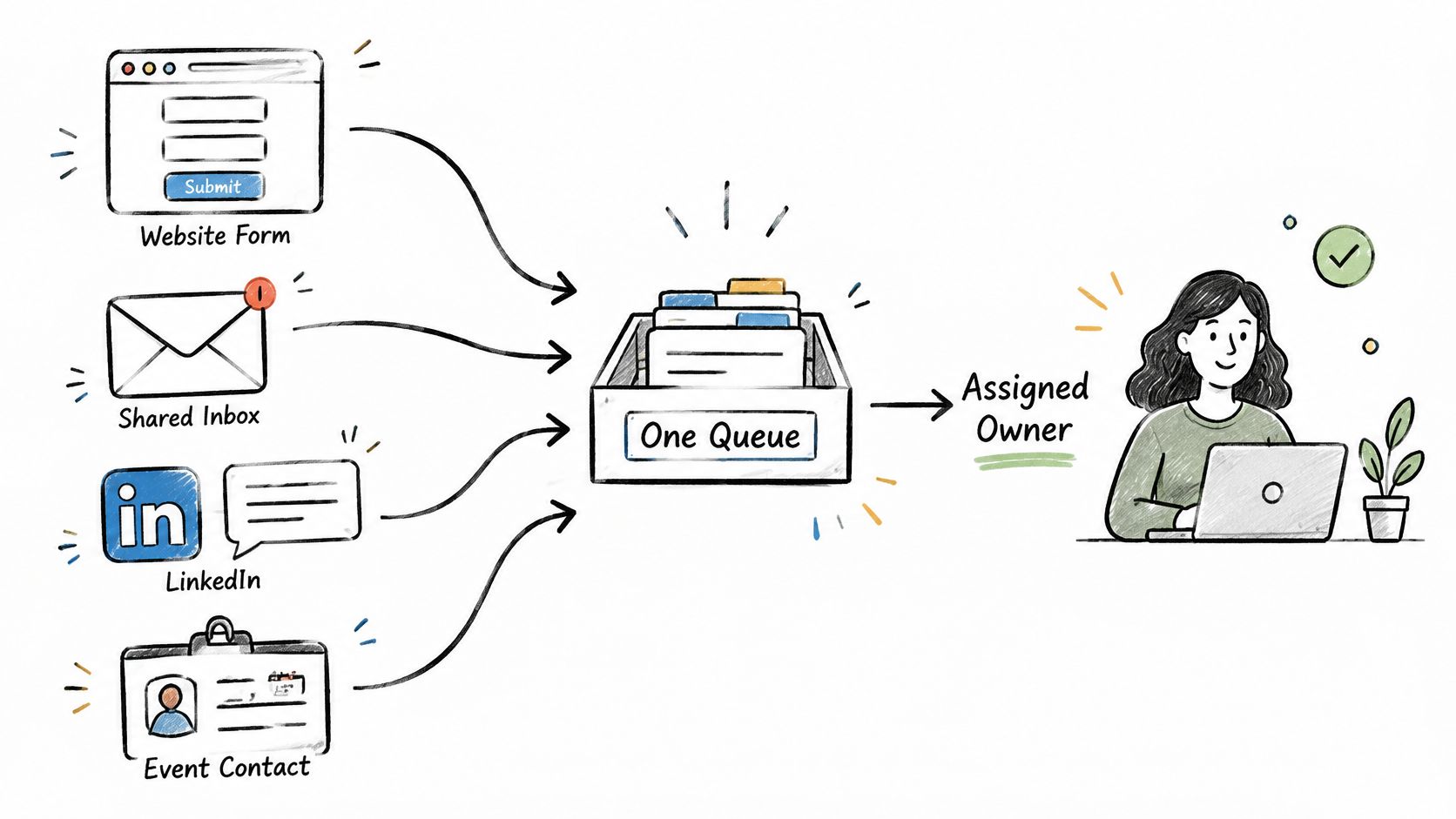
Assignment rules then pick an owner by service line, by who is free, or in rotation. An automatic acknowledgement can go out within minutes. That note is not contact. The record is worked only when a person reaches the lead and can qualify it.
The gap between a fast window and real behavior is wide. A Harvard Business Review audit of 2,241 U.S. companies, summarized by Voiso's lead response metrics, found that only 37% responded to web inquiries within one hour, while 23% never responded. Companies that attempted contact within one hour were nearly seven times more likely to qualify a lead than those waiting an additional hour, and more than 60 times more likely than those waiting at least 24 hours. A separate dataset of about 55 million sales activities, covered in GTM Bud's look at how consulting firms get clients, reported conversion about eight times higher when the first response came within five minutes rather than between five minutes and 24 hours, while only 0.1% of inbound leads were engaged inside five minutes.
A Friday inquiry
Say a fractional CFO inquiry hits a website form at 4 pm on Friday. The platform sends an automatic reply, notifies the owner, and stamps inquiry time, assignment time and first automated response. If nobody has called by Monday morning, escalation alerts the owner and can reassign the lead. The fields worth keeping are inquiry time, assignment time, first automated response, first human touch and qualification outcome. Those timestamps support a median response time, the share contacted within five minutes or one hour, and qualification rate by source.
Two edge cases need rules before go-live. The same person arriving from a form and from LinkedIn needs duplicate detection, or you'll call them twice and look careless. An out-of-scope inquiry should route to a referral partner, not sit until someone feels rude declining it. If you also build target lists before they ever hit your site, a workflow guide for B2B outbound is a practical companion for that capture work.
An automated "we got your note" is a receipt. Qualification starts when a person reaches a decision-maker.
For each source, measure time to first human contact, the share of leads contacted within one hour, and the qualification rate. If one source is fast and another is slow, the queue is leaking, not the market.
Following Up on Proposals Without Sounding Pushy
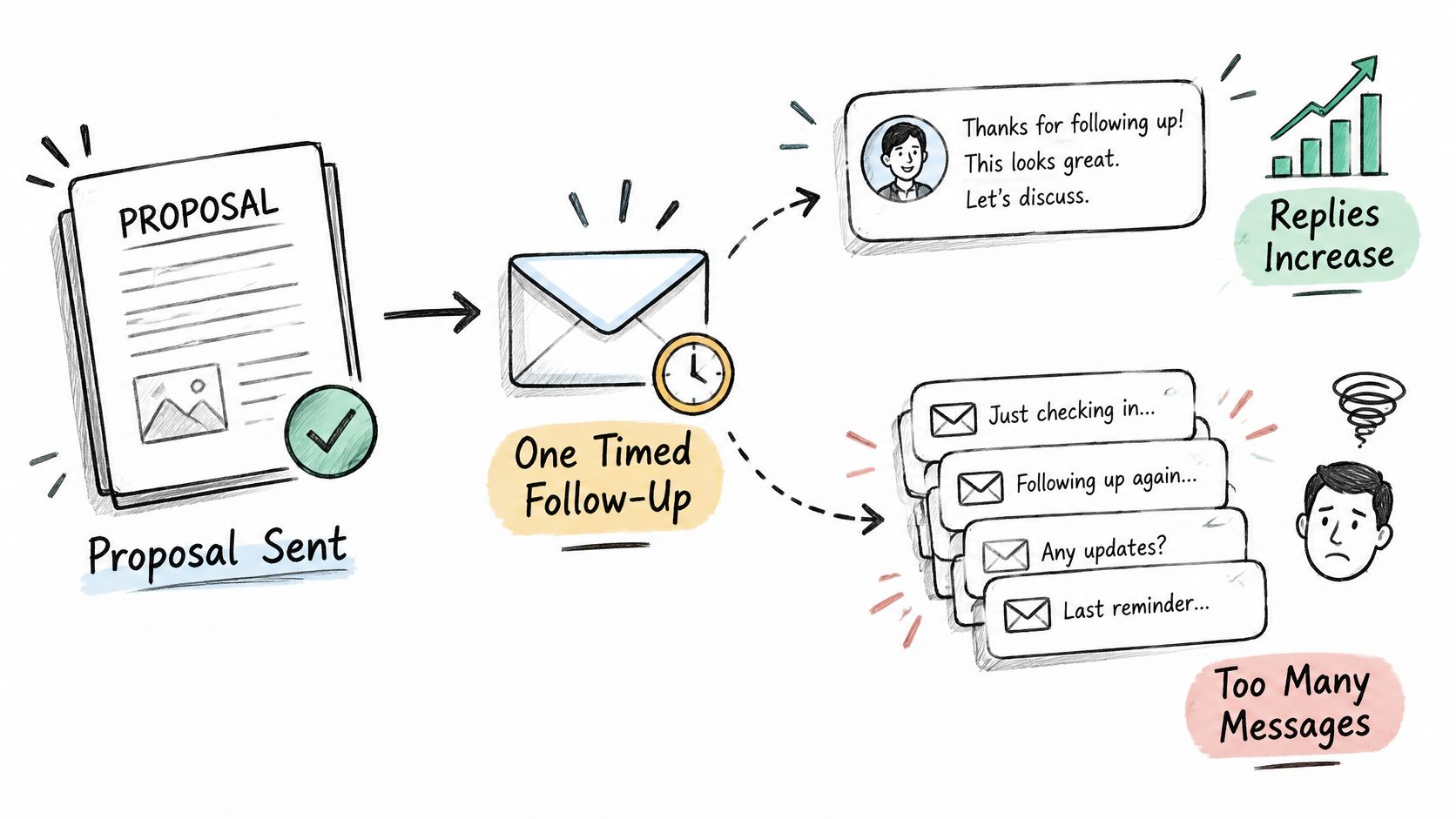
More reminders are not a better process. Advisory buying runs through several stakeholders, budget timing, internal approval and scope that still isn't settled. A nudge that ignores that context sounds desperate, even when the proposal was strong.
The silence is still real. A benchmark cited by One Hour Digital's proposal statistics reports that 48% of salespeople and independent professionals never make a follow-up attempt after an initial proposal, while the first follow-up can increase reply rates by 49%. Those figures do not mean a longer automated sequence is safer. They mean one relevant contact beats none, and a string of generic nudges can still damage trust.
A follow-up that matches the decision
- After discovery, write the decision criteria on the record. If price, timing and scope aren't named, you don't yet know what a useful follow-up would ask.
- Confirm who else must approve before you send. A proposal that skips the budget owner is already late.
- Book a mutually agreed review date. Open-ended "just checking in" notes train the buyer to ignore you.
- Ask directly about objections, and log each one. A logged objection is a next action. A third reminder is not.
- When the opportunity has been inactive for an agreed period, close the loop in a short, respectful note. Leaving it open forever clutters the board and the relationship.
The platform should track decision readiness, missing stakeholders, promised next steps and proposal age. It should not only fire timed emails. Every open proposal needs a next step on a schedule you set once, with an owner and a decision status. An overdue state should trigger a reminder or an escalation, not sit as passive data.
Say a boutique strategy firm sends a proposal to a COO who hasn't seen the budget. The right note asks for the budget owner's name and offers a short call with both of them. A third "any update?" email pretends the blocker isn't there. If the client asks for a pause, stop the sequence and put the agreed return date on the record. Restarting early is how a careful buyer starts screening your mail.
Persistence without context protects your pipeline report and costs you the relationship.
Handing a Won Deal to Delivery Without Re-Keying
Treat the handoff as a state change, not a task someone remembers on Monday. Marking an opportunity Won should update the client record, start the delivery pipeline at New Client, notify the owner, and begin onboarding and kickoff scheduling. Sales context travels with the record. Nobody retypes the promise into a second tool.
That chain is where return shows up. Nucleus Research reports that average CRM ROI declined from $4.90 to $3.10 per dollar over the last decade, while productivity and process-efficiency gains account for 51% of total CRM ROI. Storing the deal didn't create that share. Synchronized work did. Richer data across systems, with less manual syncing, is what removes coordination cost. Another screen that still needs re-keying adds an interface and keeps the cost.
A practical test is simple. Can a delivery lead open the client record and state the promise made during sales without asking anyone? If the answer is no, the Won button only changed a label. A written client onboarding workflow is the checklist that record should already satisfy.
Five numbers that show the handoff is real
| Metric | What it reveals | Direction to watch |
|---|---|---|
| Manual touches per opportunity | How much coordination is still done by hand | Falling over time |
| Overdue next steps | Deals with no scheduled action | Near zero |
| Duplicate-record rate | Whether capture is creating duplicate contacts | Falling toward zero |
| Time from Won to kickoff | How fast the client sees delivery begin | Shrinking |
| Handoffs completed without re-keying | Whether sales context reaches delivery intact | Rising toward every handoff |
Three cases break a naive "Won means start everything" rule. A partially signed deal, where only phase one is agreed, should open delivery for that phase and leave the rest in business development. A scope change after kickoff has to be able to return to sales without cloning the client. A partner-sourced win still needs a thank-you to the referrer on the day it closes, or the handoff fixed delivery and neglected the relationship that created it.
Watch manual touches and time from Won to kickoff for a month. If both stay flat, automation added a screen. It didn't remove the scramble.
Running Referral Partners as a Pipeline
Referrals are a large share of new consulting work, and most firms still treat them as a favor rather than a process. The 2022 Consultancy Growth Network BenchPress report, discussed by Thinkable Group, found that referrals generated 41% of new consulting clients, the strongest acquisition channel in that report, while only 12% of consulting firms had fully implemented a sales-referral strategy. That 41% figure isn't a universal benchmark for every firm size, but the gap is the point. The channel is large, and a written system is still uncommon, because follow-up usually depends on memory.
The Relationships and Referrals pipeline tracks partners from first relationship through active referral and ongoing nurture. A useful stage list runs like this: first relationship, first introduction, introduction received, discovery, proposal, engagement, then ongoing nurture. Every opportunity keeps its source attribution, so you can see which partner produced it. That link is what lets you thank the right person and notice who has gone quiet.
One accountant's introduction
Say an accountant introduces a founder who later signs a fractional COO engagement. The opportunity record names the accountant from the first call. On the day the deal is marked Won, a thank-you goes out the same day, and the partner gets a short note on the outcome, without client secrets they shouldn't hear. A periodic nurture touch, and a check-in when a referred deal closes or stalls, keeps the relationship from depending on whoever remembers the lunch.
Partners are not leads. They should not receive a sales sequence. Space relationship messages so a partner doesn't feel managed. A thank-you after each introduction, a light check-in on a cadence you both would accept, and silence when there's nothing real to say, is enough. If you want a field-level view of attribution, this guide on how to track referrals pairs cleanly with the stage list above.
List your current referral partners this week and write the date of last contact beside each name. Anyone past ninety days with no note is a relationship you're hoping still exists.
Deciding Whether a Small Firm Should Adopt One
The hard part for a firm of two to twenty people isn't doubting that a CRM could help. It's turning founder-led habits into stages, owners and handoffs without hiring an operations manager to babysit the tool. Cirrus Insight's CRM statistics put adoption in perspective: only about 50% of businesses with fewer than 10 employees use a CRM, while adoption rises sharply with company size, and EU-wide CRM adoption was 28.51% in 2025 after rising 2.68 percentage points from 2023. Smaller firms don't mainly lack features. They lack a setup small enough to survive a busy month.
The minimum operating setup
- Map only lead capture, discovery, proposal follow-up, onboarding and referrals. Leave campaigns, scoring and extra objects until those five paths are boringly reliable.
- Measure four things: response time, proposal age, handoff completion and referral touches. If a field doesn't feed one of those, you don't need it in month one.
- Expand automation only after the team trusts the workflow. Early sequences that feel pushy will get turned off, and the board will go stale with them.
Before you adopt anything, answer five questions in writing. Do you have a stage list? Who owns each stage? Which three sources bring most leads? Which users need access? How many contacts will you import first? Import the live relationships, not a decade of old business cards.
Rollout has three phases. Map how leads, meetings, proposals, clients and referral partners move through your firm today. Install the pipelines, follow-up, reminders, routing and handoffs so they match that map. Go live with business development first, while repetitive follow-up runs on the schedule you already set. The map is your work. Configuration without it copies someone else's sale.
We built Starward Navigators for independent advisors, solo consultants, fractional executives and small firms that generate leads through referrals, LinkedIn and events but don't have a system for turning those leads into booked calls and signed clients. A plain comparison of CRM for consulting firms helps if you're still sorting a blank database from a prebuilt operating path. Our setup maps how work moves through your firm, then configures pipelines, follow-up, reminders, routing and handoffs around that map.
Be clear about the limits. This is a CRM and follow-up system. It gives no compliance, regulatory or licensing guidance, and your firm stays responsible for its own obligations. Relationship-driven advisory sales often need fewer automated messages than the software will allow. You decide which sequences stay on.
Run the four metrics for 30 days on business development alone. Add delivery and referrals only if the team is actually using the board.
Next step this week: write the business development stage list, with an exit condition on each stage, and bring it to a mapping session. If you can't finish that page, you aren't ready to configure software, and that's useful to know before you pay for seats.
Starward Navigators builds the client acquisition infrastructure small consulting and advisory firms run, with pipelines, follow-up, proposal tracking, handoffs and referral nurture already shaped around a consulting sale. If the proposal-to-decision gap and the handoff scramble in this guide match your week, see how the operating setup is mapped and installed. Visit Starward Navigators and bring your stage list.