Most advice treats every appointment scheduling Excel template as interchangeable. It isn't. A simple daily grid solves a different operating problem from a print-first weekly book, a status tracker, a conflict detector, a capacity planner, or a workbook for several providers and rooms.
This comparison focuses on what each file is best at. You'll find options for fixed-interval booking, paper-based planning, visual status control, overlap warnings, time blocking, and multi-provider coordination. Before choosing, assess your booking volume, provider count, reminder requirements, reporting needs, and whether you need a downloadable sheet or a connected operating system.
Excel remains a practical starting point because Microsoft provides editable schedule templates with dates, time slots, task names, deadlines, and team assignments. Those templates can also be refreshed for new dates and assignments and exported as PDFs for sharing, as described in Microsoft's schedule template library. The limitation is operational rather than cosmetic. A workbook can organize bookings, but it won't independently confirm appointments, remind prospects, route new leads, or manage client handoffs.
For consulting and advisory firms, Starward Navigators is a relevant upgrade path once manual confirmations, reminders, proposal follow-up, and onboarding handoffs start consuming too much attention. The right decision isn't “Excel or software” in the abstract. It's whether the workbook still matches the workflow your team needs to run.
Table of Contents
- 1. Vertex42 Appointment Schedule Template for Excel
- 2. Vertex42 Weekly Appointment Calendar and Appointment Book for Excel
- 3. Smartsheet Free Excel Daily Planner Appointment Calendar
- 4. Template.net Appointment Schedule Template for Excel and Google Sheets
- 5. Someka Appointment Calendar Template for Excel and PDF
- 6. Someka Time Blocking Template for Excel
- 7. General Blue Appointment Planner in Excel
- 8. OfficeTemplatesOnline Free Excel Appointment Scheduler
- 9. Highfile Appointment Schedule Template for Excel and Google Sheets
- 10. Koalendar Medical Office Appointment Scheduling Template
- Appointment Scheduling Excel Templates, Top 10 Comparison
- Know When Excel Has Reached Its Limit
1. Vertex42 Appointment Schedule Template for Excel
Vertex42's Appointment Schedule Template fits a single provider managing a predictable daily or weekly booking grid. The workbook supports 15-minute, 30-minute, and 1-hour intervals, with status fields for confirmed appointments, no-shows, and breaks. Color coding lets users review the day quickly without opening a separate booking database.
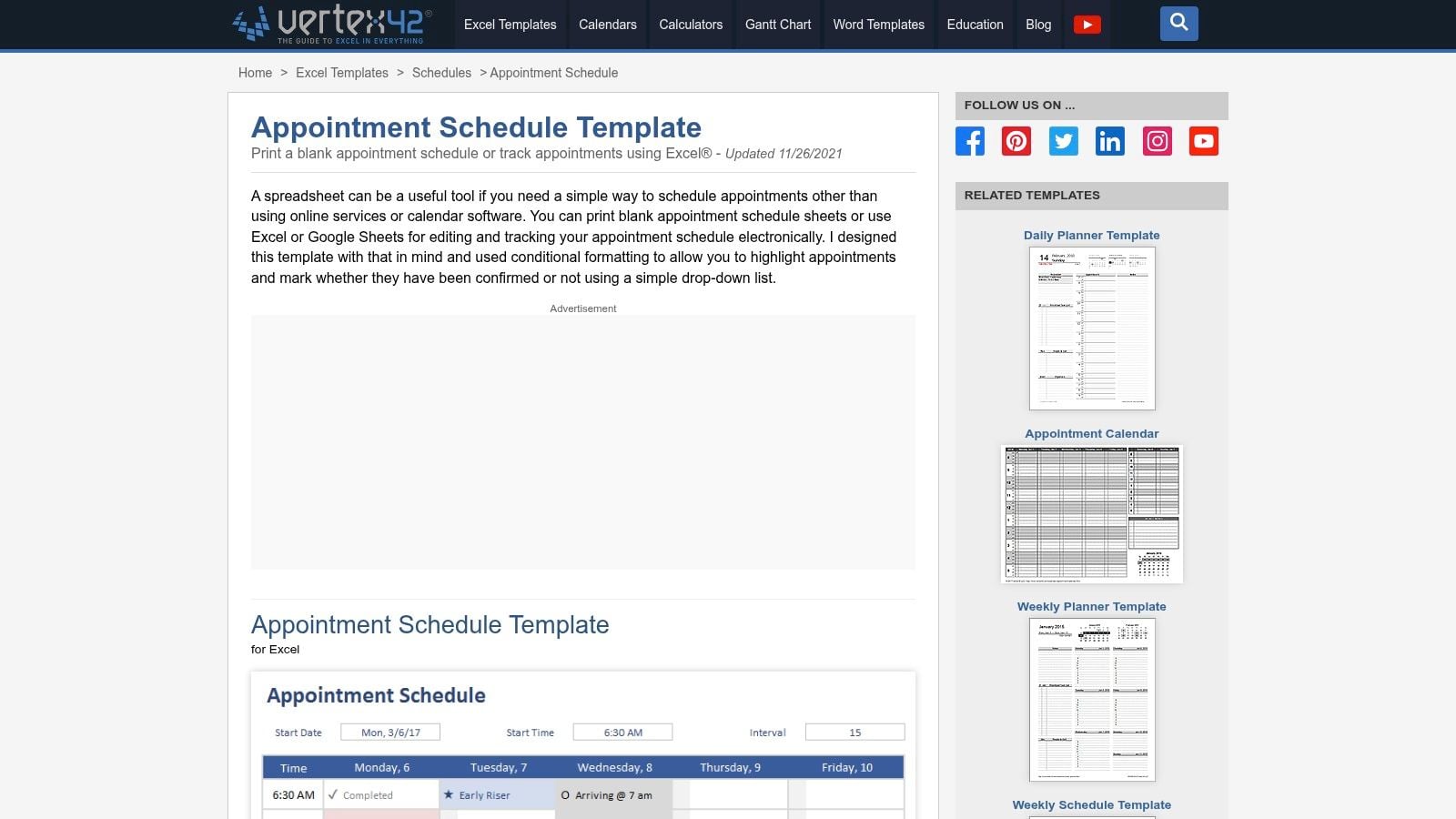
Its no-macros design keeps setup simple. Change the start date, starting time, and interval, then duplicate tabs for additional weeks. Printable weekly sheets suit a reception desk or consultant who wants a paper backup. The trade-off is manual maintenance: Excel records the schedule, but it does not send reminders, accept online bookings, or update every user when an appointment changes.
Vertex42's guidance recommends choosing 15-minute, 30-minute, or 1-hour intervals according to appointment length. That makes this workbook useful for daily booking and basic conflict control, provided one person owns the calendar and keeps entries current.
Where it works and where it stops
Use this template for one provider with recurring appointment blocks and limited coordination requirements. A team can duplicate tabs for several providers, but staff must maintain those tabs manually. That approach creates extra checking work as rooms, schedules, and booking changes increase.
Practical rule: Choose Vertex42 when a clear visual grid matters more than automation. Do not expect reminders, online booking, or a central multi-provider view.
Setup effort is low, and licensing or macro concerns do not complicate deployment. For a modest schedule, manual confirmations and rescheduling may be acceptable. For consultants coordinating discovery calls, proposal reviews, and client handoffs, the workbook eventually becomes a record of activity rather than the workflow. At that point, automated scheduling in Starward Navigators may better support the process.
2. Vertex42 Weekly Appointment Calendar and Appointment Book for Excel
The Vertex42 Weekly Appointment Calendar and Appointment Book addresses print-first planning across multiple weeks. It offers a single-page weekly calendar and a two-page appointment-book layout, so staff can choose between a compact overview and more writing space.
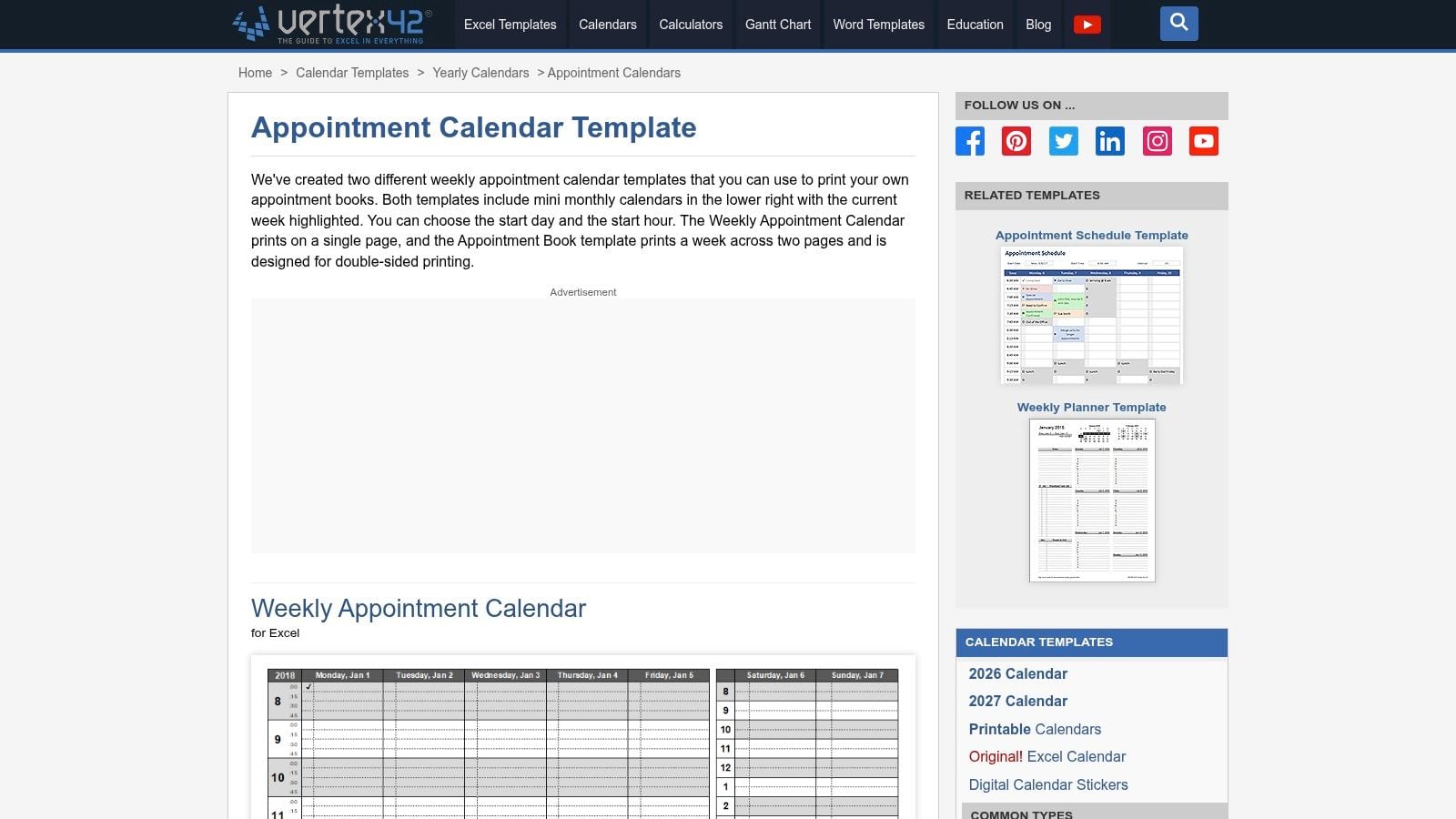
Users can set the starting day and hour, view mini monthly calendars, and highlight the current week. The duplex-printing option lets a front desk keep a two-page appointment book on one sheet. That is the practical reason to choose this file over a single-page weekly grid when reception staff, clinicians, or field consultants need a physical schedule.
A paper workflow with clear boundaries
The familiar format requires little training. A solo practitioner or small office can print weekly pages, write appointments by hand, and keep the schedule visible without opening a shared file. It fits daily booking when paper access matters more than client records, status histories, or reporting.
The workbook's fields are intentionally limited. It does not provide structured client data or useful analytics, and a handwritten cancellation or moved appointment remains local to the printed page. Staff must update other copies, contact records, and follow-up tasks separately.
Use this template when printing is an operating decision, not a replacement for coordinated digital booking. Printing several weeks at once improves availability during reception work or field visits, but it also creates version-control risk. Assign one person to identify the authoritative copy and reconcile changes before another appointment is added.
The operational trade-off
This workbook suits paper-first planning and basic capacity visibility for one provider. It becomes restrictive when several providers, rooms, or appointment changes must stay aligned. Teams needing real-time availability, online self-service, automated confirmations, or rescheduling history should move to a structured scheduling system.
For consultants coordinating discovery calls, proposal reviews, and client handoffs, customization can add fields and separate provider tabs, but manual checking grows with each dependency. Once the workbook records activity rather than controlling the workflow, automated scheduling in Starward Navigators may be a better fit.
3. Smartsheet Free Excel Daily Planner Appointment Calendar
The Smartsheet free Excel calendar template library is useful when you need a configurable daily planner rather than a full appointment database. Its appointment calendar format lets users adjust the daily start time and interval, then print a clean schedule for internal or client-facing use.
The broader library is an advantage. You can compare related calendar layouts instead of forcing one design to serve every scheduling situation. A user who needs a daily view with tighter or wider time granularity can adapt the file without building a workbook from a blank sheet.
Best for a clean daily view
The daily format suits consultants, coaches, internal service teams, and small offices where one person enters appointments and the schedule is mainly a visual reference. It can also work as a client-facing planning sheet when the printed output matters more than structured data capture.
The file isn't an end-to-end booking system. Staff still enter appointments manually, manage changes themselves, and communicate confirmations through another channel. Downloading may also involve navigating the Smartsheet site and its marketing pages, so the acquisition experience is less direct than a simple standalone file.
A useful implementation is to add a compact set of fields rather than redesigning the workbook immediately:
- Client or prospect: Record the person or organization tied to the appointment.
- Purpose: Note discovery call, review, delivery meeting, or another service type.
- Status: Use a controlled vocabulary such as Open, Booked, Confirmed, Cancelled, and No-show.
- Follow-up owner: Assign the person responsible for the next action.
That structure reflects the practical recommendation to use fields such as Date, Start, End or Duration, Client, Service, Resource, Status, and Notes. Planora Nest's Excel appointment schedule guidance also recommends protected time columns and data validation to prevent ambiguous times and inconsistent status labels.
Smartsheet is a sensible pick for daily planning with configurable granularity. It isn't the right foundation if several people need simultaneous editing, automated reminders, or reliable reporting from booking history.
4. Template.net Appointment Schedule Template for Excel and Google Sheets
Template.net's Appointment Schedule Template is aimed at users who want a pre-formatted, editable schedule with multiple office-format options. Availability in Excel and Google Sheets makes it easier to fit the file into an existing team preference, while related variants target settings such as salons and medical offices.
This is less about solving a complex scheduling algorithm and more about starting with a presentable document. Editable time slots and appointment fields let a small business add its branding, service names, contact fields, and preferred layout without designing every worksheet element from scratch.
The real value is format flexibility
Google Sheets can be useful when a team needs browser-based access, while Excel may be preferable for offline work, printing, or existing workbook processes. That choice doesn't remove the need for governance. A shared sheet still needs a clear owner, consistent status values, protected formulas, and a defined backup routine.
The marketplace model is the main drawback. Many files sit behind membership or account sign-up, and the site experience is marketing-heavy. Check the access terms, file format, and licensing conditions before standardizing the workbook across a business.
Before downloading: Confirm whether the file is genuinely available in your preferred format, whether commercial use is permitted, and whether the design includes the fields your team needs.
For a consulting or advisory firm, the template can provide a branded front-end schedule, but it won't connect appointments to lead intake, proposal stages, or onboarding by itself. If you're evaluating how a template might fit into a broader consulting workflow, compare it with the Starward Navigators template resources.
Template.net is best when presentation and format choice matter. It isn't a strong choice if you want built-in conflict control, reminder delivery, or a central operational record.
5. Someka Appointment Calendar Template for Excel and PDF
Someka's Appointment Calendar Template fits the calendar-style planning problem. It provides weekly and monthly views, customizable time slots, color categories, note space, and contact details, with layouts designed to print cleanly.
The visual hierarchy is more professional than a plain grid. A consultant can use categories to distinguish discovery calls, delivery meetings, internal work, and blocked time, then use the weekly or monthly view depending on the planning conversation. The notes and contact areas are valuable when the schedule needs to carry context instead of only showing occupied slots.
A polished calendar is still a manual calendar
Someka's example file is useful for evaluating the layout, but advanced or related tools are paid. That licensing boundary matters if you need more than the basic calendar experience. Establish who can edit the workbook, where the authoritative version lives, and how often it gets backed up before distributing it across a team.
The main limitation is transactional. The file doesn't accept bookings from a public page, check live availability across systems, or send confirmations automatically. Staff must update the workbook when an appointment is created, moved, cancelled, or completed.
That makes Someka a good fit for professional print-ready planning and a weak fit for a high-volume intake process. It can organize a consultant's week effectively when the person scheduling is also the person maintaining the file. It can't independently enforce the next step after a meeting, such as sending a proposal reminder or notifying an owner that a client is ready for onboarding.
Use it when the visual calendar is the operating tool. Don't mistake a polished layout for connected scheduling automation.
6. Someka Time Blocking Template for Excel
Someka's Time Blocking Template is designed for capacity planning and overlap control, not just appointment entry. Its event list drives weekly and monthly calendars, and the workbook includes overlap warnings, optional reminders, a dashboard, and capacity-oriented summaries.
The event-driven structure is the important distinction. Rather than typing independently into multiple calendar views, you maintain an events list and let the workbook present that information across the schedule. That approach reduces duplicate entry and makes it easier to see how meetings compete with deep work, administration, delivery, and other commitments.
Stronger planning logic, narrower booking fit
Overlap warnings are valuable for a consultant who routinely overcommits. A dashboard can also make capacity visible across work contexts, helping someone protect delivery time instead of filling every available slot with calls. The free demo gives users a way to evaluate the interface before purchasing, although the full feature set is paid and the demo requires an email.
The trade-off is specialization. This is a capable personal or multi-context planner, but it isn't built primarily for multi-provider client booking. It won't replace a system that needs provider availability, public booking, automated reminders, lead routing, and post-meeting follow-up.
Capacity test: If your calendar shows availability but your delivery work keeps slipping, a time-blocking workbook is more useful than another simple appointment grid.
For consulting firms, scheduling should also connect to what happens before and after the call. That includes qualification, proposal progression, ownership, kickoff scheduling, and client record updates. A workbook can document those actions, but a connected client onboarding workflow can coordinate them more reliably.
Choose Someka Time Blocking when the problem is over-commitment and capacity visibility. Choose another tool when the main requirement is external self-service booking across several providers.
7. General Blue Appointment Planner in Excel
The General Blue Appointment Planner is the most straightforward option in this list. It provides a single-day appointment sheet with 30-minute intervals from 8:00 to 17:00, plus fields for names and phone numbers.
Its simplicity is the feature. There is no complicated configuration layer to learn, no macro dependency, and no account sign-up required for the download. A receptionist, solo consultant, or small service business can open the file, change the labels, add basic color coding, and print the day's schedule.
A useful disposable worksheet
This format works when the schedule is short-lived and local. It can serve as a daily call sheet, a simple visitor schedule, or a printed plan for a person who needs names and phone numbers beside each time slot.
It becomes less useful as soon as the operation needs continuity. Because it shows one day, users need multiple copies for a longer planning horizon. Status tracking is minimal, and the workbook doesn't provide a central list of bookings, automated conflict warnings, provider assignment, reminders, or reporting.
The file can be extended with formulas, but customization effort rises quickly if you add logic for duration, status, availability, or duplicate bookings. At that point, a structured table with validation and protected columns is safer than adding scattered formulas to a simple grid.
General Blue is a good fit for basic daily planning and printing. It isn't a realistic system for a team managing recurring appointments, several resources, or a lead-to-client workflow. Treat it as a lightweight worksheet, not as a booking platform.
8. OfficeTemplatesOnline Free Excel Appointment Scheduler
The OfficeTemplatesOnline free Excel Appointment Scheduler addresses the most consequential spreadsheet problem, conflict control. It includes a Settings tab for services, staff, and hours, a Bookings table, daily and weekly schedule views, and a KPI dashboard. Its overlap logic flags potential double bookings without relying on VBA macros.
This is a meaningful step above a visual calendar. A structured bookings table gives the team a consistent place to record appointments, while drop-downs reduce inconsistent service and status entries. Daily and weekly views help staff inspect the schedule, and the dashboard provides light visibility into utilization, no-shows, and cancellations.
The strongest Excel choice for conflict detection
The scheduler is a good fit for salons, clinics, consultants, and other small operations that need more control but aren't ready to buy a dedicated system. The README and structured layout can reduce setup confusion, and the no-macro design is easier to distribute in environments where VBA is restricted.
There are important boundaries. The workbook assumes one location, staff availability isn't shift-aware, and reminders remain manual. It can identify a collision in the data, but it won't contact the client, ask the client to reschedule, or notify a sales owner that a discovery call is complete.
The dashboard also depends on disciplined data entry. If staff skip statuses, enter inconsistent names, or edit formulas, the summaries become less reliable. Protect the calculation areas and make the controlled fields mandatory where possible.
Conflict-control test: Enter a booking that overlaps an existing appointment and confirm that the workbook flags it before you rely on the file in production.
This is the best pick here for double-booking detection and basic operational reporting. When the next requirement is automated booking, confirmations, and reminders, review Starward Navigators' appointment automation.
9. Highfile Appointment Schedule Template for Excel and Google Sheets
Highfile's Appointment Schedule Template is a practical choice for status visibility across a five-day schedule. It uses adjustable start dates and times, configurable intervals, a status dropdown, and conditional formatting that turns booking states into visual signals.
The two-cell slot design is thoughtful. One cell can hold the status icon while the other carries notes, so the schedule preserves both the visual state and appointment context. The included documentation and print guidance also help users adapt the workbook for staff schedules without having to reverse-engineer every formatting rule.
Good status vocabulary, limited roll-up
A controlled status legend can make a schedule operational rather than decorative. Use values such as Confirmed, No-show, Out of Office, and other agreed labels consistently, then use the color system for scanning rather than adding a different color for every service.
Highfile is offered under a free license with attribution, so commercial users should account for that requirement before removing branding or distributing modified copies. Licensing is a small detail that can become a deployment issue if the workbook is used across client accounts or embedded in a paid service.
The bigger limitation is the provider structure. The per-provider tab pattern doesn't create a central roll-up for several staff members. A coordinator may need to inspect multiple tabs manually, and a change to one provider's availability won't automatically reconcile every related view.
This template works well for one provider or a small team with disciplined tab management. It doesn't solve shared availability, automated reminders, or customer self-service booking. If those needs are emerging, the team should measure how much time it spends reconciling tabs before adding more workbook complexity.
10. Koalendar Medical Office Appointment Scheduling Template
The Koalendar medical office appointment template is the most suitable option for multi-provider and room-based coordination. Its Schedule and Setup tabs support providers, rooms, and appointment types, while the daily view includes totals and a print-ready variant. The template is available in Excel, Google Sheets, and Word formats.
The resource columns make this workbook more appropriate for a clinic or service operation where an appointment needs both a person and a physical room. Setup data can give the schedule a consistent foundation, and the different file formats support digital, browser-based, and print workflows.
Better coordination, still manual
Koalendar's structure is more relevant than a single-provider grid when several practitioners share rooms or appointment types. It can help a coordinator see who is assigned to what and produce a daily schedule that staff can print.
The workbook still requires manual updates. It doesn't send automated reminders, accept bookings directly from a public page, or reconcile changes across external calendars. The site also cross-sells Koalendar's online booking product, which may distract users who only want the downloadable template.
Use the Excel version when you need a downloadable file without account sign-up, but establish a strict editing routine. One person should own setup changes, providers should use agreed status and appointment-type values, and the team should define how room changes are recorded.
Koalendar is the strongest choice in this list for multi-provider, room-aware scheduling. It won't replace an integrated booking and client-acquisition workflow, but its data structure is a more credible starting point for coordinated operations than a single-provider daily sheet.
Appointment Scheduling Excel Templates, Top 10 Comparison
| Product | Core features | UX (★) | Price / Value (💰) | Target & USP (👥 ✨/🏆) |
|---|---|---|---|---|
| Vertex42, Appointment Schedule Template (Excel) | Adjustable start date/time, intervals, status dropdowns, printable weekly sheets | ★★★ | 💰 Free / one-off download | 👥 Solo consultants; ✨ no‑macros, legend-driven color system |
| Vertex42, Weekly Appointment Calendar + Appointment Book (Excel) | Single-page weekly or two-page book, configurable start day/hour, mini monthly calendars, duplex print | ★★★ | 💰 Free / print-optimized | 👥 Paper-first users; ✨ duplex/multi-week print layout |
| Smartsheet, Free Excel Daily Planner | Daily start time & interval selection, multiple downloadable formats, print-friendly layouts | ★★★ | 💰 Free (template library) | 👥 Users needing quick daily sheets; ✨ part of reputable library |
| Template.net, Appointment Schedule (Excel/Google Sheets) | Excel & Google Sheets formats, editable slots, multiple industry variants | ★★★ | 💰 Freemium (membership/paywall) | 👥 Users wanting branded/industry variants; ✨ multi-format catalog |
| Someka, Appointment Calendar Template (Excel/PDF) | Weekly/monthly views, customizable slots, color categories, notes, print-ready layouts | ★★★ | 💰 Free example / paid advanced tools | 👥 Consultants who prefer professional print layouts; ✨ print-ready design |
| Someka, Time Blocking Template (Excel) | Events-driven weekly/monthly calendars, overlap warnings, optional reminders, dashboard | ★★★★ | 💰 Paid (free demo) | 👥 Capacity planners & solo consultants; 🏆 dashboard + double-booking warnings |
| General Blue, Appointment Planner (30‑Min Interval) | Daily grid 8:00–17:00, editable intervals, contact fields, simple formatting | ★★ | 💰 Free (no signup) | 👥 Users needing single-day printable sheets; ✨ instant download, no signup |
| OfficeTemplatesOnline, Free Excel Scheduler (with Double‑Booking Alerts) | Double-booking detection, daily/weekly views, Bookings table, KPI dashboard | ★★★★ | 💰 Free | 👥 Salons/clinics/consultants; 🏆 conflict alerts + light analytics dashboard |
| Highfile, Appointment Schedule Template (Free w/ Attribution) | Five-day schedule, adjustable slots, status dropdown, conditional formatting, print tips | ★★★ | 💰 Free (attribution required) | 👥 Commercial users OK with attribution; ✨ thoughtful docs & status system |
| Koalendar, Medical Office Appointment Template | Providers/rooms/appointment types, multi-provider columns, daily totals, print-ready | ★★★★ | 💰 Free download (site cross-sell) | 👥 Clinics & multi-provider practices; 🏆 room/provider-aware scheduling layout |
Know When Excel Has Reached Its Limit
Excel is still the right answer when one person manages a modest schedule, appointments follow predictable intervals, and manual updates are acceptable. Start with a simple daily or weekly workbook if your main requirement is visibility, printing, or a low-cost editable record. Vertex42, Smartsheet, General Blue, and Someka's calendar format fit that use case better than a complex dashboard.
Choose a more structured workbook when coordination creates operational risk. OfficeTemplatesOnline is the practical choice when double-booking alerts and light reporting matter. Someka's Time Blocking Template is more useful when the problem is capacity and over-commitment. Koalendar is better suited to providers and rooms. Highfile adds useful status visibility, while Template.net gives you format flexibility and a range of branded layouts.
Before customizing any file, document the process it must support. Decide the interval, status vocabulary, contact fields, confirmation method, cancellation handling, and backup routine. A practical field set includes Date, Start, End or Duration, Client, Service, Resource, Status, and Notes. Use data validation for statuses, protect formulas and time columns, and keep one authoritative version of the workbook.
The workbook should reflect the process, not define it.
An appointment scheduling Excel template cannot independently send confirmations, reminders, route new leads, enforce proposal follow-up, or automate client handoffs. It can show that a meeting is booked, but it can't reliably turn that event into the next commercial or delivery action without additional manual work.
That gap matters for consulting and advisory firms. A discovery call may begin with a form submission, require lead assignment, create an appointment, trigger confirmation and reminders, move into proposal tracking, and then start onboarding after a decision. Managing each transition through email, calendar edits, and spreadsheet updates creates opportunities for missed ownership and inconsistent follow-up.
Starward Navigators is a possible next step for firms that need those connected workflows. Its operating system includes lead capture and routing, appointment confirmations and reminders, proposal tracking, client onboarding automation, and referral workflows. Its appointment flow can update the opportunity record when a meeting is booked, connecting scheduling activity to the wider client-acquisition process.
Don't migrate on assumption alone. Run one real scheduling week through the workbook you plan to use. Record every manual confirmation, reschedule, conflict, reminder, proposal follow-up, and handoff. Then decide whether the failure points are small enough to fix with validation and process rules, or whether they show that your firm needs an automated operating system rather than a more elaborate spreadsheet.
Starward Navigators connects appointment scheduling with lead capture, confirmations, reminders, proposal tracking, client onboarding, and referral workflows for small consulting and advisory firms. Test whether a connected operating system fits the gaps you found in your workbook by visiting Starward Navigators.