You've got a prospect asking for a discovery call, a partner forwarding three possible time slots, and two consultants checking separate calendars before anyone replies. Meanwhile, the booking link on your website feeds one inbox, the personal link in a consultant's email feeds another, and the CRM still shows the opportunity as untouched. By the time the meeting is confirmed, the prospect may have moved on, or the partner may have promised a time that creates a double booking.
That's why appointment scheduling software for small business deserves a broader evaluation inside a consulting firm. A booking page is useful, but it only solves the visible part of the problem. The operational test is whether the system confirms the right context, reduces no-shows, captures intake information, updates the deal record, triggers proposal follow-up, and supports a clean handoff into delivery.
The market has moved well beyond a niche convenience. One estimate places global appointment scheduling software revenue at USD 554.11 million in 2025, rising to USD 636.23 million in 2026 and approximately USD 2.21 billion by 2035, with small and medium-sized businesses holding 50.10% of the market in 2025 (market estimate and SMB breakdown). For a boutique advisory firm, that growth reflects a practical shift: scheduling now sits close to revenue capture, utilization, and client experience.
Table of Contents
- The Real Problem With Scheduling Inside a Small Consulting Firm
- What Scheduling Software Must Actually Do for a Consulting Firm
- The Three Product Archetypes Buyers Compare
- Comparing Confirmations, Reminders, and Calendar Integrations
- Pricing and Seat Considerations Beyond the Headline Number
- Implementing a Scheduler Without Disrupting Client Delivery
- Matching the Right Tool to Your Firm Profile
The Real Problem With Scheduling Inside a Small Consulting Firm
A two-person advisory practice can create scheduling chaos without doing anything obviously wrong. A prospect clicks a Calendly link from one consultant, replies directly to the managing partner, and submits an intake form through the website. The team uses Gmail for the conversation, Google or Microsoft calendars for availability, and a CRM for pipeline stages. Each tool works independently, but no one tool owns the complete appointment lifecycle.
The first failure usually appears as a calendar conflict. A consultant blocks travel time in one calendar but not another. A partner accepts a meeting from an email thread before the booking tool refreshes availability. A discovery call includes several stakeholders, but the system checks only the calendar of the person who shared the link. The prospect receives a confirmation, while the internal team receives a correction.
The booking is only the first handoff
No-shows create a second leak. A basic scheduler may send a confirmation and one reminder, but it won't know what happens when the prospect misses the call. Does it offer a rescheduling link? Does it notify the opportunity owner? Does it create a follow-up task? Does it distinguish a missed discovery call from a missed proposal review?
The NIH and PMC literature review summarized for small-business scheduling reports a 6.9% no-show rate for ZocDoc dermatology bookings, compared with 17–31% for traditional booking methods. It also describes online scheduling implementations where no-shows fell by 40–42% after asynchronous rescheduling and communication flows were added. The lesson isn't that every consulting firm will achieve the same result. It's that recovery mechanics matter as much as the booking page.
Intake creates another bottleneck. A prospect may answer questions about budget, urgency, stakeholders, or the business problem in an email, but those answers remain outside the deal record. The consultant enters the call without context, then manually reconstructs the conversation afterward. If the call leads to a proposal, the proposal timeline depends on someone remembering to update the CRM and schedule the next conversation.
Operational rule: A scheduler should create the next action, not just the calendar event.
Evaluate the revenue workflow
For a small consulting team, the buying question is straightforward:
- Before the call: Does the system route the prospect to the right person and capture useful context?
- Before attendance: Does it send relevant confirmations, reminders, and rescheduling options?
- After the call: Does it update the opportunity, assign follow-up, and support proposal scheduling?
- After a win: Does it trigger onboarding and notify delivery owners?
- After a referral: Does it preserve the relationship and start the right nurture sequence?
If the answer stops at “the prospect can pick a time,” you're buying a widget beside the revenue workflow. The right scheduler should sit inside it.
What Scheduling Software Must Actually Do for a Consulting Firm
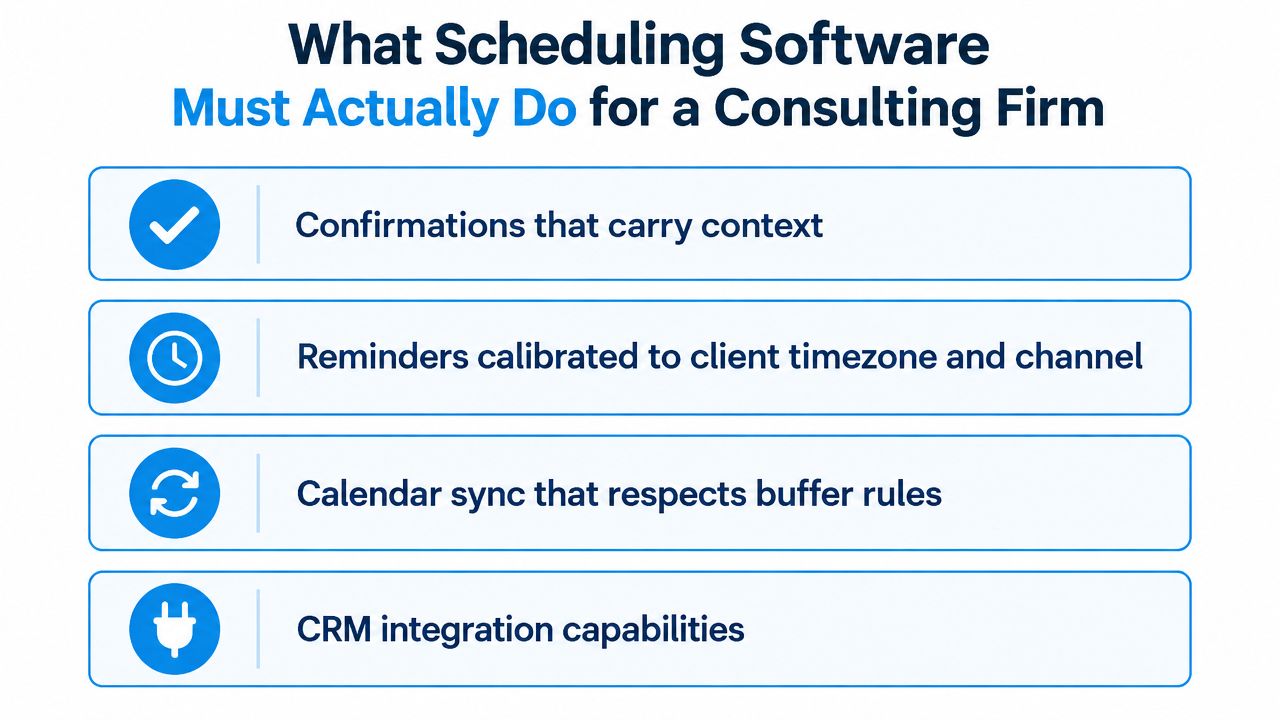
A consulting-grade scheduler needs four capabilities. Treat them as requirements, not upgrades you might consider later. Each missing capability creates manual work at exactly the point where a small firm needs speed and context.
Confirmations that carry context
A confirmation should identify the meeting purpose, participants, expected preparation, meeting format, and next step. “Your meeting is booked” is weak for a discovery call. A better confirmation can reference the submitted challenge, tell the prospect who will attend, and explain what the team will use the call to decide.
That context reduces avoidable clarification emails. It also gives the consultant a reliable starting point when the booking record and CRM record are connected.
Reminders calibrated to client timezone and channel
Reminder timing should reflect the meeting type and the client's location. A strategic discovery call may need an earlier reminder with preparation guidance, followed by a shorter prompt closer to the meeting. The channel matters too. Email may be sufficient for one client, while another responds faster to text or a direct rescheduling link.
A reminder sequence should also include a recovery path. If someone cancels, the system should make rescheduling easy. If they don't attend, the opportunity owner should receive an alert and the prospect should receive a professional next step.
Calendar sync that respects working rules
Two-way sync must account for more than busy and free status. Consulting calendars often include buffer periods, travel blocks, internal preparation, recurring delivery work, and protected focus time. A scheduler that ignores those rules creates availability that looks open but isn't operationally usable.
Test every connected calendar, especially when a firm uses both Google Workspace and Microsoft 365. OAuth permissions, shared calendars, delegated access, and personal calendar connections can behave differently after rollout.
Pipeline handoffs that preserve the deal
The booking should update the opportunity record automatically. That may mean moving a lead into a discovery stage, recording the event type, attaching intake responses, assigning the owner, and creating a proposal follow-up task after the meeting.
A scheduling layer connected to appointment automation for consulting firms can also support confirmations, reminders, rescheduling, and no-show recovery as part of the same process. The key is not the number of integrations. It's whether the booked appointment creates a dependable operational handoff.
Use this diagnostic checklist
Grade your current setup:
- No-show recovery: What happens automatically when a prospect misses the call?
- Time to confirmation: Does the prospect receive confirmation immediately, with the right context?
- Rescheduling workload: How many hours does the team spend moving meetings each week?
- CRM completeness: What share of bookings flows into the correct deal record without manual entry?
- Calendar reliability: Does availability reflect buffers, travel, and all relevant calendars?
- Proposal continuity: Can the team schedule the next commercial conversation without restarting the process?
If several answers depend on a person remembering to do something, the firm doesn't have scheduling automation yet. It has a collection of helpful tools and a fragile operating habit.
The Three Product Archetypes Buyers Compare
Most small firms compare products by brand familiarity, then discover that the shortlist contains very different categories. A booking link, a CRM-based meeting tool, and a client acquisition operating system may all advertise “online scheduling,” but they solve different problems.
Standalone booking tools
Calendly, SavvyCal, and Doodle sit closest to the scheduling transaction. They're attractive when one person needs a clean booking page, straightforward availability, and minimal setup. Calendly is familiar to prospects, SavvyCal makes calendar comparison easier for invitees, and Doodle is useful when several external participants need to find a shared time.
These tools work well for a solo advisor with a simple discovery-call motion. They become less convincing when the firm needs partner-led routing, multiple consultants, structured intake, or automated proposal follow-up. The booking may be smooth, but the commercial process still depends on separate CRM and automation tools.
Suite-based schedulers
HubSpot Meetings and Zoho Bookings belong inside broader productivity or CRM environments. Their advantage is shared context. A meeting can be associated with a contact, assigned to a team member, and connected to other lifecycle activities without as much manual copying.
This archetype suits a boutique consultancy with several consultants and overlapping client rosters. It can support shared availability, routing, and unified records more naturally than a personal booking link. The weakness is complexity. Teams may pay for a larger platform than they need, and configuration quality becomes critical.
Client acquisition operating systems
The third archetype combines scheduling with lead capture, pipeline stages, proposals, follow-up, onboarding, and referral nurture. This is the strongest fit when scheduling is only one part of a repeatable acquisition process.
It's particularly useful for fractional executives and advisory practices where a booked meeting needs to become a qualified opportunity, a proposal conversation, a delivery handoff, or a referral relationship. The trade-off is implementation effort. A broader system needs clear ownership, stage definitions, and workflow rules. It won't fix an undefined process by itself.
| Archetype | Best Fit Firm | Strengths | Weak Spots for Consulting | Example Tools |
|---|---|---|---|---|
| Standalone booking tool | Solo advisor or simple service practice | Fast setup, familiar booking links, focused scheduling | Limited pipeline context, routing, and post-meeting orchestration | Calendly, SavvyCal, Doodle |
| Suite-based scheduler | Boutique team with shared calendars and CRM needs | Unified records, team availability, routing, broader automation | More configuration and platform complexity | HubSpot Meetings, Zoho Bookings |
| Client acquisition operating system | Firm managing leads, proposals, onboarding, and referrals | Connects booking to the full commercial lifecycle | Requires process design and implementation discipline | Starward Navigators, broader CRM operating systems |
A principal should classify the shortlist before comparing individual features. If the firm needs only a reliable booking link, don't buy an operating system. If every booked call creates manual work across sales and delivery, don't expect a standalone widget to close the gap.
Comparing Confirmations, Reminders, and Calendar Integrations
Feature pages often make every scheduler look similar. The differences appear during real workflows: a prospect books with two colleagues, one consultant uses Outlook, another uses Google Calendar, the intake answers need to reach the CRM, and the partner wants meetings routed by service line.
The table below is a practical starting point. Capabilities vary by plan, configuration, and integration, so treat it as a shortlist filter rather than a contract summary.
| Platform | Confirmations | Reminders | Calendar Sync | Intake Forms | Routing |
|---|---|---|---|---|---|
| Calendly | Strong standard confirmations with event details | Automated reminders and workflows on appropriate plans | Google and Microsoft calendar connections available | Basic to advanced depending on event and plan setup | Routing forms and round-robin on team-oriented plans |
| Acuity Scheduling | Customizable appointment confirmations | Email and text reminder options depending on plan | Supports connected calendars for service availability | Strong forms for service and appointment context | Better for service rules than complex sales assignment |
| SavvyCal | Clear booking and calendar-aware confirmations | Reminder support depends on configuration and integrations | Designed around calendar comparison and connected availability | Useful booking questions, less CRM-native depth | Better for deliberate scheduling than complex routing |
| HubSpot Meetings | Confirmation tied to contact and CRM context | Can connect meeting reminders to broader lifecycle automation | Calendar integration supports team availability | Forms and CRM properties can enrich booking context | Strong fit for team routing inside the CRM |
| Doodle | Poll and booking notifications | Reminder features support coordination | Useful across organizations and participant calendars | Limited for structured consulting intake | Weak for qualification and owner assignment |
Reminders need a recovery sequence
A first reminder confirms that a meeting exists. It doesn't solve every attendance problem. For paid strategy calls, the sequence should make preparation clear, surface timezone context, offer self-rescheduling, and define what happens after a missed appointment.
The Zoho survey data on appointment scheduling reports that 41% of SMBs struggle with back-and-forth scheduling. The same survey data says 42% of SMBs can schedule appointments within an hour when software streamlines the process, while another benchmark from that survey family places the share booking in less than an hour at 30%. For consulting firms, faster booking matters because every extra exchange creates another opportunity for a lead to disengage.
Calendar parity is a rollout issue
Google and Microsoft support isn't enough as a checkbox. Confirm whether the tool can read the calendars that govern availability, write events to the right calendar, handle delegated permissions, and maintain buffers across recurring commitments. OAuth conflicts may not appear during a solo test, then surface when a team member connects a second account or shared calendar.
A good test uses real meeting types, not just a one-to-one demo. Create a discovery call, a multi-stakeholder session, and a proposal review. Add a blocked travel period, a buffer, and a conflicting internal event. Then check the invite, CRM record, reminders, and rescheduling path.
If a scheduler cannot explain what happens after a cancellation or no-show, it isn't managing the appointment lifecycle.
Use follow-up automation for consulting pipelines to connect the meeting outcome to proposal tasks, stalled-opportunity reminders, and next-step ownership. The scheduler should reduce the time between a conversation and a commercial decision, not just place another event on a calendar.
Pricing and Seat Considerations Beyond the Headline Number
The advertised monthly fee rarely represents the full cost of scheduling for a consulting firm. The actual bill depends on seats, contacts, reminder channels, branding, locations, integrations, and the amount of manual work left outside the platform.
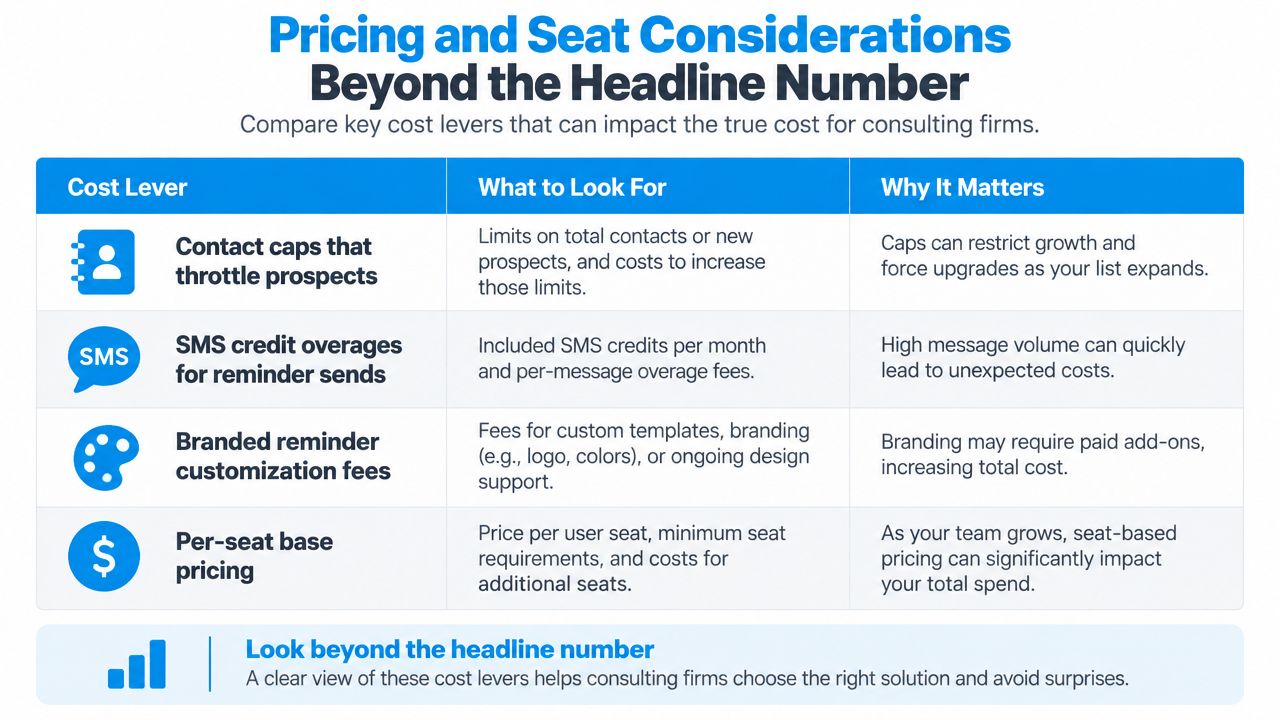
A five-person team should ask four questions before comparing plans. Does every person need a paid seat? Are active prospects counted as contacts? Do reminder messages consume separate credits? Does the firm pay more for multiple locations or branded client communications?
The cost levers that change the decision
Contact caps matter when a firm runs active lead, proposal, and referral workflows in the same system. A plan that looks affordable for bookings may restrict the records needed to support nurture and follow-up.
SMS credits can alter the economics of reminder-heavy workflows. If the firm sends confirmations, reminders, cancellation notices, and recovery prompts, determine whether those messages are included or billed separately.
Branded communication may sit behind higher tiers. A generic sender or platform branding can weaken the experience for a professional-services firm that wants the booking journey to feel consistent with its website and proposal process.
Seats and locations create another trap. A firm may need every consultant visible for routing, while a multi-office practice may pay according to location structure rather than appointment volume.
Compare total operating cost
Don't invent a precise annual total before checking the vendor's current pricing and your usage. Instead, use a formula that includes both the subscription and the work the platform leaves behind:
Total annual cost = subscription fees + seat fees + contact-tier upgrades + messaging charges + location or calendar add-ons + implementation cost + manual administration.
For a firm handling roughly 400 booked calls per month, the last term can be material even when the software fee is modest. Count the time spent correcting calendar conflicts, copying intake answers, chasing confirmations, rescheduling no-shows, and updating proposal stages. Then compare that workload across the shortlist.
Calendly's tier structure can place routing, workflows, and deeper integrations behind higher plans. HubSpot's contact-based pricing can become more significant as the database expands beyond meeting volume. Acuity's add-on structure requires a close review of calendars, reminders, payments, and other service features.
Ask each vendor to price the exact workflow, not the smallest possible booking use case. Show them the number of users, calendars, active contacts, appointment types, monthly bookings, reminder channels, and required CRM actions. If the quote excludes manual handoffs, it isn't a total-cost comparison.
Implementing a Scheduler Without Disrupting Client Delivery
A scheduler rollout shouldn't begin with a public link change. Start by protecting the meetings already in motion, then introduce automation in an order that lets the team isolate problems.
Map the current process on days 1 to 3
The operations owner should inventory every booking path, including website forms, email signatures, partner links, consultant-specific pages, and manual bookings. The delivery lead should identify calendar conflicts, buffers, travel blocks, recurring commitments, and meetings involving multiple consultants.
The CRM owner should map what happens after a booking. Record the current stages, owners, intake fields, proposal actions, and client handoff steps. The exit criterion is a written map showing the source, calendar, owner, confirmation, reminder, and next action for each appointment type.
Install in shadow mode on days 4 to 7
The system administrator configures calendars, meeting types, forms, notifications, and CRM fields without replacing public links. Run internal tests with realistic scenarios. Book, cancel, reschedule, miss, and complete meetings. Check the client email, internal alerts, calendar events, deal record, and follow-up task.
The firm should train one workflow owner and one backup owner. Nobody should advance because the interface looks simple. Advance when the team can explain the complete path from booking to next action and can restore the previous process if a test fails.
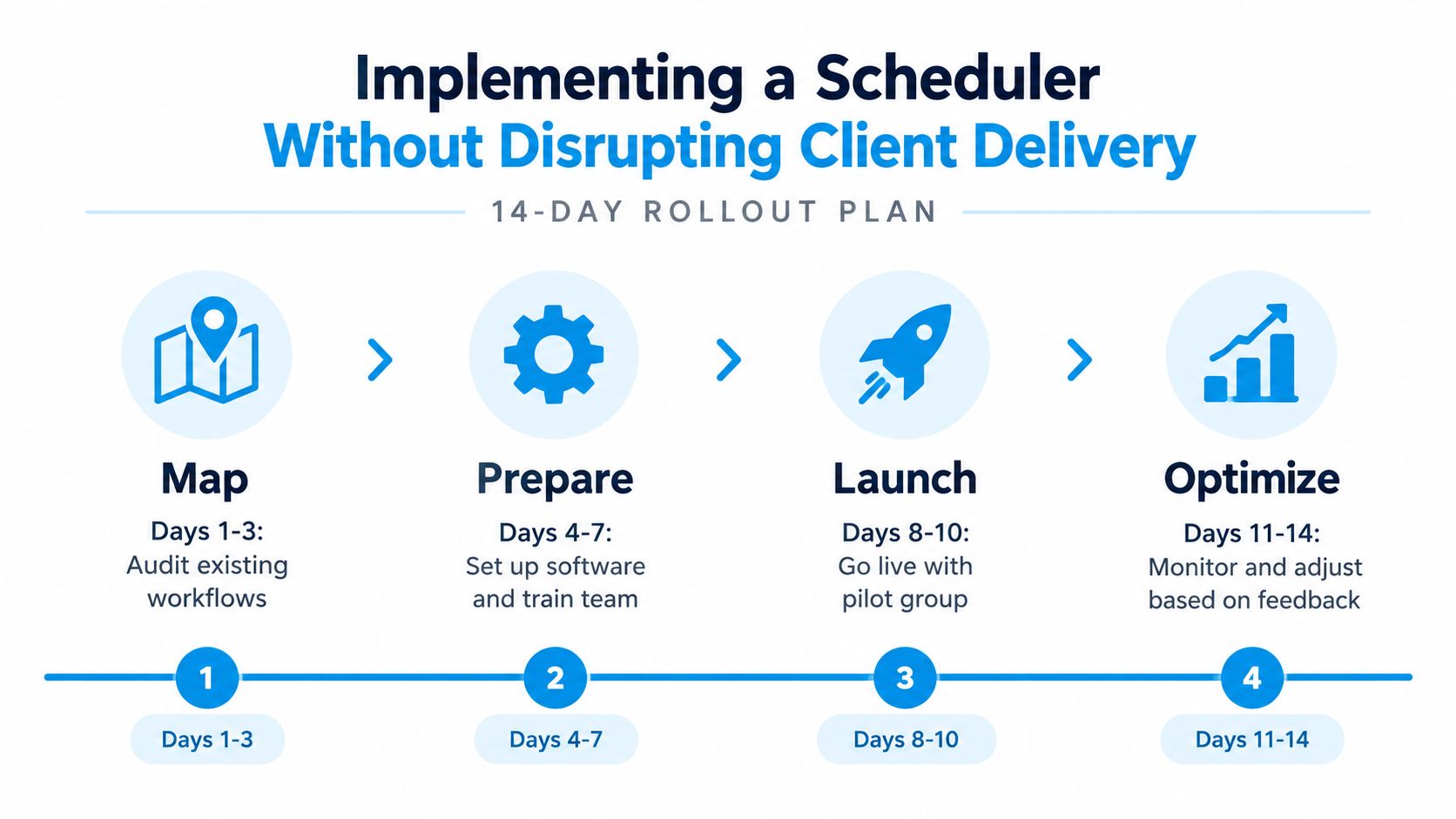
Go live on days 8 to 11
Switch one inbound path first, preferably a low-risk page or a single service line. Activate the sequence in this order:
- Confirmations: Verify event details, timezone presentation, attendees, and preparation instructions.
- Calendar rules: Confirm buffers, working hours, travel blocks, and multi-calendar availability.
- Reminders: Add the reminder cadence only after the confirmation is reliable.
- Intake: Introduce questions once the booking and notification path is stable.
- Routing and handoffs: Automate assignment, CRM updates, proposal tasks, and delivery notifications last.
This order limits alert fatigue and makes troubleshooting easier. It also prevents incomplete intake or routing rules from creating false internal activity.
Optimize on days 12 to 14
The operations owner reviews failed bookings, duplicate notifications, reschedules, no-shows, and incomplete records. The partner or practice lead reviews whether the intake questions improve discovery quality. The delivery owner checks whether won opportunities arrive with the information needed for onboarding, as described in this guide to client onboarding workflows.
Keep the legacy links available during the agreed rollback window. If a reminder misfires during a paid engagement, pause the affected sequence, contact the client directly, and revert the public link or meeting type while the team diagnoses the error. Don't continue a broken automation because the launch date has passed.
Matching the Right Tool to Your Firm Profile
The right product depends less on the number of features than on where administrative friction appears in the firm. A solo advisor needs speed and control. A boutique consultancy needs shared routing and records. A fractional executive practice needs a reliable commercial system around meetings that involve several organizations and stakeholders.
Solo advisor
For a solo advisor billing $250K or more and managing 15–25 active engagements, a standalone scheduler such as Calendly or SavvyCal paired with a lightweight CRM is usually the sensible choice. The advisor's constraint is administrative overhead, not a lack of enterprise pipeline functionality.
Use a short booking flow, clear event types, practical buffers, and a reminder sequence that makes rescheduling easy. Connect the booking to a CRM task so the next action doesn't depend on memory. This setup keeps the tool proportionate while preserving enough structure for proposal follow-up.
Boutique consultancy
For a 3–6 consultant firm with overlapping client rosters, a suite-based scheduler such as HubSpot Meetings or Zoho Bookings is a stronger fit. Shared availability, round-robin assignment, team visibility, and unified contact records address the spreadsheet babysitting that standalone links tend to create.
The practical outcome is cleaner routing. A new lead can reach the right consultant without a partner manually inspecting calendars, and the deal record can retain the meeting context needed for a proposal conversation. The firm should accept the added configuration in exchange for fewer internal handoffs.
Fractional executive practice
A fractional CRO, COO, or CFO often schedules across multiple client organizations. Each engagement may involve a sponsor, functional leaders, board participants, and recurring operating cadences. A client acquisition operating system, or a service scheduler with strong intake and lifecycle automation such as Acuity combined with appropriate CRM workflows, can reduce handoff friction.
The decision should focus on branded confirmations, detailed intake, rescheduling, proposal tracking, onboarding triggers, and referral nurture. A booking page alone won't coordinate the relationship after the first meeting.
| Firm Profile | Recommended Archetype | Primary Criteria | Expected Outcome |
|---|---|---|---|
| Solo advisor | Standalone booking tool plus lightweight CRM | Low administration, reliable availability, simple follow-up | Less scheduling exchange and cleaner personal calendar control |
| Boutique consultancy | Suite-based scheduler | Shared routing, team calendars, CRM records, ownership rules | Fewer manual assignments and more consistent opportunity updates |
| Fractional executive practice | Client acquisition operating system or service scheduler with lifecycle automation | Intake, stakeholder coordination, proposal follow-up, onboarding, referrals | Faster movement from booked meeting to proposal, delivery, and repeat relationship |
Choose the profile closest to your firm, then test the workflow rather than the feature list. Book a real discovery call, submit realistic intake, reschedule it, mark it as missed, and verify what happens to the opportunity. If the process still depends on a partner remembering the next step, the tool hasn't solved the operating problem.
Starward Navigators provides appointment automation alongside pipelines for business development, client delivery, proposals, onboarding, and referral relationships, so scheduling can connect to the broader consulting workflow. Visit Starward Navigators to evaluate whether its prebuilt operating system fits your firm's lead-to-client process.