A promising inquiry arrives while you're in a client meeting. A discovery call is booked, but nobody's sure who should send the preparation notes. A proposal sits unanswered, and a referral partner who made a thoughtful introduction hasn't heard back. In a small consulting firm, these moments often depend on whoever remembers to act.
Automated responses aren't just canned emails. They're timely operational signals that acknowledge interest, route work to an owner, set expectations, and keep relationships moving. The right message buys your team time to respond thoughtfully. The wrong one can feel impersonal, promise more than the team can deliver, or keep sending after a prospect has already replied.
These automated response examples follow the client acquisition lifecycle, from inbound lead response and discovery scheduling to proposal momentum, client onboarding, and referral relationships. Each pairs a trigger with a practical message, a personalization method, and an operational safeguard. Starward Navigators supports this coordination with prebuilt pipelines, triggers, reminders, proposal workflows, client handoffs, and referral nurture. For a broader look at connecting the steps, see this guide to sales workflow automation.
Table of Contents
- 1. Instant Lead Acknowledgment
- 2. Discovery Call Booking Confirmation
- 3. Appointment Reminder Sequence
- 4. No-Show and Reschedule Recovery
- 5. Post-Discovery Call Recap and Next Steps
- 6. Proposal Follow-Up Sequence
- 7. Stalled Opportunity Re-Engagement
- 8. Won Stage Welcome and Client Kickoff Scheduling
- 9. Referral Partner Thank-You and Acknowledgment
- 10. Lost Opportunity Close-Out and Nurture Transition
- 10 Automated Response Examples: Side-by-Side Comparison
- Build a Response System That Compounds Trust
1. Instant Lead Acknowledgment
Trigger: A prospect submits a website form, sends an inquiry, or contacts the firm through a monitored channel. The acknowledgment should go out as soon as the system captures the request, while the same workflow assigns an owner and creates a follow-up task.
Practical rule: Promise the next human response, not a resolution the team hasn't assessed yet.
A useful message confirms what came in, names the next step, and gives a realistic response window:
Thanks for reaching out, [First Name]. I've received your request about [Service]. I'll review it and reply within one business day. If you'd like to talk sooner, you can book a discovery call here: [link].
Personalize the service or topic from the form submission, and include the assigned partner's name when assignment is reliable. If the firm can't guarantee a response within one business day, choose a window it can consistently meet. A historical study of online leads popularized the five-minute response principle: leads contacted within five minutes were reported to be more likely to be reached and qualified than those contacted after thirty minutes. The Lead Response Management Study summary measured contact and qualification, not closed-won revenue.
Set a separate after-hours message that explains when a person will respond. Ask at most one useful routing question, such as the prospect's timeline, and avoid making an automated reply sound like a consultation. For a form inquiry, confirm receipt, alert the owner, and create the follow-up task in the same workflow so the message doesn't become a substitute for human action.

2. Discovery Call Booking Confirmation
A calendar booking should trigger two messages: one for the prospect and one for the consultant responsible for the conversation. The prospect's confirmation can make the call feel like a structured diagnostic rather than an open-ended chat.
Example: “Your discovery call with [Name] is confirmed for Tuesday at 10:00 AM ET. We'll discuss your current pipeline challenges and whether our approach fits. If you can, bring a rough view of where your recent clients came from. You can reschedule here: [link].”
Include the date, time zone, meeting link, and a short agenda pulled from the booking details. If the prospect selected a service or described a challenge, use that context in the message rather than sending the same generic confirmation to every lead. Keep any preparation request light. Asking someone to complete a long questionnaire before an introductory conversation can create friction before the relationship has begun.
The internal notification should identify the assigned owner, prospect, meeting details, and any form responses. That way, the consultant doesn't have to search through the calendar, inbox, and CRM before preparing.
Make rescheduling easy. A clear alternative is better than a prospect silently abandoning a meeting they can no longer attend.
Use the confirmation to reinforce the agreed next step, not to imply that the prospect must arrive with a polished business case. A short prompt can help the consultant prepare while leaving room for discovery. The system should also stop or update reminders if the meeting is moved, so the prospect doesn't receive outdated details.
3. Appointment Reminder Sequence
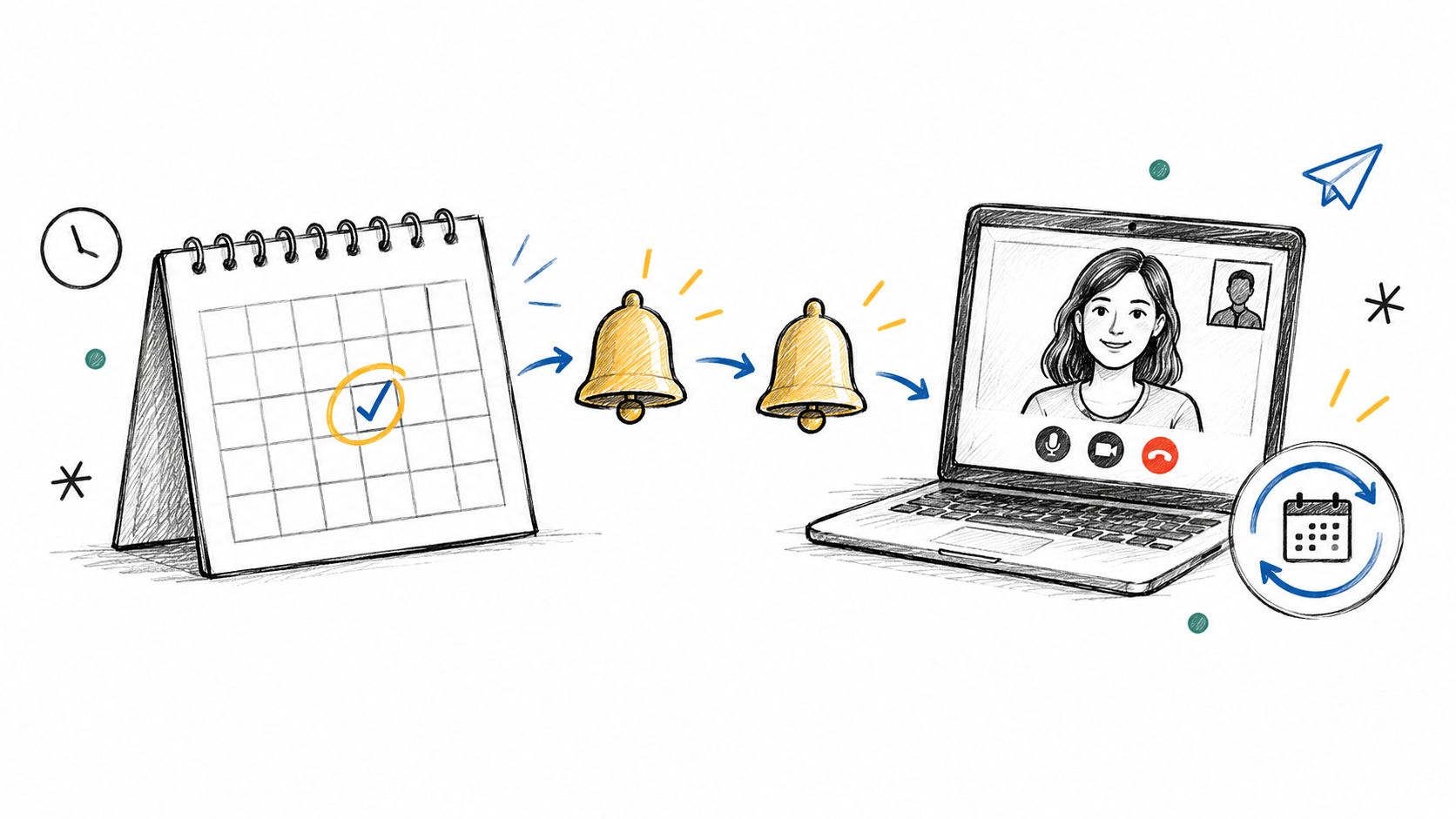
A reminder sequence helps protect scarce business-development time, but it should stop when the prospect replies or reschedules. Send concise reminders with the meeting link and a straightforward way to change the appointment.
Example, the day before: “Reminder: we're meeting tomorrow at 2:00 PM ET to discuss [topic]. Confirm or reschedule here: [link].”
Example, shortly before the meeting: “See you soon, [First Name]. Here's the meeting link: [link].”
For a consulting firm, a scheduled call might be the only open slot in a busy day. A peer-reviewed outpatient study found no-show rates of 17.3% with automated reminders, 13.6% with staff reminders, and 23.1% without reminders. The study of appointment reminders00108-7/fulltext) suggests that reminders can improve attendance, while personal outreach may be preferable for particularly important or high-risk meetings.
Build the workflow around the firm's actual calendar practices. Use the prospect's time zone, suppress reminders when the appointment is canceled, and require explicit consent before sending text messages. If the prospect hasn't confirmed by the firm's chosen point, create an internal task rather than escalating with repeated automatic messages.
A later study of automated SMS and telephone appointment communications reported no-shows declining from 18.55% to 7.01%. The 2025 study supports closed-loop reminders that let recipients confirm or reschedule, but firms should track attendance and rescheduling separately. A lower no-show rate doesn't by itself show whether the meetings were a good fit.
4. No-Show and Reschedule Recovery
When a prospect misses a call, send a brief, gracious note that makes it easy to choose a new time. Don't automate an accusation. A missed meeting may reflect a calendar clash, a changed priority, or confusion about the invitation, and the message shouldn't presume which.
Example: “Sorry we missed each other today, [First Name]. If you'd still like to talk through [challenge], you can choose another time here: [link]. If the timing has changed, just let me know and I'll update my follow-up.”
Personalize the message with the topic the prospect agreed to discuss. If the person replies that the project has been delayed, move the record to a nurture path with an agreed check-in point. If they choose another time, cancel the recovery sequence and let the scheduling workflow take over.
For someone who doesn't respond, a second message can ask whether the priority has shifted or the timing is off. Keep the sequence limited, then stop rather than letting reminders turn into pressure. Record the no-show and any stated reason in the opportunity record, but don't treat silence as proof that the lead is unqualified.
A useful safeguard is a distinct workflow for each outcome: rescheduled, replied but undecided, or no response. That prevents an automatic “pick a new time” note from arriving after a prospect has already explained they're not proceeding. Review no-show patterns with the team to identify whether unclear agendas, inconvenient booking options, or poor reminders are contributing.
5. Post-Discovery Call Recap and Next Steps
The recap is one of the places where automation needs a human editor. A template can prompt the consultant to capture the prospect's problem, desired outcome, constraints, and agreed next step, but it shouldn't invent the diagnosis or send unreviewed assumptions as if they were agreed facts.
Example: “Thank you for the conversation today. Here's what I heard: your team wants a more consistent way to follow up after proposals, and you're looking to establish the process before adding capacity. I'll send a proposed scope by Thursday. Please reply if I've missed or misunderstood anything.”
Use the prospect's own language for the problem statement. Keep the recap concise enough to forward to a colleague who wasn't on the call, and make the next action and owner explicit. If the call didn't produce a clear next step, ask the consultant to resolve that before the system marks discovery complete.
A practical workflow can create a draft from call notes, notify the owner to review it, and update the opportunity stage only after the recap is sent. That preserves consistency without outsourcing judgment about fit, scope, or the prospect's priorities.

The promised proposal date matters because it creates a shared expectation. If the firm can't meet it, the responsible person should update the prospect rather than allowing an automated sequence to imply that the proposal is still on schedule.
6. Proposal Follow-Up Sequence
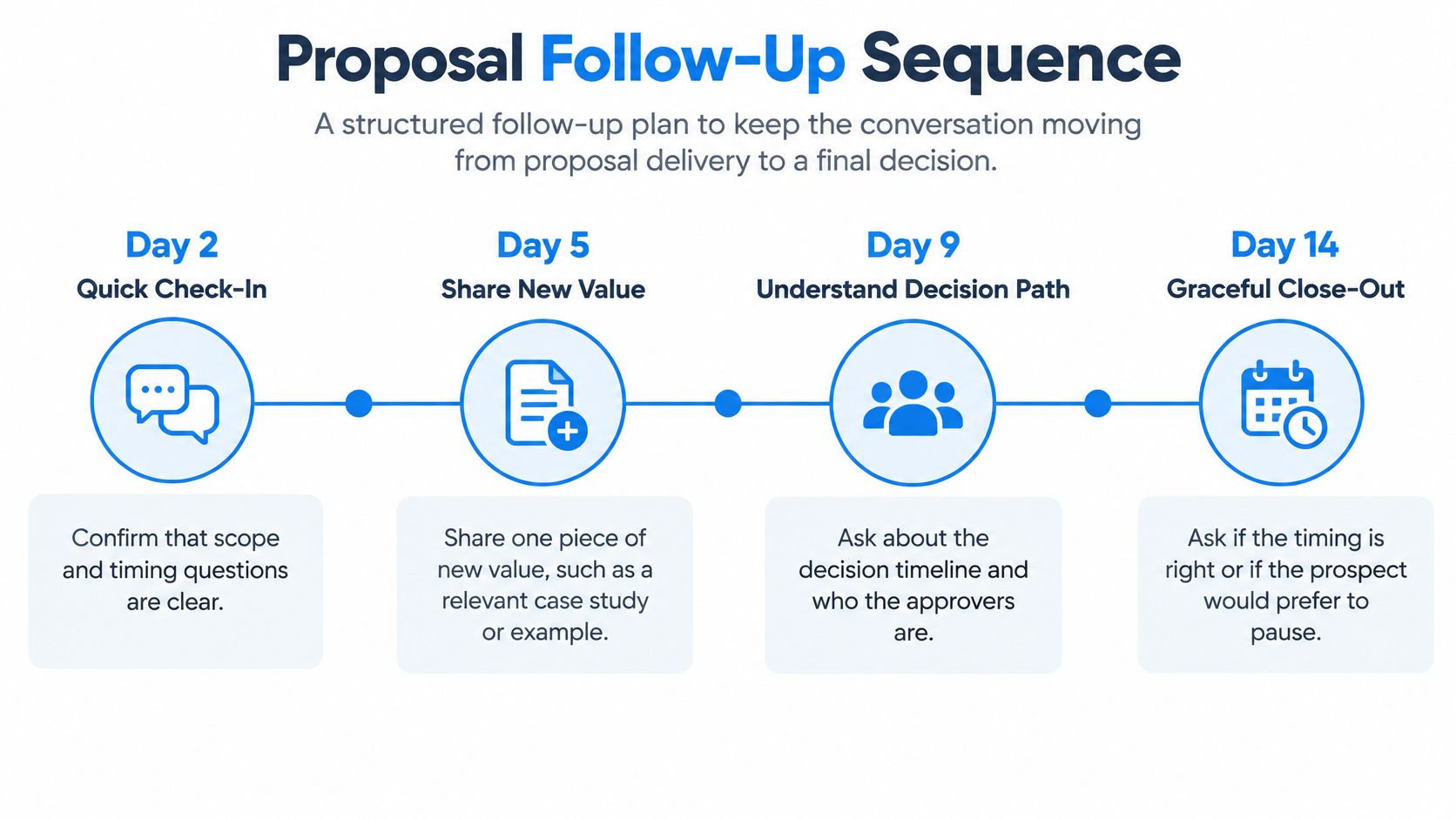
Proposals often stall after delivery because nobody has defined who will follow up or what the next decision point is. A sequence can provide structure, but each message should move the conversation forward instead of asking repeatedly whether the prospect has read the document.
Example after delivery: “Did the proposal answer your questions about scope and timing? I'm happy to walk through any section.”
Example at the next check-in: “How is your team approaching the decision, and is there a date you're working toward? That'll help us plan a practical next step.”
One message can add relevant context, such as a case example that clarifies the proposed approach. Another can ask who else needs to review the scope. Close the sequence with a respectful option to pause if the timing isn't right. Don't attach a case study merely to fill a follow-up slot; it should address a real question or concern.
Use a proposal stage with a named owner, a next action, and an agreed decision date. The proposal follow-up workflow can help teams connect proposal tracking with defined next steps, rather than leaving the opportunity in an unowned waiting state.
The safeguard is simple: pause the sequence as soon as the prospect replies, accepts, declines, or asks for more time.
Before launch, test what happens if the prospect responds by email while the workflow is waiting to send another message. If replies aren't captured reliably, assign someone to review the queue so automation doesn't create an awkward duplicate follow-up.
7. Stalled Opportunity Re-Engagement
A stalled opportunity needs a clear, low-pressure choice, not a guilt trip. A close-out note gives the prospect room to say that timing has changed and helps the firm stop treating every silent proposal as active.
Example: “I haven't heard back, so I'll assume the timing isn't right and close out our current follow-up. If I've misread that, reply and we can pick things up. Otherwise, would you prefer that I check back later?”
Personalize the note with the project or business issue under discussion, and only mention a future check-in if the prospect has indicated that one would be welcome. The automation should change the opportunity stage only after the firm's defined follow-up process has ended, not because a message was sent.
A useful sequence offers two easy paths: keep the conversation open with an agreed next step, or close it for now. If the opportunity is closed, retain the relevant history and move the contact to an appropriate nurture path with suitable permission. Don't enroll someone in promotional email just because a proposal went quiet.
Review stalled opportunities with owners so the team can distinguish a genuine future possibility from a record that needs closing. The purpose is clean pipeline management, not squeezing another reply out of someone who has already made their decision.
8. Won Stage Welcome and Client Kickoff Scheduling
When a proposal is accepted, the prospect shouldn't have to wonder whether delivery knows the deal is closed. The welcome workflow should start only after the signed scope and internal handoff are confirmed.
Example: “Welcome aboard, [First Name]. [Delivery Lead] will guide the engagement and contact you to arrange our kickoff. You can start with the onboarding checklist here: [link]. We're looking forward to working with you.”
At the same time, notify the delivery lead, create the client record in the delivery pipeline, and surface any agreed kickoff timing or onboarding requirements. Name a person rather than directing the new client to a generic inbox. If the scope hasn't been signed or the delivery owner hasn't been assigned, hold the client-facing message and create an internal task.
The client onboarding workflow describes how Won-stage updates, owner notifications, and kickoff scheduling can connect the business-development handoff to delivery. The practical benefit is consistency: the consultant who sold the work doesn't need to remember each transfer step, and the client has a named contact.
Show the delivery team which commitments were made during the sales process. A checklist can request relevant materials, but don't ask for information the client has already provided. For the client, the transition should feel coordinated, not like starting a new conversation from scratch.
9. Referral Partner Thank-You and Acknowledgment
A referral deserves a timely thank-you even when the referred prospect hasn't decided whether to talk. Trigger the acknowledgment when an introduction is recorded, and personalize it with the partner's name and the prospect's organization.
Example: “Thanks for introducing us to [Prospect Company], [First Name]. We've received the introduction and will follow up directly. I appreciate you thinking of us, and please let me know if there's a way we can support your team.”
If the prospect becomes a client, send a separate thank-you only when sharing that outcome is appropriate and permitted. Keep confidential details out of the message. For a close referral partner, an automated acknowledgment can serve as the prompt for a personal note or call, rather than being the entire relationship.
Record the referral source on the opportunity when it's created. That gives the firm a reliable way to recognize who made the introduction and prevents an automated message from crediting the wrong person. A referral tracking workflow can help maintain that record and support relationship follow-up over time.
The referral tracking approach can be paired with a nurture cadence, but don't let a generic campaign replace a relevant personal touch. Give partners useful updates at a sensible pace, and offer to return the favor where there's a genuine fit.
10. Lost Opportunity Close-Out and Nurture Transition
When a prospect chooses another provider or declines the proposal, close the loop with respect. The message should thank them, leave room for future work, and ask for feedback only if they're willing to share it.
Example: “Thank you for considering us for [Project]. I respect your decision. If you're open to sharing, what most influenced your choice? No need to reply if you'd rather not. I hope we'll have a chance to work together in the future.”
If the firm wants to send occasional updates, ask permission rather than treating a sales conversation as consent to a nurture campaign. A simple follow-up might say: “Would a short update on [topic] be useful from time to time, or would you prefer no further messages?” Store the answer so the next workflow respects it.
Use a consistent loss-reason field when the prospect shares one, such as timing, scope, price, another provider, or no decision. Review the information periodically to spot patterns, but don't assume every lost opportunity has a lesson the prospect wants to explain. If someone requests no further contact, suppress promotional nurture and retain only the records the firm needs to respect that request.
The close-out should update the opportunity stage and stop proposal reminders. That small operational step prevents the system from congratulating the team on “following up” while sending a decision-stage message to someone who has already said no.
10 Automated Response Examples: Side-by-Side Comparison
Read the table in lifecycle order: capture interest, protect scheduled time, keep decisions moving, hand off cleanly, and preserve relationships after the outcome. Inside an operations system such as Starward Navigators, each row should map to a trigger, a personalization source, a safeguard, and a tactic the team can run consistently.
| Lifecycle stage and example | Trigger | Personalization method | Operational safeguard | Practical tactic and expected outcome |
|---|---|---|---|---|
| Instant Lead Acknowledgment | Form submission, inbound email, or CRM lead creation | Source, service interest, named owner | Route to a human after receipt; cap automatic replies | Send immediate confirmation with response-time commitment; reduces lead leakage |
| Discovery Call Booking Confirmation | New booking event | Time, agenda, short intake answers | Calendar sync checks conflicts and time zone | Attach intake before the call; fewer errors and better preparation |
| Appointment Reminder Sequence | Timed pre-meeting points | Meeting time, join link, reply-to-change option | SMS consent where applicable; stop when confirmed | Escalate unconfirmed meetings to the owner; fewer no-shows |
| No-Show and Reschedule Recovery | Meeting ends with no join or cancellation | Original agenda and direct reschedule link | Limit retries; open CRM task if silent | Offer a low-pressure reschedule; recovers some misses and reveals changed priorities |
| Post-Discovery Call Recap and Next Steps | Call marked completed | Goals, constraints, decisions from notes | Human review before sending | State owners and dates clearly; builds shared understanding toward proposal |
| Proposal Follow-Up Sequence | Proposal sent with no stage change | Scope, stated concern, relevant proof | Pause on reply; cap cadence | Alternate check-ins with task creation; surfaces objections and keeps decisions moving |
| Stalled Opportunity Re-Engagement | No activity for 10 to 21 days, or long silence | Last discussed outcome and status | Exit to nurture on reply or continued silence | Give a close-or-reopen choice plus a professional pause/resume path; clears stale forecast |
| Won Stage Welcome and Client Kickoff Scheduling | Stage changes to won or agreement signed | Project name, delivery contacts, kickoff window | Complete handoff checklist before welcome | Send scheduling link and kickoff list; shortens time to kickoff and reduces missed steps |
| Referral Partner Thank-You and Acknowledgment | Referral recorded or meaningful milestone reached | Partner name, referred contact, permitted detail | Accurate source records; partner-specific messages; confidentiality safeguards | Acknowledge quickly without exposing client details; encourages repeat referrals |
| Lost Opportunity Close-Out and Nurture Transition | Stage marked lost or proposal declined | Project, decision, reason if shared | Consent-aware nurture permission and loss-reason field | Stop proposal reminders and log the reason; preserves the relationship and clean reporting |
Build a Response System That Compounds Trust
The examples work best as connected workflows, not as a folder of isolated templates. Start with capturing and acknowledging inbound interest, then connect discovery scheduling and no-show recovery. From there, maintain proposal momentum and close outcomes cleanly, followed by client onboarding and referral relationship nurture. Each handoff should make clear who owns the next action and what happens if the prospect or client replies.
Before building an automation, map five things: its trigger, its message, its owner, its exit condition, and the measure that tells you whether it's working. For an inquiry acknowledgment, for example, the trigger might be a completed form, the owner a named partner, and the exit condition a human response or a booked call. Track time to first acknowledgment separately from time to human response and time to the next agreed step. That distinction helps the firm avoid treating an instant receipt confirmation as if it were a substantive answer.
More messages don't automatically mean better follow-up. A vague acknowledgment can frustrate someone if it offers no next step, while an accurate, timely update can reassure them even when a full answer requires review. Survey findings on service expectations point to this tension: 96.5% of consumers consider fast responses important or very important, while expectations for resolution vary. The customer-service response expectations survey offers context, but a consulting firm should set its own service commitments based on its capacity and audience.
Keep personalization, consent, stage accuracy, and human review at the center of the design. Let automation manage the clock, assignment, reminders, and record updates. Keep people responsible for diagnosing needs, setting scope and pricing, handling sensitive context, and deciding when a conversation needs empathy or judgment. When an automated response can't answer confidently, route the original inquiry and conversation history to a named person. Consumers' stated concerns about accuracy and preference for human support make that handoff an important safeguard, not a feature to add later. Consumer preferences for AI-supported care highlight why teams should make ownership and escalation clear.
In Starward Navigators, firms can connect responses to prebuilt Business Development, Client Delivery, and Relationships & Referrals pipelines. Its workflows cover lead follow-up, appointments, proposals, client handoffs, and referral nurture. To plan the order of your work and the measures that matter, use this verified data sequencing and KPI guide. Choose one workflow, test it with the people who will use it, and refine it before expanding across the client lifecycle.
If inquiry follow-up, proposal tracking, or client handoffs rely on memory, start by mapping one process and naming its owner, trigger, and exit condition. Starward Navigators provides client acquisition infrastructure for consulting and advisory firms, including connected pipelines, automated follow-up, appointment reminders, and referral workflows. Explore whether its operating system fits the way your firm manages prospects and client relationships.