A lead capture form is an online form that collects a prospect's contact and qualification details so a business can follow up, qualify, and route them into its sales process. Across industries, average form conversion rates are reported at 1.7% to 2.9%, while top-performing forms can exceed 11% (ContentFlashAI's form conversion benchmarks).
You may already have one on your consulting firm's website. A prospect completes it, the message lands in a shared inbox, and someone eventually replies. That setup looks functional until a high-value inquiry arrives outside business hours and nobody owns the next step.
The form itself is only the visible part. Behind it, you need a clear offer, sensible qualification, reliable routing, rapid confirmation, and a path from inquiry to meeting. Treating the form as a static website widget hides the core business problem: capturing interest is not the same as converting interest into a qualified conversation.
Table of Contents
- The Moment a Lead Slips Through and Why the Form Matters
- How Lead Capture Forms Evolved Into a Conversion Discipline
- Essential Fields That Balance Qualification and Completion
- UX Principles That Decide Whether Prospects Submit
- Privacy and Trust Considerations for Consulting Firms
- Form Types and Examples Suited to Consulting Services
- From Submission to Booked Meeting Without Losing the Lead
- A Practical Checklist for a Lead Capture Form That Works
The Moment a Lead Slips Through and Why the Form Matters
A prospect submits an inquiry at 9:47 PM, shortly after presenting a difficult issue to their board. They explain that the company needs help, select a service area, and share a rough timeline. They expect someone to respond the next morning.
Instead, the submission sits in a general inbox. A generic reply arrives 36 hours later, without acknowledging the prospect's industry, situation, or budget. By then, the prospect may have contacted another advisory firm, postponed the decision, or decided that your firm's response process reflects its overall client experience.
A lead capture form collects contact and qualification details from a prospective buyer. The business uses that information to continue the conversation, assess fit, and send the inquiry to the right person or workflow. It might appear on a landing page, service page, resource page, contact page, or scheduling flow.
Practical rule: The form isn't complete when the visitor clicks submit. It's complete when the right person can act on the inquiry without recreating the context from scratch.
The first conversion point
For an advisory firm, the form is usually the first identifiable conversion in the acquisition system. Before submission, you may know that someone visited a page or downloaded a resource. After submission, you can connect the inquiry to a person, organization, service need, and potential next action.
That makes the form more than a data-entry component. Its questions influence completion, its answers influence qualification, and its integrations determine whether the lead receives a useful response. A short form with no routing can create avoidable delays. A detailed form with too much friction can prevent good prospects from submitting at all.
The right question isn't “What fields should we put on the page?” Ask instead: What does our team need to respond appropriately, and what can we learn later?
A well-designed form creates a clean handoff from buyer interest to business action. It captures enough information to make the next conversation relevant, while keeping the initial request easy enough for a busy executive to complete.
How Lead Capture Forms Evolved Into a Conversion Discipline
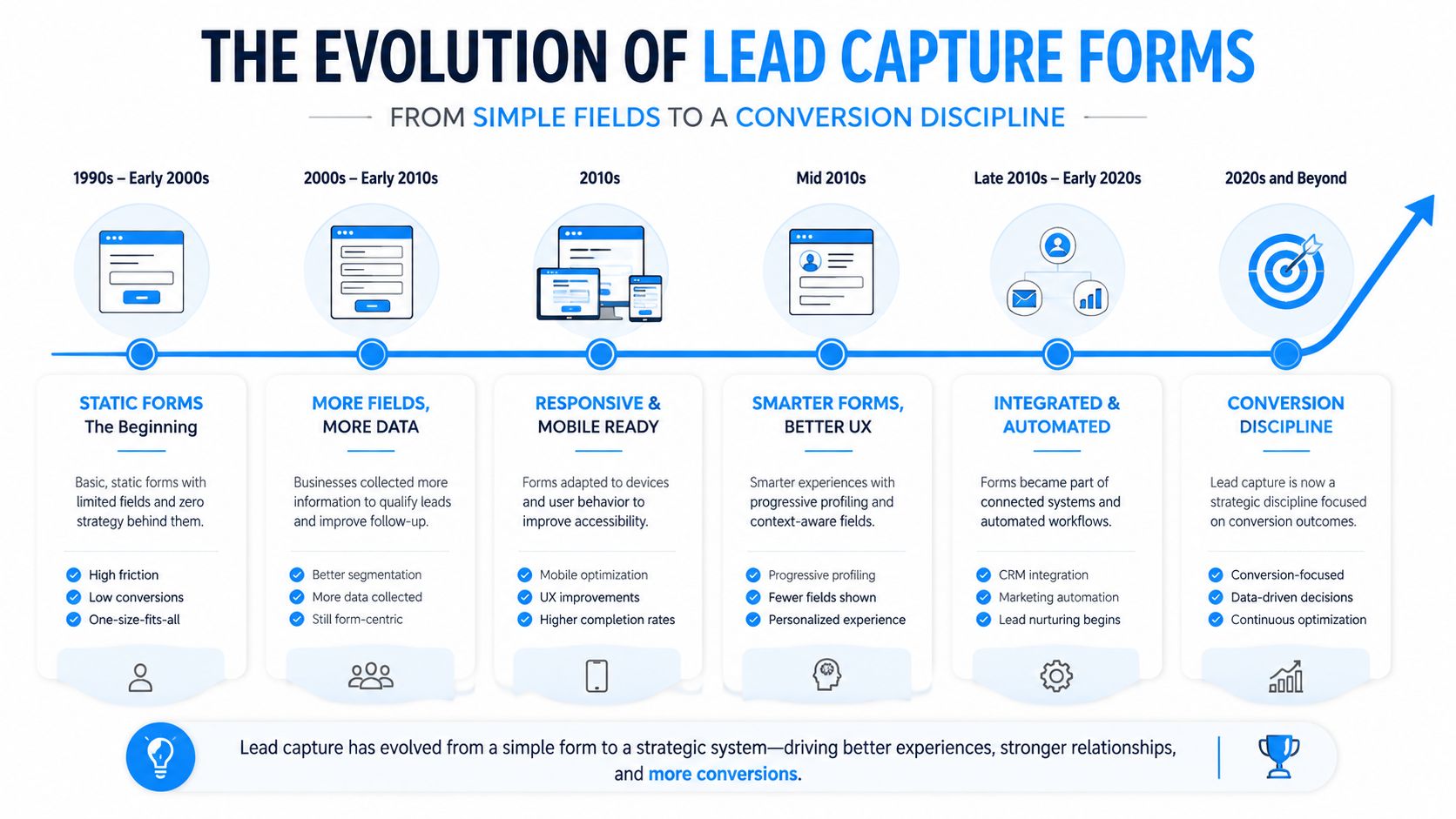
Early website contact boxes generally asked for a name, email address, and message. They served as digital mail slots. The business received an inquiry, and a person manually decided what to do with it.
That approach became less reliable as firms added more campaigns, service lines, landing pages, and qualification requirements. A generic message no longer told the team whether the prospect wanted a strategy engagement, a fractional executive, a workshop, or a simple pricing conversation.
Benchmark data made the trade-off visible. Average form conversion rates across industries are reported at 1.7% to 2.9%, while top-performing forms can exceed 11% (ContentFlashAI). Those figures don't describe one universal target, but they show why firms need to evaluate forms as measurable conversion assets rather than assume that every visitor who sees one will complete it.
Why field count changed the conversation
Field design became central because completion rates tend to fall as the form asks for more information. One-field forms have been reported at 18.2% to 25.5% conversion, three-field forms at around 25%, and seven-field forms at roughly 12% or lower (ContentFlashAI's field-count benchmarks).
The figures don't mean a seven-field form is always wrong. A prospect booking a serious engagement may accept more questions than a reader requesting a short guide. They do show that every additional field creates a decision for the visitor. The firm must justify that decision with better routing, stronger qualification, or a more useful next step.
Modern forms therefore use techniques such as conditional logic, multi-step layouts, and progressive profiling. A visitor may answer a broad service question first, then see only the fields relevant to that choice. A returning contact may provide new information instead of repeating details already stored in the system.
Landing-page context also matters. Research cited in form-performance materials reports landing-page forms converting around 6.6%, compared with roughly 1.7% for whole-site forms (Elfsight's lead capture form guidance). The lesson is strategic: a focused page and a focused offer can give the form a clearer job than a generic contact box placed everywhere.
Consulting firms now need to think like conversion operators. They should define the form's purpose, monitor starts and completions, inspect lead quality, and test changes without sacrificing the information needed for a productive first conversation.
Essential Fields That Balance Qualification and Completion
A consulting form should collect the smallest useful set of details for its specific conversion. The goal isn't to build a complete client record on the first interaction. The goal is to make the next action informed, timely, and appropriate.
Start with the basics:
- Full name: Gives the team a person to address and prevents an anonymous inquiry from entering the pipeline.
- Work email: Helps identify the organization and gives the firm a dependable follow-up channel. A business domain can also provide useful context for B2B qualification.
- Company: Lets the advisor prepare for the organization rather than treat the inquiry as an isolated request.
- Role or job title: Adds context about seniority, influence, and the kind of conversation the prospect may expect.
- Service-related question: Ask what the prospect needs, such as an engagement type, timeline, or broad investment range. Use select options or radio buttons when possible, so the prospect can answer quickly.
Fields that should usually wait
A phone number can be valuable when the team intends to call. If nobody follows up by phone, requiring it adds friction and may reduce trust. The same principle applies to revenue, detailed project scope, procurement information, and extensive free-text explanations.
Progressive profiling gives you another option. Collect identity and broad intent first, then ask for deeper context after the prospect has received value or booked a conversation. This approach respects the buyer's time while still allowing the firm to improve its record over time.
Every field should earn its place by improving routing, qualification, or the eventual close. Curiosity isn't a sufficient reason to make a question required.
| Field | Purpose | Friction Level | Recommendation |
|---|---|---|---|
| Full name | Personalize the response and identify the contact | Low | Required |
| Work email | Create a follow-up channel and support B2B context | Low | Required |
| Company | Prepare for organizational context | Low | Usually required |
| Role or job title | Indicate decision-making context | Low to moderate | Include when relevant |
| Service need | Route the inquiry to the correct offering | Moderate | Use clear choices |
| Timeline | Help prioritize the response | Moderate | Optional or use ranges |
| Phone number | Enable direct contact | Moderate | Ask only when the team will call |
| Detailed project scope | Support discovery preparation | High | Collect later |
A firm that relies heavily on referrals should also connect the form to source tracking rather than ask a vague “How did you hear about us?” question as a required field. A dedicated process for tracking referrals can preserve relationship context without burdening every new prospect.
UX Principles That Decide Whether Prospects Submit
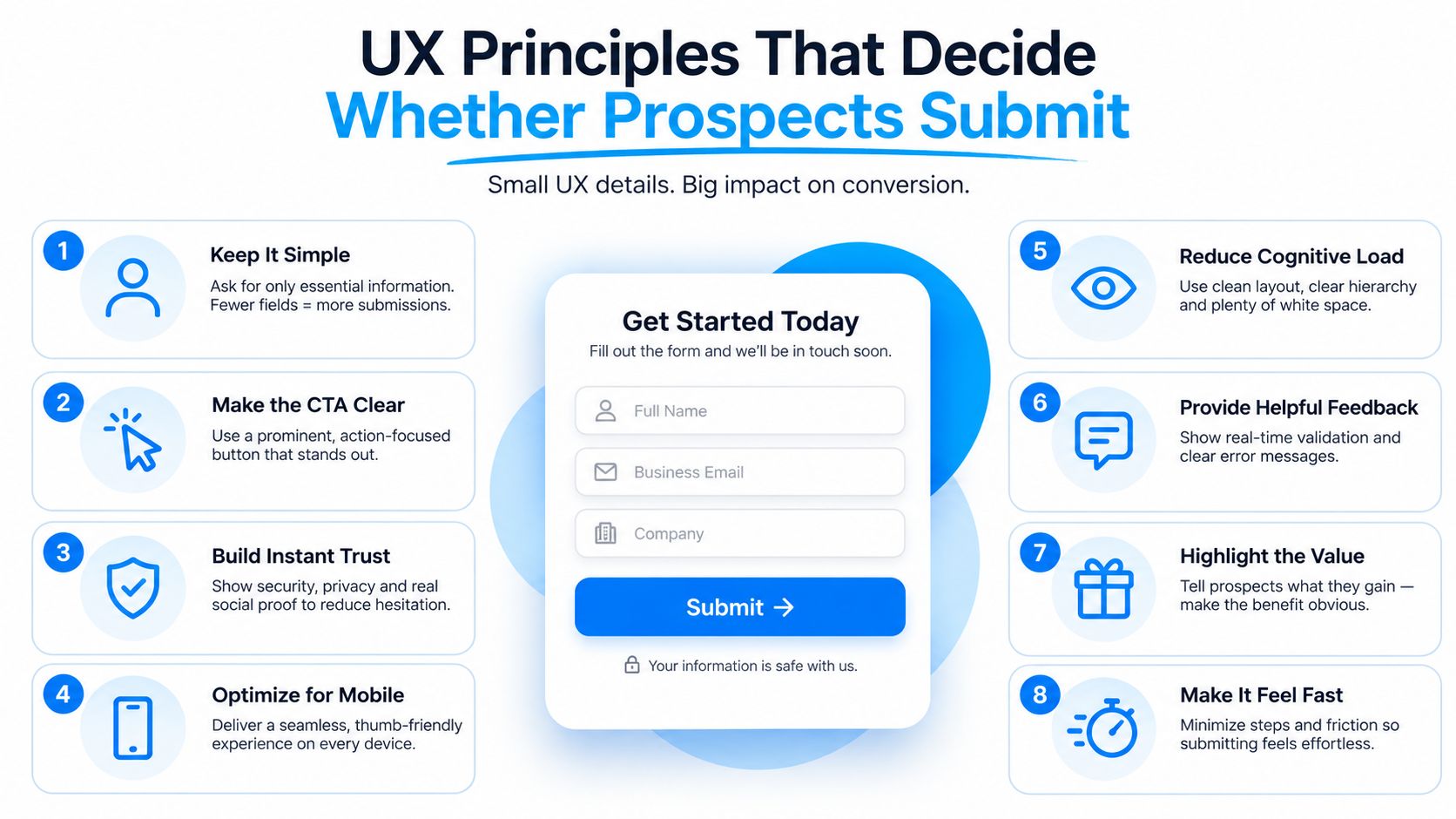
Form UX determines whether a prospect experiences the inquiry as a reasonable next step or an administrative task. Consulting buyers may be willing to share meaningful business context, but they still need to understand why each question matters and what will happen after submission.
Field count provides a useful starting point. Historical benchmarks report one-field conversion at 18.2% to 25.5%, three-field forms around 25%, and seven-field forms at roughly 12% or lower (ContentFlashAI's conversion statistics). The numbers reinforce a practical principle: ask for the information required at this stage, not every detail your CRM could store.
Reduce uncertainty at the point of action
Use labels that describe the answer plainly. “What would you like help with?” is easier to process than an internal phrase such as “Engagement classification.” Explain the value exchange above the form, and use button copy that confirms the outcome, such as “Request a discovery conversation” or “Get the advisory overview.”
Keep error messages beside the relevant field. Support autofill for names and email addresses. Use inline validation so the visitor doesn't complete an entire form only to discover a formatting problem after clicking the button.
Multi-step forms can help when a consulting intake needs more context. Research cited in form-performance studies reports multi-step forms converting 86% higher than standard single-step forms (Elfsight's form creation guidance). That doesn't make a multi-step layout automatically superior. It works when the sequence feels coherent, the first step is easy, and a progress indicator makes the remaining effort clear.
Match the experience to intent
A top-of-funnel resource form should usually be lighter than a meeting-booking intake. Someone requesting a diagnostic checklist hasn't necessarily agreed to a sales conversation. Someone choosing a calendar slot has already shown stronger intent and may accept questions that help the advisor prepare.
Mobile design deserves direct testing on real devices. Use a single-column layout, large tap targets, sensible keyboard types, and select controls that don't require excessive typing. Optional fields should be visibly optional, not disguised as required questions.
A form can also reduce abandonment by showing what happens next. Tell the prospect whether they'll receive a resource, an email confirmation, a calendar link, or a personal response. Clear expectations build confidence without adding another field.
Privacy and Trust Considerations for Consulting Firms
Consulting prospects often disclose sensitive information before a formal engagement begins. They may describe strategic concerns, organizational changes, financial pressure, or leadership challenges. A firm that handles that information casually can undermine confidence before the first meeting.
The form should make the data exchange understandable. State what information you collect, why you collect it, how the firm will use it, and which categories of third-party tools may receive it. If submissions flow into a CRM, email platform, scheduling tool, or analytics system, the privacy notice should explain that relationship in language a prospective client can understand.
Consent depends on context
B2B status doesn't remove privacy responsibilities. The correct treatment depends on the person's location, the purpose of processing, the communication channel, and the legal framework that applies. GDPR commonly requires a documented lawful basis, CCPA-related disclosures may require notice about collection and rights, and Canadian CASL can impose requirements for commercial electronic messages.
Don't bury consent in a footer or rely on a pre-checked marketing box. Put the relevant explanation close to the submit action, separate service follow-up from optional marketing where appropriate, and give the prospect a clear way to withdraw permission.
| Region / Framework | Core Requirement | Form Treatment |
|---|---|---|
| European Union, GDPR | Identify and document an appropriate lawful basis and provide required transparency | Link to a clear privacy notice and use specific consent language where consent is the basis |
| California, CCPA-related obligations | Provide relevant notice about personal information collection and applicable rights | Explain collection purposes near the form and make rights information accessible |
| Canada, CASL | Follow requirements for commercial electronic messages and consent management | Separate marketing permission from operational follow-up and provide an unsubscribe path |
| Other jurisdictions | Local rules may govern collection, storage, transfer, and outreach | Confirm requirements with qualified privacy counsel before launch |
Retention needs an owner. Decide how long inquiry records remain active, where they are stored, who can access them, and how deletion or correction requests are handled. Make unsubscribe requests flow across every nurture sequence, not just one mailing list.
For an advisory founder, visible privacy practices communicate operational maturity. A named data owner, plain consent language, and an accurate retention statement can build trust before anyone discusses credentials or fees.
Form Types and Examples Suited to Consulting Services
The right form depends on buyer intent, offer value, and the next step you can support. A general inquiry and a ready-to-book discovery call shouldn't force the same experience.
| Form type | Best fit | Typical information | Main trade-off |
|---|---|---|---|
| Simple contact form | General questions and low-commitment inquiries | Name, work email, company, message | Higher accessibility, less qualification |
| Service qualification form | Clearly defined advisory offerings | Identity, service need, role, timeline | Better routing, more initial friction |
| Calendar booking form | High-intent prospects ready to speak | Contact details, meeting topic, scheduling data | Faster path to a meeting, narrower use case |
| Multi-step intake form | Complex engagements requiring context | Progressive questions based on service or situation | More insight, greater abandonment risk |
| Resource-gated form | Guides, diagnostics, reports, or templates | Basic contact details and resource interest | Builds a nurture audience, may produce lower immediate buying intent |
A strategy firm answering pricing questions might use a short form with company, role, service interest, and timing. The response can explain the factors that shape scope, then invite the prospect to a suitable conversation.
A fractional CFO firm may use a booking flow instead. The prospect chooses a meeting time after selecting a broad need such as cash-flow planning, reporting improvement, or board preparation. A few preparation questions can help the advisor use the meeting well without demanding a full financial intake before contact.
A multi-step form suits a firm that serves several industries or engagement models. The first answer can determine whether the prospect sees questions about a transformation program, an interim executive role, or a focused workshop. Conditional paths prevent irrelevant questions from appearing.
Resource forms need a different expectation. A person downloading a diagnostic report may be interested in the subject without being ready to hire. Use the form to identify the topic and permission for appropriate follow-up, then nurture based on the resource rather than treating every download as a sales-qualified opportunity. Content connected to generating leads for email marketing should preserve that distinction.
From Submission to Booked Meeting Without Losing the Lead
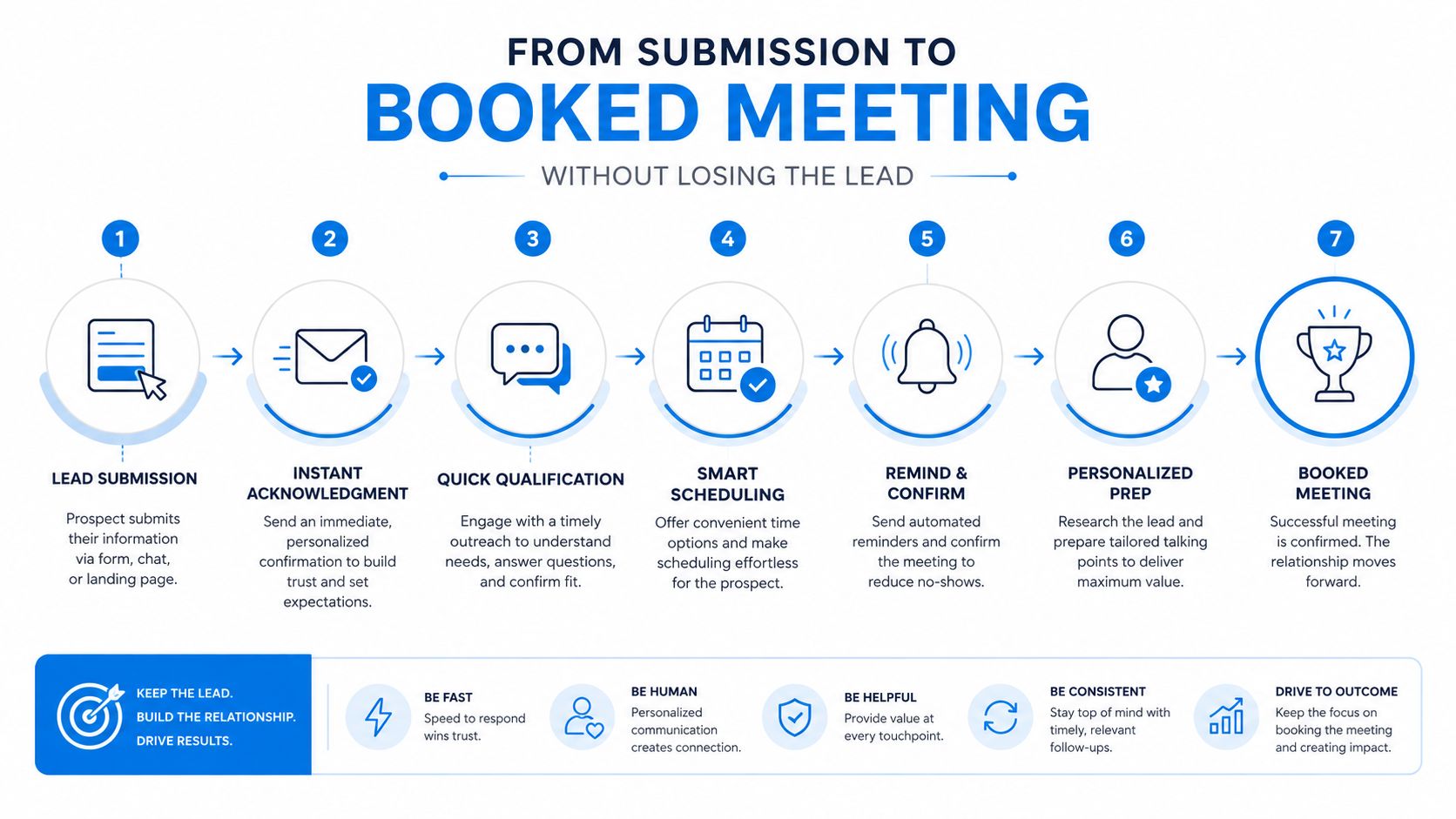
Submission changes the form's job. Before the click, the system is reducing friction and collecting useful context. After the click, it must trigger an accurate, fast, and relevant response.
A practical workflow sends the record to the right owner, confirms receipt with the prospect, and offers a clear next step. Routing rules can use service line, company profile, geography, or the advisor's availability. The firm should also record the original source, so a website inquiry, referral, event contact, and LinkedIn response don't disappear into one undifferentiated queue.
Speed matters because interest can fade while the prospect waits. A 2026 benchmark summary reports teams responding within five minutes converting at about 21%, compared with 2.3% for teams waiting a day, while only about 7% of teams answered within five minutes (Aloware's lead-response benchmarks). The same industry materials cite research indicating that contacting a lead within five minutes can produce an order-of-magnitude lift versus waiting longer.
Build the handoff, don't hope for it
An inbox creates uncertainty. A CRM-driven workflow can assign ownership, create a task, send a confirmation email, and alert the assigned consultant without requiring someone to notice a new message manually.
The confirmation should acknowledge the inquiry and set expectations. It might include a scheduling link, explain the anticipated response, or direct the prospect to preparation material. If the form promised a resource, deliver it immediately and keep the sales invitation proportionate to the prospect's intent.
Meeting conversion also depends on what happens after booking. Appointment confirmations, reminders, preparation instructions, and internal notes reduce the chance that a qualified inquiry becomes a missed appointment. A consistent client onboarding process should begin only after the opportunity is won, but the form-to-meeting handoff needs its own defined owner and status.
For consulting firms, the operational definition of success should extend beyond form completion. Track whether the inquiry was assigned, whether a response went out, whether a meeting was booked, and whether the opportunity progressed. The form is the entry point. The acquisition system determines its commercial value.
A Practical Checklist for a Lead Capture Form That Works
Use this checklist to review the form on your site this afternoon. Each item connects the visible experience to a downstream operating requirement.
Purpose
- Name the conversion: Decide whether the form requests a general inquiry, resource access, qualification, or a booked meeting.
- Define the next action: Specify who receives the submission and what the prospect should experience immediately afterward.
- Match the offer to intent: Don't ask a low-commitment visitor for the same information as a ready-to-buy prospect.
- Set a quality definition: Decide what makes an inquiry worth routing to a consultant, rather than measuring completion alone.
Fields
- Keep the first request focused: Include the information needed for identity, context, and initial routing.
- Use structured choices: Turn service type, timing, or broad engagement need into clear options where possible.
- Delay deep discovery: Move detailed scope, sensitive financial information, and extensive qualification into a later step.
- Review every required field: Remove anything that doesn't improve routing, qualification, or the next conversation.
UX
- Make the value obvious: Place a direct explanation of what the prospect receives beside the form.
- Write a specific button label: Tell the visitor what happens after the click.
- Test mobile completion: Check typing, dropdowns, validation, spacing, and confirmation on an actual phone.
- Use multi-step logic selectively: Choose it when the form needs meaningful qualification, not merely because it looks modern.
Privacy
- Show relevant consent language: Put it near the submit action and separate optional marketing permission from operational communication.
- Publish the handling path: Identify the privacy notice, storage purpose, third-party tools, and retention approach.
- Assign responsibility: Name the person or role responsible for data requests, corrections, deletion, and unsubscribe handling.
- Check regional obligations: Confirm that the form and follow-up process match the jurisdictions where your prospects are located.
Routing and response
- Set an under-five-minute rule: The cited response benchmarks make rapid action a practical operating standard, not a decorative promise (Aloware).
- Automate assignment: Route by service line, geography, company context, or owner availability.
- Send confirmation immediately: Acknowledge the inquiry and provide the next useful step.
- Protect meeting momentum: Include scheduling access, reminders, and preparation guidance when the prospect is ready.
Measurement
- Track completion: Compare form views, starts, and completed submissions.
- Inspect abandonment: Look for the field or step where prospects stop.
- Measure lead quality: Review whether submissions fit your target client profile and service model.
- Follow the funnel: Connect form completion to assigned leads, booked meetings, attended meetings, proposals, and won work.
A form can be technically flawless and still fail commercially if nobody owns what happens next. The strongest review question is simple: What does our current form fail to tell us, and which follow-up action does that gap delay? Fix that issue before the next campaign sends traffic to the page.
Starward Navigators provides client acquisition infrastructure for consulting and advisory firms, including website-connected lead capture, routing, follow-up automation, appointment confirmations, proposal tracking, client handoffs, and referral workflows. Visit Starward Navigators to see how a form can connect to a complete acquisition operating system instead of ending in a shared inbox.